
.webp)
.webp)
.webp)







.webp)
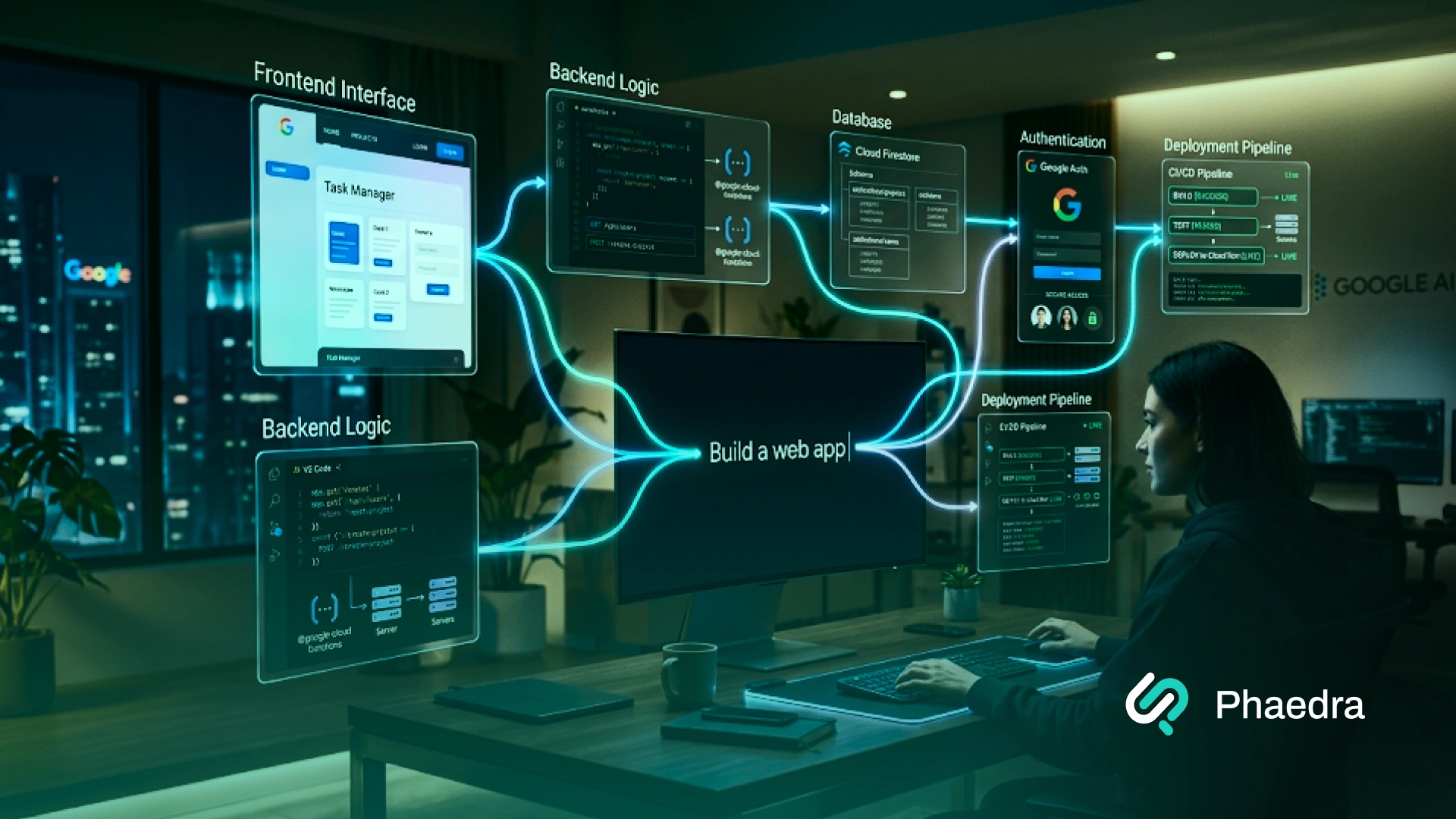
Vibe coding tools help you build software by describing what you want in plain English instead of writing every line of code manually. The right tool can generate screens, write code, fix bugs, connect APIs, create project files, and help turn an idea into a working prototype much faster.
For founders, product teams, developers, and business leaders, the real question is not just which AI coding tool is popular. It is which tool fits your use case: quick MVP, frontend prototype, internal dashboard, existing codebase, cloud app, or production-ready software.
This guide compares the best tools by use case, pricing model, code quality, business readiness, and developer workflow, so you can choose the right option without wasting time, credits, or engineering effort.
Vibe coding means using natural language prompts to build, edit, or improve software with the help of AI. Instead of writing every line manually, you explain what you want and let an AI assistant or AI agent create the first version.
For example, you might say:
“Build a task management web app with user authentication, a dashboard, project cards, and a dark mode UI.”
A good vibe coding AI tool can then generate code, create the project structure, suggest components, connect APIs, or help you fix errors.
But vibe coding is not one single thing. It has two main styles:
These tools help non-technical founders, marketers, designers, and complete beginners build apps with zero local setup. Examples include Lovable, Bolt, Replit, Firebase Studio, and v0.
These tools work inside your code editor, terminal, or GitHub workflow. They are better for experienced developers working with multiple files, version control, existing code bases, tests, and production code. Examples include Cursor, Claude Code, GitHub Copilot, and Kiro.
This difference matters. The best AI for programming inside a real engineering workflow is not always the same as the best prototyping tool in vibe coding platforms for a founder trying to test an idea in one afternoon.
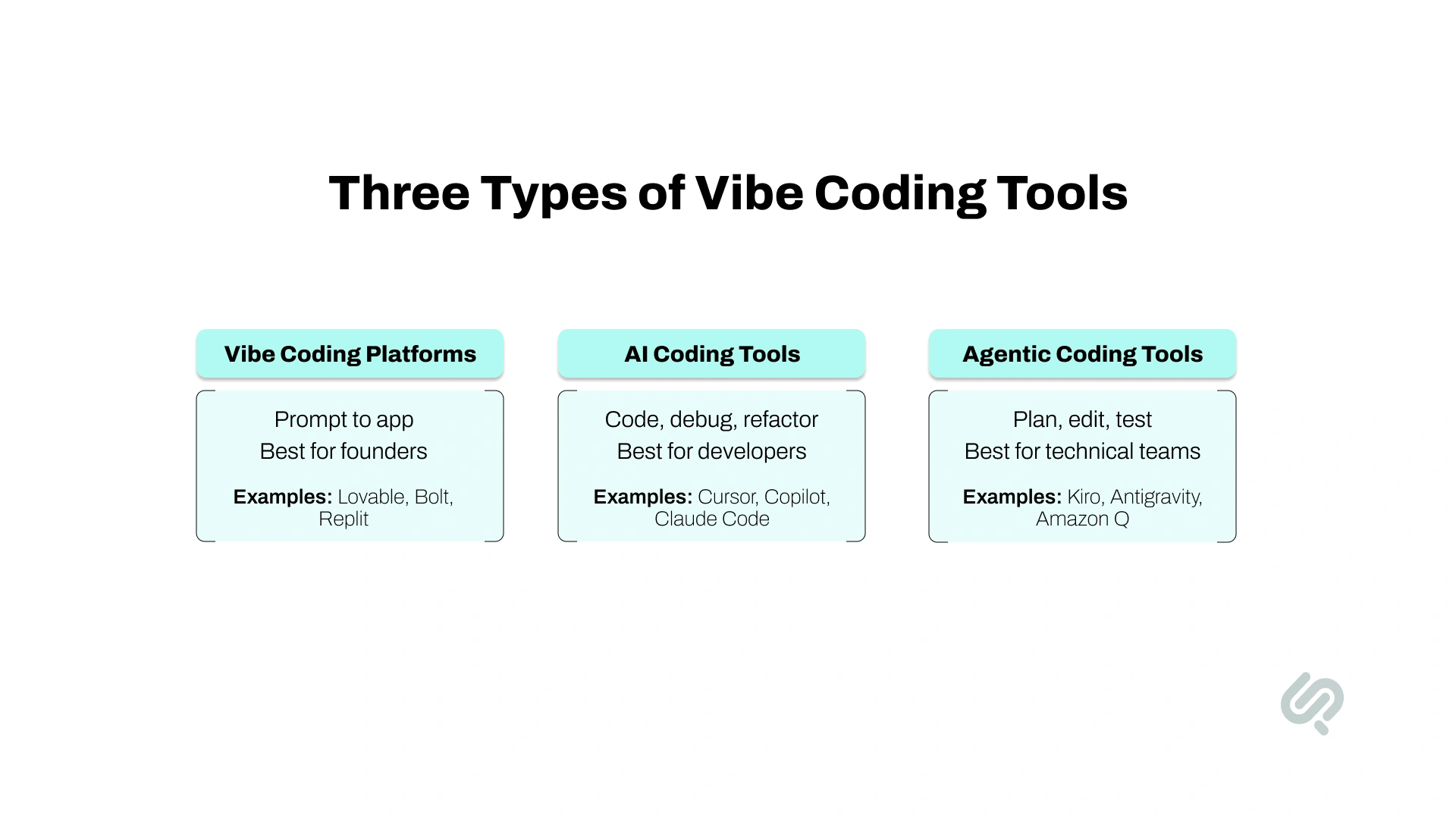
Not every AI tool works the same way. Some are simple browser-based builders, while others are advanced development assistants for professional engineers.
For business users, this difference matters. A founder building a prototype may need Lovable or Bolt. A CTO improving an existing codebase may need Cursor, Claude Code, GitHub Copilot, or Kiro. The best choice depends on whether you are testing an idea, building a product, or improving software that already exists.
Vibe coding is growing because software teams want faster ways to move from idea to working product. Instead of starting with a blank file, users can describe what they want and let AI create the first version of screens, code, APIs, or project structure.
This shift is happening for three clear reasons.
First, AI coding is becoming normal in software teams. Gartner predicts that 75% of enterprise software engineers will use AI code assistants by 2028, compared to less than 10% in early 2023. (1)
Second, AI agents are moving from experiments into business workflows. More teams are using AI to plan tasks, write code, create tests, fix bugs, and automate repetitive development work.
This is also part of the wider shift toward AI-first software development, where AI supports coding, testing, code review, and deployment from day one.
Third, developers can move faster on routine tasks. Research on GitHub Copilot found that developers using the tool completed a coding task 55.8% faster than developers without it. (2)
But faster does not always mean safer. AI-generated code can still have logic issues, security gaps, weak architecture, or poor maintainability. That is why serious teams use these tools to speed up development, not to skip code review, testing, or engineering leadership.
The best tool depends on what you are building, who will use it, and how serious the final product needs to be.
A founder testing an idea needs a different tool than a developer working inside an existing codebase. A designer building a frontend prototype needs something different from a CTO modernizing a legacy system.
Use these criteria before choosing a tool:
For simple experiments, speed matters most. For business software, control matters more. Choose a tool that gives you the right balance of speed, ownership, security, and maintainability.
The best tool is not always the most popular one. The best tool is the one that matches your project stage, technical risk, team skill level, and launch goal.
Cursor is one of the strongest AI coding tools for developers who want AI inside a familiar code editor. It feels close to VS Code, but with strong AI features built into the workflow.
Cursor can help you write code, edit files, understand existing code bases, fix errors, and work across multiple files.
Its pricing page lists a free Hobby plan, a Pro plan at $20/month, and an Ultra plan at $200/month. Cursor also says generated code belongs to the user and can be used commercially.
Key Features:
Pros:
Cursor is great if you already know how to code and want a faster workflow. It is one of the best developer productivity tools because it keeps you close to the actual code while helping with repetitive work.
Cons:
It has a steeper learning curve for complete beginners. If you have zero coding experience, Cursor may feel too technical compared to Lovable, Bolt, or Replit.
Best For:
Cursor is best for professional developers, startup engineers, and teams that want the best AI for programming inside a real codebase.
Claude Code is one of the strongest tools for serious AI-assisted development. Official Claude Code docs describe it as an agentic coding tool that can read your codebase, edit files, run commands, and work across terminal, IDE, desktop, and browser environments.
This makes Claude Code different from simple code generation tools. It can work with an entire codebase, handle multiple files, and help with more complex development tasks.
Key Features:
Pros:
Claude Code is excellent for developers who want an AI agent that can understand more context and help with deeper engineering tasks. It is one of the best coding automation tools for multi-file work.
Cons:
Usage limits and pricing can be confusing depending on your plan and workflow. Claude’s Max plan includes Claude Code with much higher usage than Pro, but heavy users still need to understand limits before relying on it for daily work.
Best For:
Claude Code is best for experienced developers who need help with large features, code review, debugging, refactoring, and maintaining existing code bases.
Lovable is one of the easiest vibe coding platforms for non-technical founders. It helps users create software by describing what they want in natural language.
It is especially popular for MVPs, SaaS ideas, landing pages, dashboards, and simple web apps.
Lovable offers a free plan with daily credits and paid plans starting at $25/month. Its documentation also explains that projects can connect and sync with GitHub, which helps with code backup, collaboration, and handoff to developers.
Key Features:
Pros:
Lovable is one of the best options for non technical users who want to start vibe coding without a local setup. It gives fast visual feedback and can turn a business idea into a working app quickly.
Cons:
It is not the strongest choice for deep backend logic, complex architecture, or long-term production systems without developer review.
Best For:
Lovable is best for founders, product managers, marketers, and small teams that want a fast vibe coding AI tool for MVPs and product validation.
v0 is one of the best tools for frontend development and modern UI components. It is especially useful for generating React code, landing pages, dashboards, app screens, and polished interface ideas.
v0’s pricing page lists a free plan with monthly credits, visual Design Mode, GitHub sync, and Vercel deployment. Paid plans add more credits, team collaboration, and business controls.
Key Features:
Pros:
v0 is probably the best prototyping tool in vibe coding platforms if your main goal is clean UI and frontend code. It works well when you want screens fast but still care about code quality.
Cons:
It is not the best option for full backend-heavy apps. It shines most in frontend and UI-heavy workflows.
Best For:
v0 is best for designers, frontend developers, SaaS teams, and founders who want polished interfaces and working React code.
Replit is one of the most complete browser-based coding platforms. It is useful because it combines an online code editor, an AI agent, hosting, collaboration, and deployment in one place.
Replit’s pricing page includes a free Starter plan with daily Agent credits and a Core plan starting at $25/month monthly or $20/month annually, with monthly credits and autonomous long builds.
Key Features:
Pros:
Replit is a strong vibe coding-free tool for users who want to build apps without installing anything. It is also more flexible than many simple app builders because it gives access to code and a real development environment.
Cons:
Projects can become harder to manage as they grow. Reddit users often recommend exporting or syncing code and using version control once a project becomes serious.
Best For:
Replit is best for students, solo builders, complete beginners, and founders who want to build apps in one browser tab.
Bolt is built for speed. It helps users turn ideas into websites, web apps, and lightweight products through natural language prompts.
Bolt has a free plan with public and private projects, token limits, website hosting, and unlimited databases. Its Pro plan starts at $25/month and removes daily token limits while adding custom domain support and other features.
Key Features:
Pros:
Bolt is fast, simple, and fun to use. It is a good vibe coding free tool when you want to test an idea quickly.
Cons:
Bolt uses token-based pricing, and larger projects can consume more tokens because the AI has to process more project context. Bolt’s own support docs explain that larger project file systems can increase token usage.
Best For:
Bolt is best for quick prototypes, landing pages, early MVPs, and idea testing.
GitHub Copilot is one of the most widely used AI tools for developers. It works inside popular editors and connects naturally with GitHub workflows.
GitHub’s pricing page lists a free plan with 50 agent mode or chat requests per month and 2,000 completions per month.
Copilot Pro costs $10/month and includes cloud agent, code review, Claude and Codex access, and 300 premium requests. Copilot Pro+ costs $39/month and includes 1,500 premium requests.
Key Features:
Pros:
Copilot is strong for teams already using GitHub. It is one of the safest coding automation tools for business because it fits into version control, pull requests, and code review.
Cons:
Premium requests can be confusing. GitHub explains that advanced models, large context windows, cloud agent sessions, and other features can use premium requests.
Best For:
GitHub Copilot is best for developers, engineering teams, and businesses that want AI help inside normal software development workflows.
Kiro is a newer tool, but it is important because it focuses on structured AI development. It is built around specs, agents, hooks, and context management.
Kiro’s pricing page lists a free tier with 50 credits, Pro at $20/month with 1,000 credits, Pro+ at $40/month with 2,000 credits, and Power at $200/month with 10,000 credits.
Key Features:
Pros:
Kiro is one of the most interesting options if you want an AWS vibe coding tool that feels more structured than a simple prompt-based app builder.
Cons:
It is not the easiest tool for complete beginners. It is better for users who already understand software planning and development.
Best For:
Kiro is best for developers and teams that want structured AI-assisted development with better project context.
Firebase Studio is Google’s browser-based AI development workspace for building and prototyping full-stack apps. It is useful for users who want to create web apps with Firebase, Google Cloud, authentication, databases, APIs, and deployment support in one ecosystem.
However, there is an important update. Google has announced that Firebase Studio shut down on March 22, 2027. Users are being guided toward Google AI Studio and Google Antigravity for future AI-assisted development. (3)
Google Antigravity is the more future-facing option. It is an agentic development platform designed to help developers plan, build, edit, test, and verify software with AI agents across the editor, terminal, and browser.
Key Features:
Pros:
Firebase Studio is useful for quick full-stack prototypes, especially if your app needs Firebase Authentication, Firestore, hosting, or Google Cloud services.
Google Antigravity is stronger for developers who want a more advanced AI coding workflow with agents that can plan, execute, and verify development tasks.
Cons:
Firebase Studio should not be treated as a long-term standalone platform because it is being sunset. Teams using it should plan migration early instead of building critical workflows around it.
Google Antigravity is more technical than beginner-first platforms like Lovable, Bolt, or Replit, so non-technical users may need developer support.
Best For:
Firebase Studio is best for quick Google/Firebase-based prototypes.
Google Antigravity is best for developers and technical teams that want a Google vibe coding tool for AI-assisted full-stack development, agentic coding, and future-ready Google ecosystem workflows.
Amazon Q Developer is not a classic browser-based code platform. It is better described as an AWS-focused AI assistant for developers working in cloud, IDE, CLI, and AWS-heavy workflows.
Amazon Q Developer pricing includes a free tier and a Pro tier, with support for agentic requests and code transformation.
Key Features:
Pros:
Amazon Q Developer is useful if your team already works heavily inside AWS. It can help with AWS-specific tasks in a way generic AI coding tools may not.
Cons:
It is not the best first pick for non technical users or simple frontend prototypes.
Best For:
Amazon Q Developer is best for cloud teams, AWS developers, and enterprise engineering teams.
The main list covers the strongest options for most users, but a few other tools are worth knowing.
These tools do not all need full reviews in this article. A short mention helps cover more search intent without making the blog too long.
Here are the best free tools to try first:
Free plans are best for learning and testing. For business projects, check private project limits, export options, usage credits, and commercial ownership before building too much inside one platform.”
Paid plans become useful when you need more credits, more requests, better models, private projects, custom domains, team controls, or deeper codebase support.
Do not compare paid tools only by monthly price. Some tools use credits, tokens, premium requests, or API usage. The better question is how much useful output you get before limits, rework, or extra costs appear.
Yes, but only the right tools should be used for existing codebases. Beginner-friendly platforms like Lovable and Bolt are better for new prototypes. They are not the best first choice for large legacy systems, complex backend logic, or multi-year software products.
For existing software, stronger options include Cursor, Claude Code, GitHub Copilot, Kiro, Amazon Q Developer, and Google Antigravity. These tools are better suited for reading project files, suggesting refactors, creating tests, fixing bugs, explaining old code, and helping developers work across multiple files.
This matters because many business software problems do not start with a blank screen. They start with:
AI can speed up modernization work, but it cannot replace engineering judgment. A legacy system still uses cloud infrastructure.
“Vibe coding is powerful because it removes repetitive implementation work and helps teams move faster. But speed alone is not software engineering. For business products, AI-generated code still needs architecture review, testing, security checks, and deployment discipline before it becomes production-ready.”
— Abubakar Shams, CEO & Vibe Code Expert, Phaedra Solutions
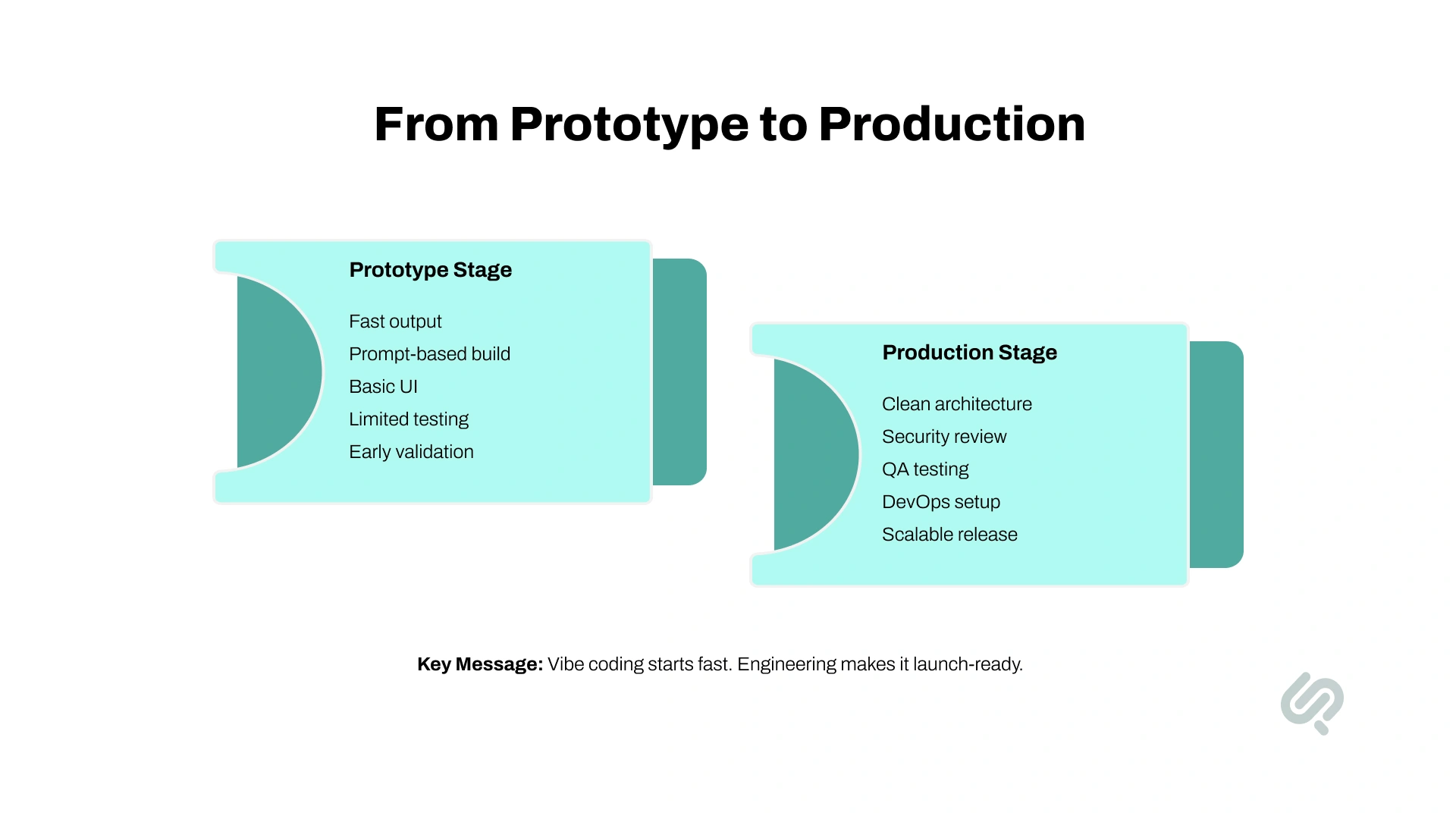
Vibe coding tools can help you build faster, but they are not risk-free. The biggest issues usually appear when a quick prototype starts becoming a real product.
AI-generated code may look clean in the first version, but problems often appear as more features are added. The tool may create duplicate logic, unnecessary files, weak structure, or code that works once but becomes hard to maintain later.
This is why AI-generated code should always be reviewed before launch.
Many tools struggle when a project becomes larger. They may forget earlier decisions, overwrite useful code, change the wrong file, or fix one issue while creating another.
This is especially risky in apps with multiple screens, APIs, roles, databases, and integrations.
Some tools charge by monthly plan. Others use credits, tokens, premium requests, or API usage. A tool that looks affordable at first can become expensive during heavy development.
Before using any tool seriously, check:
AI-generated code can miss important security details. This includes weak authentication, exposed API keys, unsafe database rules, poor input validation, or insecure file handling.
If the app handles customer data, payments, healthcare data, financial information, or internal business records, security review is required.
Vibe coding is helpful for non-technical users, but it can become frustrating when something breaks. If you do not understand the project structure, error messages, dependencies, or backend logic, you may keep prompting the AI without solving the real issue.
This is where developer support becomes valuable.
A quick prototype is not always ready to become a real product. The code may need restructuring, testing, documentation, database cleanup, API review, and deployment planning before launch.
The safest approach is to treat vibe coding as a fast starting point, not the final engineering process.
Vibe coding tools are best used with human oversight. Developers should review the code, test the product, check security, clean up architecture, and make sure the app can scale.
For business software, the goal is not just to build fast. The goal is to build something stable, secure, and maintainable.
Vibe coding is useful for moving fast, but tools alone are not enough when the product becomes serious.
You should bring in developers when:
The risk is not that AI creates code. The risk is shipping code that no one has reviewed, tested, secured, or structured properly.
For businesses, the best workflow is not “AI instead of developers.” It is AI-assisted development with expert review. That gives you the speed of modern coding automation and the reliability of professional software engineering.
A strong example is Phaedra Solutions’ legacy event platform modernization case study. The client had an outdated Ruby on Rails platform with slow performance, rising AWS costs, and limited scalability. Instead of rebuilding everything from scratch, Phaedra Solutions modernized the platform through a phased migration, backend improvements, and cloud optimization.
The result was a stronger product foundation: AWS costs dropped from $22K to $9K per month, annual savings reached $132K, and the system supported 500K+ event messages. This connects directly to vibe coding because AI-assisted development can speed up modernization tasks, but the real business value comes when senior engineers apply architecture, DevOps, QA, and rollout discipline.
Vibe coding can help you move faster, but tools alone do not guarantee clean architecture, secure code, stable releases, or a product that can scale. The smartest teams use AI to accelerate the build, then bring in experienced developers to review, refine, test, and launch it properly.
Phaedra Solutions offers Vibe Coding Development Services for founders, startups, and businesses that want to turn AI-generated prototypes into reliable web apps, mobile apps, MVPs, internal tools, and modernized software systems.
Our AI-first process uses leading coding tools, AI agents, automation workflows, and senior engineering review to reduce development time, optimize cost, and improve delivery efficiency by 30% to 80%, depending on project size, complexity, and scope.
With Phaedra Solutions, you can:
Ready to move beyond a demo? Book a Free 30-Minute Vibe Coding Consultation.



Ameena is a content writer with a background in International Relations, blending academic insight with SEO-driven writing experience. She has written extensively in the academic space and contributed blog content for various platforms.
Her interests lie in human rights, conflict resolution, and emerging technologies in global policy. Outside of work, she enjoys reading fiction, exploring AI as a hobby, and learning how digital systems shape society.