


.webp)


.webp)
.webp)






.webp)
AI vs traditional web development is not really a question of “AI or humans.” For business websites, the smarter question is: which parts of the build can AI speed up, and which parts still need expert judgment?
AI-assisted website development can reduce time spent on research, sitemap planning, wireframes, UX copy, code scaffolding, SEO checks, QA planning, and documentation. Traditional web development still matters for custom architecture, complex backend logic, legacy system modernization, security, compliance, and long-term scalability.
The best approach for most businesses is a hybrid one. Use AI to reduce repetitive work, then use senior designers, developers, QA engineers, and SEO specialists to protect strategy, performance, security, and conversion quality.
This guide compares AI-assisted website development and traditional web development across speed, cost, quality, risk, modernization, and business value, so you can choose the right path for your next website build.
AI-assisted web development uses AI tools to support planning, design, coding, content, testing, SEO, and optimization. Traditional web development relies more heavily on manual planning, design, development, QA, and deployment. The best option depends on your website’s complexity, timeline, budget, and long-term business goals.
Yes, it is usually faster for business websites, landing pages, SaaS websites, ecommerce MVPs, and content-heavy websites. AI helps teams create first drafts, page structures, wireframes, code scaffolds, SEO briefs, and QA test ideas faster. Human experts still need to review the final output before launch.
It can reduce website development cost when the scope is clear and the team uses AI to reduce manual production time. It does not remove the need for strategy, UX, custom development, QA, security, technical SEO, or post-launch support. The savings come from efficiency, not from skipping expert work.
No. AI can speed up repetitive development work, but it cannot fully replace human judgment, architecture planning, security review, brand thinking, UX decisions, or business logic. AI works best as a productivity layer inside a properly managed development process.
Use an AI website builder for a simple site, quick landing page, or early concept. Use an AI-assisted agency when you need custom design, SEO structure, CMS control, CRM integration, analytics, performance optimization, conversion strategy, and long-term scalability.
Traditional development is better for complex web applications, enterprise portals, regulated workflows, advanced user roles, heavy backend logic, deep integrations, and legacy system dependencies. In these cases, AI can still support parts of the process, but senior engineering control is essential.
For most business websites, the best approach is AI-assisted or AI-first web development with human review. This gives you faster delivery, lower manual effort, better planning, stronger QA, and a more scalable website than a basic AI website builder.
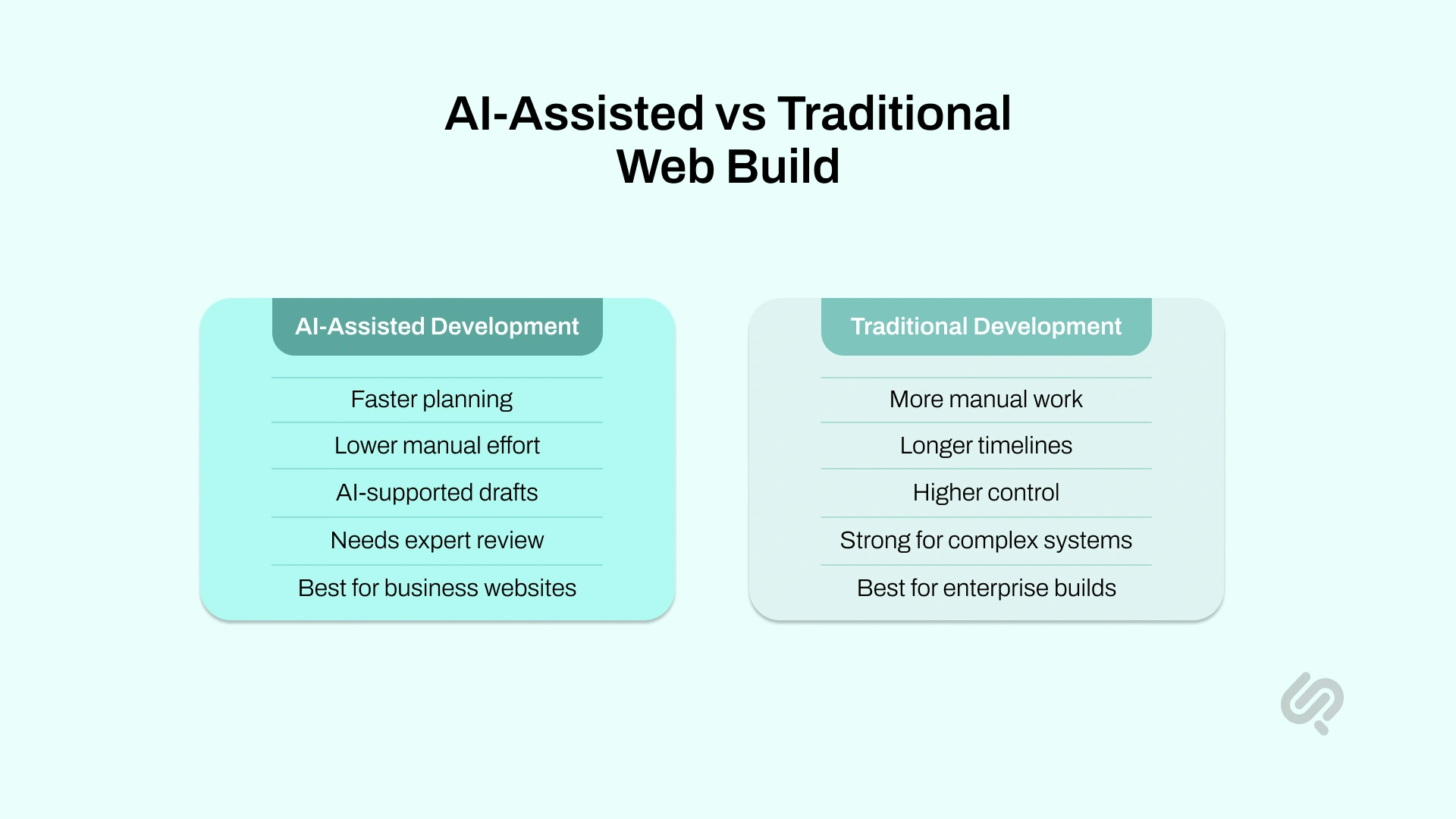
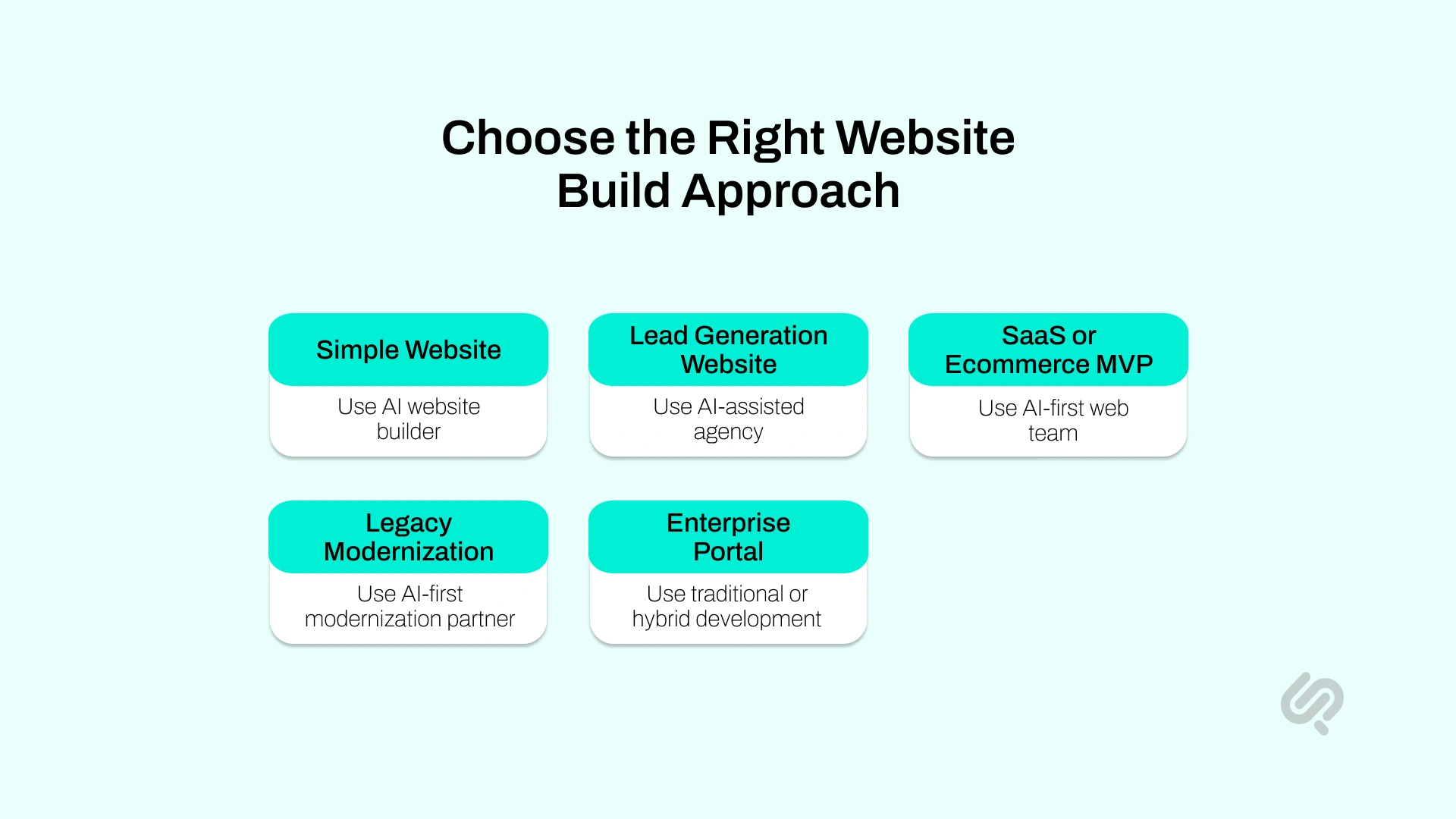
There is no single best option for every website. The right choice depends on your scope, timeline, budget, integrations, and risk level.
For most business websites, the strongest answer is not fully AI or fully traditional. It is a smart hybrid approach where AI speeds up repeatable work, and experts handle strategy, UX, development, QA, SEO, and launch quality.
The simple rule is this:

AI-assisted website development uses AI tools to support the website-building process. AI can help with research, planning, design ideas, content drafts, code scaffolding, SEO checks, testing ideas, and optimization.
It does not mean AI builds the whole website alone.
Human experts still guide the strategy, review the output, and make the final decisions around UX, brand, architecture, security, performance, and conversion.
AI can help with:
The goal is not just to launch faster. The goal is to build a website that is faster to produce, easier to manage, and still strong enough for real business use.
This is where many businesses make the wrong choice.
An AI website builder and an AI-assisted development agency solve different problems.
An AI-assisted agency is a better fit when the website needs:

Speed is one of the clearest differences between AI-assisted website development and a traditional web build.
In a traditional process, teams usually start each stage manually, from sitemap planning and wireframes to copy, development, and QA. This gives control, but it also adds time.
AI-assisted website development makes the process faster by giving teams a stronger starting point. AI can help create early drafts, suggest page structures, prepare content ideas, support code scaffolding, and generate testing checklists. Human experts still review everything, but they are not starting from zero.
A controlled GitHub Copilot study found that developers using AI assistance completed a coding task 55.8% faster than the control group, which supports the idea that AI can reduce time on clear, repeatable development work. (1)
AI-assisted website development is faster because it reduces blank-page work. Instead of spending days creating the first version of a sitemap, landing page structure, UX copy, or QA checklist, teams can use AI to prepare the first draft and then improve it.
AI can speed up:
The main speed benefit is not that AI builds the entire website alone. The real benefit is that it helps designers, developers, writers, and QA teams complete repetitive tasks faster while keeping humans in control of the final quality.
Traditional web builds take longer because most tasks are handled manually and often passed between different teams. Strategy may start with one team, design with another, development with another, and QA near the end.
Common delays include:
Traditional development can still produce excellent websites, but it usually takes more time to reach the first usable version.
Cost is another major difference between both approaches. A traditional web build often costs more because more time is spent on manual planning, custom layouts, content creation, development, QA, and revisions.
AI-assisted website development can reduce website development cost by helping teams complete repeatable work faster. It does not remove the need for professional designers, developers, strategists, or QA experts. It simply helps them use their time more efficiently.
AI-assisted website development can reduce cost because it shortens the time spent on early drafts, research, content planning, SEO briefs, code scaffolding, and QA preparation. When the team can move faster through these tasks, the overall project becomes more efficient.
AI can reduce cost by speeding up:
The cost benefit comes from efficiency, not from removing expert work. Human review is still needed for strategy, design quality, development, security, SEO, accessibility, and final testing.
Traditional website development usually costs more because every page, layout, feature, integration, and test plan requires more manual effort. The more complex the website, the more time each team member needs to spend on planning, building, reviewing, and fixing.
Website development costs often increase because of:
A simple business website will cost less than a SaaS website, an ecommerce platform, or a custom web portal.
Quality depends on how the website is built, reviewed, tested, and improved. AI-assisted website development can improve quality when AI is used as a support tool and human experts review the final output.
But AI can also reduce quality if teams use it only to move faster and skip proper review. A fast website is not useful if it has weak copy, generic layouts, broken forms, poor mobile performance, or security issues. For form-heavy sites, screening submissions on submit keeps junk out of the CRM, and Form Guard handles exactly that check at the entry layer.
AI-assisted website development can improve quality by helping teams check more things earlier in the process. It can support better page structure, clearer content organization, faster SEO checks, stronger QA planning, and better handoff between teams.
AI can help improve:
For a business website, quality is not only about how the design looks. A quality website should load fast, work well on mobile, explain the offer clearly, support SEO, collect leads properly, and stay reliable after launch.
AI can reduce quality when teams publish its output without review. AI-generated content may sound generic, layouts may look repetitive, and code may need cleanup before it is safe or scalable.
Common risks include:
AI can create a strong first draft, but it should not be treated as the final version. Designers, developers, QA experts, and SEO specialists still need to check the work before the website goes live.
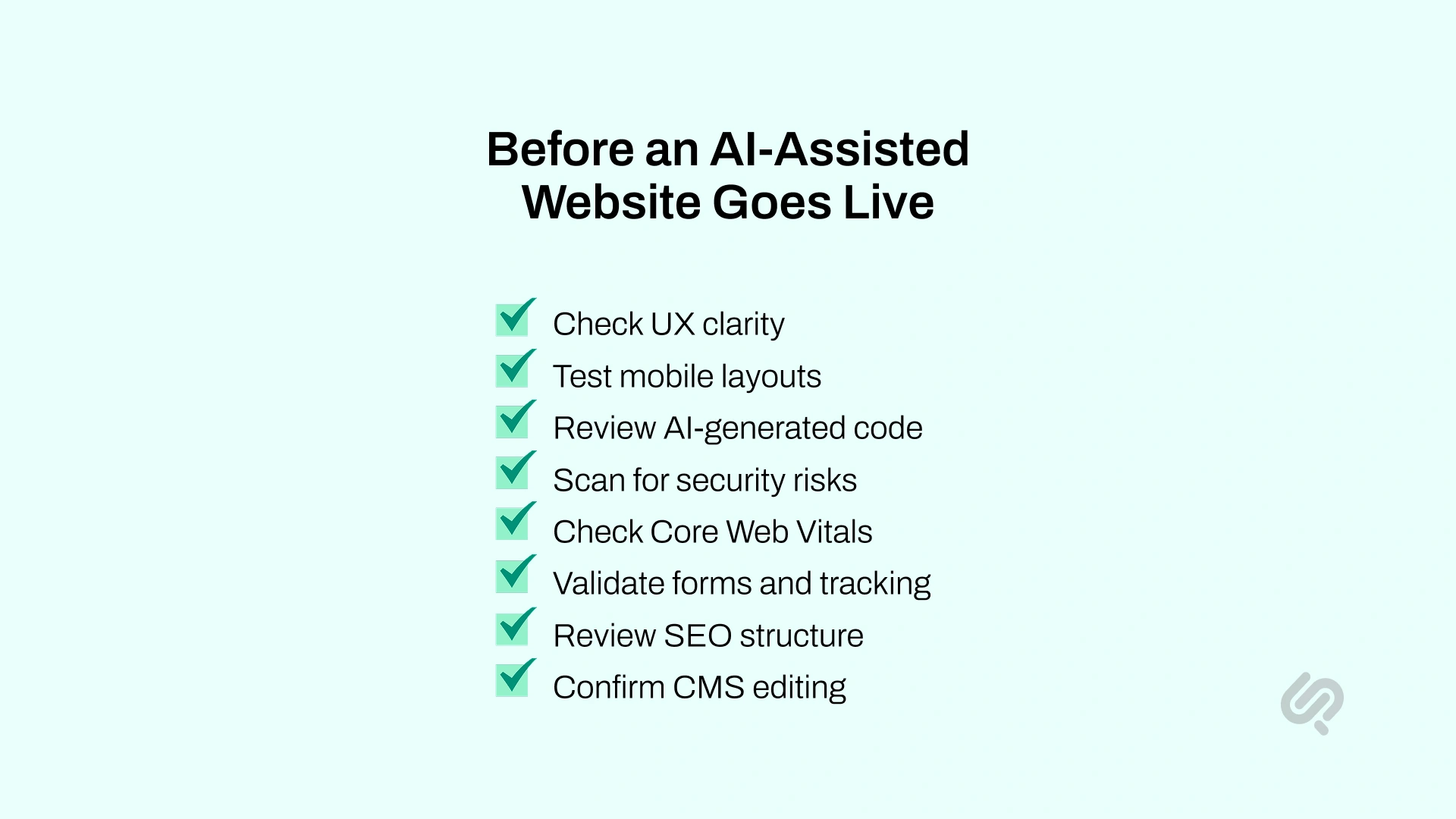
AI can help teams move faster, but speed alone does not guarantee quality.
Stack Overflow’s 2025 Developer Survey found that 46% of developers actively distrust the accuracy of AI tools, which is why AI-assisted website development should always include expert review before launch. (2)
Before an AI-assisted website goes live, the team should check:
Security also needs special attention. Veracode’s GenAI code security research found that 45% of AI-generated code samples failed security tests and introduced OWASP Top 10 vulnerabilities. This does not mean AI should be avoided. It means AI-generated code should be reviewed, tested, and scanned before launch. (3)
The best approach is human-in-the-loop development.
AI creates the starting point. Experts make it reliable. QA makes it launch-ready. As Mujtaba Sheikh, Head of Development and Design at Phaedra Solutions, puts it:
“AI should remove blank-page work, not accountability. The fastest web builds still need senior judgment around architecture, UX, QA, security, and business goals. That is where AI-first delivery creates real value: speed without handing quality over to a tool.”
Many businesses comparing AI-assisted and traditional web development are not building from scratch. They already have an old website, an outdated CMS, slow pages, a weak SEO structure, a poor mobile experience, or messy integrations.
This is where AI can make modernization faster and more manageable.
AI can support legacy website modernization by helping with:
This does not mean AI should rebuild the entire website without human review. Legacy systems often have hidden dependencies, old plugins, broken tracking, outdated code, and business logic that must be handled carefully.
Traditional development is still important for:
For business leaders, the value is simple. AI reduces the slow audit, planning, documentation, and repetitive rebuild work. Human experts still protect the parts that affect security, performance, SEO, and long-term scalability.
AI can speed up website development, but it can also create problems when businesses treat it as a shortcut instead of a tool.
AI can create pages quickly, but it cannot decide your offer, audience, positioning, keywords, or conversion path. These decisions should come before design or development starts.
AI copy can sound polished but still be generic, inaccurate, or misaligned with your brand. Review it for facts, tone, proof points, search intent, and CTA clarity.
A fast website still needs clean URLs, headings, metadata, internal links, schema, page speed, and indexable content. SEO should be planned before development, not added after launch.
AI-assisted websites still need full testing. Check forms, buttons, menus, mobile layouts, browser behavior, page speed, tracking, CMS editing, and integrations.
AI website builders are useful for simple websites. They are not the best fit for custom portals, ecommerce workflows, SaaS onboarding, dashboards, APIs, multilingual systems, or legacy integrations.
AI-generated code and third-party tools must be reviewed carefully. Before launch, check SSL, form security, payment flows, access control, data handling, and plugin risks.
The safest approach is to use AI for speed, but keep experts responsible for quality.
Before choosing AI-assisted website development or traditional web development, ask these questions:
If the website is simple, an AI website builder may be enough.
If the website needs leads, SEO, integrations, custom design, or long-term scalability, an AI-assisted agency is usually a better choice.
If the website connects to complex systems, handles sensitive data, or needs advanced workflows, traditional or hybrid development is safer.
AI-first web development does not mean giving the whole project to AI. It means using AI across the delivery process to reduce manual work, speed up decisions, and help experts focus on higher-value work.
A strong AI-first website development process usually includes:
AI can support competitor research, sitemap ideas, content structure, user journey mapping, and SEO planning. Human experts still define the offer, positioning, audience, conversion path, and business goals.
AI can help create first drafts of page flows, wireframe ideas, section layouts, and UX copy. Designers then refine the experience so it feels clear, branded, mobile-friendly, and easy to use.
AI can support keyword mapping, metadata drafts, FAQ ideas, page briefs, and content structure. SEO specialists still check search intent, internal links, headings, schema, technical SEO, and content quality.
AI can help with code scaffolding, reusable components, documentation, and simple development tasks. Developers still review architecture, performance, security, integrations, and maintainability.
AI can help generate test cases, edge cases, accessibility reminders, and performance checklists. QA engineers still test the website manually and technically before launch.
AI can support analytics reviews, content updates, conversion ideas, and performance monitoring. Human teams still decide what to change based on business goals and real user behavior.
This is the main difference between basic AI website creation and AI-first web development. AI-first delivery uses AI to improve the process, but experts remain responsible for the result.
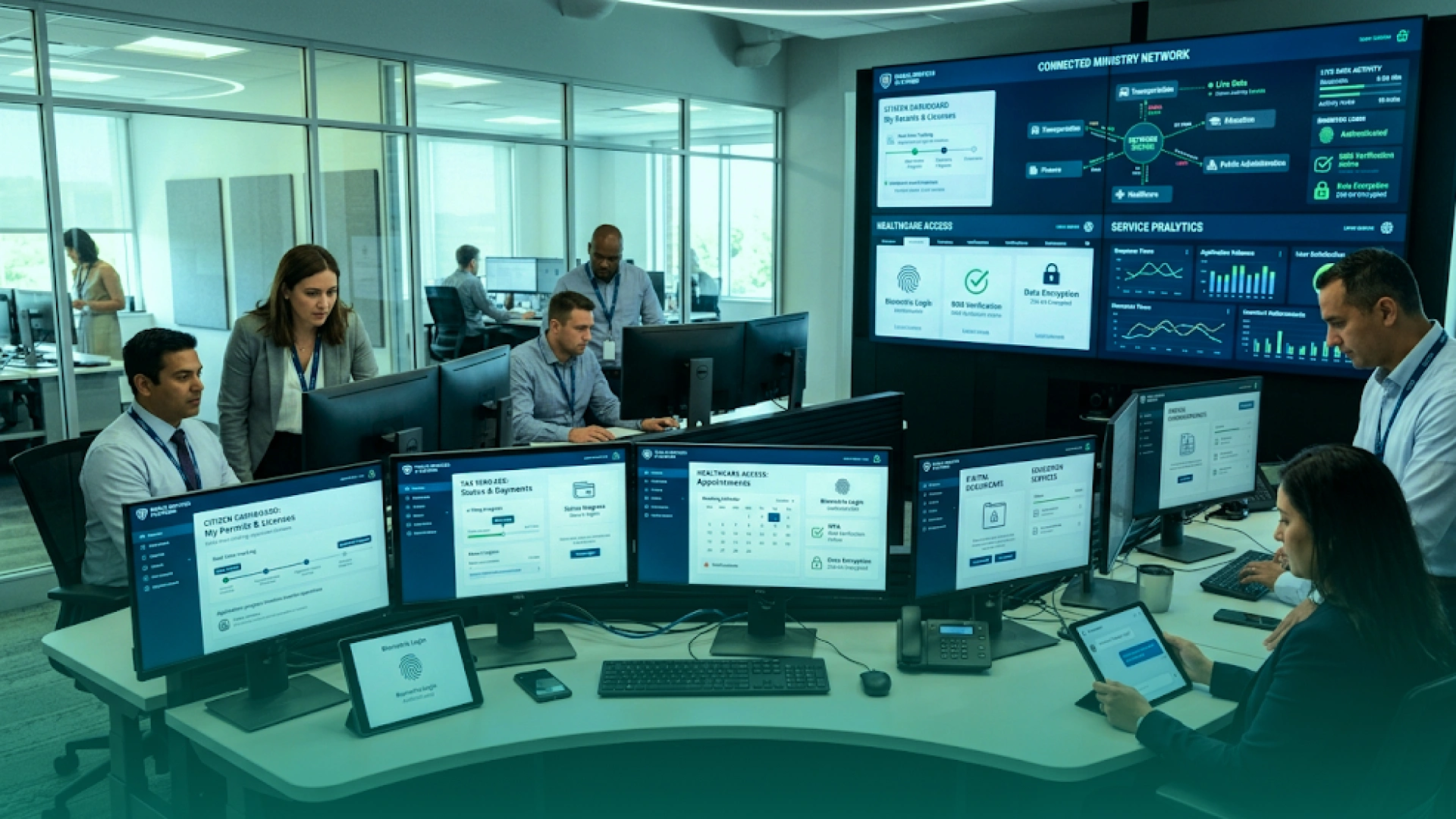
Phaedra Solutions helped a government agency build an AI-first digital government platform that brought 30+ scattered public services into one connected web portal and mobile Super App.
Instead of creating another standalone website, the project unified service access, real-time request tracking, AI-powered guidance, centralized authentication, and secure ministry integrations into one digital experience for citizens, businesses, ministries, and administrators.
This case shows why the real comparison is not simply AI vs traditional web development.
A traditional build could have created pages and forms, but the client needed a scalable platform with AI assistance, secure APIs, IAM, MFA, role-based access control, analytics, cloud deployment, and future ministry onboarding.
With an AI-first delivery process across web, mobile, backend, AI, QA, security, and DevOps, Phaedra delivered a stronger foundation for faster service discovery, better governance, and long-term digital modernization.
The real winner in AI vs traditional web development is not a tool. It is the right process.
If you need a business website, SaaS website, ecommerce MVP, a landing page system, or legacy website modernization, Phaedra Solutions can help you build through AI-first web development services.
Our team uses AI agents, Claude, Cursor, and AI-supported delivery workflows across research, sitemap planning, UX, content structure, frontend development, backend development, DevOps, QA, SEO checks, documentation, and launch planning.
But we do not hand your website over to AI and hope for the best.
Senior designers, developers, QA engineers, and strategists still review the work for architecture, UX, security, performance, accessibility, SEO, integrations, and conversion quality. Depending on project size, complexity, and scope, this AI-first process can help reduce development timelines, optimize cost and efficiency, and reduce delivery team load by 30% to 80%.
If you want the speed of AI-assisted development with the control of an expert engineering team, the next step is simple.



Ameena is a content writer with a background in International Relations, blending academic insight with SEO-driven writing experience. She has written extensively in the academic space and contributed blog content for various platforms.
Her interests lie in human rights, conflict resolution, and emerging technologies in global policy. Outside of work, she enjoys reading fiction, exploring AI as a hobby, and learning how digital systems shape society.
