



.webp)


.webp)
.webp)







Your product idea can be great, and still die in build mode.
Most SaaS doesn’t fail because the tech is “hard.” It fails because teams build the wrong thing first, pick a stack that doesn’t scale, or launch without a real feedback loop.
SaaS application development is the step-by-step process of planning, designing, building, testing, launching, and improving a cloud-based app that users access through the internet (usually by subscription).
In this guide, we’ll walk through the full process, from shaping your idea and validating the MVP to choosing the right tech stack, designing for scale, and locking down security from day one.
You’ll also see how modern SaaS teams use cloud platforms, proven frameworks, and (when it makes sense) generative AI to move faster without creating a fragile product.
Get Tailored SaaS Solutions That Scale.
SaaS meaning: Software as a Service (SaaS) is a way of delivering software over the internet instead of installing it on your computer.
In simple terms, a SaaS company builds and runs a cloud-based app, and users access it through a browser or a lightweight app. You don’t manage servers, updates, or security. The provider handles all of that for you.
This model makes software easier to use, cheaper to start with, and faster to scale. That’s why many modern products now focus on tailored SaaS solutions built for specific industries, teams, or workflows, instead of one-size-fits-all software.
Below is a quick comparison of SaaS vs traditional software:
SaaS is not just a delivery model; it changes how software is planned, built, and used. Today, most businesses rely on dozens of SaaS tools for sales, finance, support, collaboration, and operations.
That’s why modern SaaS product strategy & consulting focuses on:
This also explains why many startups now follow an MVP to product development for startups approach, launching small, learning quickly, and improving based on user feedback.
Whether you're working with in-house dedicated software engineers or partnering with an offshore development company, SaaS development is now the standard path for turning ideas into scalable digital products.
The average company now uses about 106 SaaS applications, reflecting how deeply SaaS has penetrated all areas of business operations (1).
SaaS is now the standard way to build and deliver software because it solves real business problems better than traditional software.
SaaS applications can be launched worldwide instantly. Users sign up online and start using the product right away, without installation or setup delays.
The global SaaS market is projected to grow from around $375.57 billion in 2026 to about $1,482.44 billion by 2034, showing strong long-term expansion with a CAGR of nearly 18.7 % during this period. (2)
The SaaS business model uses subscriptions or usage-based pricing instead of large one-time payments. This reduces operational costs and makes budgeting easier.
Modern SaaS platforms use cloud-native infrastructure and multi-tenant architecture, allowing them to scale smoothly as users and data grow.
SaaS products are updated frequently based on real user feedback, helping teams deliver tailored SaaS solutions that match customer needs.
SaaS platforms are built with APIs and integration capabilities, making it easy to connect CRM, finance, support, and collaboration tools into one workflow.
Teams can test ideas, release features, and adapt quickly without long development or deployment cycles, giving SaaS businesses a competitive edge.
The SaaS market continues to grow rapidly, showing that SaaS development is now central to modern software and business growth.
SaaS isn’t an abstract idea. It’s the software teams use every day to sell, collaborate, manage data, and run operations.
These real-world products show how SaaS application development solutions turn specific business problems into scalable, cloud-based platforms.
Salesforce is one of the most well-known examples of SaaS-based application development done right. It provides cloud-based CRM tools that help businesses manage sales, marketing, customer support, and analytics in one platform.
Built on a scalable, multi-tenant architecture, Salesforce shows how SaaS cloud application development enables global access, frequent updates, and deep Salesforce integration capabilities with third-party systems without on-premise software.
Slack is a communication platform designed for modern, distributed teams. It allows users to collaborate in real time through channels, messaging, file sharing, and integrations with other SaaS tools.
Slack is a strong example of SaaS application development solutions focused on usability, reliability, and continuous improvement through frequent feature releases.
Zoom delivers video conferencing and virtual collaboration as a cloud-based service used by millions worldwide. Its success comes from simple UX, reliable performance, and the ability to scale quickly during usage spikes.
Zoom highlights how SaaS cloud application development supports high availability, real-time performance, and seamless updates without user intervention.
Shopify is a vertical SaaS platform that helps businesses create and manage online stores without building custom software.
It handles hosting, payments, security, and integrations, allowing merchants to focus on selling. Shopify is a clear example of SaaS-based application development tailored to a specific industry with strong extensibility through apps and APIs.
HubSpot offers marketing, sales, and customer service tools in a unified SaaS platform. Its modular design allows businesses to start small and expand as they grow.
HubSpot demonstrates how well-planned SaaS application development solutions combine UX, automation, analytics, and integrations into a scalable, subscription-based product.
.webp)
SaaS application development follows a structured lifecycle, from validating the idea to building, launching, and improving the product. This section explains each step in that journey.
Every successful SaaS product starts with solving a real problem. This stage helps you confirm that your idea is useful, needed, and worth building before investing in full SaaS application development.
Before building anything, you need to understand what people are actually struggling with. Your SaaS should remove friction, save time, reduce cost, or improve accuracy for a real user group.
Your goal is to find a problem that users care about and would pay to solve.
Once you understand the problem, look at how others are solving it today. This helps you avoid building something that already exists and find ways to stand out.
This step helps you position your SaaS clearly in the market.
Your product should be built for a particular type of user. The clearer you are about who it’s for, the easier it is to design the right features and messaging.
This clarity allows you to build tailored SaaS solutions that fit real workflows.
Before full development, test whether people actually want your solution. This helps reduce risk and prevents wasted development effort.
This MVP to product development for startups approach lets you learn fast and build smarter.
Use your research and validation results to refine both the product and the business behind it.
This ensures your SaaS is not only useful but also sustainable as a business.
Once your idea is validated, the next step is to turn it into a clear plan. This stage is about defining what you’re building, how you’ll build it, and who will build it, before any serious development starts.
This step creates a clear blueprint for your SaaS product. It ensures everyone on the team understands what needs to be built and why.
Clear requirements reduce rework, confusion, and wasted development time.
Before designing screens or writing code, think about how users will actually move through your product.
This helps ensure your SaaS is easy to use from day one and meets user expectations.
Now decide how the product will be built at a high level. These choices affect scalability, performance, and long-term flexibility.
This stage often involves SaaS product strategy & consulting to make sure the architecture supports long-term growth.
Finally, define how the work will be executed and who will do it.
This step ensures everyone shares the same roadmap and expectations.
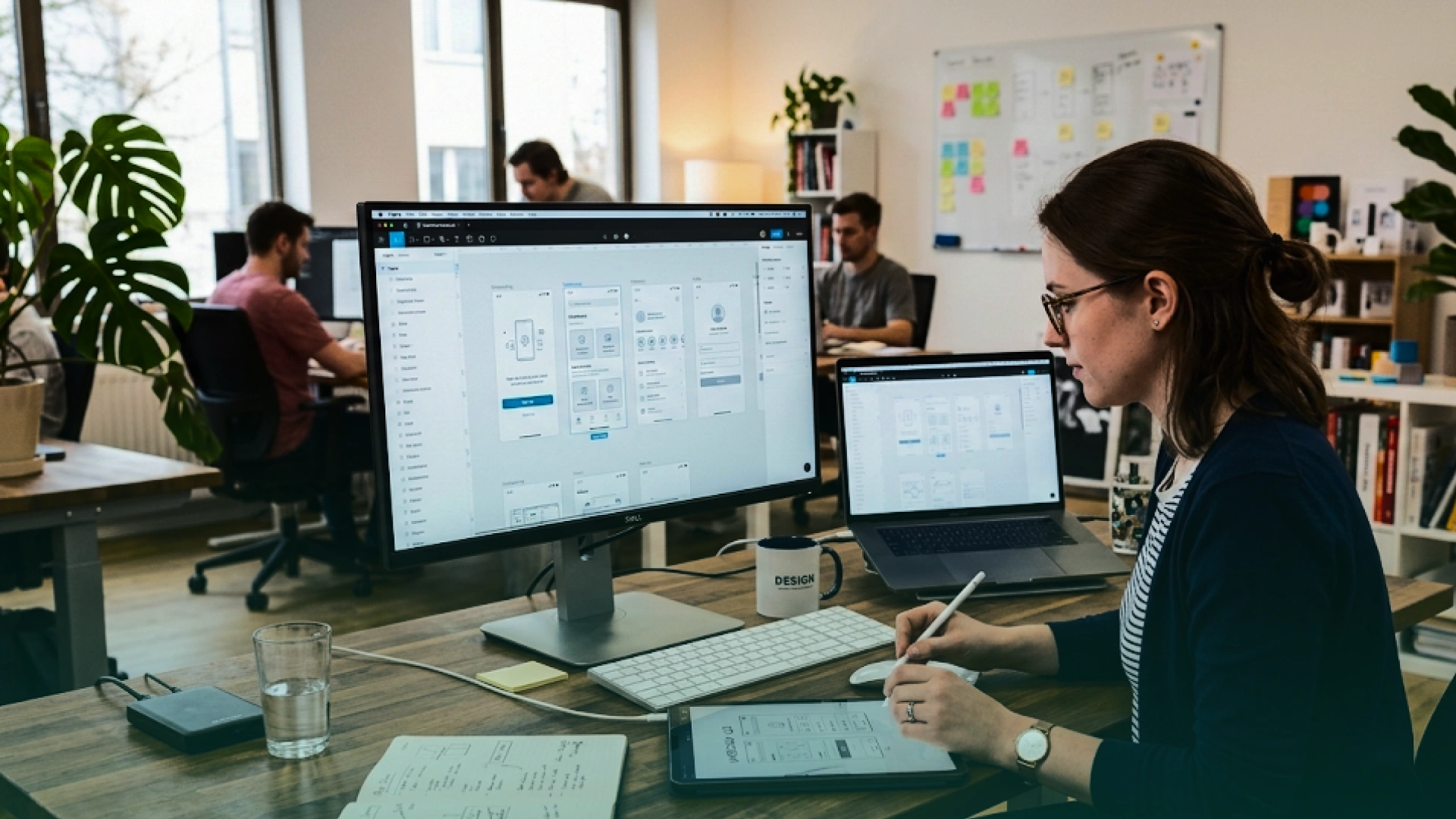
This stage is about shaping how your SaaS product looks, feels, and flows. Good UX/UI design helps users understand your product quickly and enjoy using it, which directly affects adoption, retention, and long-term success.
This step focuses on how your product looks on screen and how users move through it.
A clear and simple interface reduces friction and helps users get value faster.
UX is about how easy and natural it feels to use your product from start to finish.
Strong UX reduces churn and increases the chances that users stick with your SaaS long term.
Before writing real code, create a clickable version of your product to test ideas quickly.
Prototyping helps you validate design decisions early and saves time and money later.
This stage is about setting up the technical foundation of your SaaS. The choices you make here affect how fast you can build, how well your product scales, how secure it is, and how easy it will be to maintain in the future.
Choose tools and frameworks that match your product needs and your team’s skills.
The right stack helps your team move fast without creating technical debt.
Your SaaS needs a reliable cloud infrastructure to run and scale.
Using cloud platforms makes your SaaS easier to scale and operate globally.
Your architecture determines how well your SaaS performs as users grow.
Most modern SaaS platforms use multi-tenant, cloud-native architecture from day one.
Security should be part of the system design, not an afterthought.
Strong security builds trust and protects your business and users.
Your SaaS should connect easily with other tools your users already use.
Good integration increases product value and makes your SaaS easier to adopt.
This is where your SaaS product starts becoming real. Your development team, whether in-house dedicated software engineers or an offshore development company, now builds the product based on the plans, designs, and architecture defined earlier.
The backend powers everything behind the scenes, including logic, data, and security.
The backend is the foundation of your SaaS platform’s reliability and performance.
The frontend is what users see and interact with every day.
A fast and intuitive frontend improves adoption and reduces churn.
Instead of building everything from scratch, connect with trusted external tools.
These integrations speed up development and add powerful capabilities to your SaaS.
Good development practices keep your code stable and your releases fast.
Before launch, your SaaS must be stable, secure, and reliable. This stage ensures your product works as expected, performs well under load, and keeps user data safe.
This checks whether all features work the way they are supposed to.
Fixing issues now is far cheaper and safer than fixing them after users are live.
Your SaaS must;
A slow product leads to frustrated users and higher churn.
Your product must;
Strong security builds trust and protects your business.
This ensures your product works well in real-world conditions.
This final polish helps deliver a smooth, professional experience
This stage is where your SaaS goes live and starts creating real value for users. But launch is not the finish line. It’s the start of continuous improvement, scaling, and learning.
This step puts your SaaS into a live, production environment.
This ensures fast, safe, and reliable releases.
Once your SaaS is deployed, the next decision is how to go live. The launch approach you choose affects the quality of user feedback, system stability, and early traction.
Most successful SaaS application development solutions start with a soft launch before moving to a full public release.
A soft launch means releasing your SaaS to a limited audience first.
Soft launches are ideal for validating SaaS-based application development decisions with minimal risk.
A hard launch is a public release to a broader audience.
Hard launches work best once your SaaS cloud application development setup is stable, secure, and tested under real usage.
After launch, your focus shifts to stability, performance, and reliability.
Ongoing maintenance keeps your product stable and trustworthy.
Your users will show you what’s working and what isn’t.
This feedback loop helps you build a better product over time.
As your SaaS grows, your infrastructure and operations must grow with it.

Security and scalability are not features you “add later” in SaaS. They are part of the foundation. If they’re ignored early, teams often pay for it with data risks, performance issues, and expensive rebuilds as usage grows.
Strong SaaS application development solutions treat security and scalability as shared responsibilities across design, architecture, development, and operations from the very beginning.
For SaaS cloud application development, this means assuming growth, expecting failures, and planning for real-world usage, not best-case scenarios.
The goal is to protect user data, maintain performance under load, and scale without breaking core workflows. In SaaS-based application development, these decisions determine whether your product feels reliable or fragile as customers grow.
Build these in from day one:
When these fundamentals are built early, SaaS products scale more smoothly, earn user trust faster, and avoid costly technical debt that slows growth later.
Building a SaaS product comes with challenges that go beyond regular software development. Knowing what these challenges are and how to handle them helps you build a product that is stable, trusted, and easy to grow.
SaaS products store and process sensitive customer data, so security must be a top priority. A single breach can damage trust and hurt your business badly.
The best approach is to build security into the product from day one by encrypting data, using strong authentication, controlling access carefully, and following compliance standards like GDPR or PCI-DSS.
Regular security testing and audits help prevent vulnerabilities before they turn into real issues.
Businesses use many tools, and they expect them to work together smoothly. If your SaaS cannot integrate with other systems, it quickly becomes less useful.
An API-first approach helps your product connect easily with CRMs, accounting tools, and other SaaS platforms. This makes your product more flexible and more valuable inside real business workflows.
A SaaS app must perform well whether it has 100 users or 100,000. If the system slows down as usage grows, users will leave.
Cloud-native infrastructure, auto-scaling, caching, and performance monitoring help your SaaS stay fast and reliable as demand increases.
Users expect your product to always be available, even while you release updates. This means you need automated deployment pipelines, safe release methods like rolling updates, and rollback options if something goes wrong.
These practices allow you to improve the product frequently without interrupting users.
In SaaS, customers can leave at any time if they stop seeing value. That’s why continuous improvement matters.
Listening to user feedback, tracking product usage, improving UX, and offering good customer support all help keep users engaged and loyal over time.
Even the best SaaS idea won’t succeed without the right people behind it. SaaS application development needs more than just coding. It requires product thinking, design, engineering, testing, and ongoing support working together.
A strong SaaS development team usually includes:
In early-stage startups, one person may cover multiple roles — what matters is that every responsibility is clearly owned.
Founders usually choose between building an internal team, working with an offshore development company, or using a hybrid model.
An in-house team gives you full control and deep product knowledge, but it’s slower and more expensive to build.
Outsourcing to a top SaaS application development company offers faster execution, lower costs, and access to experienced, dedicated software engineers, especially for MVPs or early growth.
Many teams choose partners that offer full-cycle SaaS application development services or custom SaaS application development services to cover everything from design to launch.
A hybrid approach is common: keep core product and strategy in-house, and use external engineers to speed up development or handle specific areas.
Most SaaS teams use agile methods to stay flexible and move fast. Short sprints, clear priorities, regular demos, and strong communication tools (like Jira and Slack) help teams stay aligned, especially when working with remote or offshore developers.
Sometimes you need specialists for security, cloud, UX, or scaling. Bringing in external experts or consultants at the right time can improve quality and reduce risk, especially when building complex or sensitive systems.
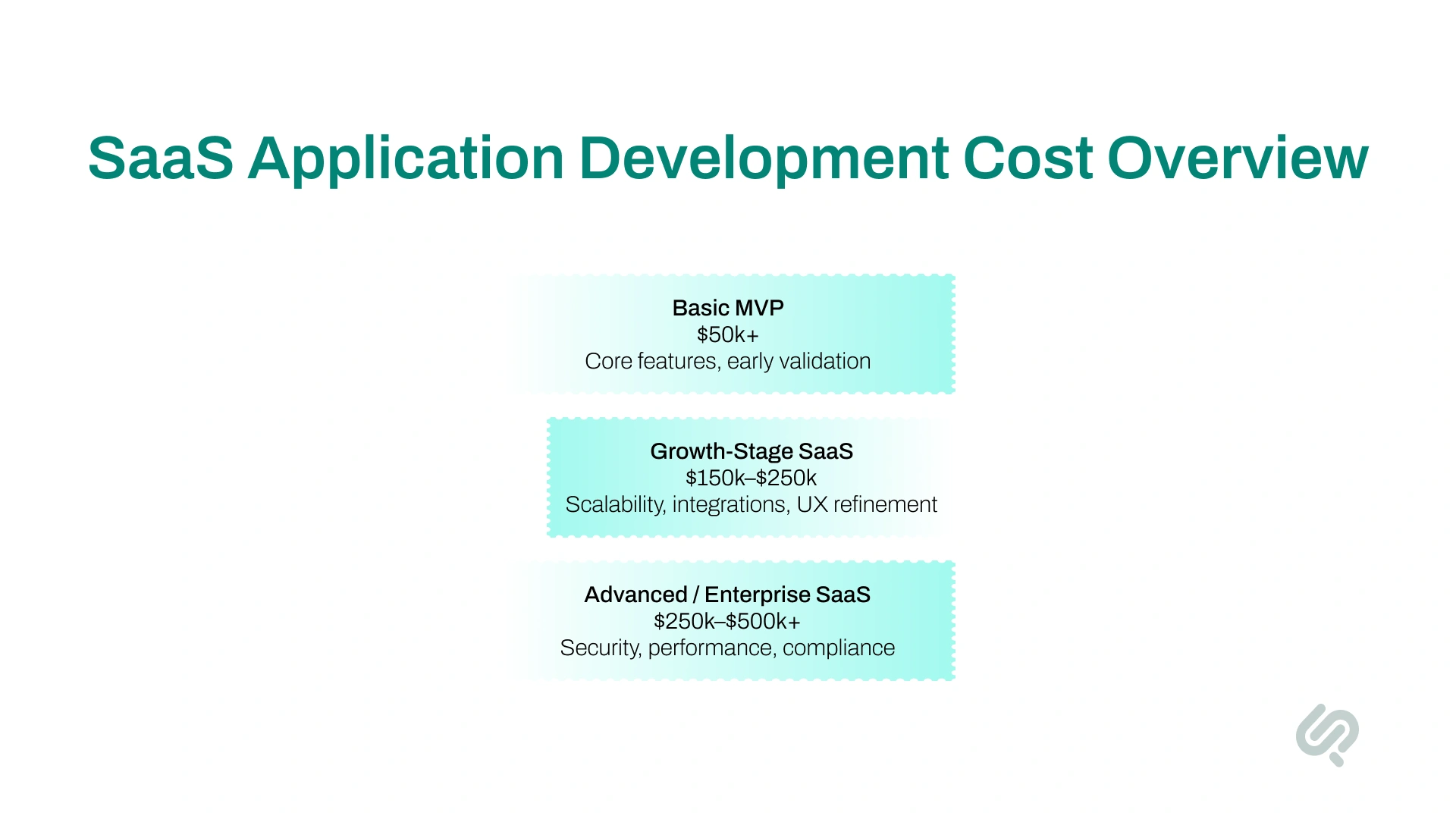
The cost of building a SaaS product depends on what you’re building, how complex it is, and how fast you want to launch. This section gives you a simple view of where the money usually goes.
Building a SaaS product that lasts requires more than shipping features fast. The strongest platforms are designed to scale, stay secure, and improve continuously without breaking under growth or complexity.
These best practices help teams avoid common mistakes and build software that users trust and stick with.
Following these best practices helps SaaS teams build products that scale reliably, adapt faster, and deliver long-term value instead of short-lived launches.
SaaS is evolving fast, and what works today may not be enough tomorrow. These trends show where SaaS development is heading and how founders can stay ahead.
In short, the future of SaaS belongs to products that are smart, flexible, secure, industry-focused, and built to adapt quickly to user needs.
To understand what separates scalable SaaS products from those that struggle as they grow, we spoke with someone who works closely with SaaS teams across design, development, and architecture decisions.
Mujtaba Sheikh from Phaedra Solutions, who leads SaaS design and development efforts across multiple long-term products, pointed to a pattern he sees repeatedly:
“Most SaaS products don’t fail because of the technology itself. They struggle because design, architecture, and development decisions are made in isolation. When these pieces aren’t aligned early, teams pay for it later with slow performance, rework, and scalability issues.”
He explained that successful SaaS application development happens when teams treat UX, backend structure, and scalability as one connected system — not separate tasks handled at different stages.
“When teams plan for growth from the start, they avoid painful rebuilds and can adapt faster as user demand increases. That’s when SaaS platforms stop feeling fragile and start feeling reliable.”
This reflects a common reality in SaaS development: strong tools and frameworks matter, but long-term success depends on how well foundational decisions are made and revisited as the product evolves.
Building a SaaS product in 2026 is no longer just about writing code. It’s about designing a scalable system that can evolve with users, technology, and the market.
Founders who succeed focus on real problems, validate fast, choose flexible architectures, and treat SaaS as a living product, not a one-time release.
Whether you work with in-house dedicated software engineers, a hybrid team, or an offshore development company, the outcome depends on how well strategy, design, development, and delivery are aligned.
SaaS products that are cloud-native, secure by design, integration-ready, and user-driven will continue to outperform traditional software, and that’s where the future is headed.
Book a Free 30-minute Call for SaaS Product Strategy & Consulting.



Ameena is a content writer with a background in International Relations, blending academic insight with SEO-driven writing experience. She has written extensively in the academic space and contributed blog content for various platforms.
Her interests lie in human rights, conflict resolution, and emerging technologies in global policy. Outside of work, she enjoys reading fiction, exploring AI as a hobby, and learning how digital systems shape society.
