



.webp)


.webp)
.webp)






.webp)
Cloud security during outages means protecting access, data, monitoring, and recovery actions when cloud services become unstable. During a cloud outage, the biggest risks are over-permissioned emergency access, misconfigurations, exposed storage, delayed detection, and insecure failover steps.
A cloud outage does more than interrupt uptime. It creates pressure, weakens visibility, and pushes teams toward fast fixes. That is when new security gaps often appear.
Logs may lag, identity systems may fail, recovery changes may bypass safeguards, and attackers can hide inside the noise. Real cloud resilience means restoring applications, storage, and databases without exposing systems, data, or users to extra risk.
Below, we break down where security risk appears first during a cloud outage, how to protect your infrastructure while systems are unstable, and what to verify before recovery is truly complete.
Cloud security during outages means keeping access, data, monitoring, backups, and recovery actions secure while cloud services are unstable.
Because visibility drops, some controls fail, and teams often make emergency changes under pressure. That combination creates new security gaps.
The biggest risks are unauthorized access, misconfigurations, exposed storage, delayed detection, weak failover, and insecure emergency changes.
Use least-privilege access, MFA, tested backups, secure failover, strong logging, change approvals, and a clear outage response plan.
Yes. If access rules are loosened, storage is misconfigured, or attackers exploit the confusion, an outage can lead to data exposure or unauthorized access.
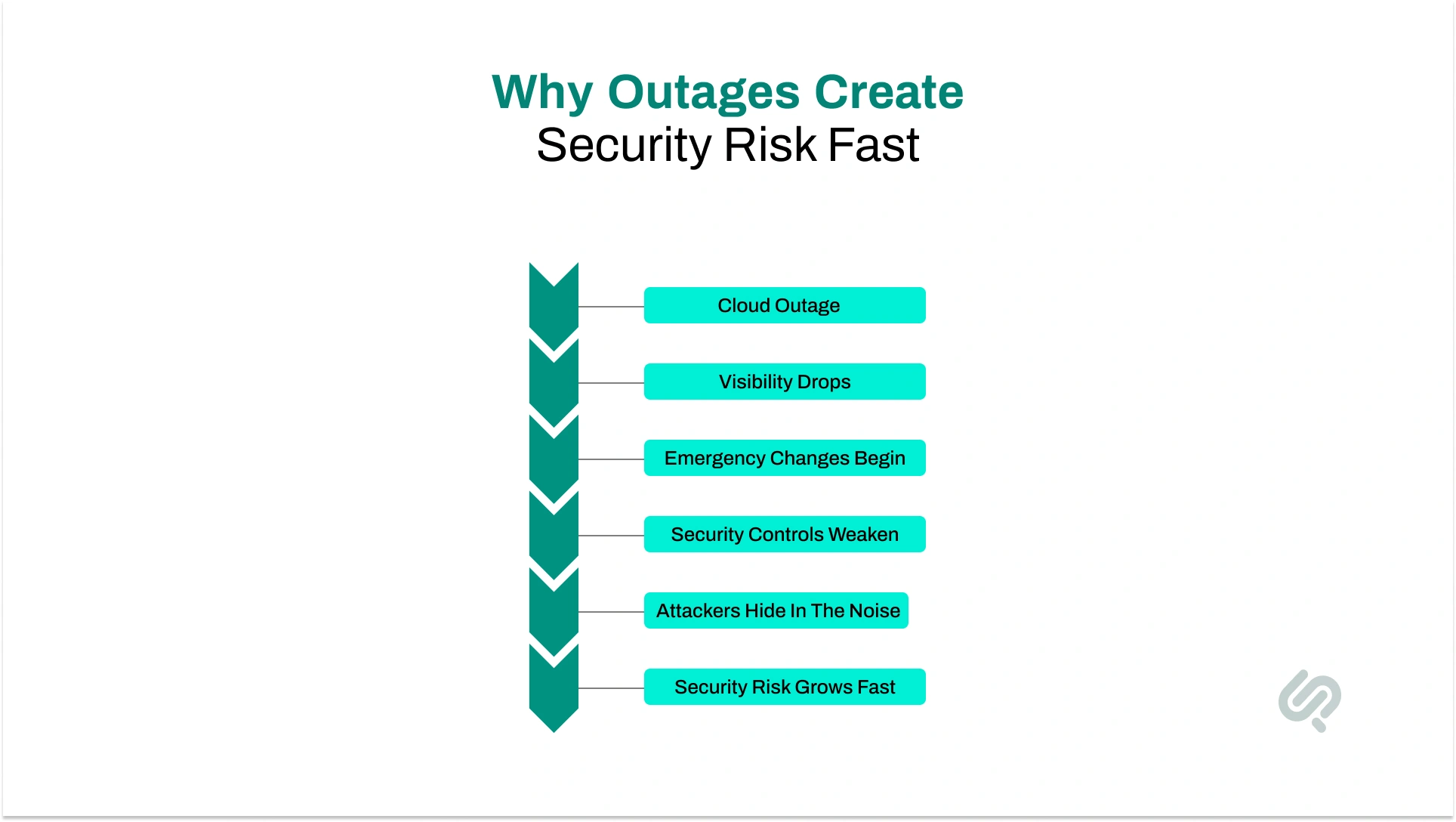
A cloud outage changes more than uptime. It changes visibility, access, and decision-making speed. When teams lose normal signals and start making fast recovery changes, security risk rises quickly.
The risk grows fast for a few clear reasons:
Logs, alerts, telemetry, and dashboards may be delayed or unavailable. Teams cannot always tell whether they are seeing a provider issue, an internal failure, or attacker activity.
During instability, unusual behavior is harder to spot. Suspicious actions can blend in with normal outage-related failures.
Teams may open network paths, relax permissions, disable checks, or reroute traffic to restore service. These changes can leave behind new attack paths.
If monitoring, identity, or gateway services depend on the same cloud stack, those controls may weaken during the same incident.
A failure in one service can affect authentication, DNS, storage access, logging, CI/CD, or third-party tools. That widens both operational and security risk. Research shows that third-party involvement in breaches doubled to 30%, which is a strong reminder that outage risk can spread through things your team does not directly control. (1)
In some cases, teams route around WAFs, gateways, or filtering layers to keep systems alive. That can expose origin servers, APIs, and internal services more than intended.
Fast fixes made under stress often create lasting security issues, especially when change approvals and review steps are skipped.
That is why cloud security during outages has to be planned as part of recovery, not added after the outage begins.

A cloud outage doesn’t only affect availability. It also increases security risk because teams lose visibility, systems behave unpredictably, and fast recovery changes can weaken normal controls. That is why outage response should protect access, data, and cloud resources at the same time.
During an outage, teams often grant extra permissions or use emergency access to restore systems faster. That may help in the moment, but it can also open the door to users, accounts, or systems that should not have that level of control. If those permissions stay active, the risk continues even after recovery.
The global average cost of a data breach is $4.88 million, and 70% of organizations said the breach caused significant or moderate disruption (2).
What damage can it cause?
Example: A team gives broad admin access to fix a broken service during an outage. The issue gets resolved, but the extra permissions are never removed, leaving the environment exposed.
Recovery usually involves quick changes to storage settings, network paths, failover rules, or access controls.
When teams are under pressure, those changes are more likely to be made without proper review. A small mistake during recovery can create a serious cloud security gap.
What damage can it cause?
Example: A storage bucket policy is changed quickly so an app can reconnect after an outage. The app works again, but the bucket is now open wider than intended.
If MFA, token services, or conditional access tools become unstable during an outage, users and systems may not be able to authenticate normally.
That often pushes teams toward risky shortcuts like shared credentials or emergency accounts with too much power. Once identity controls weaken, the rest of the environment becomes harder to secure.
What damage can it cause?
Example: An organization’s MFA flow starts failing during a provider issue. To keep operations moving, the team uses a shared admin login, which later becomes a serious audit and security problem.
A cloud outage can affect more than uptime. If failover, backup restore, or replication processes are not tested properly, data may be lost, corrupted, or restored in the wrong state. This can damage operations and trust even after systems come back online.
What damage can it cause?
Example: A database failover succeeds during an outage, but the replica is behind. The service returns, yet recent customer transactions are missing from the restored data.
54% of organizations said their most recent significant outage cost more than $100,000, and one in five said it cost more than $1 million. (3)
Outages often affect dashboards, alerts, logs, and telemetry. When visibility drops, security teams may not be able to tell whether they are dealing with a service failure, a misconfiguration, or an active attack. That makes it easier for real threats to hide inside the confusion.
What damage can it cause?
Example: A company’s monitoring depends on the same cloud services that are failing. While teams focus on recovery, suspicious activity in one workload is missed until much later.
Cloud outages create stress, urgency, and rushed decision-making. In that kind of environment, even experienced teams are more likely to make mistakes. A fast fix that skips normal security checks can create new vulnerabilities that last beyond the outage itself.
What damage can it cause?
Example: An engineer disables a security check to get an application running again. The app recovers, but the missing control later leaves the service exposed to unnecessary risk.
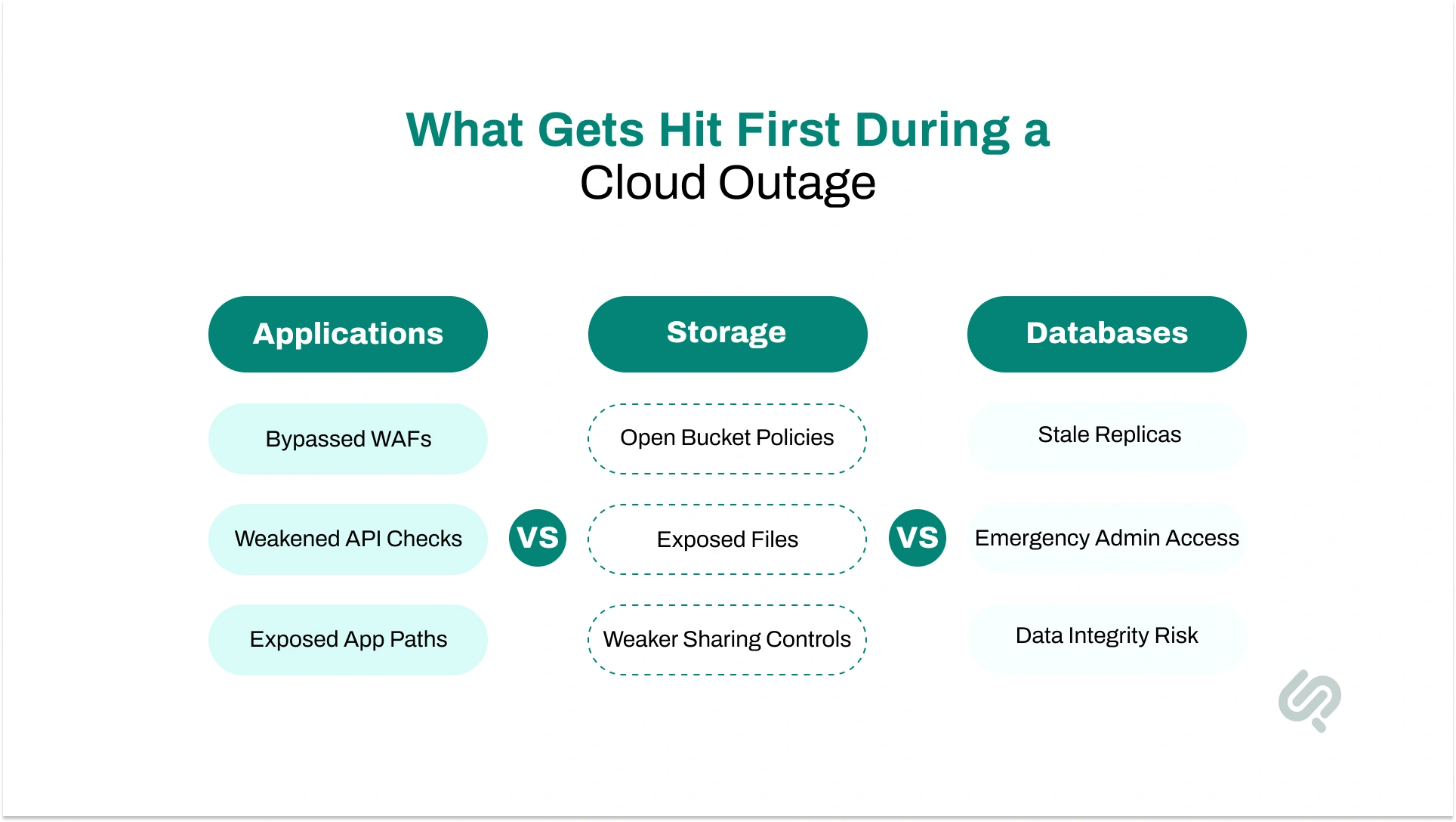
A cloud outage can affect every layer of your environment, but applications, storage, and databases usually face the most immediate risk.
These systems are often changed quickly during recovery, and that is exactly where security gaps can appear. If recovery steps are rushed or poorly controlled, the outage can turn into a bigger problem involving exposed data, weak access, or unstable systems.
As Mujtaba Sheikh (Head of design, development, IoT, and blockchain at Phaedra Solutions) says:
“During a cloud outage, the real danger is not only that systems stop. It is that recovery decisions made under pressure can bring applications, storage, and databases back in a weaker security state than before.
The safest teams design recovery so every fallback path still protects access, data integrity, and visibility.”
Applications are usually the first thing teams try to restore during an outage. To get services running again, teams may reroute traffic, disable certain checks, or roll back changes quickly.
This is why teams building scalable web apps with cloud hosting should plan fallback paths and protective layers before traffic or dependency failures happen. These steps may help restore uptime, but they can also weaken important protections if they are not handled carefully.
What damage can it cause?
Example: A team reroutes traffic around a failing security layer so users can access the app again. The service comes back online, but the application is now exposed without the same level of protection.
Cloud storage faces a different kind of risk during an outage. Teams may change bucket policies, sharing settings, or replication rules just to restore access to files and data. If those updates are made too quickly or without review, sensitive data can become visible to the wrong users.
What damage can it cause?
Example: A storage setting is opened temporarily so internal teams can reach files during an outage. The outage ends, but the broader access setting is left in place.
Databases are often the most sensitive part of the environment because they hold critical business and customer data.
During an outage, failover, replication delays, stale replicas, or emergency credential changes can all create security and integrity issues. A database may come back online, but that does not mean it is fully safe or fully accurate.
What damage can it cause?
Example: A database failover is triggered during an outage, but the replica is behind. The system returns, yet some recent records are missing, and emergency admin access was never reviewed.
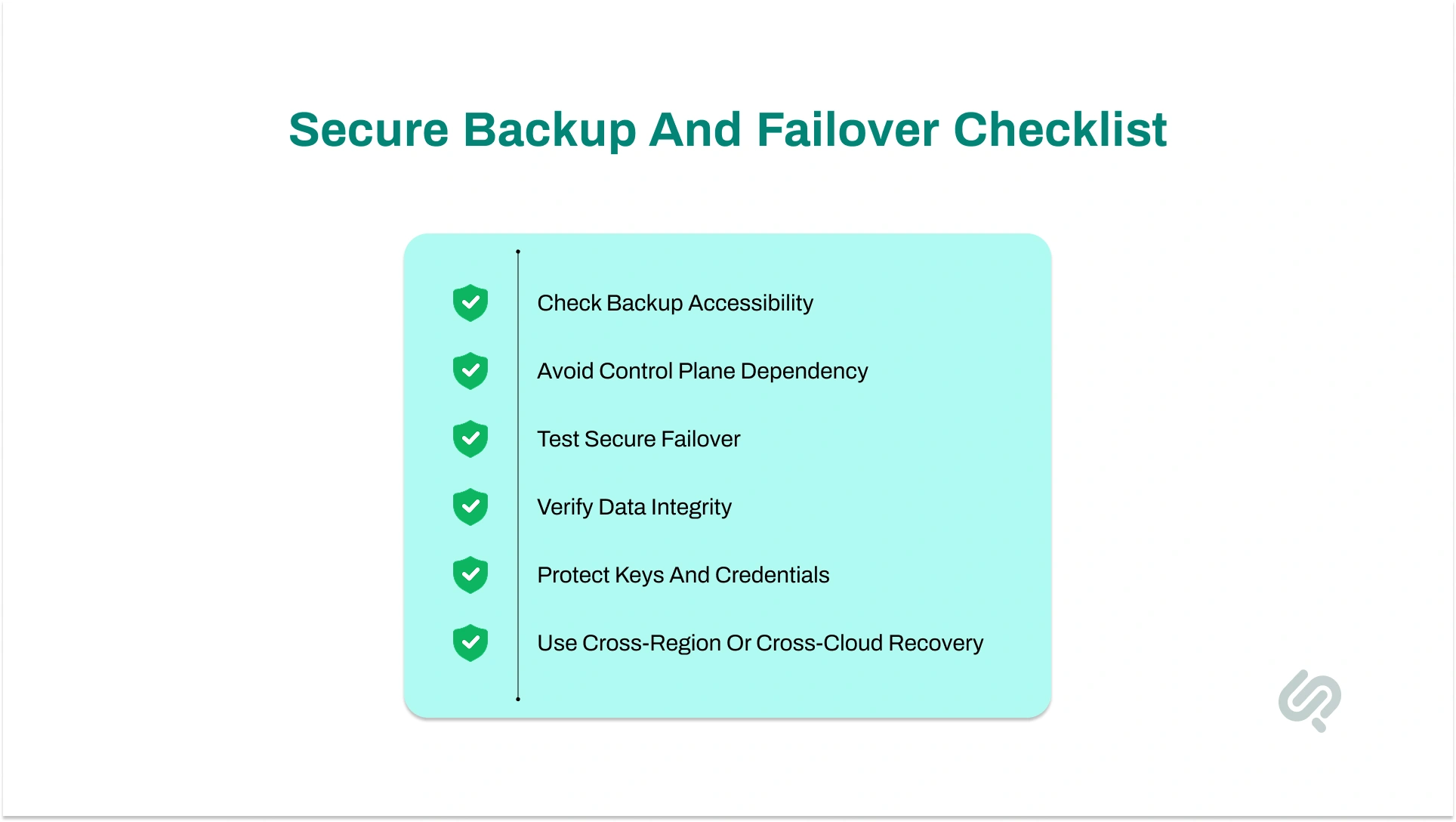
Many businesses say they have backups. The real question is whether those backups are usable when core services are unstable. A backup is only valuable if your team can access it safely, restore it quickly, verify it, and switch traffic without creating new security risk.
That is why cloud outage preparedness needs more than backup storage. It needs outage-ready backups, tested access, and secure failover steps for applications, storage, and databases.
Common problems include:
If backup access, restore actions, or failover controls rely on the same provider systems that are struggling, recovery can slow down or fail. This is one of the biggest hidden risks in cloud outages.
A backup may exist, but the team may not be able to reach it quickly, decrypt it, or restore it without manual workarounds. Backup accessibility matters as much as backup retention.
Teams often test uptime, but not the full security of failover. A service may restart in another region, but with weaker policies, older data, or missing protections.
A failover target may be behind the primary system. That means the service returns, but some records are missing or inconsistent. Recovery is not complete until data integrity is confirmed.
If keys, secrets, or admin credentials are difficult to access during an outage, teams may use unsafe shortcuts. That turns a recovery issue into a security issue.
A safer model looks like this:
If your recovery path depends on the same weak point that just failed, it is not real resilience. It is only a delayed version of the same risk. For public-facing systems, a multi-CDN setup and independent traffic routing can reduce reliance on a single edge layer during disruption.
The best time to strengthen cloud security is before an outage starts. Once systems are unstable, teams are focused on restoring service, not building safer processes from scratch.
For many teams, this sits inside a wider digital transformation strategy where resilience, visibility, and security have to be designed together from the start.
That is why businesses need a few core practices already in place. The goal is simple: reduce risk before disruption, respond in a controlled way during downtime, and recover without exposing data, access, or infrastructure.
Cloud security posture management helps you find risks early across your cloud environment. It gives security teams a clearer view of exposed storage, weak network rules, unencrypted data, and over-permissioned cloud accounts before those issues turn into real incidents.
How to implement it:
Benefits:
Access control is one of the most important parts of cloud security. If too many users or systems have broad permissions, an outage can make that risk much worse. Strong identity and access management limit who can reach sensitive systems and what they can do.
How to implement it:
Benefits:
Multi-factor authentication adds an extra layer of protection beyond passwords. Even if credentials are exposed, MFA makes it much harder for unauthorized users to get into cloud systems.
How to implement it:
Benefits:
Data encryption protects business data, customer data, and other sensitive data even if access controls fail. It is one of the strongest ways to reduce damage during an outage or a security incident.
How to implement it:
Benefits:
Many businesses think only about the cloud provider, but outages often spread through connected systems. Identity services, DNS, logging, CI/CD, monitoring tools, and external vendors can all affect recovery and security.
How to implement it:
Benefits:
A recovery plan should not only restore systems. It should restore them safely. That means backups, failover, replica promotion, traffic rerouting, and rollback steps all need testing before a real outage happens.
How to implement it:
Benefits:
When cloud systems become unstable, do not improvise. A short, repeatable outage response plan helps teams move faster without dropping security controls.
Start with the first few critical actions:
Check whether the problem is provider-wide, region-wide, service-specific, or local to your own environment.
Stop deployments, infrastructure changes, and non-urgent admin work until the incident is understood.
Save alerts, admin activity, access logs, and system events wherever possible. Even partial visibility is better than none.
Until proven otherwise, assume the disruption may include security exposure, not just downtime.
During active recovery, protect the environment in a controlled way:
Emergency access should be time-limited, approved, and logged. This is where strong break-glass access control matters.
Do not disable MFA across the environment just to move faster. If fallback access is needed, use a secure exception process, not a broad bypass.
If you move traffic, switch regions, or run in fallback mode, keep authentication, API checks, and network controls active wherever possible.
Record temporary permissions, routing changes, storage policy edits, DNS updates, and security exceptions as they happen.
Recovery should follow documented secure failover steps, not ad hoc workarounds.
Teams need a clear way to share status when normal tools are affected. Good communication reduces duplicated work and risky guesswork.

Recovery is not finished when systems come back online. This is the point where many hidden security issues get missed. A fast post-outage security review helps make sure temporary fixes do not become long-term exposure.
Start with the most important checks:
Revoke emergency admin rights, time-limited access, and any elevated permissions that were added during the outage.
If any shared logins, backup credentials, or bypass accounts were used, rotate them immediately.
Restore WAF rules, API checks, MFA flows, logging, monitoring, and policy enforcement that may have been weakened during recovery.
Check storage buckets, databases, origin servers, API gateways, DNS settings, and network rules for accidental exposure.
Confirm that failover, replication, and restore actions did not leave the business with missing, duplicated, or outdated records.
Compare admin activity, identity events, change logs, and response timelines to confirm what happened and what was changed.
If the team had to improvise, the runbook was incomplete. Capture the gaps while they are still fresh.
A strong incident tracking workflow makes it much easier to review emergency changes, response timelines, and follow-up actions after the outage.
This final review is what turns outage response into real secure cloud outage recovery.
A cloud outage should not be the moment you discover that your backups are hard to access, your emergency access is too broad, or your monitoring depends on the same failing services.
Phaedra Solutions’ Cloud Resilience & Outage-Readiness Assessment helps you review identity controls, backup accessibility, failover paths, monitoring coverage, and recovery runbooks before disruption turns into a bigger security incident.
If you want a practical next step, book a Cloud Resilience Consultation. We’ll review where your cloud environment is most exposed during outages and show you what to fix first.



Ameena is a content writer with a background in International Relations, blending academic insight with SEO-driven writing experience. She has written extensively in the academic space and contributed blog content for various platforms.
Her interests lie in human rights, conflict resolution, and emerging technologies in global policy. Outside of work, she enjoys reading fiction, exploring AI as a hobby, and learning how digital systems shape society.
