

.webp)


.webp)
.webp)






Cloud infrastructure security during an outage means protecting identity, access, logs, encryption, backups, and failover paths while your cloud provider is unstable. The goal is not just to restore uptime. It is to keep critical systems safe, maintain visibility, and avoid rushed changes that create bigger security risks.
Cloud outages are no longer rare. They are a normal part of running modern cloud services at scale. When a provider degrades, teams often lose visibility, lose control, and start making fast changes that weaken security.
This guide explains how to protect critical systems, sensitive data, and recovery paths during cloud outages.
It also covers serverless failures, monitoring blind spots, and failover decisions across multi-region, hybrid-cloud, and multi-cloud environments so you can recover without weakening your security posture.
Start with identity, access management, and change controls. If logins fail or teams begin bypassing approval steps, a normal outage can quickly become a security problem.
Yes. During cloud outages, teams often lose visibility, rush fixes, and loosen controls to keep services running. That increases the risk of misconfigurations, exposed credentials, and data loss.
Not always. Multiple availability zones help reduce local failures, but they may not protect you from regional outages, control-plane failures, or a full cloud provider outage.
Use retry limits, queues, idempotency, dead-letter queues, and safe fallback paths. In serverless systems, one failing dependency can trigger retry storms, error messages, and failures across critical applications.
Keep backup data in a secondary region and, for the most important workloads, outside a single cloud provider. A backup only helps if you can still access it when the main platform is down.
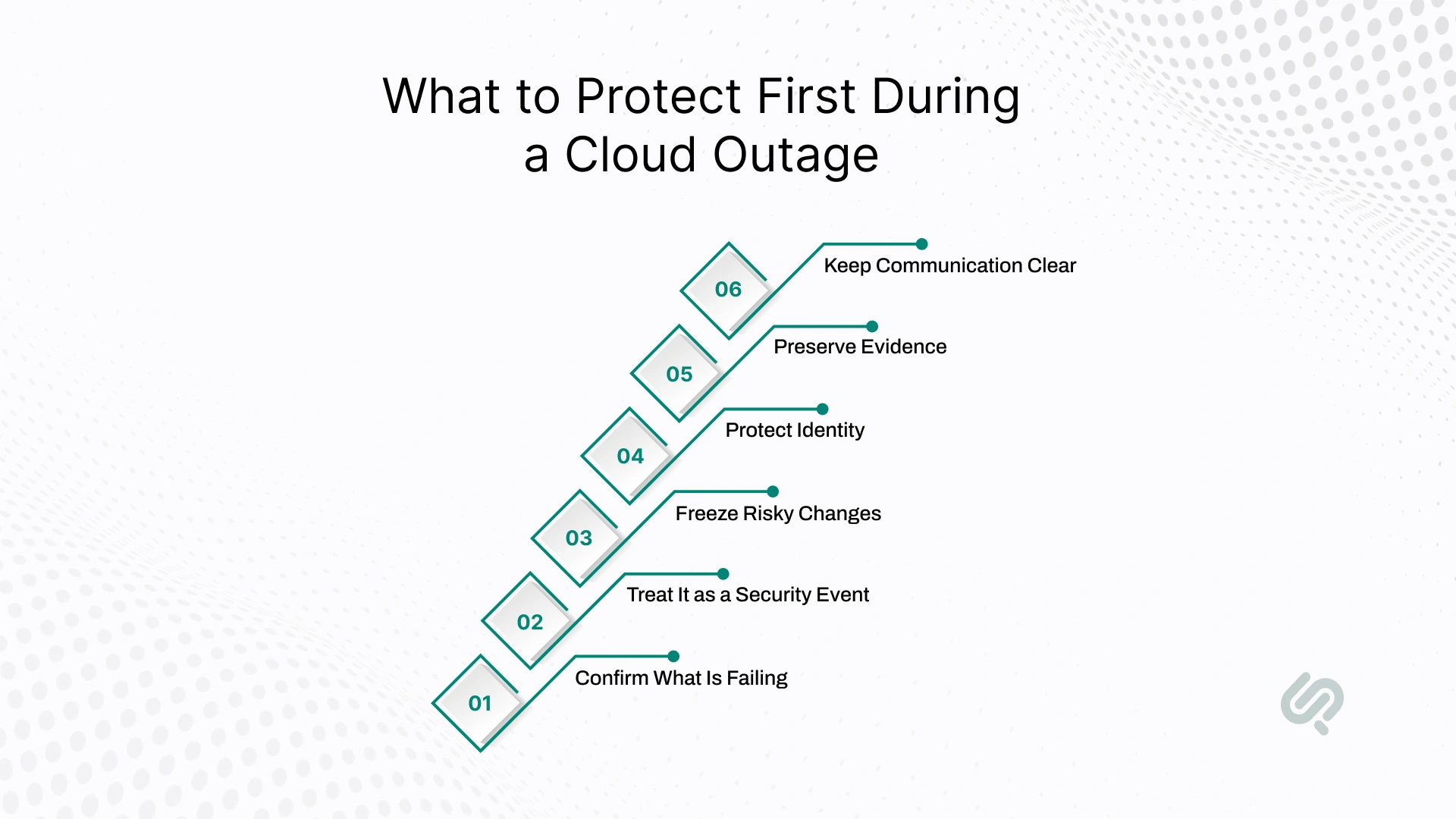
When a cloud outage starts, the biggest risk is not just downtime. It is panic. Teams begin restarting services, changing DNS, opening access, or pushing fixes without a clear plan. That is how a normal outage turns into a security issue.
The best response is to switch into a defined outage mode. This is a simple response state that tells your team what to pause, what to protect, who can approve changes, and which security policies cannot be bypassed.
Outages are expensive fast. Uptime Institute’s 2025 analysis found that 54% of respondents said their most recent significant outage cost more than $100,000, and 1 in 5 said it cost more than $1 million. (1)
Before making changes, check whether the issue is:
Use more than one signal:
Do not rely only on the provider dashboard. During major outages, status pages can lag behind real impact.
Even if the incident starts as a service failure, it can quickly create security risks. During cloud outages, teams often lose visibility, rush changes, and weaken controls just to keep systems running.
Watch for:
If access management becomes unstable, tighten control instead of relaxing it.
This is one of the most important steps. Outages create change chaos by default, and uncontrolled changes often cause more damage than the outage itself.
Every emergency change should have:
If those five things are missing, pause before making the change.
Focus first on critical systems and critical applications. Do not try to restore everything at once.
Good first moves include:
This helps contain failure and keeps the outage from spreading.
Assume your monitoring systems may be incomplete. Export logs, metrics, and recent config changes while you still can. You will need that timeline later for investigation and cleanup.
This is where strong incident tracking matters, because a clean record of changes, alerts, owners, and decisions makes outage response faster and post-incident review much more reliable.
At the same time, keep updates simple:
Also, make sure your communication tools are not tied to the same failing provider or region.

Most people search for answers about cloud outages because they want to restore uptime fast. That makes sense.
But downtime is only part of the problem. A serious outage can also weaken your cloud security, limit your visibility, and push teams into rushed decisions that create bigger risks later.
This is why outage planning should never be only about high availability or disaster recovery. It should also answer a harder question: what happens to your security controls when the platform you depend on becomes unstable?
Many teams assume their backups, failover plans, and redundant architecture will protect them during a cloud provider outage. But even well-designed environments often depend on a small set of shared services behind the scenes.
These usually include:
When those pieces degrade, you may lose the ability to:
That creates a hidden single point of failure. On paper, your workloads may look redundant. In practice, they may still depend on one weak layer of control.
This is why some regional outages spread much further than expected. Teams think they are protected because workloads are distributed, but the management layer, identity layer, or DNS path is still concentrated in one place.
A recent Cloudflare outage guide shows how one provider-side configuration failure can ripple across websites, APIs, and business systems when too much traffic depends on shared infrastructure.
Cloud dependence is still rising. Gartner forecasts worldwide public cloud end-user spending will reach $723.4 billion in 2025, up from $595.7 billion in 2024, and says 90% of organizations will adopt a hybrid cloud approach through 2027. (2)
Another reason outages become security problems is simple: you lose sight of what is happening.
During major cloud failures, teams often find that:
That means your monitoring systems may not be trustworthy at the exact moment you need them most.
This creates a dangerous blind spot. If you cannot clearly see what changed, who made a change, or whether critical data is exposed, then the outage is no longer just an availability issue. It becomes a security and response problem too.
And this is where attackers gain an advantage. They do not need the outage itself to be a breach. They only need the confusion around it.
When systems are unstable, people get stressed. They move faster, verify less, and accept workarounds they would normally reject. That makes outages a perfect moment for phishing, impersonation, and social engineering.
A few common examples include:
This is why outage response needs a simple security rule: No credential resets, privileged access changes, or emergency exceptions should happen outside the normal verified approval path.
Even during a real outage, identity controls still matter. In fact, they matter more.
One of the biggest hidden risks during outage recovery is the “temporary” change that never gets cleaned up.
Teams under pressure may:
These changes may help in the moment, but they often stay in place longer than intended. That increases the attack surface and leaves behind weak points that attackers can exploit later.
This is why outage recovery should always happen in two stages:
Stage 1: Stabilize the service: Get the environment under control and protect critical operations.
Stage 2: Re-secure the environment: Review every emergency change, remove unsafe workarounds, restore normal controls, and confirm that no risky exceptions remain.
If you only focus on restoration and skip re-securing, the real damage may happen after the outage ends.
The pressure teams feel during outages is real because the financial stakes are high. Downtime can mean:
But a security failure during an outage can cost even more than the outage itself.
If one rushed change exposes sensitive data, weakens access controls, or leaves critical systems open, the financial, legal, and compliance impact can last much longer than the original disruption.
That is the real lesson here: cloud outage is not just a reliability event. It is also a security stress test.
Not every security control matters equally during an outage. Some controls become much more important because they help you keep access, visibility, and safe recovery when the environment is unstable.
If you protect these five areas first, your cloud infrastructure security will be much stronger under pressure.
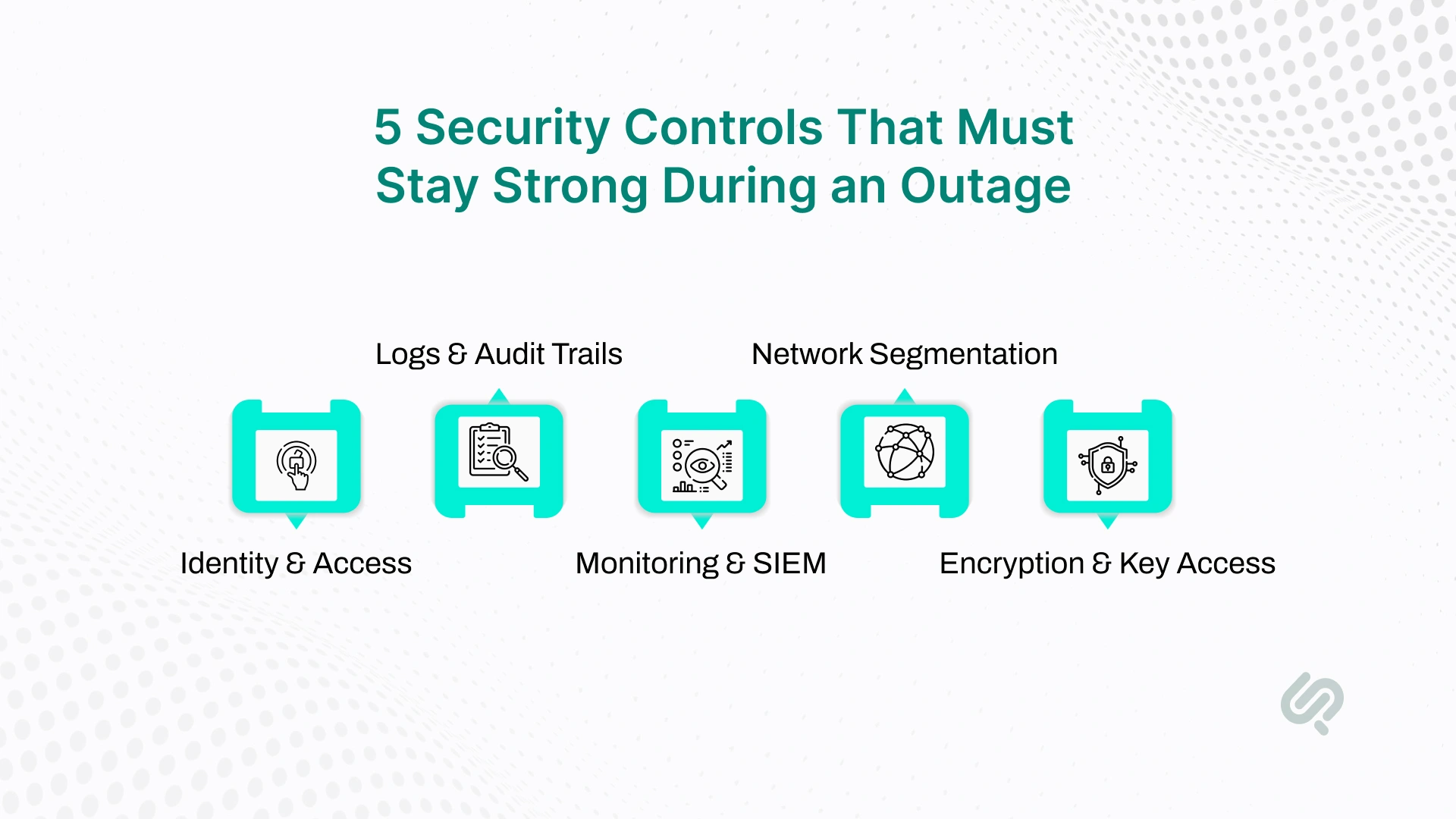
If users cannot sign in safely, or if teams start sharing credentials, the outage can turn into a security incident fast.
Protect identity and access management first. That means keeping privileged access tight, enforcing multi-factor authentication where possible, and having secure break-glass access for real emergencies.
You need to know what changed during the outage, who made those changes, and whether critical systems stayed protected. If logs disappear or become delayed, you lose both visibility and proof.
Audit trails, config history, and telemetry should be treated like critical security assets, not optional operational data.
Cloud-native dashboards may not be enough during a provider issue. A stronger setup includes external monitoring, out-of-band alerting, and SIEM visibility that is not fully tied to one region or one cloud platform.
Good monitoring helps teams separate local issues from broader provider outages and respond with more confidence.
During disruption, teams sometimes widen firewall rules or open unnecessary paths just to keep traffic moving. That creates risk.
Network segmentation, controlled routing changes, and tightly managed traffic rules help reduce blast radius and stop one failure from spreading further across critical systems.
Encryption only helps if your team can still access keys and secrets safely during failover or recovery. If key access depends on the same failing region or provider path, recovery becomes much harder.
Strong cloud security planning makes sure encryption, secret rotation, and key access still work when the main environment is degraded.
These five controls are the backbone of secure outage response. If they stay intact, your team has a much better chance of protecting data, maintaining compliance, and restoring service without creating long-term security gaps.
Cloud outages do not remove your security responsibilities. Even when the cloud provider is having a problem, your team still owns a big part of cloud infrastructure security.
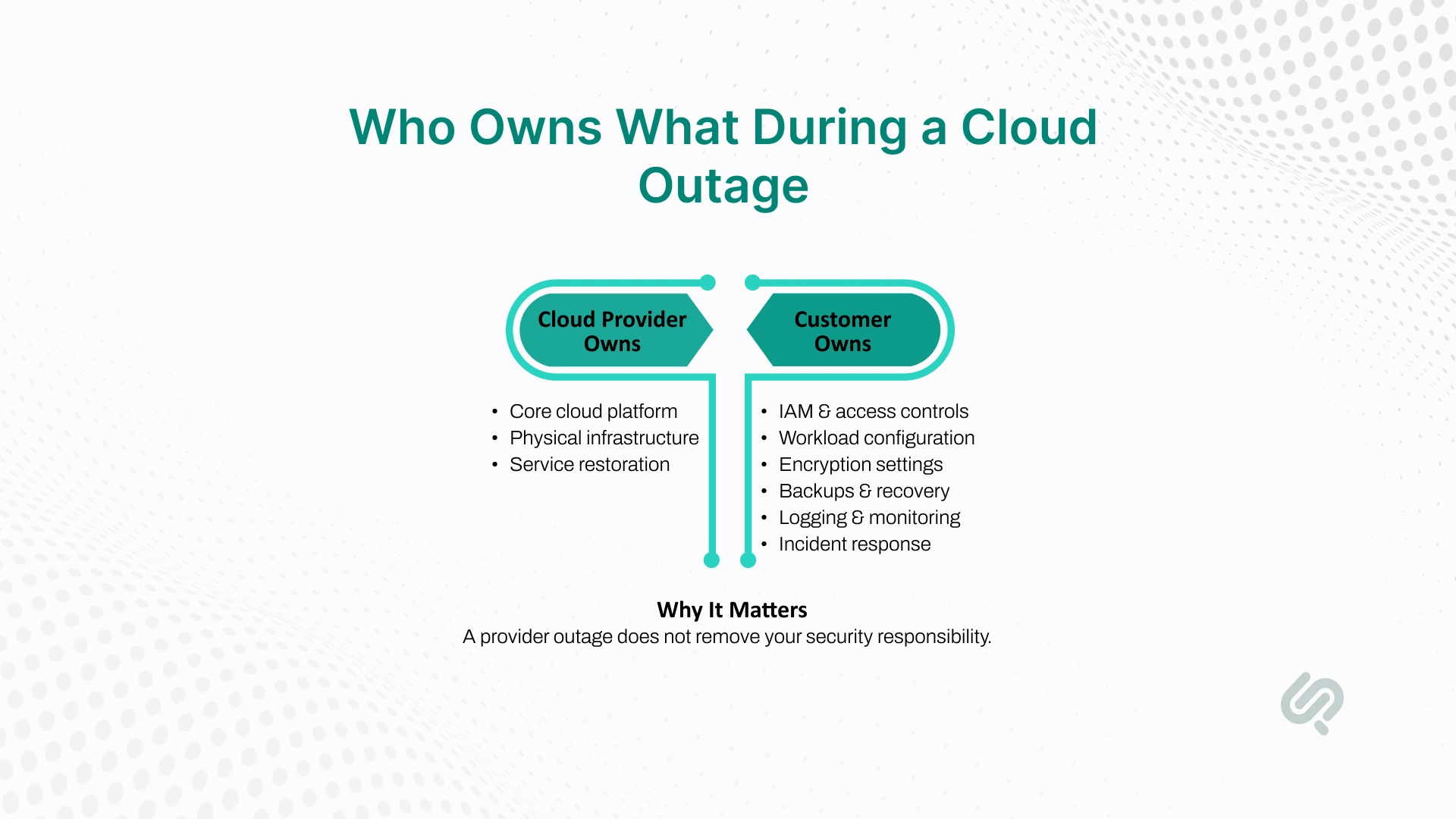
The provider is responsible for the underlying cloud platform, physical data centers, and core infrastructure that runs the service. If there is a platform failure, they are responsible for restoring that environment.
Your business still owns the security of what you build and run on top of that platform. That includes:
A provider outage may explain why systems are failing, but it does not protect you from bad decisions made during the incident. If teams widen access, bypass approvals, lose audit trails, or fail over into an environment with weaker controls, the security risk still belongs to the customer.
That is why a strong shared responsibility model matters even more during cloud outages. The provider may restore the platform, but your team still has to protect data, manage access safely, and recover without creating new weaknesses.
A cloud provider outage becomes much more dangerous when too many parts of your business depend on one weak point.
That weak point could be one region, one identity system, one monitoring pipeline, one backup location, or one cloud service provider.
When that fails, the issue is no longer just downtime. You can also lose access, visibility, and the ability to respond safely. That is why outage readiness is not only about uptime. It is about making sure your cloud security controls still work when your main platform does not.
Cloud outages can happen for many reasons, and your plan should account for more than one scenario. Common triggers include:
The key point is simple: your next outage may not be limited to one service. It could affect a full region, shared control-plane services, or several systems at once.
The first step is to understand exactly what your most important systems depend on. For each of your mission-critical systems, document the cloud services it uses, the region or regions where it runs, the shared services it depends on, and where its critical data lives.
In most cases, that includes services like IAM, DNS, routing, certificates, storage, and API Gateway.
A good dependency map should answer questions like:
This exercise helps uncover hidden risks. A workload may look redundant, but still relies on a single identity path or shared DNS layer.
A backup may exist, but the team may not be able to access it during a cloud provider outage. Once you map these dependencies clearly, it becomes easier to see which critical applications need stronger protection first.
Using multiple availability zones is an important part of high availability, but it should be treated as the starting point, not the full strategy.
It helps reduce the impact of local failures inside the same region, but it does not fully protect you from regional outages, shared control-plane failures, or issues affecting core platform services.
This is where many teams get a false sense of safety. Zonal redundancy is useful, but if the problem hits the region more broadly or affects services like identity or DNS, then spreading across zones may not be enough.
A stronger design asks:
That is the level of planning real resilience requires.
Once you know what is critical, the next step is deciding how far your redundancy needs to go. For some teams, a secondary region with backup and restore is enough.
For others, a warm standby or active/passive model makes more sense. The right choice depends on how much downtime and data loss your business can tolerate.
A realistic strategy usually falls into one of these models:
A full multi-cloud strategy can reduce reliance on a single cloud provider, but it also adds operational and security complexity.
You are no longer managing one environment. You are managing identity, logging, encryption, and security policies across multiple cloud platforms.
If full multi-cloud is too heavy, hybrid cloud or lighter hybrid cloud solutions can still reduce risk. Even a smaller fallback setup can help you:
That may be enough to help your business continue operating while the main environment is unstable.
It is also important to stay realistic about service level agreements. SLAs may offer service credits, but they do not protect your business from the real cost of an outage.
They do not cover lost revenue, emergency recovery work, customer trust damage, or the effect on critical operations.
That is why SLAs should be seen for what they are: contracts, not resilience plans.
Your real protection comes from:
Those are the things that determine whether your organisation can recover safely when an outage hits.
One of the most common failover mistakes is simple: the backup environment is not secured like production. A team may have a secondary environment ready, but when traffic moves there, the same access controls, logging, monitoring, or encryption rules are missing.
Before the next disruption, make sure every failover or backup environment includes the same baseline protections, such as:
The goal is not just to fail over. The goal is to fail over without weakening your security posture.
The best way to do that is to automate it. When security controls are built through infrastructure as code, failover becomes more repeatable and less dependent on memory or rushed manual steps. That reduces mistakes and helps teams recover faster without creating new risks.
During an outage, teams often focus on restoring service first and worry about compliance later. That is risky. In regulated environments, emergency changes can still create audit, legal, and security problems if they are not tracked properly.
A safer approach is to treat compliance as part of outage response, not as a separate task after the fact. Every emergency access change, firewall update, routing change, or backup action should still be documented. Teams should know who approved it, why it was needed, how long it should stay in place, and when it must be reviewed.
This matters for more than reporting. Good documentation helps you prove that sensitive data stayed protected, security controls were handled responsibly, and temporary workarounds did not become permanent risks. In practice, strong cloud infrastructure security means preserving both protection and accountability during disruption.
Serverless can reduce day-to-day infrastructure work, but it also creates a different kind of risk during cloud outages.
A single application may depend on Lambda, API Gateway, queues, databases, DNS, and identity services at the same time. If one of those breaks, the impact can spread fast across the whole flow.
That is what makes serverless outages tricky. The first failure is often not the only problem. Retries increase, queues build up, functions start timing out, and suddenly a small issue becomes a much bigger one.
In that kind of situation, your team needs its own outage mode instead of assuming the platform will recover exactly when you need it to.
When serverless dependencies fail, the safest response is not to keep everything running at any cost. It is to reduce noise, protect critical workflows, and stop one failure from spreading into a larger security problem.
A secure serverless design should include:
These controls improve both reliability and serverless security. They help protect critical applications, reduce blast radius, and make it easier to investigate what really happened during the outage.
A cloud outage does not just affect your applications. It can also weaken the very tools you rely on to detect problems, control access, and recover safely.
That is why resilience planning should go beyond uptime. You also need to know how monitoring, identity, and backup access will behave when your primary provider is unstable.
When teams design monitoring, they often assume it will be available when something breaks. In reality, major outages can delay logs, disrupt dashboards, and make cloud-native monitoring unreliable right when you need it most.
Engineers in real-world outage discussions often describe the same frustration: missing visibility, delayed telemetry, and no clear way to confirm whether the issue is local or provider-wide.
A stronger setup uses three layers of monitoring:
This gives you a more reliable way to confirm impact, separate local issues from broader outages, and make safer decisions under pressure.
Your audit trail is not just operational data. It is a core security control. If it disappears during an outage, you lose both detection and proof.
That is why logs and event history should be protected with the same seriousness as production data.
Good practice includes exporting logs to a separate account or tenant, replicating them to another region, forwarding them to an external SIEM, and using retention or immutability controls so evidence cannot be deleted easily.
You should also monitor your failover path, not just production. A common mistake is failing over into an environment that has little or no visibility.
Access control is one of the first places where an outage can turn into a security incident. If IAM or identity services are affected, people may be unable to log in through normal channels. That is when teams start taking shortcuts, and those shortcuts often create long-term risk.
A proper break-glass process should give your team a last-resort way to regain admin control without weakening security. These emergency credentials should be:
The goal is simple: regain access without creating new exposure.
Many teams protect workloads in one region while also relying on identity services tied to that same region. That creates a hidden weakness. If the region is impaired, the workloads may still exist, but responders may not be able to authenticate and act.
To avoid that, your fallback design should make sure responders can still authenticate even if the primary region is unavailable. Identity should be treated as part of the resilience architecture, not as an assumed constant.
During an outage, it is tempting to widen permissions just to move faster. That is understandable, but risky.
Temporary admin access, broad emergency roles, and rushed access changes often stay in place longer than intended.
A safer approach is to use time-boxed, just-in-time access for emergency roles, keep permissions narrow, and record every privilege change.
Once the situation is stable, remove emergency access, rotate credentials used during response, and confirm that normal security policies are fully restored.
Many DR plans look strong on paper because backups exist. The real problem appears when the outage occurs, and the team cannot actually reach them.
Modern cloud outages often create data inaccessibility more than true data loss. If backups depend on the same control plane, provider, or region that is having problems, then recovery becomes much harder. That is why backup planning should focus on accessibility, not just restoration.
A stronger recovery setup should include:
This matters even more during large-scale events, when many companies try to recover at once, and provider capacity becomes limited.
Many teams test whether backups can be restored. Far fewer test whether backup data can be accessed quickly and safely when the cloud provider is degraded. That is a major gap.
During a real outage, the biggest problem is often not that backup data is gone. It is that the team cannot reach it, query it, decrypt it, or use it without depending on the same failing control plane. This is why backup testing should include more than restore time.
Your disaster recovery plan should answer practical questions like:
This kind of testing makes your backup strategy, business continuity, and cloud disaster recovery plan much stronger. It also reduces the risk of discovering access problems at the worst possible moment.
Recovery is not finished when services come back online. Once the environment is stable, there should be a structured re-secure phase.
That phase should confirm:
If you skip this step, you risk carrying hidden weaknesses into the next outage.
A strong outage-resilient baseline is not just about keeping systems online. It is about making sure your most important systems stay secure even when normal tools start failing.
In practical terms, that means:
That is the real difference between basic redundancy and real resilience. One focuses on uptime. The other makes sure you can still operate safely when the next outage puts your architecture under stress.
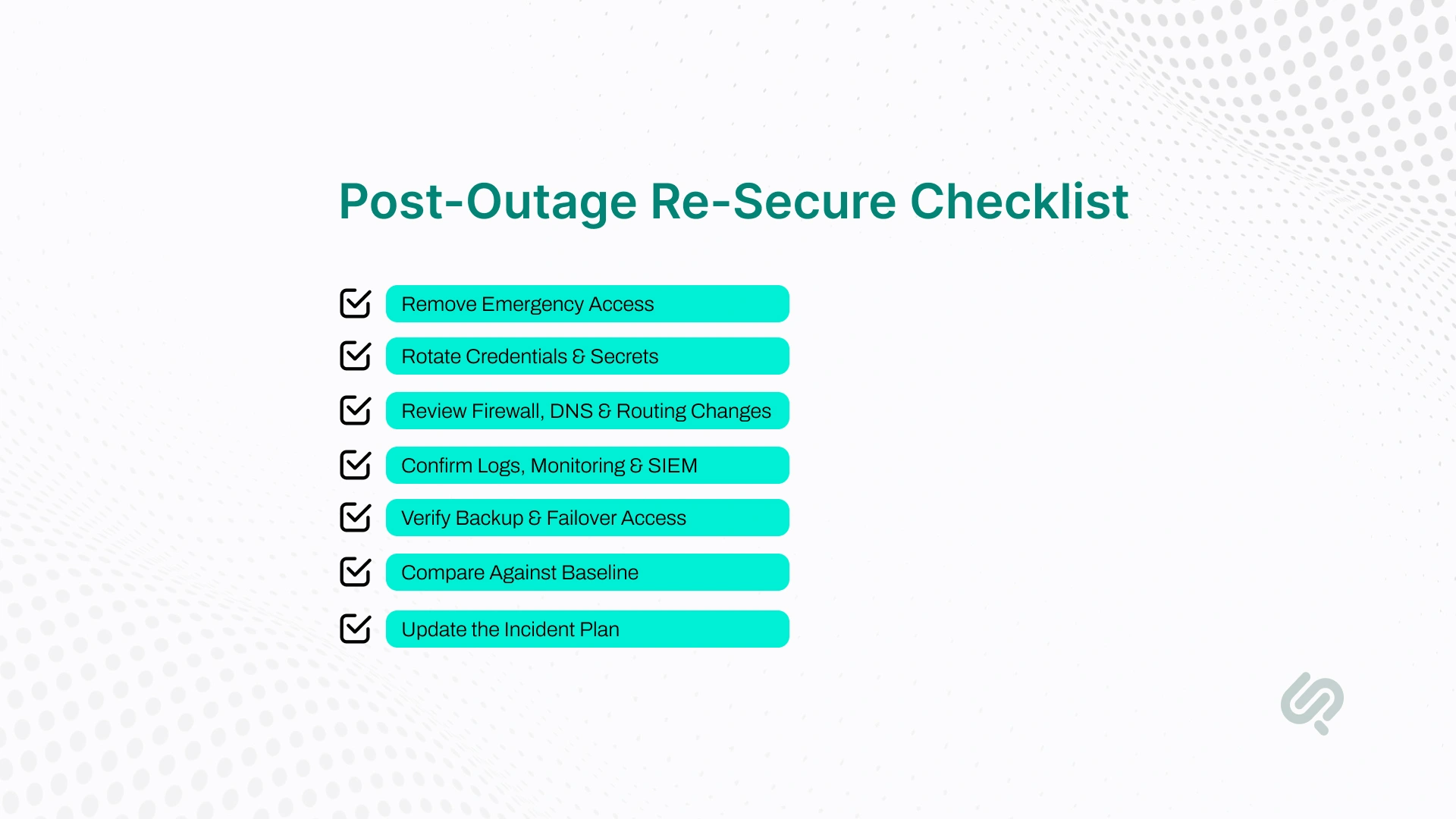
Getting systems back online is only part of the job. Once the immediate outage is under control, your team needs to make sure the environment is secure again.
A good post-outage re-secure checklist should include:
This step is critical because many long-term security problems come from rushed outage fixes that never get cleaned up. Strong cloud security is not only about surviving the disruption. It is about making sure temporary workarounds do not become permanent vulnerabilities.
If this article exposed gaps in your identity design, monitoring coverage, backup accessibility, or failover model, the next step is to review how your cloud environment behaves when core services degrade.
Phaedra Solutions’ Cloud & DevOps service helps teams build containerized infrastructure, CI/CD pipelines, and automated environments that reduce downtime and make recovery more repeatable.
If you need a strategy-first next step, book a free call with our team to review your architecture, access model, and outage risks before the next incident.



Ameena is a content writer with a background in International Relations, blending academic insight with SEO-driven writing experience. She has written extensively in the academic space and contributed blog content for various platforms.
Her interests lie in human rights, conflict resolution, and emerging technologies in global policy. Outside of work, she enjoys reading fiction, exploring AI as a hobby, and learning how digital systems shape society.