


.webp)
.webp)











.webp)
Software Development Life Cycle (SDLC) is the difference between software that ships smoothly — and software that slips deadlines, overruns budgets, or breaks after launch.
Most software failures don’t happen because teams lack talent. They happen because planning is rushed, requirements shift, testing is incomplete, or releases lack structure. The SDLC exists to prevent exactly that — by giving teams a clear, step-by-step process to plan, build, test, deploy, and maintain reliable software.
In simple terms, SDLC means: a structured framework that guides software from idea to production while reducing risk, improving quality, and keeping delivery predictable.
This guide breaks down SDLC phases, models, real-world examples, and best practices — so you can understand how high-performing teams build scalable, secure, and maintainable software.
The Software Development Life Cycle (SDLC) is a structured process used to plan, build, test, deploy, and maintain software. It provides a clear framework that guides software development from initial idea to long-term support.
Purpose
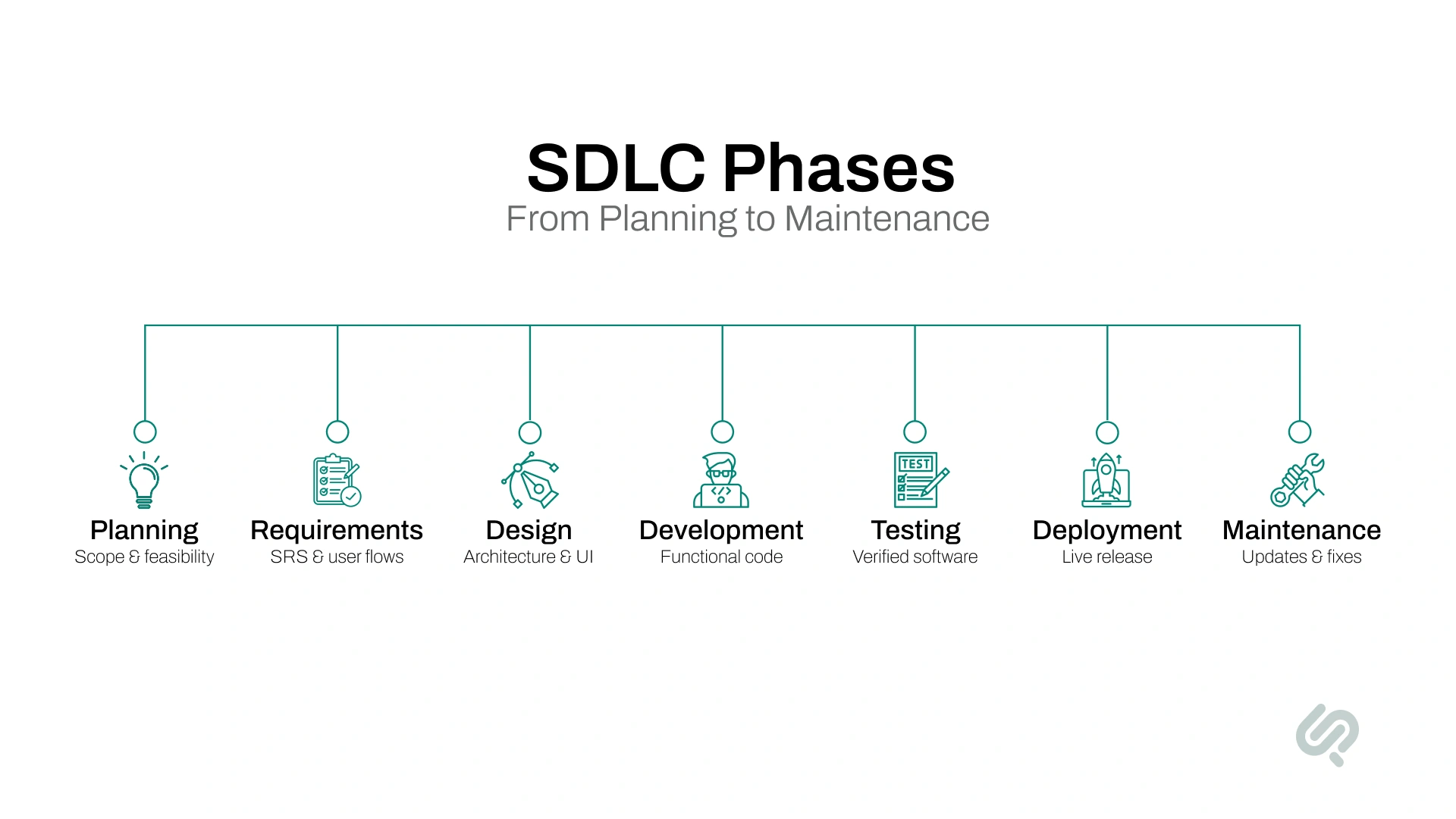
The software development life cycle phases break complex software projects into manageable steps.
Each phase has a clear goal, defined outputs, and prepares the foundation for the next stage, helping teams deliver reliable, high-quality software.
The planning phase defines what needs to be built and why. Teams outline the project scope, goals, timelines, budget, and resources. This phase sets expectations before any technical work begins.
Why it matters
Example
A fintech startup plans a mobile payments app, defining features, compliance needs, budget, and delivery milestones before development starts.
This phase focuses on understanding user needs and business requirements in detail. Teams document functional and non-functional requirements, usually in a Software Requirements Specification (SRS).
Why it matters
Example
Product managers gather user flows and compliance rules to define exactly how users will send, receive, and track payments.
During the design phase, teams decide how the system will be built. This includes system architecture, database design, APIs, and user interface layouts.
Why it matters
Example
Architects design a microservices-based backend and a responsive UI to support high transaction volumes.
In the development phase, developers write the actual code based on approved designs. Version control systems and coding standards are used to ensure consistency and collaboration.
Why it matters
Example
Developers implement payment processing, authentication, and dashboards using agreed frameworks and APIs.
The testing phase verifies that the software works as intended. QA teams perform unit testing, integration testing, system testing, and user acceptance testing (UAT).
Why it matters
Example
QA tests payment failures, edge cases, and security scenarios before approving the release.
Deployment is the process of releasing the software to the production environment. This may involve staged rollouts, data migration, and user training.
Why it matters
Example
The app is launched on app stores with monitoring tools enabled to track real-time performance.
After deployment, the software enters maintenance. Teams fix bugs, apply security patches, and add improvements based on user feedback.
Why it matters
Example
The team releases regular updates to improve performance and add new payment features based on user feedback.
In real-world software development, SDLC is a control system that helps teams reduce risk, avoid outages, and release software safely.
Most teams run SDLC across multiple environments:
Changes don’t move freely between phases. Instead, teams use phase gates — checkpoints that ensure key conditions are met before moving forward.
This structure prevents rushed launches, reduces costly rollbacks, and keeps teams aligned on what “done” means (especially in Agile, DevOps, and SaaS environments where speed is high).
A well-defined software development life cycle (SDLC) goes beyond technical structure; it directly influences delivery speed, software quality, and business success.
By following a structured development process, teams gain clarity, control, and consistency across the entire project.
Key benefits of SDLC include:
This is why teams often evaluate software development services not just on code quality, but on how disciplined the delivery process is.
There is no one-size-fits-all approach to the software development life cycle (SDLC). Different SDLC models are designed to handle varying levels of project complexity, risk, and change.
Choosing the right model depends on your project goals, team structure, and delivery expectations.
The Waterfall model follows a strict, linear sequence where each phase must be completed before the next begins. Once a phase is finished, changes are difficult to introduce.
Best suited for
Example
A government reporting system with predefined rules and compliance requirements is built step by step, with full documentation approved before development starts.
The Agile model focuses on iterative development, frequent releases, and continuous customer feedback. Work is delivered in short cycles called sprints, allowing teams to adapt quickly to change.
Best suited for
Example
A SaaS startup releases new features every two weeks based on user feedback and usage data, refining the product with each sprint.
In the Iterative model, software is developed in repeated cycles. Each iteration adds improvements based on feedback from the previous version.
Best suited for
Example
An analytics platform launches a basic dashboard first, then improves performance, usability, and features in later iterations.
The Spiral model combines iterative development with continuous risk assessment. Each cycle evaluates technical, security, and business risks before proceeding.
Best suited for
Example
A healthcare system evaluates data security and compliance risks at every development cycle before adding new features.
The V-Model pairs each development phase with a corresponding testing phase. Testing is planned early and executed alongside development.
Best suited for
Example
A medical device application maps requirement validation, system testing, and user acceptance testing directly to each development stage.
The Incremental model delivers software in functional pieces. Each release adds new features while building on the previous version.
Best suited for
Example
An e-commerce platform launches with basic product browsing and checkout, then adds recommendations, reviews, and loyalty features later.
This model integrates development and operations through automation, CI/CD pipelines, and continuous monitoring. Releases are frequent, fast, and reliable.
Best suited for
Example
A streaming service deploys updates multiple times a day using automated testing and deployment pipelines.
These terms are often used interchangeably, but they don’t mean the same thing. In simple terms:
Focuses specifically on how software is planned, built, tested, deployed, and maintained. It defines the engineering workflow from idea to release.
Covers a broader scope than SDLC, including not just software, but:
It looks at the entire system, not just the code.
ALM manages the full lifespan of an application, including:
SDLC is often a core part of ALM and broader product development frameworks.
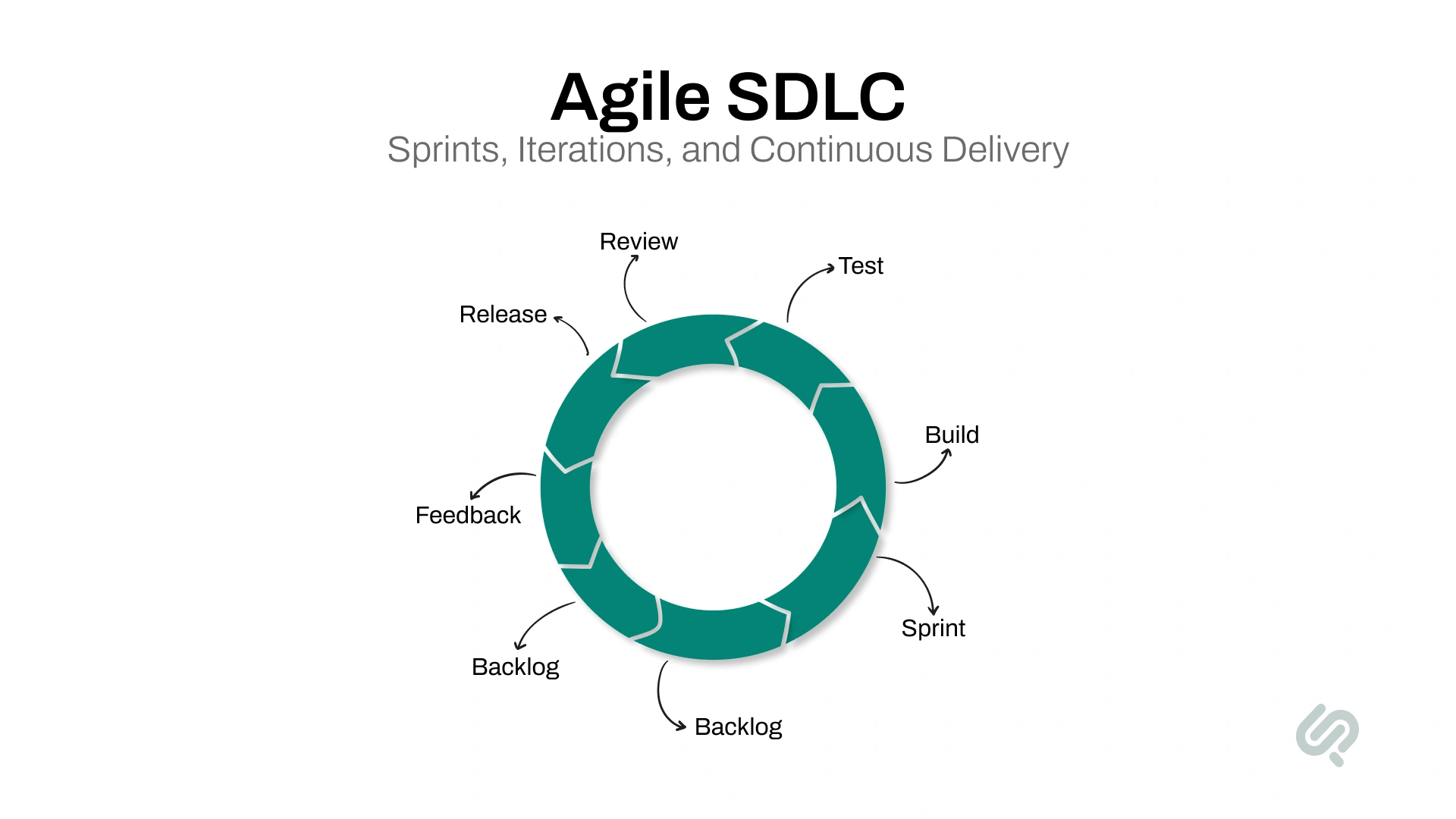
The agile software development life cycle is an iterative and flexible approach to building software that prioritizes speed, adaptability, and customer feedback.
Instead of locking all requirements upfront, Agile breaks development into short cycles called sprints, where teams design, build, test, and release working software continuously.
In Agile SDLC, work is organized around user stories and prioritized based on business value. Teams deliver small, usable increments every few weeks, allowing stakeholders to review progress and suggest changes early, before problems become costly.
It’s no surprise that around 71% of organizations now use Agile practices in their software development life cycle. (2)
Agile is especially effective for SaaS product development and scalable product development for startups, where requirements change rapidly and speed matters.
Agile also aligns closely with DevOps practices, emphasizing continuous integration, automated testing, and close collaboration across teams. Daily standups, sprint reviews, and retrospectives keep everyone aligned and accountable.
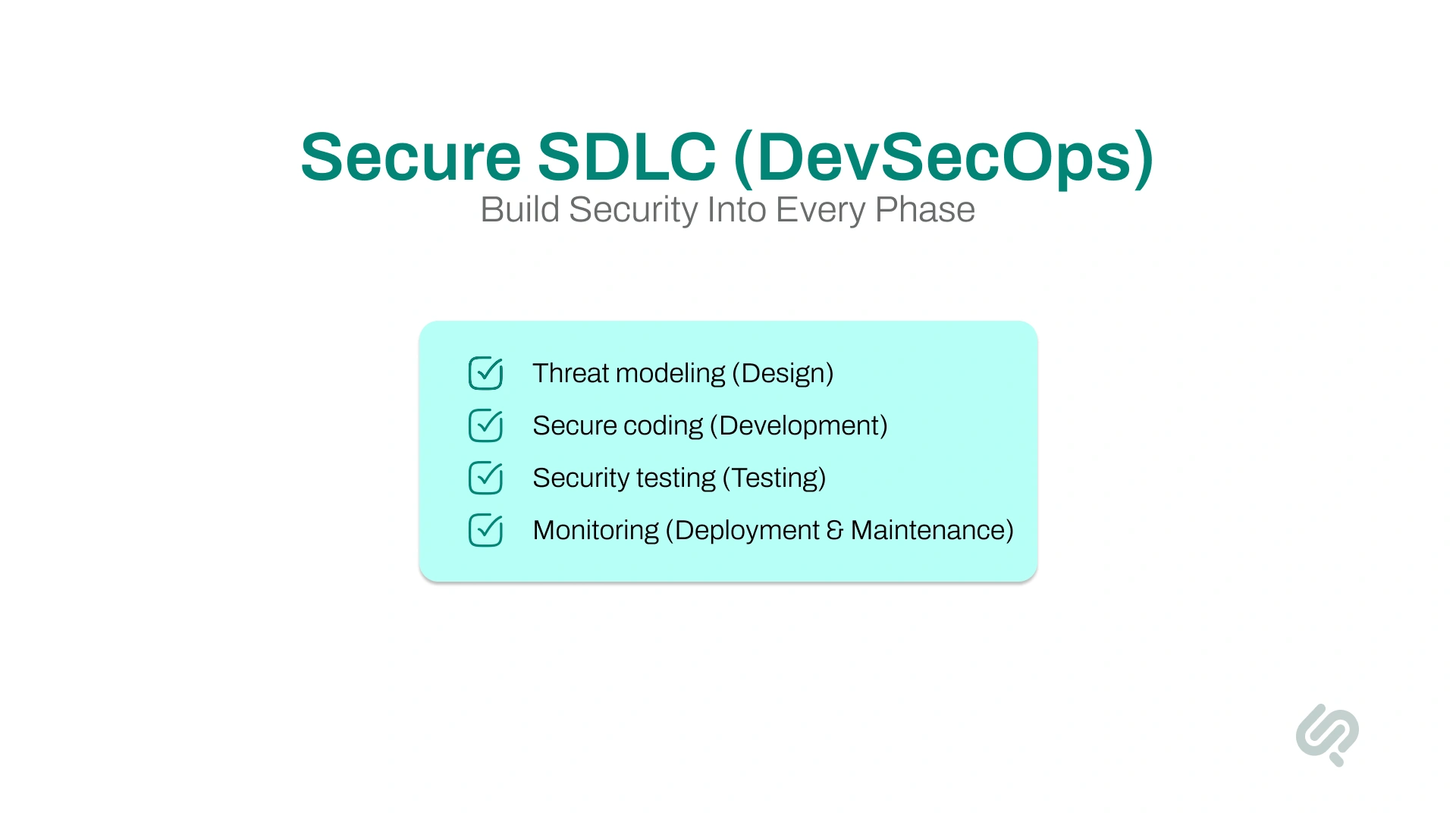
The secure software development life cycle (SecSDLC) integrates security into every phase of the SDLC, from planning to maintenance.
Rather than treating security as a final checkpoint, SecSDLC ensures vulnerabilities are identified and addressed early, when fixes are faster and less expensive.
Security activities are embedded throughout the process. This includes threat modeling during design, secure coding practices during development, and security testing such as static analysis, dynamic testing, and penetration testing during QA.
Software vulnerabilities are costly. Studies estimate that organizations lose hundreds of billions of dollars annually due to failed projects and poor-quality software, many caused by security gaps.
International standards such as ISO/IEC/IEEE 12207 reinforce the importance of defined software life cycle processes for quality, governance, and long-term maintainability. (3)
More than half of technology leaders now rank security as their top software development challenge.
By embedding security early, teams can:
Many teams align their secure SDLC practices with the NIST Secure Software Development Framework (SSDF) (4), which defines industry-recognized security activities across planning, development, testing, and release.
In mature environments, DevSecOps automates security checks so that builds fail automatically if vulnerabilities are detected, ensuring only secure code reaches production.
Quality assurance (QA) plays a critical role in ensuring that software functions correctly, performs reliably, and meets user expectations. QA is not a single step; it’s a continuous process that supports every stage of the SDLC.
Modern QA strategies combine manual testing, automated testing tools, and continuous integration pipelines to catch defects as early as possible.
Automated testing tools and CI pipelines allow teams to validate changes quickly with every code update. Peer code reviews, static analysis, and regular builds further strengthen software quality.
Even with a structured software development life cycle (SDLC), teams often face challenges that can impact delivery timelines, software quality assurance, and overall project success.
Recognizing these challenges early is key to managing them effectively.
Common SDLC challenges include:
If these issues keep repeating, SDLC optimization consulting can help teams fix bottlenecks (handoffs, testing gaps, release risk) without changing everything at once.
Across multiple Phaedra Solutions case studies, projects that introduced SDLC improvements reduced bug-related rework costs by up to 38% and improved delivery predictability.
For SaaS product development and startup environments, the software development life cycle (SDLC) must support speed, flexibility, and long-term scalability.
Unlike traditional software, SaaS products evolve continuously, with frequent updates delivered through the cloud.
Most SaaS teams rely on Agile and DevOps-driven SDLC models, releasing MVPs early to validate ideas, collect user feedback, and improve features through rapid iterations.
This approach reduces time to market while keeping development aligned with user needs.
Scalability is a core concern in SaaS-focused SDLCs. Planning for growth starts early (often in the design phase) by adopting cloud-native architectures, microservices, containerization, and automated infrastructure.
Continuous integration and deployment (CI/CD) pipelines then ensure updates are delivered reliably without disrupting users.
Why SDLC matters for SaaS and startups:
In short, scalable product development for startups requires an SDLC that is lightweight yet disciplined, one that balances speed with long-term maintainability.
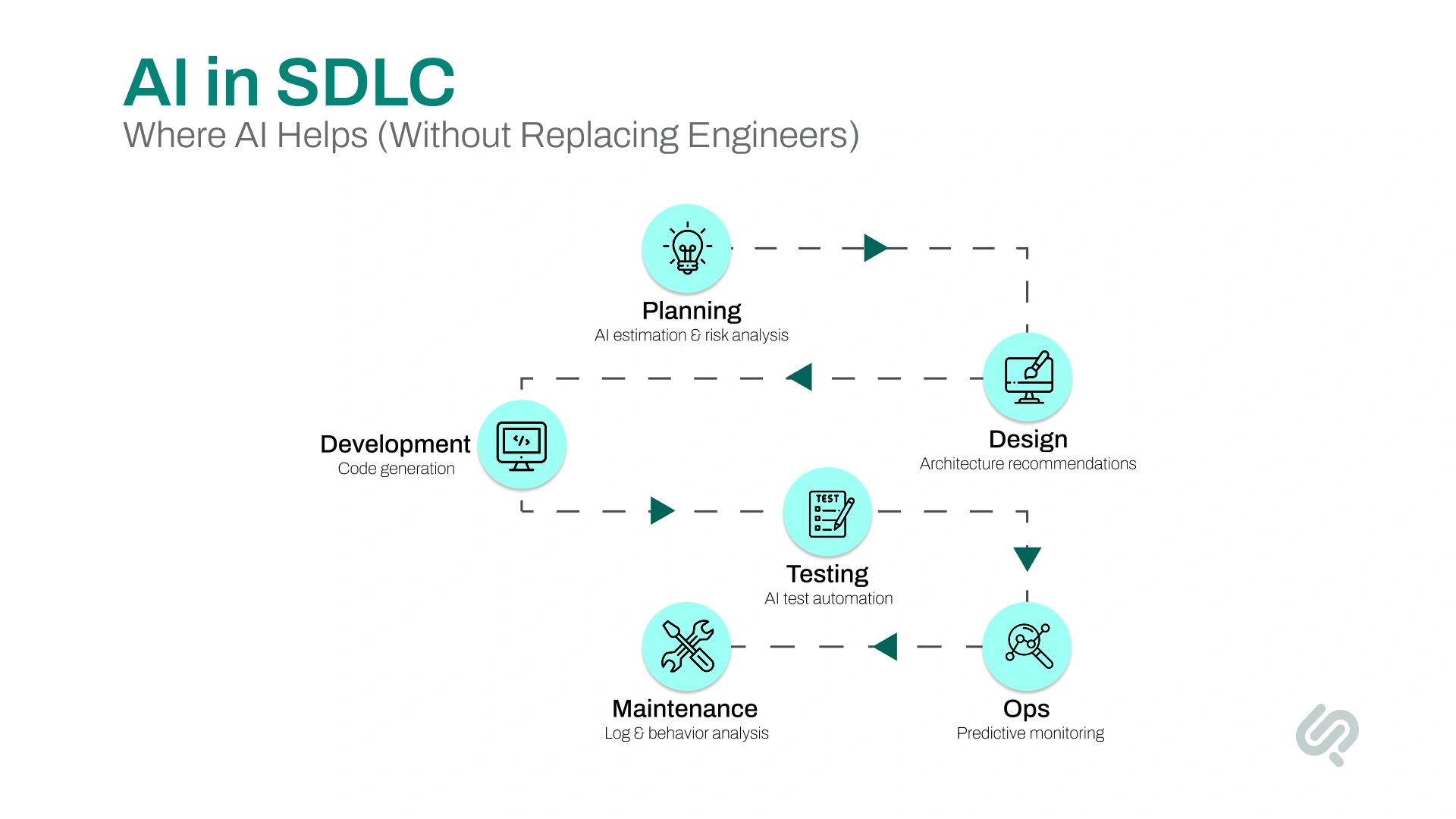
Artificial intelligence is reshaping how teams execute the software development process, improving speed, accuracy, and decision-making across every SDLC phase.
Rather than replacing developers, AI enhances human capabilities by automating repetitive tasks and surfacing insights earlier.
AI-powered tools are now embedded throughout modern SDLCs, particularly in Agile and DevOps environments, where rapid feedback loops are essential.
How AI supports each SDLC phase:
When combined with Agile and DevOps practices, AI enables faster iterations, higher software quality, and more reliable releases, especially for teams working with on-demand development teams or distributed setups.
Modern software development increasingly relies on global software development companies and on-demand development teams. These models allow organizations to access specialized talent, scale quickly, and reduce costs — but they also require a well-defined SDLC to succeed.
Global teams operate across different time zones, cultures, and locations. While this enables round-the-clock progress, it can introduce coordination and communication challenges.
An on-demand development team, on the other hand, allows companies to bring in external specialists for specific phases or short-term needs.
A structured SDLC ensures consistency, accountability, and alignment (regardless of where the team is located).
Key benefits of SDLC for distributed teams:
Best practices for distributed SDLC execution:
With the right SDLC in place, even fully remote or on-demand teams can deliver cohesive, high-quality software.
The software development life cycle continues to evolve as technology, team structures, and user expectations change. Several trends are shaping how modern SDLCs operate today.
Key SDLC trends to watch:
Here’s why SDLC continues to matter in modern software development:
After reviewing projects that slipped timelines or launched with avoidable defects, the same pattern shows up again and again: teams didn’t fail in coding. They failed in clarity and handoffs.
Khawar Qayyum, Digital Transformation & Project Management Lead at Phaedra Solutions, puts it simply:
“When the SDLC is treated like a checklist instead of a shared agreement, teams move fast, but in different directions. The biggest wins come from defining what ‘done’ means in each phase, then enforcing it with lightweight gates.”
He adds that Agile and DevOps don’t replace SDLC. They depend on it:
“Sprints and CI/CD work best when requirements, quality checks, and ownership are explicit. Otherwise, speed turns into rework.”
The Software Development Life Cycle (SDLC) remains one of the most reliable foundations for building successful software, regardless of how fast technology evolves.
While tools, automation, and AI have transformed how software is built, the need for a structured development life cycle has not changed.
Teams that follow a well-defined SDLC consistently deliver higher-quality software, lower risk, and better business outcomes.
From early planning and clear requirements to testing, security, and long-term maintenance, SDLC ensures that speed never comes at the cost of stability or scalability.
Whether you’re developing an enterprise platform, launching a SaaS product, or scaling a startup, the right SDLC approach, Agile, DevOps, or hybrid, helps teams stay aligned, adapt to change, and deliver software with confidence.
In short, SDLC isn’t a constraint. It’s the framework that makes modern software development sustainable and successful.


1.Assessing IT Project Success: Perception vs. Reality — ACM Queue
2.17th State of Agile Report — Digital.ai (BusinessWire)
3.ISO/IEC/IEEE 12207: Software Life Cycle Processes — ISO
4.NIST Secure Software Development Framework (SSDF) — SP 800-218
Superagency in the Workplace: Empowering People to Unlock AI’s Full Potential — McKinsey & Company

Ameena is a content writer with a background in International Relations, blending academic insight with SEO-driven writing experience. She has written extensively in the academic space and contributed blog content for various platforms.
Her interests lie in human rights, conflict resolution, and emerging technologies in global policy. Outside of work, she enjoys reading fiction, exploring AI as a hobby, and learning how digital systems shape society.