logo
Index
Blog
>
Artificial Intelligence
>
What Is Computer Vision? Real-Life Examples & Applications

What Is Computer Vision? Real-Life Examples & Applications

What Is Computer Vision? Real-Life Examples & Applications

Computer vision is artificial intelligence that enables machines to understand images and video, identify objects, and trigger actions in real time.

The easy answer to what is computer vision? It helps software “see” visual data and use it for decisions, from medical scans and retail shelves to factory quality checks and autonomous driving.

In this guide, you’ll learn exactly how computer vision works, where it delivers business value, how it differs from machine vision and image processing, and what tools and architecture choices matter if you want production-ready results.

Make Your Next Million with Computer Vision Solution Development.

Key Takeaways:

  1. Computer vision helps machines understand and respond to images and video using AI and deep learning.
  2. It’s used in many industries, from autonomous vehicles and medical imaging to retail optimization and security systems.
  3. Core techniques include object detection, image segmentation, pose estimation, and image classification.
  4. Tools like OpenCV, YOLO, PyTorch, and cloud-based APIs make building computer vision systems more accessible.
  5. The future of computer vision involves multimodal AI, edge deployment, and more human-like scene understanding.

What Is Computer Vision?

Computer vision is a branch of artificial intelligence (AI) that enables computers to process and understand visual information from the world around them. 

Just like humans use their eyes and brain to recognize and react to what they see, computer vision allows machines to do the same, automatically identifying objects, scenes, people, and actions in digital images and videos.

Did you know? 

The global computer vision market reached $19.8 billion in 2024 and is projected to surpass $58 billion by 2030. (1)

What Is the Main Goal of Computer Vision?

The main goal of computer vision is to enable machines to see, understand, and act on visual information the way humans do (using images and video to make accurate, real-world decisions).

In practical terms, computer vision aims to:

  • Turn visual data (images, video) into usable insights
  • Help systems recognize objects, people, and scenes
  • Enable automated decisions based on what the system “sees”
  • Reduce manual work and human error in visual tasks
  • Support real-time actions in environments like healthcare, retail, manufacturing, and autonomous driving

In short, computer vision exists to transform visual input into reliable, machine-driven understanding and action at scale.

What Is Computer Vision Used For in Real Life? 

Computer vision is used in many industries to solve real problems, speed up processes, and reduce human error. Here are some of the top Vision AI use cases:

1. Retail & Inventory Management

  • Used for product recognition, shelf-scanning, and loss prevention.
  • Computer Vision for Retail Optimization helps stores track stock levels in real time.

2. Automotive & Transportation

  • Computer Vision for Autonomous Driving helps self-driving cars detect traffic signs, pedestrians, and road conditions.

3. Healthcare

  • Medical image analysis allows computers to detect tumors, fractures, or diseases from X-rays, MRIs, and other scans.

4. Security Systems

  • AI-powered surveillance systems can detect suspicious activities, recognize faces, or flag unauthorized access in real time.

5. Everyday Devices

  • Facial recognition in phones, augmented reality filters in social media apps, and smart doorbells all use computer vision technology.

Did you know? 

Computer vision adoption is accelerating: 42% of enterprises have already implemented AI solutions, while another 40% are actively exploring them, according to IBM. (2)

How Computer Vision Works: 5 Core Steps

Computer vision works by teaching computers how to interpret and make decisions from visual input, images, or video, using artificial intelligence and mathematical models. Here's a simplified breakdown of the typical process:
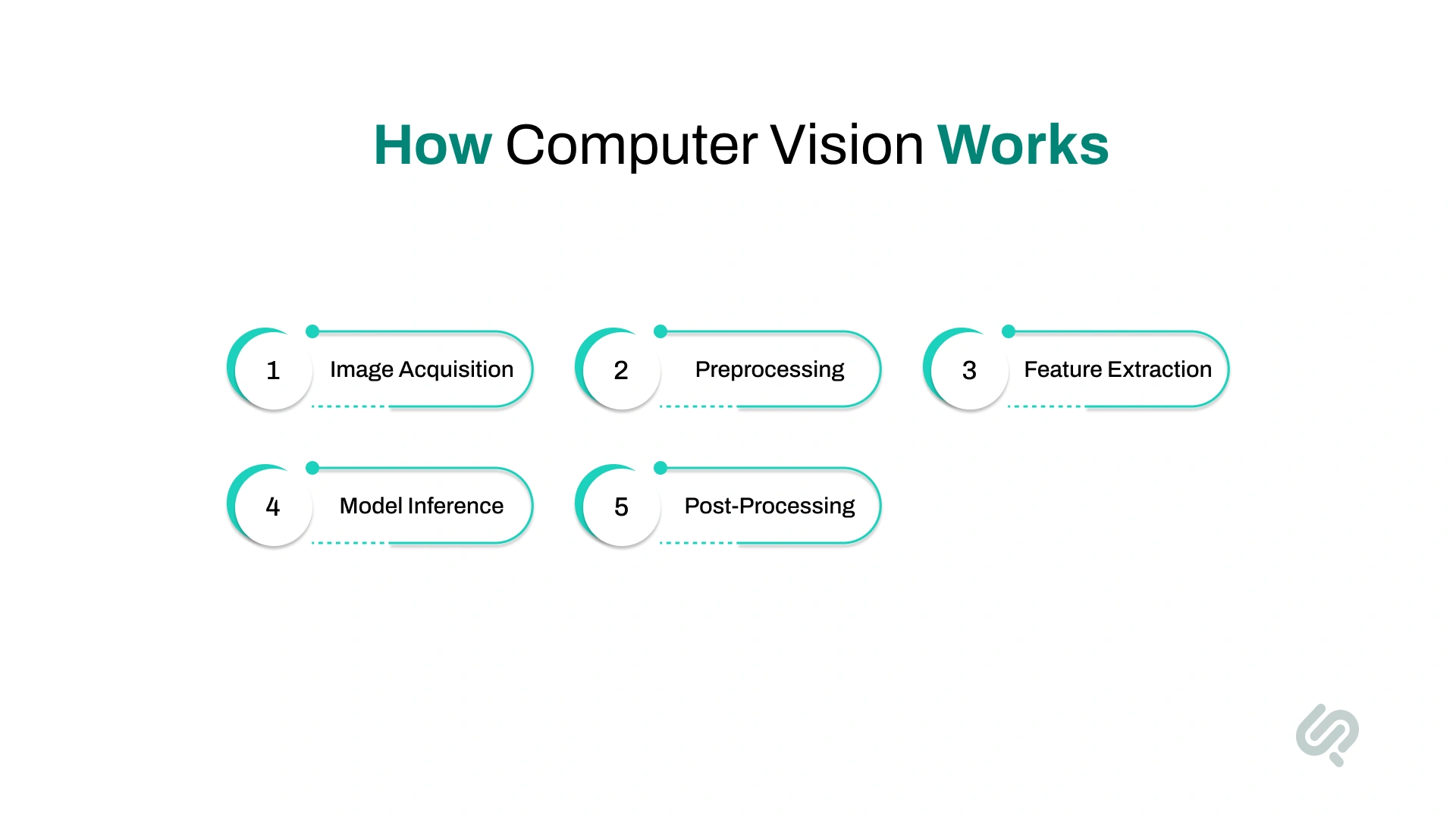
How Computer Vision Works: 5 Core Steps Infographic

1. Image Acquisition

The system captures input from a digital camera, video feed, or sensor. This is the input image used for processing.

2. Preprocessing

Images are cleaned and standardized, resized, de-noised, or enhanced for better clarity. This ensures consistent results regardless of lighting or angle.

  • Example: Adjusting brightness or contrast for low-light footage

3. Feature Extraction

The system identifies important parts of the image, such as edges, corners, textures, or patterns. These features help it distinguish between different objects or scenes.

  • Example: Using SIFT or CNN layers to detect patterns like eyes or wheels

4. Model Inference (Prediction)

Deep learning models (like CNNs, Vision Transformers, or GANs) analyze the features and classify, detect, or segment objects in the image.

  • Example: A CNN detects a car and draws a bounding box around it

5. Post-Processing and Decision Making

The system outputs its prediction (e.g., “stop sign detected”) and triggers a response, like slowing down a self-driving car or flagging a quality issue on an assembly line.

Computer Vision Deployment Options: Cloud vs Edge vs On-Prem

Computer vision systems can be deployed in different environments depending on performance, privacy, and infrastructure needs. The right deployment model impacts speed, cost, and compliance.

(A) Cloud deployment

Best for scalability and fast setup.

  • Centralized processing
  • Easy to scale and update
  • Suitable for non-sensitive visual data
  • Higher latency for real-time use cases

(B) Edge deployment

Best for real-time and low-latency use cases.

  • Runs directly on devices (cameras, IoT, mobile)
  • Faster response, works offline
  • Reduces bandwidth costs
  • Ideal for factories, retail stores, drones, and vehicles

(C) On-premise deployment

Best for strict data control and compliance.

  • Runs within private infrastructure
  • Supports sensitive data (faces, medical images)
  • Higher setup and maintenance costs
  • Common in healthcare, government, and regulated industries

Computer Vision vs Machine Vision vs Image Processing

These three terms are often used interchangeably, but they solve different problems and require different levels of intelligence.

In simple terms:

  • Computer vision uses AI to understand images and video in complex, real-world environments.
  • Machine vision is designed for controlled industrial inspection and automation.
  • Image processing focuses on enhancing or transforming images, not understanding them.

Here’s a quick comparison:

Category Computer Vision Machine Vision Image Processing
Primary goal Visual understanding Industrial inspection Image enhancement
Intelligence level AI-driven Rule-based No AI
Typical use Real-world scenes Factory lines Photo cleanup
Data complexity High variability Controlled input Static images
Example use Road detection Defect check Noise removal

What’s the Difference Between These 3?

  • Computer vision is flexible and learns from data. It’s used in self-driving cars, healthcare imaging, retail analytics, and security systems.
  • Machine vision is built for factories and production lines, where lighting, camera angles, and objects are tightly controlled.
  • Image processing improves image quality (sharpening, resizing, filtering) but doesn’t “understand” what’s in the image.

This distinction helps teams choose the right approach when deciding how to build or buy visual AI systems.

Top Computer Vision Tasks: Detection, Segmentation, OCR, and More

Computer vision systems perform a set of core tasks that allow machines to “see,” understand, and act on images and video. These tasks are the building blocks behind real-world applications like self-driving cars, medical imaging, facial recognition, and smart retail.

Below are the most important computer vision tasks you should know:

1. Object Detection

What it does: Finds and labels objects in an image or video.

Why it matters: Enables systems to locate people, vehicles, products, or hazards in real time.

Common uses:

  • Detecting cars and pedestrians for autonomous driving
  • Identifying people or objects in security footage

2. Image Segmentation

What it does: Splits an image into meaningful regions by labeling each pixel.

Why it matters: Helps systems understand scenes in detail, not just object location.

Common uses:

  • Separating roads, sidewalks, and obstacles for self-driving cars
  • Highlighting tumors or organs in medical scans

3. Optical Character Recognition (OCR)

What it does: Reads text from images and scanned documents.

Why it matters: Converts visual text into searchable, usable data.

Common uses:

  • Extracting text from invoices and IDs
  • Digitizing printed documents and forms

4. Image Classification

What it does: Assigns a label to an entire image based on what’s inside it.

Why it matters: Enables fast categorization of visual content.

Common uses:

  • Classifying medical images as normal or abnormal
  • Tagging product images in eCommerce

5. Object Tracking

What it does: Follows the same object across multiple video frames.

Why it matters: Supports motion analysis and real-time monitoring.

Common uses:

  • Tracking players in sports analytics
  • Following vehicles across camera feeds

6. Pose Estimation

What it does: Detects body joints or object positions in 2D or 3D space.

Why it matters: Enables motion understanding and gesture-based interaction.

Common uses:

  • Tracking athlete movement and posture
  • Powering gesture controls in AR/VR apps

7. Facial Recognition

What it does: Identifies or verifies people based on facial features.

Why it matters: Enables secure access and identity verification.

Common uses:

  • Face unlock on smartphones
  • Access control in secure facilities

8. 3D Scene Understanding

What it does: Understands depth, distance, and spatial layout of scenes.

Why it matters: Allows machines to navigate and interact with physical environments.

Common uses:

  • Robotics navigation
  • AR/VR spatial mapping

9. Image Generation & Enhancement

What it does: Creates or improves images using AI models.

Why it matters: Helps improve data quality and simulate rare scenarios.

Common uses:

  • Enhancing low-quality medical scans
  • Generating synthetic training data

Real-World Applications of Computer Vision Across Industries

Computer vision helps businesses turn images and video into real-time, actionable insights. Below are the most impactful real-world applications of computer vision across industries like retail, healthcare, security, and automotive.

1. Retail and Inventory Management

Computer vision helps retailers automate inventory tracking, monitor shelf activity, and improve in-store experiences.

  • Cameras detect when customers pick up products and update smart carts
  • Vision systems monitor shelf levels and alert staff when restocking is needed

2. Autonomous Vehicles

Computer vision enables self-driving systems to “see” and understand road environments using cameras and sensors.

  • Recognizes traffic signs and lane markings
  • Detects pedestrians, cyclists, and nearby vehicles in real time

3. Security and Surveillance

AI-powered vision systems monitor spaces for threats and unauthorized access without constant human oversight.

  • Flags suspicious activity in restricted areas
  • Enables license plate recognition for automated access control

4. Healthcare and Medical Imaging

Computer vision supports faster and more accurate analysis of medical scans.

  • Highlights suspicious regions in X-rays, MRIs, and CT scans
  • Flags early signs of disease for clinical review

5. Manufacturing and Quality Control

Vision systems inspect products and assemblies on production lines to reduce defects and waste.

  • Detects cracks, scratches, or misalignment in products
  • Verifies the correct placement of components on circuit boards

6. Augmented and Virtual Reality (AR/VR)

Computer vision allows AR/VR systems to understand physical spaces and align digital content with the real world.

  • Maps rooms for virtual furniture placement
  • Tracks hand and body movement for immersive interaction

7. Emerging Use Cases (Agriculture, Robotics, Personalization)

Computer vision is expanding into new domains beyond traditional industries.

  • Drones scan crops to detect disease and stress
  • Retailers analyze visual data to personalize the in-store and online experience

Core Technologies Behind Computer Vision Development

Computer vision systems are powered by a combination of artificial intelligence, deep learning models, and data processing techniques that enable machines to interpret visual information and make decisions. 

These technologies work together to help computers recognize patterns, understand scenes, and act on visual data in real-world environments.
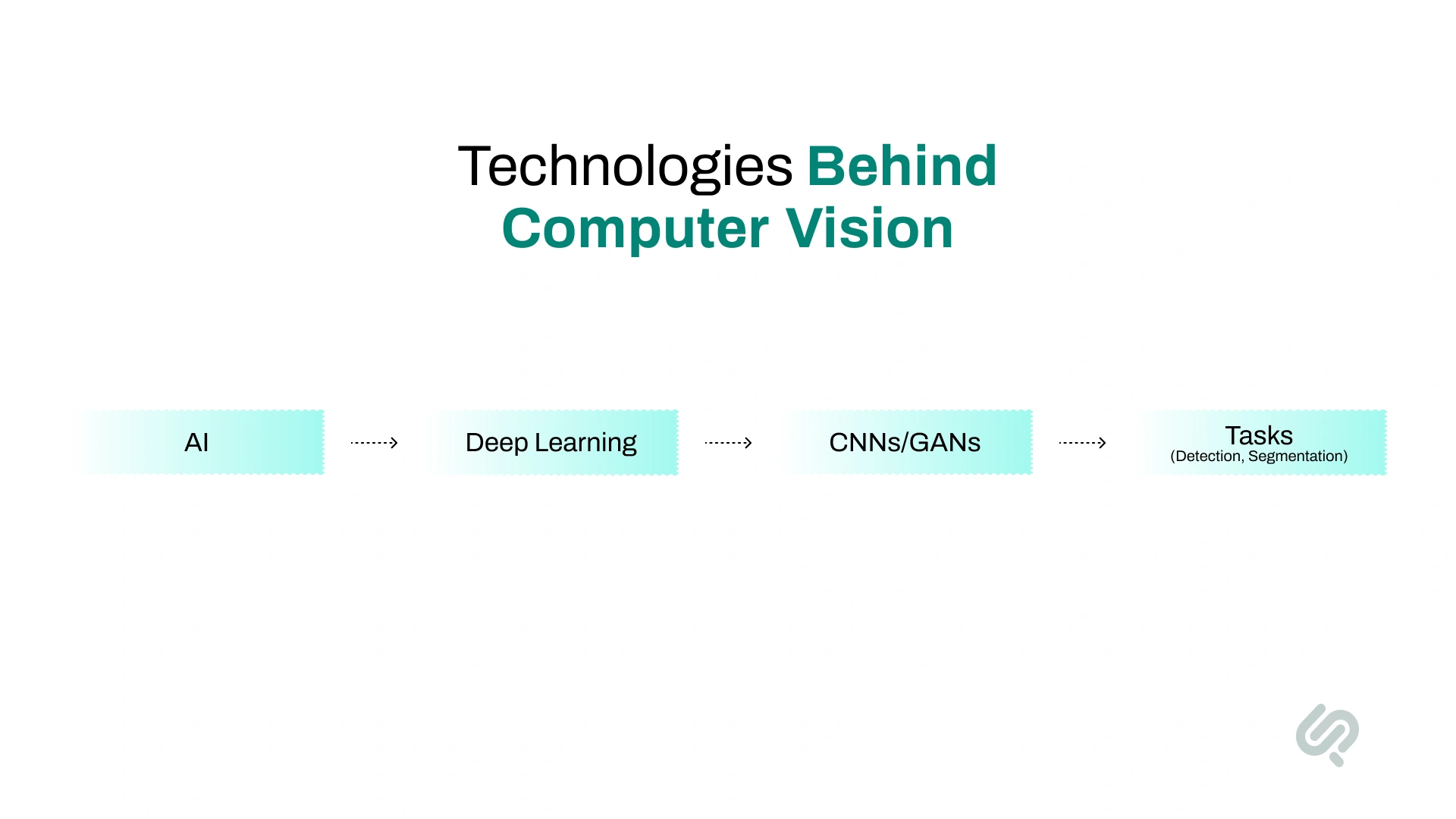
1. Artificial Intelligence (AI) & Machine Learning

Computer vision is a subfield of AI that enables machines to interpret images and video. Machine learning allows systems to improve performance over time by learning from labeled visual data.

  • Powers automation tasks like face recognition and object detection
  • Models improve accuracy as more data is processed

2. Deep Learning

Deep learning enables models to automatically learn visual features from raw images without manual programming.

  • Used in image classification, scene understanding, and object recognition
  • Drives performance gains in medical imaging and autonomous systems

3. Convolutional Neural Networks (CNNs)

CNNs are the backbone of most computer vision systems, designed specifically for image analysis.

  • Detect shapes, edges, and textures in layered stages
  • Power object detection, segmentation, and visual recognition

4. Generative Adversarial Networks (GANs)

GANs generate realistic images by training two competing models.

  • Used for image synthesis and enhancement
  • Helpful in data augmentation and simulating rare scenarios

5. Feature Extraction

This process identifies important visual patterns such as corners, edges, and textures.

  • Traditional methods like SIFT pioneered feature matching
  • Modern deep learning models now learn features automatically

6. Vision Transformers (ViTs)

ViTs apply transformer architectures to visual data.

  • Break images into patches and model global relationships
  • Achieve strong results in classification and segmentation tasks

7. Data Preprocessing

Visual data must be cleaned and standardized before training.

  • Includes resizing, normalization, and noise reduction
  • Improves training stability and model accuracy

8. Multimodal AI

Multimodal systems combine vision with text, audio, or sensor data.

  • Enables richer understanding of scenes and context
  • Powers image captioning, video understanding, and AI assistants

How Businesses Use Computer Vision to Cut Costs and Improve Accuracy

Businesses across industries are adopting computer vision technologies to streamline operations, improve safety, and unlock new value from visual data. 

About 42% of enterprise-scale companies report actively using AI in their business, while another 40% are exploring or experimenting with it, indicating strong momentum toward broader deployment. (3)

From healthcare to agriculture and manufacturing, these real-world applications show how powerful computer vision solutions are in practice:

Businesses Use Computer Vision Image

1. Automating Quality Control

Companies use computer vision systems to inspect products and identify defects on production lines—faster and more accurately than manual inspection.

  • Detects flaws like scratches, cracks, or mislabels in real time.
  • Helps maintain high product quality while reducing human error.

2. Diagnosing Diseases from Medical Images

Computer vision in healthcare assists doctors by analyzing X-rays, MRIs, and CT scans to detect early signs of illness.

  • AI tools help diagnose conditions like pneumonia, tumors, and bone fractures.
  • Supports radiologists by highlighting areas of concern for further review.

3. Powering Autonomous Vehicles

Computer vision for autonomous driving helps self-driving cars safely interpret and respond to road environments.

  • Recognizes lanes, traffic signs, and pedestrians for real-time decisions.
  • Enables collision avoidance and safe navigation under changing conditions.

4. Monitoring Crops in Agriculture

In farming, computer vision technology monitors crop health and optimizes field management.

  • Drones capture and analyze images to detect pest damage or plant stress.
  • Systems alert farmers to areas that need watering or fertilization.

5. Enhancing Customer Behavior Analysis

Retailers and marketers use computer vision to analyze visual content across platforms, including social media.

  • Tracks patterns in customer photos to understand preferences.
  • Helps brands spot emerging trends through image data analysis.

6.  Strengthening Security With Facial Recognition

Facial recognition systems powered by computer vision help secure workplaces, events, and public areas.

  • Authenticates individuals for access control and time tracking.
  • Flags safety compliance violations, like missing hardhats or face masks.

7. Predicting Maintenance in Industrial Settings

Computer vision models can detect signs of wear or failure in equipment before problems happen.
  • Identifies leaks, rust, or overheating in machinery through cameras.
  • Improves safety and prevents costly breakdowns in factories or plants.

8. Supporting Developers with Tools and Platforms

Supporting Developers with Tools and Platforms logos Image


Leading tech companies offer robust platforms for building and deploying computer vision solutions.

  • Intel and NVIDIA provide frameworks, edge AI tools, and GPUs optimized for vision tasks.
  • Cloud-based platforms allow fast prototyping and scaling of computer vision applications.

How to Choose the Right Computer Vision Approach (API vs Custom Model)

When building a computer vision solution, one of the first decisions is whether to use a prebuilt computer vision API or develop a custom computer vision model. The right choice depends on your use case, data, accuracy needs, and how critical vision is to your product or operations.

Use a Computer Vision API When:

  • You need to launch quickly with minimal setup
  • Your use case is common (face detection, OCR, basic object detection)
  • You don’t have large labeled datasets
  • You’re testing feasibility or building a prototype
  • Speed and cost matter more than perfect accuracy

Examples: AWS Rekognition, Google Vision API, Azure Computer Vision

Build a Custom Computer Vision Model When:

  • Your use case is highly specific (custom defects, unique objects, domain visuals)
  • You need higher accuracy than generic APIs provide
  • You have access to quality-labeled image or video data
  • Computer vision is a core part of your product or competitive advantage
  • You need full control over performance, privacy, and deployment

Hybrid approach (often the best path):

Many teams start with an API to prove value, then transition to a custom model once the use case, data, and ROI are clear. This reduces risk while still allowing long-term scalability and control.

Computer Vision Challenges: Bias, Privacy, and Reliability

Some challenges to watch out for are:

1. Data Bias and Fairness

Vision models can inherit bias from unbalanced or non-diverse image datasets. This can lead to errors in facial recognition, healthcare diagnoses, and security systems.

  • Example: Vision models misclassifying faces from underrepresented groups.
  • Solution: Use balanced datasets and test models for fairness and transparency.

2. Interpretability and Trust

Deep learning models like CNNs or generative adversarial networks often act as black boxes. It’s hard to explain why they made a decision.

  • Challenge: Gaining stakeholder trust, especially in safety-critical fields like medical imaging or self-driving cars.
  • Emerging solution: Visual explanations (e.g., saliency maps) that show what the model focused on.

3. Data Privacy & Security

Vision systems deal with sensitive data—like faces, license plates, or medical records. Ensuring privacy is essential.

  • Example: Real-time monitoring in public areas must follow privacy laws (e.g., GDPR).
  • Technology fix: Use of anonymization or on-device processing to protect users.

4. Generalization Across Environment

Many computer vision models struggle when used in different settings, like lighting changes, weather conditions, or camera angles.

  • Example: A model trained in sunny weather may fail in snow or fog.
  • Solution: Train with diverse, augmented datasets and test in the real world 

Where Computer Vision Is Going Next (Edge AI, Multimodal, 3D Vision)

1. Edge Deployment

More companies are moving vision models from the cloud to edge devices like smartphones, drones, and IoT cameras. This reduces latency and improves real-time performance.

  • Example: Real-time object detection in wearable fitness trackers.
  • Challenge: Ensuring vision models remain efficient and secure on limited hardware.

2. 3D and Spatial Understanding

Future systems will better understand depth, space, and 3D structure—crucial for robotics, AR/VR, and autonomous navigation.

  • Example: Scene understanding in mixed reality environments.
  • Keyword tie-in: scene understanding, vision system, human visual system

3. Multimodal Integration

Multimodal AI, combining vision with language, audio, or sensor data, is reshaping how systems understand context.

  • Example: AI that watches video and explains what’s happening using natural language processing.
  • Enables a richer understanding in apps like smart assistants and digital twins.

The Next Phase of Computer Vision 

At Phaedra Solutions, we’re seeing computer vision shift from “object detection demos” to context-aware decision systems that run in real operations, warehouses, hospitals, and field environments. 

The biggest change is not just better model accuracy. It’s better business accuracy: lower false alerts, faster response times, and measurable outcomes teams can trust.

As Hammad Maqbool, AI Expert at Phaedra Solutions, puts it:

“Computer vision delivers real value when it moves beyond detecting objects and starts understanding operational context. The goal isn’t just model accuracy. It’s dependable decisions teams can trust in live environments.”

Our teams are also seeing strong momentum in three areas:

  • Edge-first vision deployments for low-latency, real-time decisions
  • Multimodal workflows (vision + text + sensor data) for richer context
  • Continuous monitoring loops to prevent model drift after launch

Final Verdict

Computer vision is no longer just a research topic. It’s a real-world technology driving innovation across industries. 

Whether it’s powering self-driving cars, helping doctors analyze medical images, or allowing retailers to track inventory in real time, computer vision is unlocking new ways to process and understand the visual world.

As more businesses adopt computer vision solutions and invest in AI consulting, the demand for smarter, faster, and more ethical systems will continue to rise. 

If you’re looking to build or scale your own vision AI project, now’s the time to explore the tools, techniques, and expert guidance that can bring it to life.

Book a Free 30-minute Computer Vision AI Consulting Session.

FAQs

What is computer vision used for in real life?

What is the difference between machine vision and computer vision?

What are the core tasks in computer vision?

Which tools are best for building computer vision systems?

What is the future of computer vision?

Share this blog
READ THE FULL STORY
Author-image
Ameena Aamer
Associate Content Writer
Author

Ameena is a content writer with a background in International Relations, blending academic insight with SEO-driven writing experience. She has written extensively in the academic space and contributed blog content for various platforms. 

Her interests lie in human rights, conflict resolution, and emerging technologies in global policy. Outside of work, she enjoys reading fiction, exploring AI as a hobby, and learning how digital systems shape society.

Check Out More Blogs
search-btnsearch-btn
cross-filter
Search by keywords
No results found.
Please try different keywords.
Thank you! Your submission has been received!
Oops! Something went wrong while submitting the form.
Manual vision slowing you?
Get Exclusive Offers, Knowledge & Insights!