

.webp)
.webp)











%20(1).webp)
UI/UX design cost in 2026 usually ranges from $5,000 for a simple design refresh to $150,000+ for a complex product or platform.
Most business-grade UI/UX projects fall between $15,000 and $80,000, depending on the number of screens, user roles, platforms, research depth, prototype needs, and developer handoff.
For business owners, the real question is not only “How much does UI/UX design cost?” It is:
This guide breaks down UI/UX design cost by project type, complexity, pricing model, and deliverables so you can plan your budget with more clarity.
UI/UX design cost in 2026 usually ranges from $5,000 to $150,000+. Small websites and simple app flows cost less, while SaaS platforms, mobile apps, marketplaces, dashboards, and multi-user systems cost more.
A realistic UI/UX design budget for an MVP is usually $15,000 to $35,000. This often includes user flows, wireframes, high-fidelity UI screens, a clickable prototype, and developer handoff.
UI/UX design quotes vary because each project has a different number of screens, user roles, platforms, features, research needs, and revision cycles. A 10-screen website is not priced the same as a 60-screen SaaS dashboard.
UI/UX design becomes more expensive when the project needs user research, multiple user types, admin panels, advanced dashboards, mobile and web versions, accessibility work, custom branding, or a design system.
You need to share your project type, screen count, user roles, platform requirements, must-have features, timeline, and expected deliverables. A good agency should give you a scoped estimate, not just a wide price range.
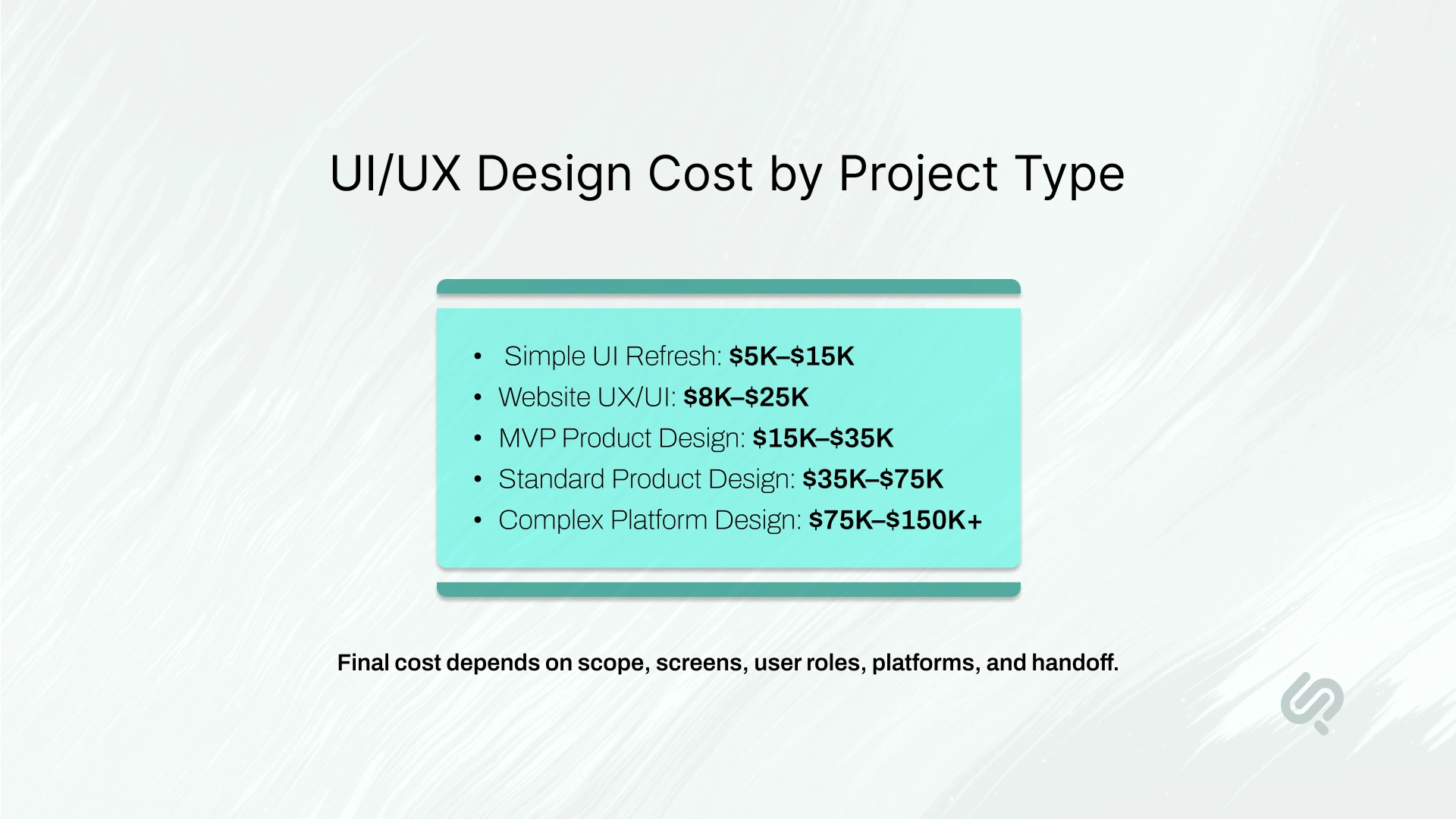
The easiest way to estimate UI/UX design cost is to start with the type of product you want to build.
These are planning ranges, not fixed prices. The final UI/UX design cost depends on the scope, complexity, timeline, and level of design detail needed.
Clutch’s 2026 UX pricing guide also supports this wide pricing range. According to Clutch, UX/UI design projects reviewed on its platform typically cost $10,000–$49,999, while the average UX agency project cost is $84,973.08. This is why a simple design refresh and a full product design project should never be estimated the same way. (1)
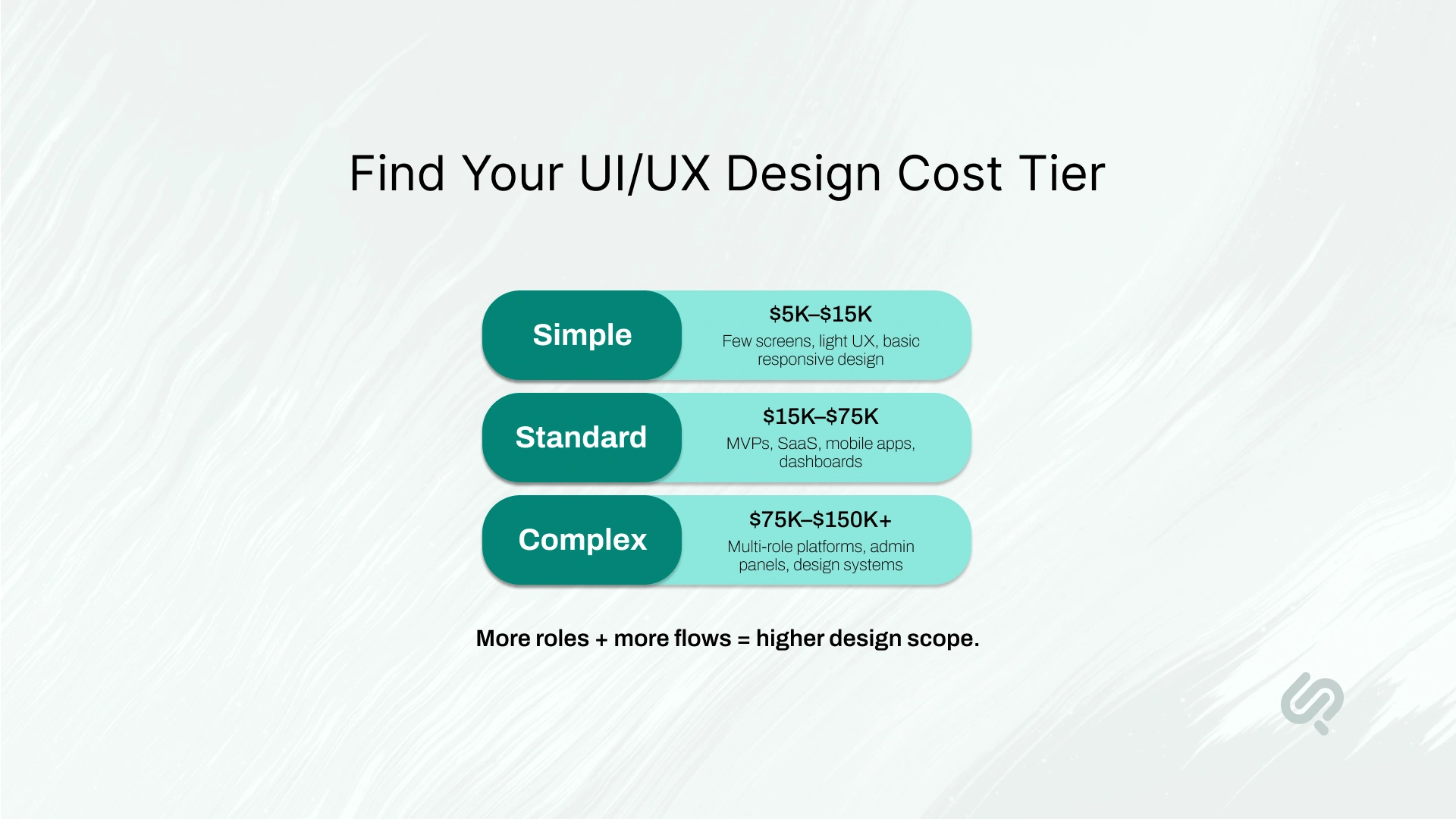
Most UI/UX projects fall into one of three cost tiers: simple, standard, or complex.
A simple project usually has fewer screens, fewer user flows, and limited research.
This tier is a good fit if you need:
Estimated cost: $5,000–$15,000
Typical timeline: 2–4 weeks
A standard project needs more structure, more user flows, and a clear product experience.
This tier is a good fit if you need:
Estimated cost: $15,000–$75,000
Typical timeline: 4–10 weeks
A complex project has multiple users, roles, permissions, platforms, and workflows.
This tier is a good fit if you need:
Estimated cost: $75,000–$150,000+
Typical timeline: 2–6 months
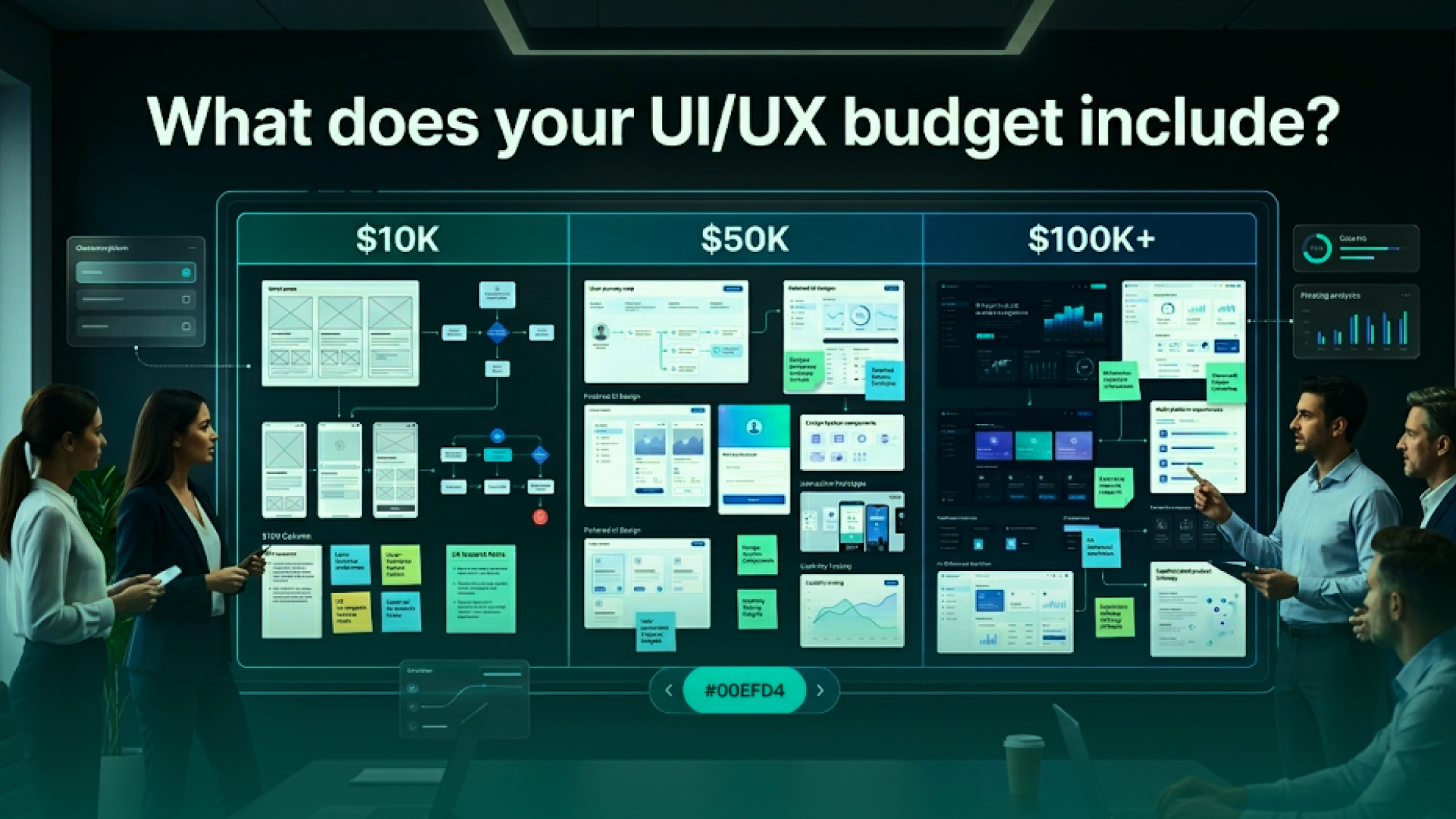
A wide price range is only useful when you know what each budget level actually includes.
A $10K UI/UX design project is usually small and focused.
You may get:
This budget works best for simple websites, landing pages, UI refreshes, or one focused product flow.
It is usually not enough for deep user research, multiple user roles, complex dashboards, or a full design system.
A $50K UI/UX design project usually supports a complete digital product experience.
You may get:
This budget works well for MVPs, SaaS products, ecommerce platforms, dashboards, and mobile apps.
A $100K+ UI/UX design project is usually for complex platforms with deeper product logic.
You may get:
This budget is common for platforms where design mistakes can affect revenue, operations, security, or user adoption.
This is why larger design budgets should be viewed as product risk reduction, not only design spend. McKinsey found that companies in the top quartile of its McKinsey Design Index achieved 32 percentage points higher revenue growth and 56 percentage points higher total returns to shareholders over five years compared with industry peers. (2)
Strong design does not guarantee growth, but the data shows why serious product teams invest in design quality early.
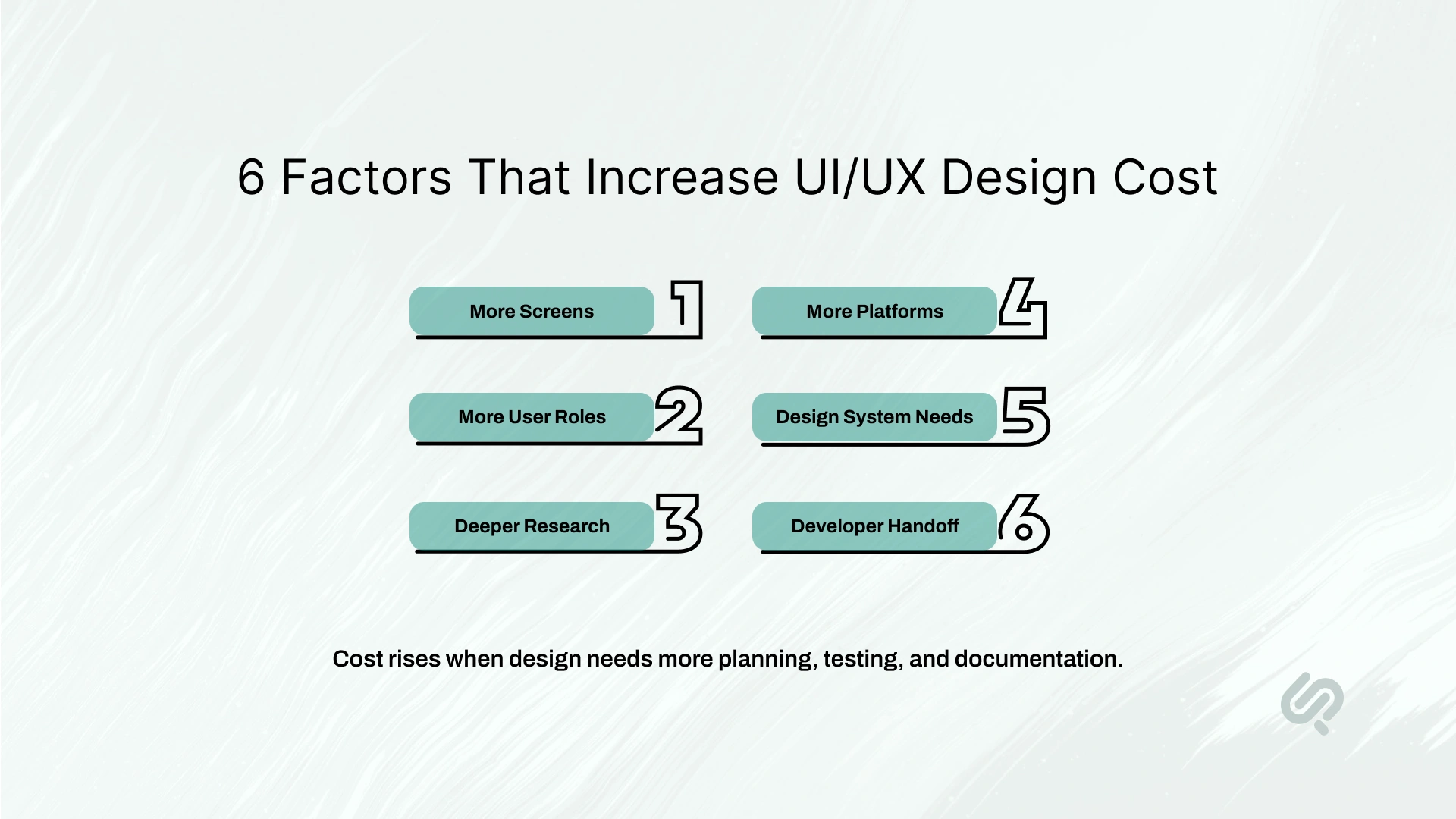
UI/UX design cost increases when the project needs more thinking, testing, documentation, and coordination. The biggest cost drivers are usually scope, complexity, and clarity.
More screens mean more layouts, more states, more components, and more review time.
A 10-screen MVP costs less than a 70-screen SaaS product because the design team must plan more flows, edge cases, and interactions.
A product with one user type is simpler to design.
A platform with customers, admins, vendors, managers, and support teams costs more because each role needs its own journey, permissions, dashboard, and actions.
Research adds cost, but it reduces guesswork.
Common research activities include:
Skipping research can lower the first quote, but it can also increase redesign and development costs later.
Usability testing does not always need a large research budget to be useful. Human Factors International summarizes research from Nielsen, Landauer, Virzi, Sauro, and Lewis showing that 4–5 usability test participants can uncover around 80%–85% of usability problems in a test round when issues are reasonably discoverable. For buyers, this means a small testing round can often prevent expensive design and development rework later. (3)
A web app, iOS app, Android app, and tablet experience are not the same design scope.
Each platform may need different layouts, gestures, screen sizes, navigation patterns, and responsive behavior.
A design system costs more upfront, but it can save money later.
It usually includes:
This is useful for SaaS products, dashboards, enterprise platforms, and products that will grow over time.
Design systems add upfront cost, but they can reduce repeat design work. In a Figma experiment, designers completed tasks 34% faster when they had access to a design system compared with working from older design files. This is why a design system makes more sense for products that will keep adding screens, features, and teams over time. (4)
Good UI/UX design does not stop at pretty screens.
A proper handoff includes:
This adds design time, but it reduces confusion during development.

A complex UI/UX project does not cost more only because it has more screens. It costs more because every user type needs a clear journey.
For the Esports Tournament Platform, Phaedra designed a multi-user product for players, teams, organizers, sponsors, and admins. The platform included tournaments, leagues, scrim ladders, team profiles, team finder, gaming calendars, organization spaces, and an admin panel.
This kind of project requires more UX planning because each role has different goals, permissions, flows, and actions. A player does not use the platform the same way as an organizer. A sponsor does not need the same dashboard as an admin.
That is why complex UI/UX design cost includes more than visual design. It includes information architecture, role-based journeys, interactive prototypes, usability thinking, and developer-ready handoff.
For business owners, this is the difference between buying screens and investing in a product experience that can support real users, operations, and growth.
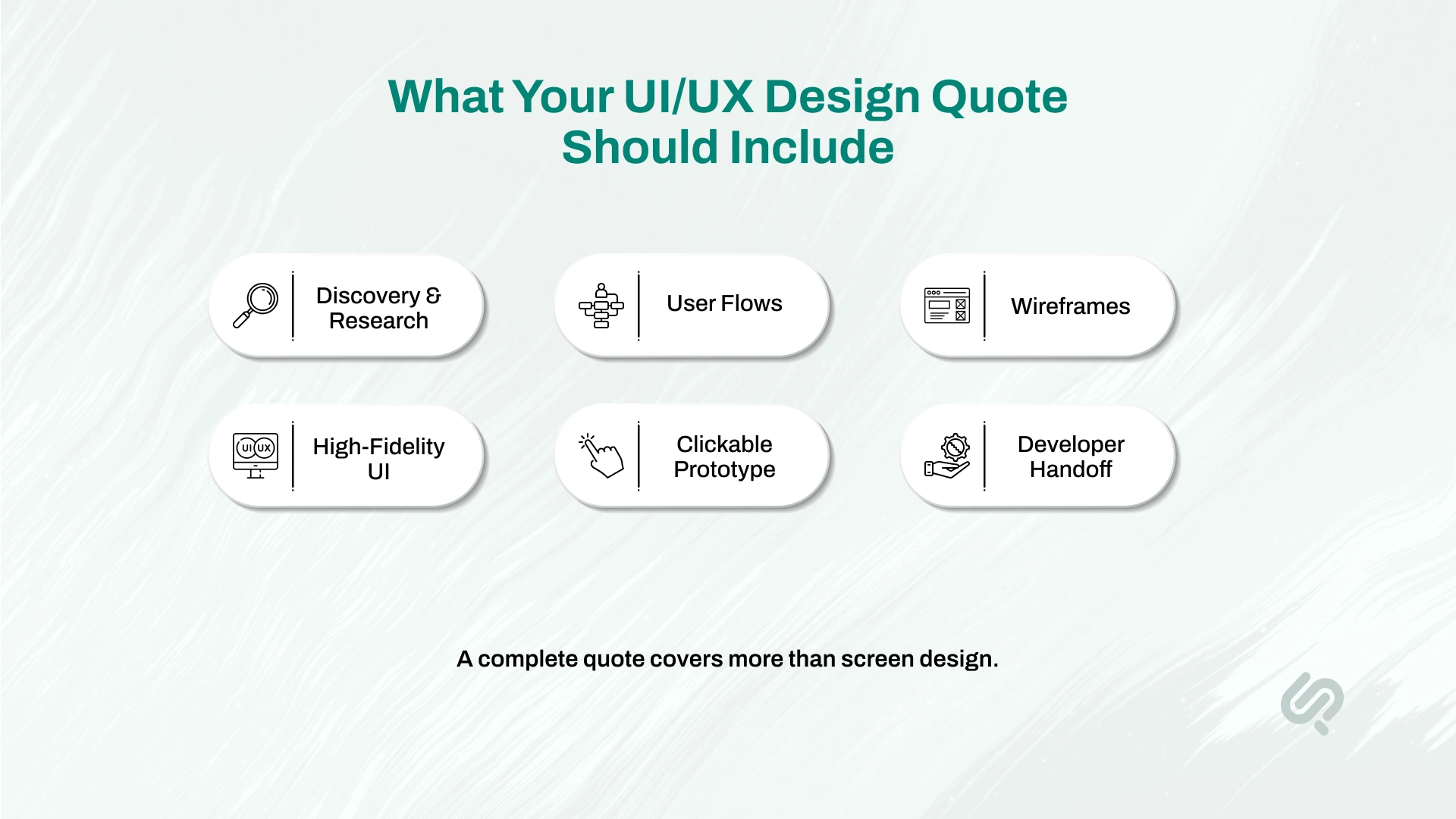
UI/UX design cost usually covers more than screen design. A complete product design engagement includes research, structure, visuals, testing, and handoff.
“A good UI/UX quote should never be based on screen count alone. The real work is understanding user roles, removing friction, and preparing designs that developers can build without guesswork.”
— Mujtaba Sheikh, Design Head at Phaedra Solutions
This step defines the product goals, users, competitors, and business requirements.
It may include:
This step defines how users move through the product.
It may include:
Wireframes show the basic layout before visual design begins.
They help teams confirm:
This is where the product gets its final look and feel.
It may include:
A clickable prototype helps stakeholders and users test the product before development.
It can show:
Developer handoff prepares the design for engineering.
It may include:
A cheaper quote may skip some of these steps. That can work for small projects, but it can create problems for larger products.
UI/UX design pricing depends on how clear your scope is and how much flexibility your project needs.
Fixed scope pricing works best when the project is clearly defined before work starts.
Use this model when you know:
This model gives you better cost control because the price is agreed upfront.
Time and materials pricing works best when the product is still changing.
Use this model when:
This model gives more flexibility, but it needs strong project management to avoid cost creep.
A monthly retainer works best for companies that need ongoing UI/UX support.
Use this model for:
This is useful for SaaS teams, funded startups, ecommerce brands, and companies with active product roadmaps.
A design sprint works best when you need fast clarity before committing to a larger product design project.
Use this model for:
A design sprint helps you reduce uncertainty before spending more on full product design.
Phaedra Solutions prices UI/UX design projects based on scope, complexity, timeline, and deliverables.
Our goal is to give you a clear estimate before design begins, so you understand what is included and what may change the price.
A scoped UI/UX design quote may include:
Before estimating UI/UX design cost, we usually clarify:
This helps us give you a realistic quote instead of a generic price range.
Phaedra uses an AI-assisted UI/UX design process to reduce unnecessary design hours without removing human judgment.
AI helps our design team move faster during:
Senior designers still make the important decisions. They own the product logic, user experience, visual quality, accessibility, usability, and developer handoff.
This helps reduce wasted time in early exploration and review cycles. It also helps clients get clearer scope, faster iteration, and more predictable UI/UX design cost compared to a slow traditional design process.
An AI-assisted design workflow can help lower costs by reducing:
The result is not a cheaper design for the sake of being cheap. The goal is better planning, faster clarity, and fewer avoidable delays.
Who you hire affects both the cost and the quality of the final product experience.
A freelancer can be cost-effective for small tasks. A boutique agency can be useful for visual-heavy work. A full-service product partner is usually better when the design must connect with real product logic, business goals, and development.
For complex projects, the cheapest option often becomes expensive later if the design misses user flows, edge cases, responsive behavior, or developer handoff details.
Hidden costs usually appear when the scope is unclear. They are not always intentional, but they can increase your final budget.
A good UI/UX design quote should clearly explain what is included, what is not included, and what counts as extra work.
Before you choose a UI/UX design agency, ask questions that reveal scope, process, and hidden costs.
Ask if the quote includes research, wireframes, UI screens, prototypes, design system work, revisions, and developer handoff.
A quote without screen count or flow count is hard to compare.
Some quotes include only UI design. Others include interviews, competitor review, usability testing, and journey mapping.
Revision limits should be clear before the project starts.
A prototype helps you test the user journey before development begins.
Ask if the agency will provide specs, components, responsive behavior, states, and documentation.
A good agency should explain how extra screens, features, platforms, or revisions are priced.
A clear quote protects both sides. It helps you compare vendors fairly and avoid budget surprises later.
To get an accurate UI/UX design quote, prepare the right information before speaking to an agency.
You do not need a perfect brief. But you should know the basics.
Tell the agency whether you need:
List who will use the product.
For example:
More user roles usually mean more flows and higher UI/UX design cost.
You do not need an exact number, but a rough estimate helps.
For example:
Include features such as:
Clarify whether you need:
Ask for a quote that shows:
The more specific your scope is, the more accurate your UI/UX design quote will be.
UI/UX design timelines depend on scope, screen count, user roles, and review speed.
Timelines can increase when the project needs research, usability testing, multiple stakeholders, advanced prototypes, or a full design system.
A faster timeline is possible when the scope is clear, feedback is quick, and the team already has brand guidelines or product requirements.
UI/UX design cost depends on your product type, number of screens, user roles, platforms, research needs, and handoff requirements.
A simple design refresh may need a small budget. A complex SaaS platform, ecommerce product, mobile app, or multi-role dashboard needs deeper planning and a larger design scope.
At Phaedra Solutions, we help business owners, founders, and product teams define the right UI/UX scope before they spend. As an AI-first design and software partner, we use AI-assisted research, faster prototyping, structured UX workflows, and senior design review to help you move from idea to developer-ready product faster.



Areesha is a content writer with over 2 years of experience in writing about tech and digital trends. She focuses on topics like AI, remote work, and productivity.
Her blogs have helped startups grow their content reach and improve lead generation. She writes with a focus on clarity, simplicity, and reader value.
