

.webp)
.webp)


%20(1).webp)







%20(1).webp)
Your product idea may be strong, but without the right product design process, it can still fail during development, launch, or user adoption.
A clear process helps you validate the problem, understand users, map workflows, create wireframes, test prototypes, and prepare development-ready designs before engineering starts.
At Phaedra Solutions, we use an AI-first product design process to help founders, product teams, and growing businesses move from idea to launch with less guesswork. AI helps us speed up research, competitor analysis, wireframe exploration, usability feedback review, and design documentation. Senior designers still lead the strategy, user experience, and final design decisions.
In this guide, we’ll explain the 7 product design steps we follow at Phaedra Solutions and when it makes sense to bring in a product design partner to run the process with you.
An AI-first product design process uses AI to support research, competitor analysis, wireframing, prototyping, usability testing, and design handoff. Senior designers still lead the strategy, user experience, and final product decisions.
The 7 steps are product goal definition, user and market research, research analysis, concept prioritization, wireframing and prototyping, usability testing, and development handoff.
Product design helps teams validate the idea, define user flows, test prototypes, and prepare clear design specs before engineering starts. This reduces rework, unclear features, and development delays.
AI helps product teams process research faster, compare competitors, explore more design directions, group usability feedback, and prepare clearer documentation for developers.
No. AI speeds up repetitive and research-heavy work, but product designers still make the key decisions around user needs, product logic, usability, accessibility, and business goals.
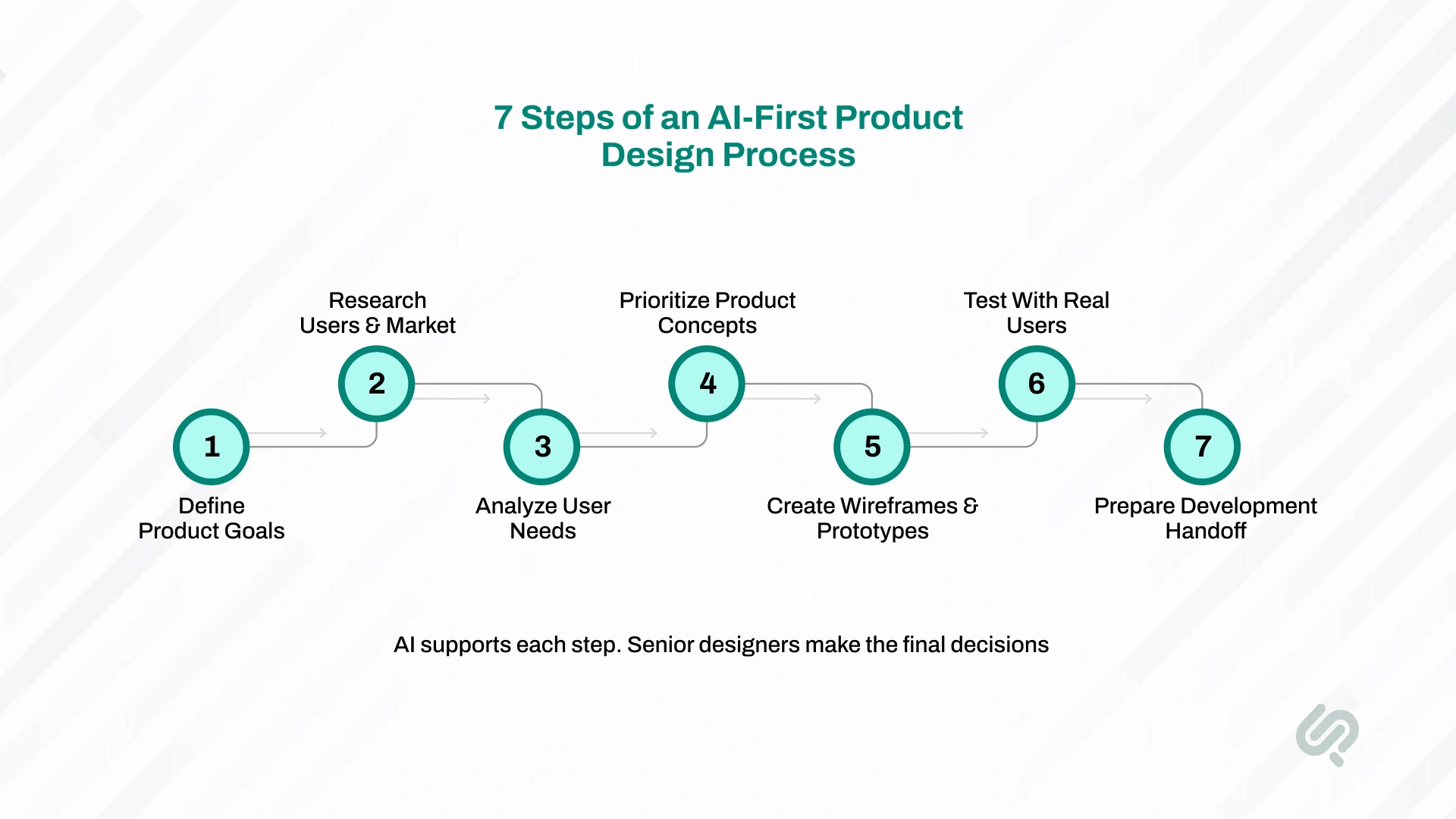
An AI-first product design process is a structured way to turn an idea into a validated, user-friendly, development-ready product with AI supporting the research, analysis, prototyping, testing, and handoff stages.
The core product design process stays the same: you still define the product goal, research users, map journeys, prioritize features, create wireframes, test prototypes, and prepare designs for development.
The difference is speed and clarity. AI helps product teams process research faster, compare competitor experiences, explore more wireframe directions, group usability feedback, and create clearer documentation for developers.
At Phaedra Solutions, the process includes 7 steps:
This AI-first process helps teams reduce design mistakes, avoid unnecessary features, improve usability, and give developers clearer requirements before the build begins.
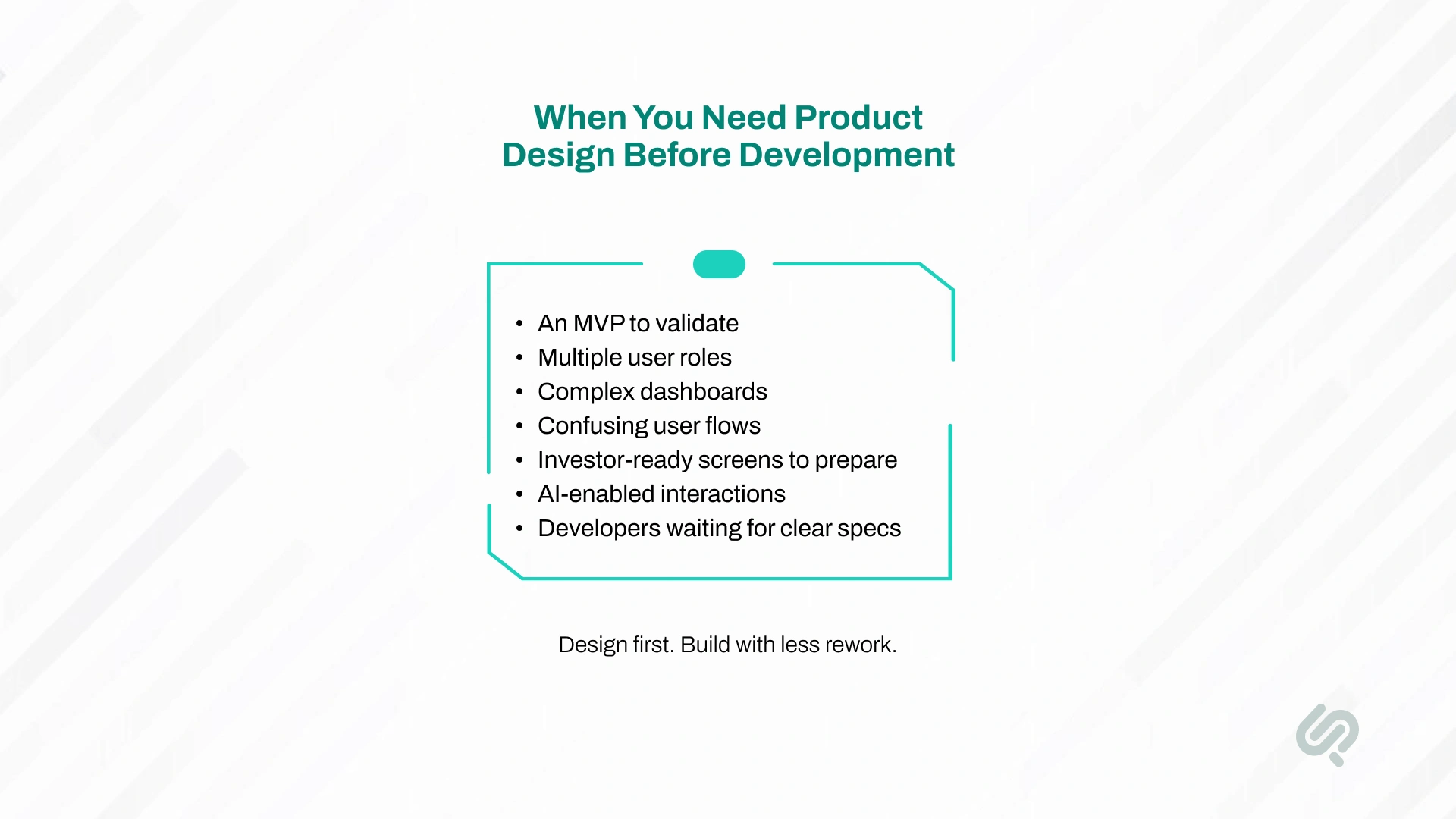
You need an AI-first product design process when your product idea has too many unknowns to move straight into development.
This process is useful when:
An AI-first approach helps reduce manual research work, speed up competitor analysis, test more design directions, and prepare clearer documentation for developers.
Skipping this process often leads to unclear features, weak usability, expensive rework, delayed development, and products that look finished but fail in real use.
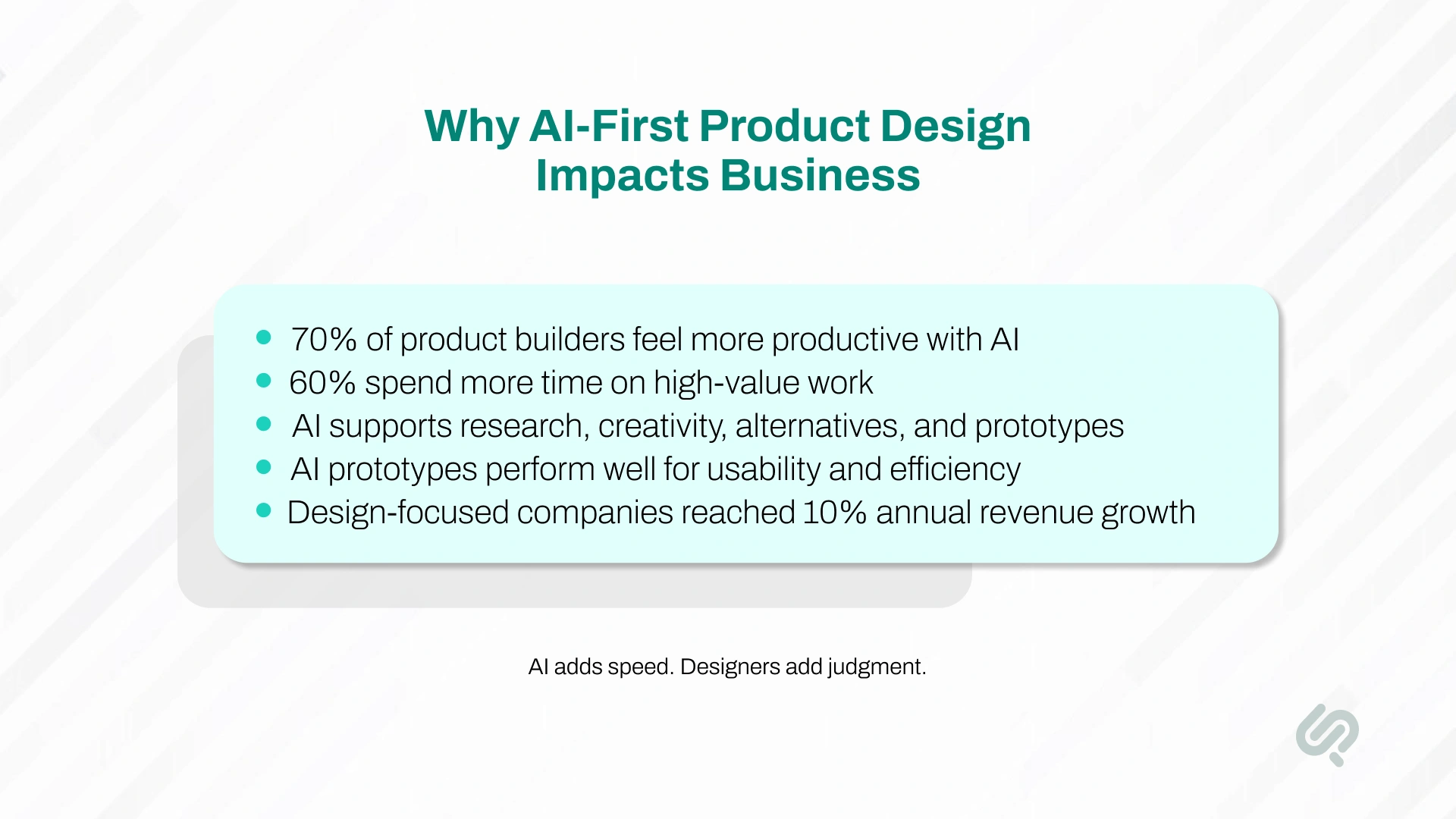
An AI-first product design process helps teams move faster through research, ideation, prototyping, testing, and design handoff while keeping senior designers in control of product decisions.
Here’s what the data shows:
The takeaway is simple: AI can speed up the product design process, but business impact comes from combining AI speed with senior design judgment. That means faster research, better prototypes, clearer handoff, fewer development gaps, and stronger product decisions before launch.
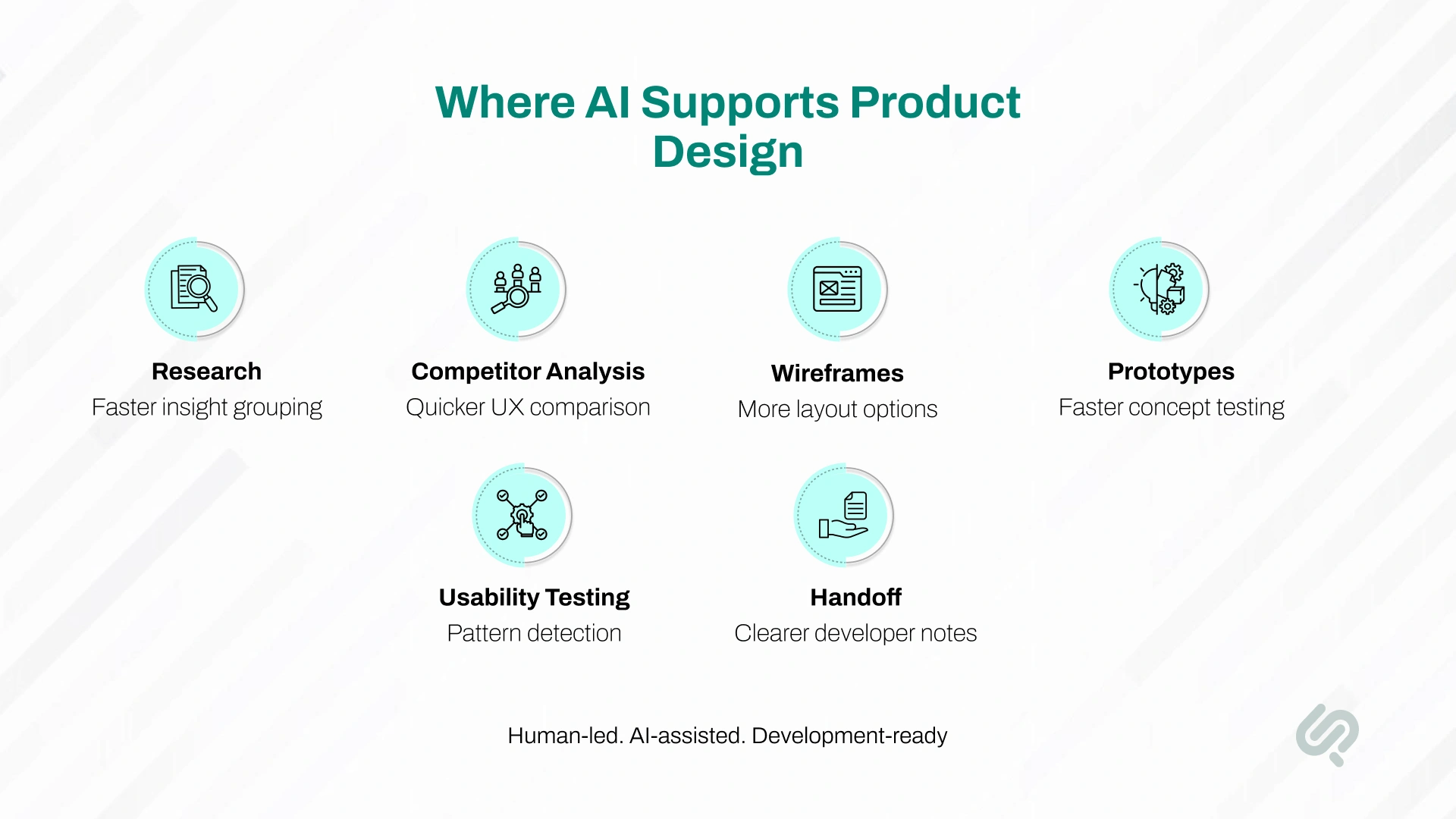
Phaedra Solutions uses an AI-first approach to product design — meaning AI is embedded across the research, analysis, prototyping, and documentation stages of every project.
AI helps the team process information faster, explore more design directions, and prepare clearer handoff material for development. Senior product designers lead all strategy, user experience decisions, and final design outputs.
The practical result is a faster process with more iterations, more thorough research synthesis, and better documentation — without adding time or cost. The 7 steps below explain how this works in practice.
Every product design engagement starts with clarity on what you're building, who it's for, and what a successful outcome looks like for the business.
This step defines the product's purpose, target users, core problem being solved, and the metrics that will determine success. It aligns the design team, product stakeholders, and developers around a shared direction before any research or design work begins.
Without this step, teams end up designing features based on assumptions rather than a defined problem. It's the single most common cause of scope creep, misaligned expectations, and products that get built but don't get used.
What this step produces:
A product vision statement, defined business goals and success metrics, initial user assumptions to be validated in research, and a shared brief the full project team works from.
How AI helps here:
AI assists with competitive landscape scanning — surfacing what similar products offer, where they fall short, and what user expectations already exist in the market. This gives the strategy conversation more context, faster.
With a defined product vision, the next step is to validate it against reality.
This means researching the market and understanding how real users think, work, and make decisions — before any design decisions are made.
Good research at this stage answers two questions: is there a real need for this product, and what do users actually care about? It uncovers the gap between what users say they want and how they actually behave. This is the foundation that every future design decision builds on.
Research in this step typically includes user interviews, competitor analysis, workflow observation, and survey data. The goal is not to collect as much data as possible — it's to collect enough to identify clear, recurring patterns in user behaviour and market gaps.
What this step produces:
A research summary, key user insights, competitor analysis, market gap analysis, and initial findings that are ready for synthesis.
How AI helps here:
AI accelerates competitor analysis by comparing product flows, feature sets, and UX patterns across multiple tools quickly. For a broader, data-driven view of competitors, teams can use Oxylabs’ scraper API to collect structured data from public competitor websites at scale, giving AI systems additional information to analyze alongside product features and UX patterns. It also helps organize raw interview notes and survey responses into structured themes, reducing the time from data collection to actionable insight.
Raw research data is not yet useful for design. This step turns interview notes, survey responses, and competitor findings into clear user needs, defined personas, and prioritized problems the product must solve.
This is where user personas are created — not as marketing documents, but as practical design references that keep the team grounded in real user goals and frustrations throughout the rest of the process. It's also where user journeys are mapped: how does a user move from a problem to a solution, and where does the current experience break down?
This step prevents the most common and expensive design mistake: building features based on what the team thinks users want rather than what the research shows they need.
What this step produces:
User personas, defined user needs and pain points, user journey maps, and a prioritized problem list that guides feature decisions.
How AI helps here:
AI helps group qualitative research findings by theme, surface repeated patterns across interviews, and flag contradictions in the data. This reduces the manual analysis work and helps the team move from research to design clarity faster.
With clear user needs defined, this step generates potential solutions and decides which ones are worth building.
It's where the team explores multiple approaches to the user journey, identifies which features are essential versus optional, and aligns on a product concept before visual design work begins.
Prioritization frameworks — such as MoSCoW (Must-have, Should-have, Could-have, Won't-have) or value vs. effort mapping — help teams separate the core product from feature requests that can wait. This is particularly important for MVP scoping: defining the smallest version of the product that solves the core user problem and can be tested with real users.
What this step produces:
A prioritized feature list, an MVP scope definition, and a validated product concept ready for wireframing.
How AI helps here:
AI helps evaluate each proposed feature against user research findings — flagging where a feature addresses a validated pain point versus where it's based on an assumption. This makes prioritization conversations faster and more grounded in user data.

This is where the product takes visual shape for the first time.
Starting with low-fidelity wireframes — simple structural layouts that show how screens are organized without colour, typography, or detailed styling — the team maps out every key user flow before moving to high-fidelity design.
Wireframes are followed by interactive prototypes: clickable, realistic representations of the product that users can navigate as they would the real thing. Prototypes are used for stakeholder review, internal alignment, and usability testing in the next step.
The purpose of this step is to make every design decision visible and testable before development begins. Changes to a wireframe take minutes. Changes to a built product take days or weeks.
What this step produces:
Low-fidelity wireframes for all key screens and flows, a high-fidelity interactive prototype, and initial UI design covering visual language, component styles, and layout structure.
How AI helps here:
AI-assisted tools support rapid wireframe exploration — generating initial layout directions based on product requirements so designers can evaluate multiple structural approaches quickly. This increases the number of options considered before committing to a direction, without extending the timeline.
“The prototype is where assumptions become visible. If users struggle with the flow at this stage, we can fix it in hours — not after weeks of development work.”
— Mujtaba Sheikh, Design Head at Phaedra Solutions
A prototype only tells you what you built. Usability testing tells you whether it works for the people who will actually use it.
This step puts the prototype in front of real users — typically 5 to 10 people who match the target audience — and observes how they complete key tasks. The goal is to identify where users get confused, where flows break down, and what assumptions in the design don't hold up under real use.
Findings from testing are prioritized by impact and fed back into the design before development begins. This loop — prototype, test, refine, retest — is what separates products that work well for users from products that work well in demos.
Testing should combine qualitative observation (watching users navigate the prototype and noting where they hesitate or make errors) with quantitative measures (task completion rate, time on task, error rate). Both types of data inform different design decisions.
What this step produces:
A usability testing report with prioritized findings, a revised prototype reflecting key improvements, and documented design decisions with rationale for the development team.
How AI helps here:
AI helps group usability feedback by friction point, identify recurring issues across multiple test sessions, and surface patterns in user behaviour data. This reduces the time between testing and actionable design improvements.
The final step in the product design process is preparing everything the development team needs to build the product accurately — without requiring constant designer involvement during the build.
Developer-ready handoff is not simply sharing a Figma file. It includes annotated design specifications covering component behaviour, interaction states, responsive breakpoints, spacing and sizing values, accessibility requirements, and asset exports. It also includes a complete design system: the documented library of components, styles, and patterns that keeps the product visually consistent as new screens and features are added over time.
A well-prepared handoff reduces developer questions, prevents inconsistencies between the design and the built product, and accelerates the build timeline.
What this step produces:
A finalized UI design with all screens and states, a complete design system and component library, annotated developer specifications, exported assets, and handoff documentation.
How AI helps here:
AI assists with preparing design documentation — generating component descriptions, interaction notes, and handoff annotations faster than manual writing. This means developers receive more thorough documentation without the handoff phase extending the project timeline.
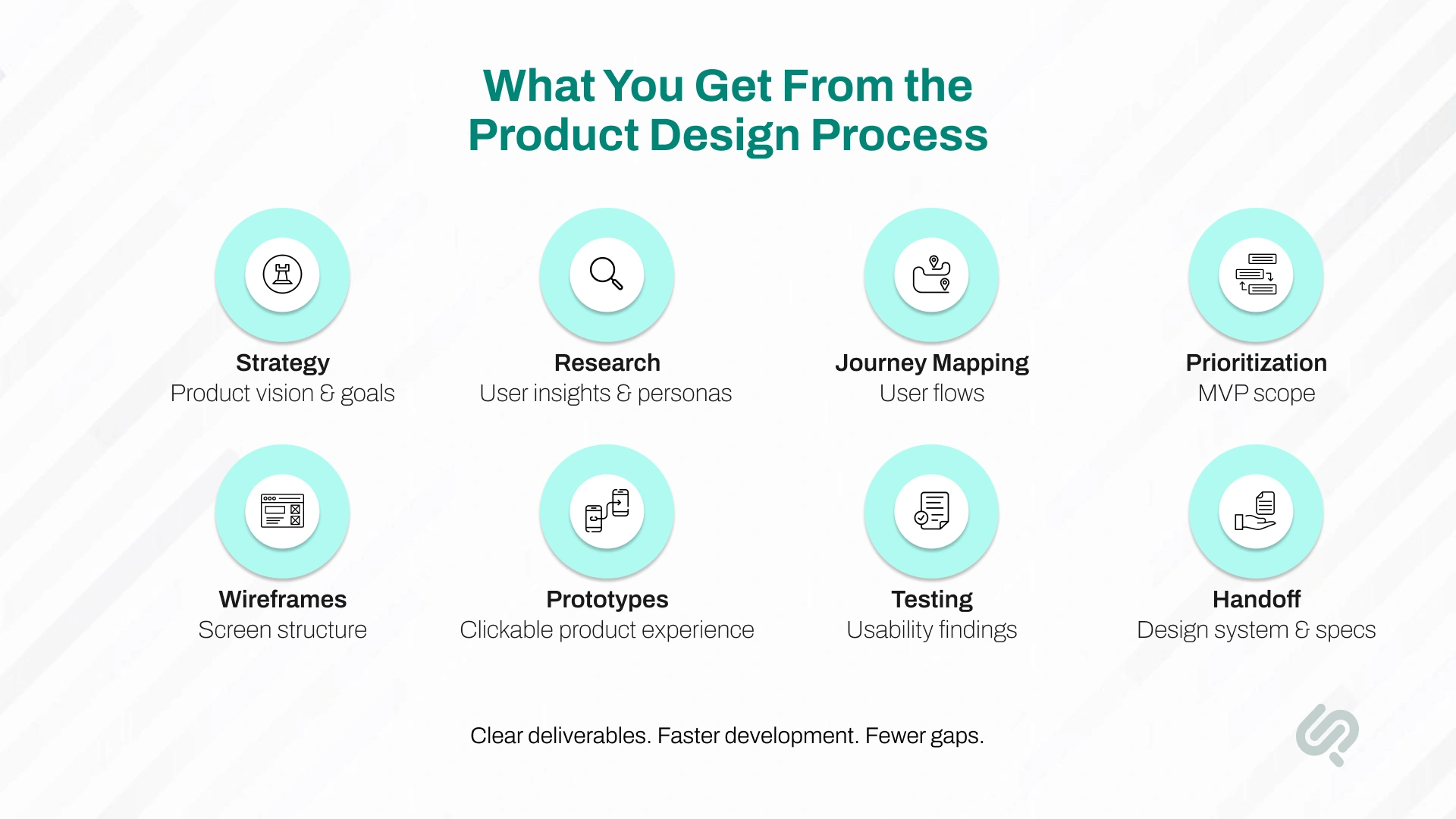
A good product design agency should not only show you screens. It should give you clear deliverables that help your team move from idea to development with confidence.
These deliverables reduce confusion between founders, designers, developers, and stakeholders. They also help development teams build faster because the product logic is already defined.
Phaedra Solutions ran the full product design process for an event safety command centre — a platform used by security, medical, site, and guest service teams to report incidents, track locations, manage communications, and generate reports during large-scale live events.
The core design challenge wasn't the screens. It was the operational complexity underneath them: multiple user roles with different workflows and permissions, field usage on mobile in high-pressure conditions, and stakeholders who had never used a digital command system before.

You can run the product design process in-house if you already have experienced UX researchers, product strategists, UI designers, and developers working together.
But many teams need a product design partner when the idea is complex, the timeline is tight, or the product needs to move into development quickly.
You should hire a product design partner when your team has a product idea but needs help turning it into a clear, validated, development-ready experience.
This usually happens when:
A product design partner helps you reduce risk before development begins. The goal is not just to design screens. The goal is to define the right product for the right users, before your team spends months building it.
Many products fail because teams move too quickly into development without solving the design and user experience problems first.
Common mistakes include:
These mistakes increase rework, delay launch, and make development more expensive. A clear UX design process helps teams make better decisions before engineering time is spent.
A strong product starts with a clear design process.
At Phaedra Solutions, we help you validate the idea, map the user journey, design the interface, test the prototype, and prepare everything your development team needs to build with confidence.
As an AI-first product design and development partner, we use AI to speed up research, prototyping, feedback analysis, and handoff documentation while keeping senior designers in control of the final product experience.
Start your product design journey with Phaedra Solutions. Explore our product design services, or book a free 30-minute consultation.



Musa is a senior technical content writer with 7+ years of experience turning technical topics into clear, high-performing content.
His articles have helped companies boost website traffic by 3x and increase conversion rates through well-structured, SEO-friendly guides. He specializes in making complex ideas easy to understand and act on.
