.webp)
.webp)
.webp)
.webp)









The most cost-effective AI solutions for small business are the tools that save time on repetitive work without adding high setup costs, extra headcount, or technical complexity. For most small teams, that usually means AI for content writing, customer support, email marketing, CRM follow-up, bookkeeping, meeting summaries, and workflow automation.
Small businesses do not need enterprise budgets to get real value from AI. They need the right tool for the right bottleneck. A low-cost AI tool is only worth it if it helps your team respond faster, reduce manual admin, improve consistency, or get more done each week.
This guide breaks down the best affordable AI tools for small businesses, which jobs they are best at, what kind of ROI to expect, what risks to watch for, and when it makes sense to move from off-the-shelf tools to a more custom AI solution.
The most cost-effective AI solutions are usually tools that save time on repetitive work without adding heavy setup or hiring costs. For most small teams, that means AI for writing, design, customer support, CRM follow-up, bookkeeping, meeting notes, and workflow automation.
The fastest-return AI tools are usually the ones tied to work your team repeats every week. Customer support replies, lead follow-up, content drafting, meeting summaries, and admin automation often create value faster than more advanced AI projects.
Many small-business AI tools start with free plans or low monthly pricing, then scale up as your usage, team size, or automation needs grow. The real cost is not just the subscription. It is also how many tools you need and how much manual work still happens between them.
No. Most small-business AI tools are built for non-technical users and offer templates, simple prompts, and no-code setup. Technical help becomes more important when you need custom workflows, deeper integrations, or stricter data control.
Start with one repeated task that wastes time every week. Pick something clear, measurable, and low-risk, test it for 30 days, and only expand once the tool proves it saves time or improves output quality.
A custom AI solution makes sense when off-the-shelf tools stop fitting the way your business works. Common signs are disconnected workflows, weak integrations, privacy concerns, inconsistent outputs, or too much manual cleanup between tools.
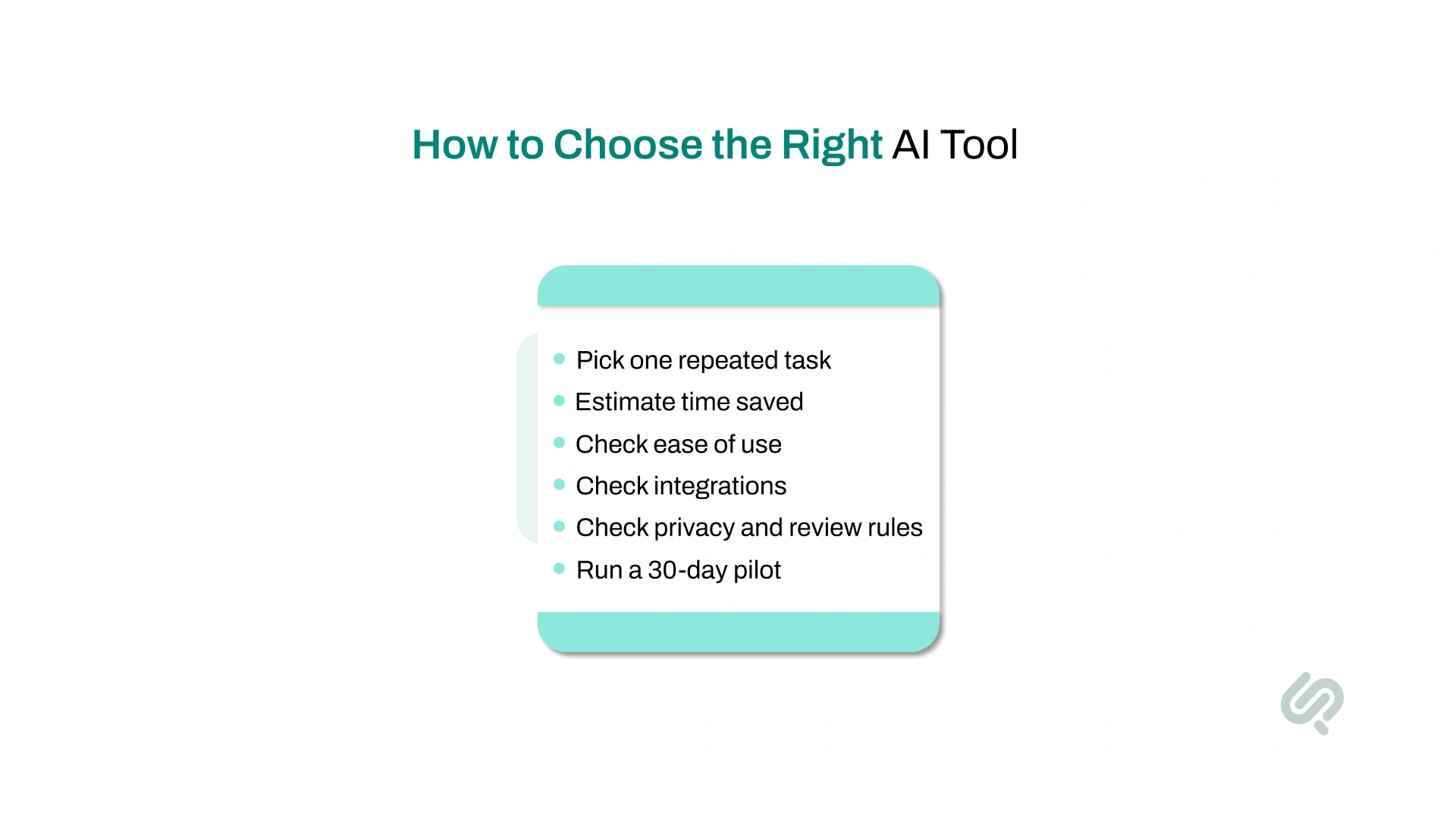
Do not start with the tool. Start with the problem.
The best low-cost AI tools for small businesses are the ones tied to a real bottleneck. That could be slow content production, too many repetitive customer questions, missed sales follow-ups, messy meeting notes, or hours lost on manual admin. If the problem is clear, the tool choice gets much easier.
Use this simple filter before you pay for anything:
A smart way to start is a 30-day pilot with one use case. Measure time saved, accuracy, output quality, and whether your team actually uses it. If the result is strong, expand. If not, switch tools before your stack becomes bloated.

Many small businesses start with AI tools that improve writing, marketing, and customer communication because those areas create repetitive work fast.
The best options here are usually easy to test, affordable to start, and useful without technical setup. If your team spends time writing emails, replying to common questions, building social content, or creating simple marketing assets, these are often the easiest AI tools to justify first.
If you need a virtual assistant or an AI chatbot that never sleeps, ChatGPT has your back. It is considered one of the best AI tools for those requiring constant support.
Whether you’re writing refund policies and product descriptions or addressing customer queries, this tool makes the process fast.
Brainstorming new offers becomes painless with the best AI tool (like ChatGPT) at your service.
As of March 2026, OpenAI says ChatGPT has more than 900 million weekly active users and over 50 million subscribers. (1)
What You Can Create:
Canva AI brings design to your fingertips, even if you’ve never touched Photoshop in your life. Just describe what you want, and it generates branded content in seconds.
What It Can Do:
Whether you're drafting a client proposal or updating your LinkedIn, Grammarly ensures your message lands the right way.
Why It Matters:
It’s your safety net for all things written, especially when reputation and first impressions matter.
MailChimp is one of the most popular email marketing platforms to automate your email campaigns. It makes campaign creation feel effortless, even if you're not a designer or marketer.
Why Small Teams Love It:
Whether you’re running your first campaign or scaling to thousands of subscribers, Mailchimp helps you create, automate, and optimize all in one place. However, for businesses with specific needs or those looking for different pricing models or feature sets, exploring Mailchimp alternatives might be beneficial.
Not every small business needs advanced AI. Most just need help with the work that repeats every day.
That is why tools for notes, CRM follow-up, bookkeeping, scheduling, and workflow automation often create value faster than more experimental use cases. If your team wants practical gains, this is where AI often feels most useful first.
Notion AI turns your workspace into a thinking assistant. This helps you move faster, stay organized, and never start from scratch.
Here’s what it helps you do:
Zoho’s built‑in AI assistant, Zia, helps you stop guessing and start closing. AI for sales leaders shows how modern revenue teams turn these insights into a predictable pipeline.
Zia analyzes your data to:

If you’re a solopreneur or running a small marketing team, Copy.ai is your new best friend. It helps you crank out quality content at scale without hiring a copywriter.
Use Cases:
QuickBooks isn’t just accounting software anymore. With AI baked in, it’s like having a virtual bookkeeper that never misses a transaction.
What It Can Do:
Buffer makes staying consistent on social media feel effortless.
Pair it with Canva to create and post branded visuals on autopilot. Buffer also recommends the best times to post.
It helps you write captions that click with your audience by analyzing user behavior.
Why It’s Great for SMBs:
It’s everything you need to build your online presence without burning out your team.
Zapier helps small businesses automate the repetitive work that slows teams down. It connects the apps you already use, so you can move leads, trigger follow-ups, and keep tasks updated without doing everything manually.
Here’s what it helps you do:
Not every small business needs the same AI tool. The right choice depends on the kind of work you want to make faster, easier, or more consistent.
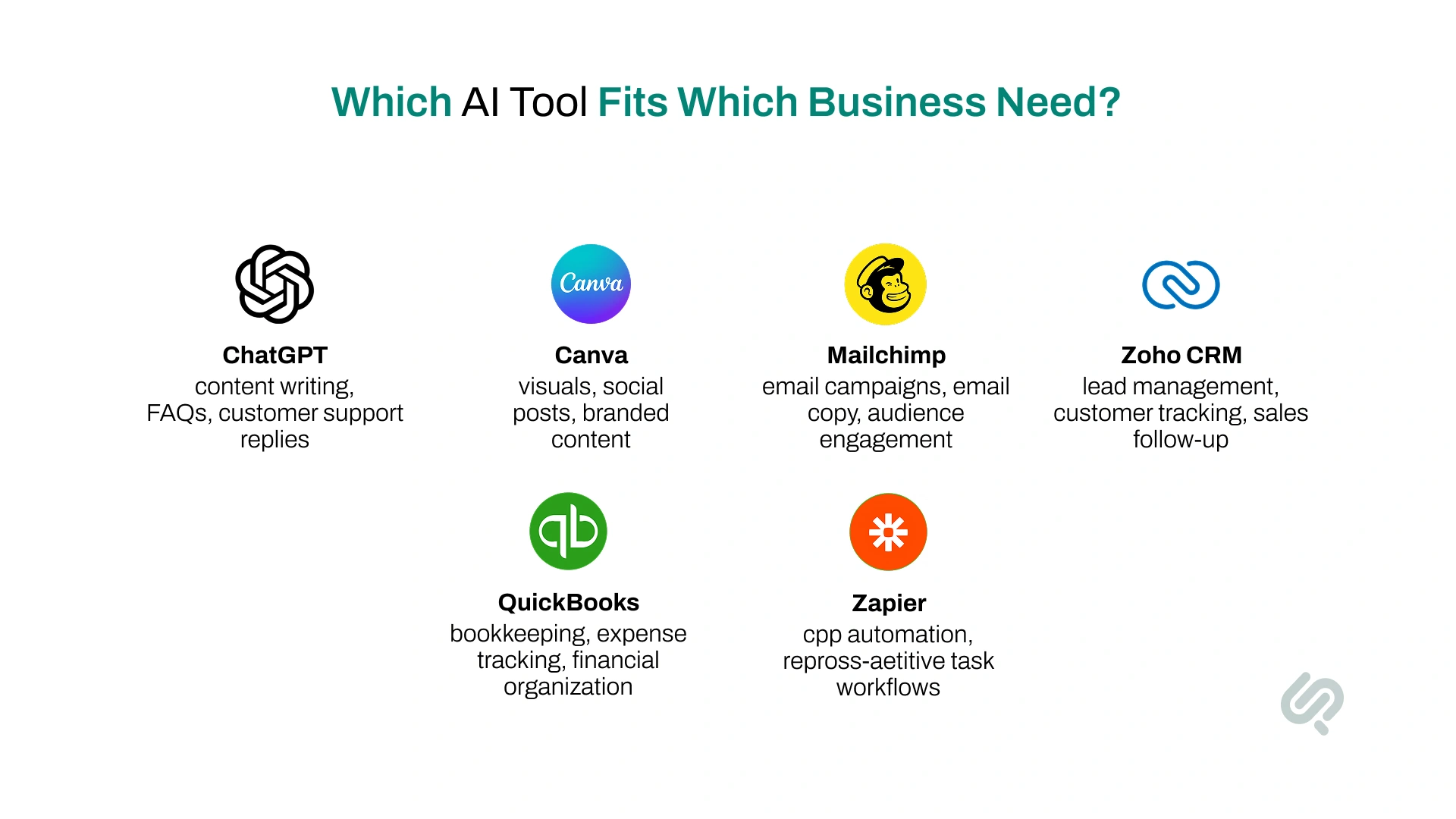
Here’s a simple way to choose:
If your biggest problem is content, start with ChatGPT or Canva.
If your biggest problem is follow-up and customer communication, start with Mailchimp or Zoho CRM.
If your biggest problem is admin work and repetitive tasks, QuickBooks and Zapier usually give faster practical value.
The goal is not to use every AI tool. The goal is to choose the one that solves the problem your business deals with most often. If you want to compare more categories before choosing, review our guide to the best generative AI tools.
Do not judge AI by one prompt or one afternoon of testing. Give it a short, focused trial.
Use this simple 30-day test:
This approach keeps costs low, reduces tool clutter, and helps small teams find value faster.
The biggest benefit of AI is not that it feels advanced. It is that it helps small teams get more done without adding the same amount of manual work.
When used well, AI can help small businesses:
The best results usually come from practical use cases, not experimental ones. If a tool saves time every week and helps your team work more consistently, it is already creating value.
AI can be cost-effective, but it is not risk-free. Small businesses usually run into problems when they expect too much from a tool, skip review, or add too many disconnected apps too quickly.
Common challenges include:
The fix is usually simple: start small, test one use case, review output, and expand only when the tool is actually saving time.
Low-cost AI tools can save time. But low cost should never mean low caution.
Before your team starts using any AI tool, check these basics:
For small businesses, the goal is not just faster output. It is a safe, useful, and trustworthy output.

AI is not only useful for marketing or content. It can also improve the work happening behind the scenes. (3)
For many small businesses, that is where the most immediate value shows up first. Pairing these improvements with small business restructuring can strengthen credibility with creditors.
AI can help with:
The more AI is connected to real-day-to-day workflows, the more useful it becomes. For small businesses, the biggest wins often come from reducing friction in work that already happens every day.
If you are just starting, begin with one tool that supports one operational problem (Freemium AI tools work wonderfully for this). That is usually the fastest path to practical results.
You do not need complicated prompt engineering to get value from AI. A few clear prompts can already save time.
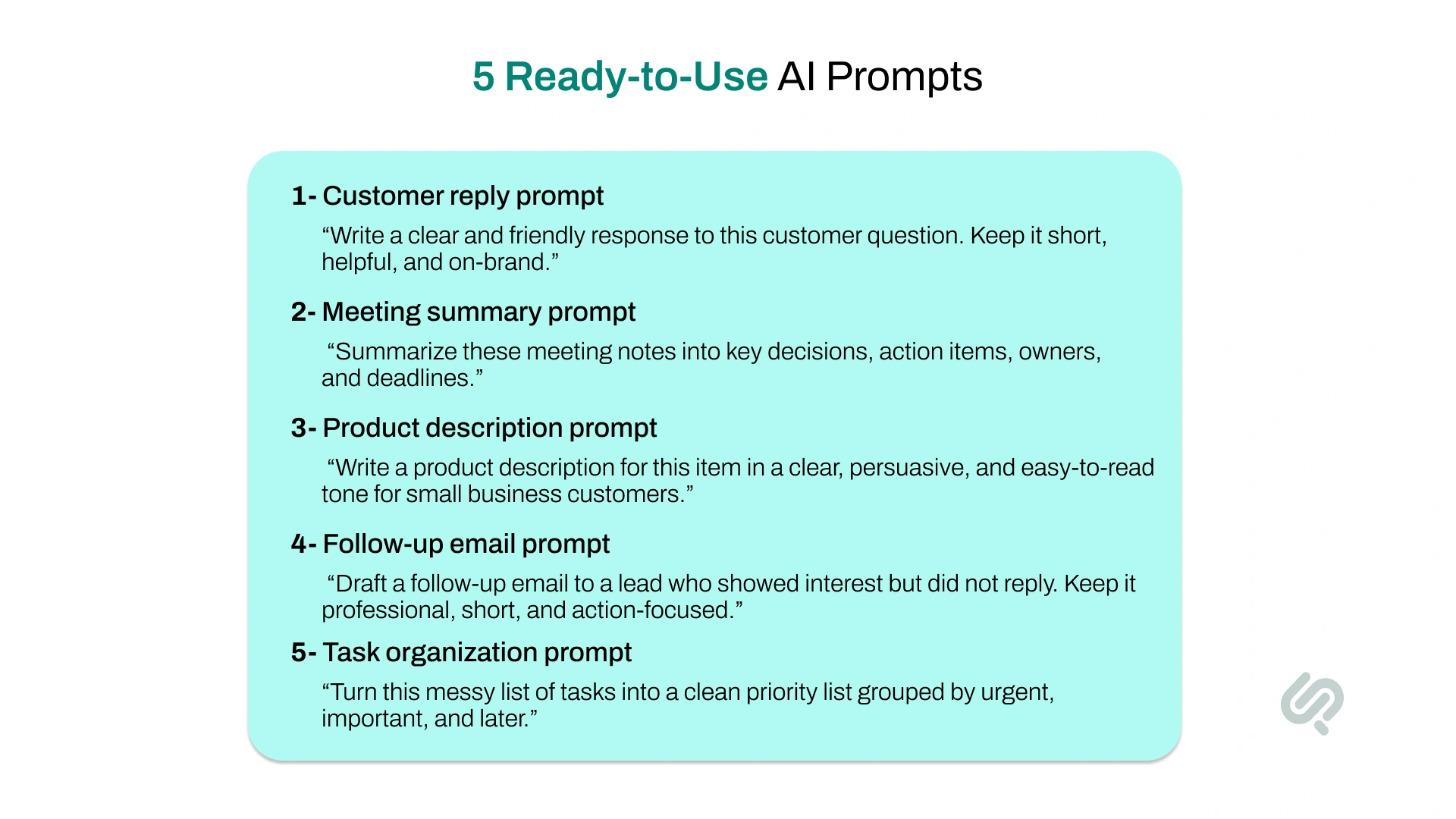
Here are five practical examples:
“Write a clear and friendly response to this customer question. Keep it short, helpful, and on-brand.”
“Summarize these meeting notes into key decisions, action items, owners, and deadlines.”
“Write a product description for this item in a clear, persuasive, and easy-to-read tone for small business customers.”
“Draft a follow-up email to a lead who showed interest but did not reply. Keep it professional, short, and action-focused.”
“Turn this messy list of tasks into a clean priority list grouped by urgent, important, and later.”
Good prompts are specific, practical, and tied to real work. That is what usually makes AI useful for small teams.
Affordable AI tools are a smart way to start. But they do not stay cost-effective forever. At some point, a small business can outgrow basic tools. That usually happens when:
This is the point where custom automation or a more tailored AI setup can create better value than adding another low-cost subscription.
The goal is not to replace affordable tools too early. It is to notice when “cheap and quick” starts creating hidden costs in time, quality, or control.
AI tools are a strong starting point for small businesses. But once your team starts juggling too many tools, weak integrations, or repetitive manual fixes, they stop being cost-effective.
That is usually the point where a custom workflow makes more sense.
Our AI workflow automation services help small businesses connect tools, reduce admin, and build practical automations around real work.
If you want to see what that could look like for your business, book a strategy call with our team.



Umar is a tech writer with 7 years of experience turning complex software topics into easy-to-understand content.
His writing has helped companies reduce bounce rates and improve user time-on-page by up to 60%. He focuses on clarity, structure, and audience-first communication.