.webp)
.webp)
.webp)
.webp)








Creating an AI system means turning a real business or product need into a working solution that can learn from data, make predictions, generate outputs, or automate decisions.
In practice, that usually means defining the problem, preparing the right data, choosing the best model approach, testing it carefully, and deploying it in a way that your team can trust and scale.
If you want to create an AI system, the hard part is usually not finding an AI tool. It is choosing the right use case, deciding whether to build from scratch or use an existing model, and making sure the system works inside real workflows.
That is why many AI pilots stall after the demo stage, even as adoption keeps growing across businesses.
This guide explains how to build an AI system step by step, what you need before development starts, how to avoid common mistakes, and when a custom AI model or AI MVP makes more sense than a full build. It is written for teams that want practical clarity, not just theory.
Start with one clear business problem, collect the right data, choose the simplest model that can solve it, test it in real scenarios, and deploy it into a workflow people actually use.
Yes. Most teams start with a pretrained model, prompt engineering, or light fine-tuning. Building from scratch only makes sense when the data, use case, and ROI clearly justify it.
You need a specific use case, usable data, model strategy, computing resources, testing, deployment planning, and ongoing monitoring after launch.
Python is the best default for most AI projects because the ecosystem is mature and development is faster. Java, R, and C++ matter more when enterprise integration, statistics, or performance-heavy workloads are the priority.
Use pretrained models for speed, fine-tuning for domain-specific improvement, and custom AI only when the problem is highly specialized and the added cost is justified.
You need enough data to reflect the real task, the edge cases, and the expected outputs. A smaller clean dataset is usually more valuable than a large messy one.
A simple prototype can take weeks. A production-ready AI system with integration, evaluation, security, and monitoring usually takes months.
Most fail because the use case is vague, the data is weak, the workflow was never redesigned, or no one owns deployment, governance, and performance after launch.
An AI system is software that uses data and models to perform tasks such as prediction, classification, recommendation, generation, or decision support.
Unlike traditional software, an AI system is not only built with fixed rules. It also learns patterns from examples, which helps it handle tasks where the logic is too complex, too large, or too variable to write by hand.
In practical terms, an AI system usually includes:
That is why building an AI system is not just about choosing a model. It is also about choosing the right problem, using relevant data, testing the output carefully, and making sure the system works inside a real workflow.
For most businesses, an AI system is not meant to “think like a human.” It is meant to do one job better, faster, or at greater scale than a manual process.
Stanford HAI says 78% of organizations reported using AI in 2024. That is a much stronger freshness signal. (1)
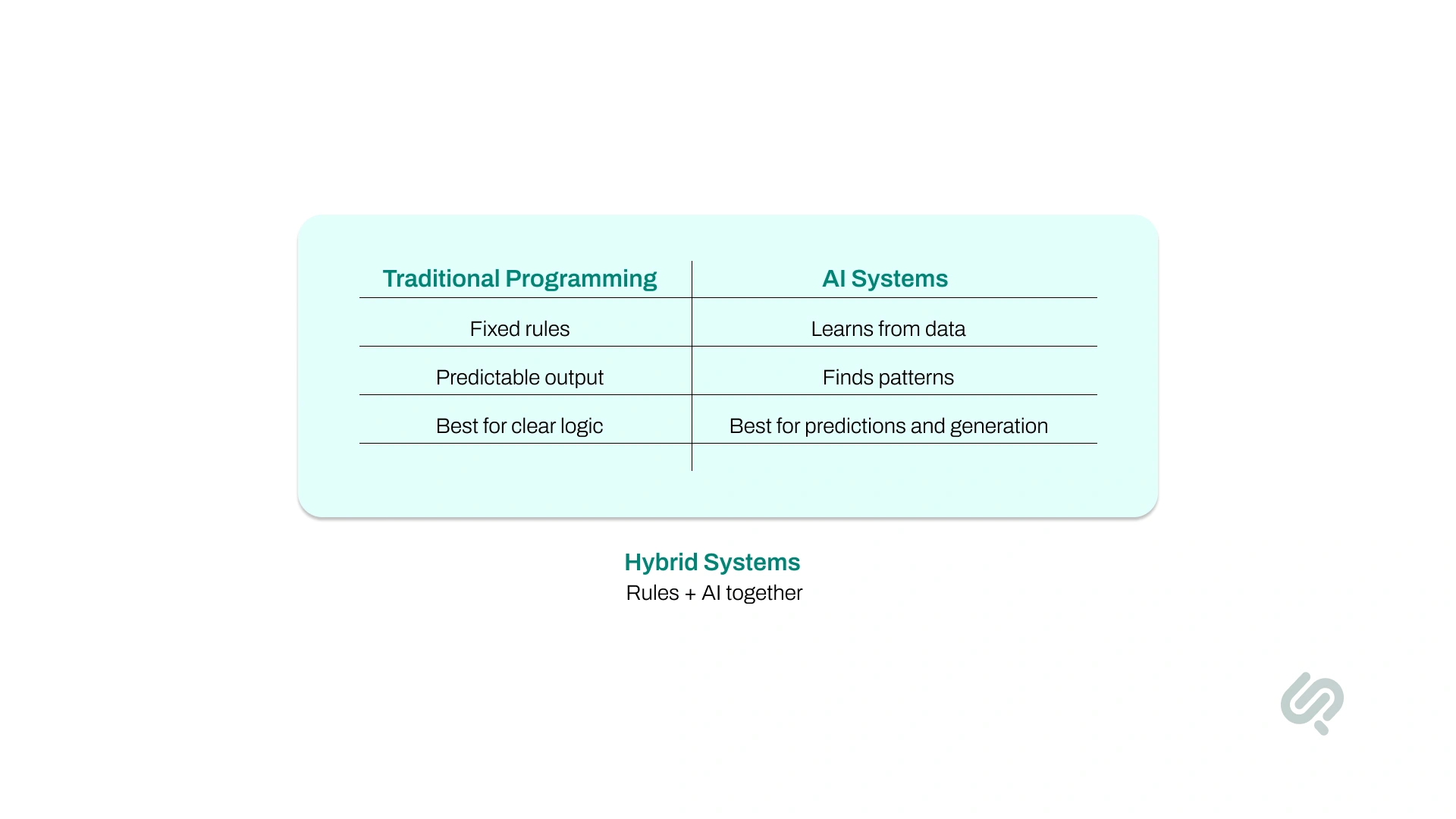
Traditional software follows rules written by developers. If the rules are correct, the output is predictable. That works well when the logic is clear, fixed, and easy to define.
AI systems work differently. Instead of relying only on explicit rules, they learn patterns from data. That makes them useful for tasks where the inputs are messy, the patterns are hard to describe, or the output needs to improve over time. CEI explains this difference clearly by contrasting rule-based programming with pattern learning from examples.
A simple way to think about it:
Use traditional programming when the answer can be defined with clear rules. Use AI when the answer depends on patterns in data, language, behavior, or complex inputs.
That is also why many AI projects fail when teams start with “we want AI” instead of “we want to solve this specific problem.” If the problem does not need learning, prediction, or generation, AI may not be the right tool.
Most companies do not build AGI. They build task-specific AI systems tied to a workflow, product feature, or business decision. That framing is far more useful for this article than ANI / AGI / ASI. Clarifai and CEI both lean into real implementation paths like prediction, classification, generation, deployment, and monitoring rather than speculative AI categories.
Here are the main types of AI systems businesses actually build:
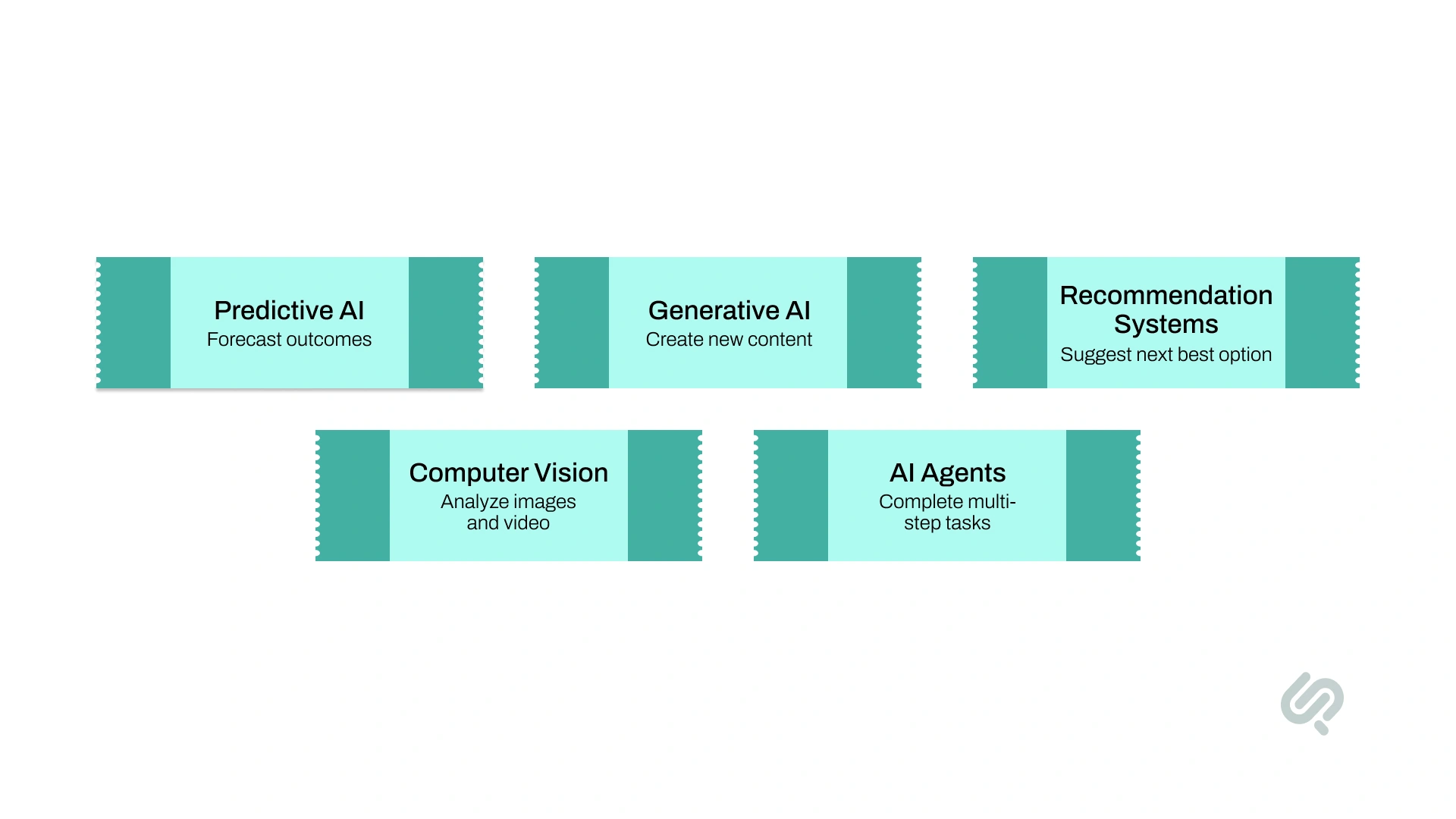
These systems analyze historical data to forecast what is likely to happen next.
Examples include:
These systems create new outputs such as text, summaries, answers, code, or images.
Examples include:
These systems suggest products, content, actions, or next steps based on behavior and patterns.
Examples include:
These systems analyze images or video to detect objects, events, patterns, or quality issues.
Examples include:
These systems use models, tools, and logic together to complete multi-step tasks.
Examples include:
When people ask how to create an AI system, this is usually what they mean: choosing the right type of system for the actual business problem.
Want to know how to create an AI system? We’ve compiled a list of 9 key requirements you need to get your AI up and running.
Here’s a simple guide to understand the 9 requirements to build an AI system:
Start by defining exactly what you want the AI system to do and how success will be measured. A clear goal helps you choose the right data, model, workflow, and deployment path.
This matters even more now because organizations are using AI in more parts of the business than before. McKinsey reports that companies now use AI in an average of three business functions, but the biggest value does not come from adding AI tools alone.
It comes from redesigning workflows so the system actually improves how work gets done
Once you’re sure of the objective, you can set clear, measurable goals to help guide your AI’s development process.
Your AI system needs clean, relevant, and well-structured data to perform well. If the training data is incomplete, outdated, biased, or inconsistent, the output quality will suffer too.
Before building the system, make sure your data is accurate, usable, and closely matched to the task you want the AI to handle.
For example, an AI developed for detecting fraud in financial transactions will need a clear and comprehensive dataset of financial regulations, as well as a dataset of past transactions to learn from.
An AI system design is only as good as its algorithms and models. These algorithms and models are like recipes that guide the AI on how to learn data.
Depending on your project, you may utilize algorithms for tasks like regression, classification, or clustering. Models can be pre-built or custom-made, depending on your needs.
Training your AI system requires sufficient computing power. This can be through high-performance local machines or cloud-based solutions. For example, training deep learning models often require powerful GPUs or cloud services like Google Cloud.
Providing your AI system with the required computing power will enable it to perform efficiently and effectively.
You need appropriate tools and frameworks for developing an AI system that fits your purpose. For this purpose, you can utilize Python libraries (like TensorFlow, PyTorch, or Scikit-Learn).
These tools and frameworks provide the necessary functionalities to create, train, and evaluate AI systems.
Making an AI system from scratch requires solid programming knowledge. Languages like Python are mainly used because they’re simple to use and have extensive libraries full of helpful tools.
Knowing how to write code and debug it is crucial for the implementation and refinement of your AI system.
Testing and evaluation is another vital requirement to build your own AI system. Once your AI system is trained, you need to check its performance in real-world scenarios and make adjustments if required.
Testing and evaluation provide multiple valuable metrics like accuracy, precision, and recall to help measure how well your AI system is working.
Deploying your AI system reveals just how well it integrates into your existing workflows or products.
For this requirement, you may have to set up APIs, cloud services, or user interfaces to ensure your AI can be used effectively by users.
In real-world projects, deployment also means connecting the AI system to APIs, product workflows, dashboards, and internal business systems so the output can be used where decisions and actions actually happen.
AI developers often overlook this but continuous monitoring and updates form the backbone of your AI system. Performing these tasks ensures that your AI system remains relevant and fixes any issues as they come along.
Once the system is live, you need to watch for model drift, evaluate outputs regularly, and add human review where decisions are sensitive or quality control matters.
Google Cloud specifically notes that human review can help with responsible use, quality control, and monitoring generated content, and its deployment guidance emphasizes evaluation and model monitoring as ongoing operational work.
Following these requirements will help you build an AI system from start to finish. Each of these steps is crucial in ensuring that your AI system is effective, reliable, and valuable.
A strong AI system is built in stages. The model matters, but the full process matters more. Both competitor articles give much more space to the actual workflow of building, training, evaluating, deploying, and maintaining an AI system.
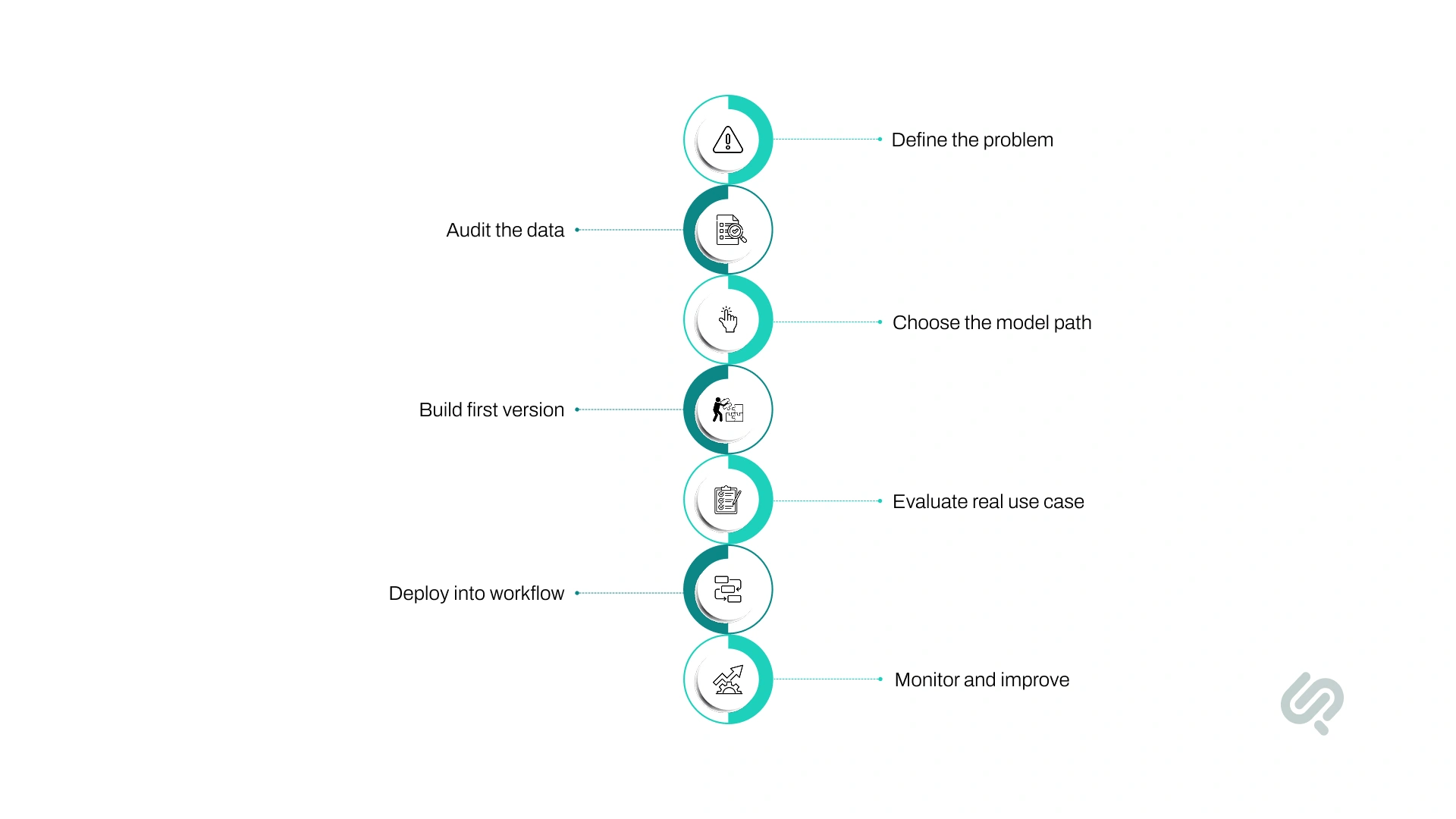
Start with one narrow problem that is worth solving.
Ask:
A vague goal like “add AI to our product” is not enough. A better goal is “reduce manual document review time by 40%” or “classify support tickets with 90% accuracy.”
Before choosing a model, check whether you have enough usable data.
You need data that is:
If the data is weak, the system will be weak. Clean, relevant data usually matters more than picking the most advanced model.
Do not start with a full custom model unless you truly need it.
In many cases, the best path is:
This keeps cost, complexity, and risk lower.
Now create a working version of the system.
This usually includes:
At this stage, the goal is not perfection. The goal is to prove the system can solve the right problem under realistic conditions.
Do not judge the system only on a lab test.
Test it against:
For some systems, accuracy is the main metric. For others, speed, cost, consistency, explainability, or user trust matter just as much.
An AI model only becomes useful when it is connected to where work happens.
That may mean:
If the output stays disconnected from the workflow, the system usually stalls after the demo.
AI systems are not one-time builds. They need active monitoring after launch.
Track:
This is where production AI becomes a real system instead of a pilot.
Many articles talk only about the model, but a real AI system is bigger than the model. Clarifai explicitly frames AI implementation around infrastructure, data, service, model, and application layers, which is one of the biggest strengths missing from your article right now.
A practical AI system usually has four working layers:
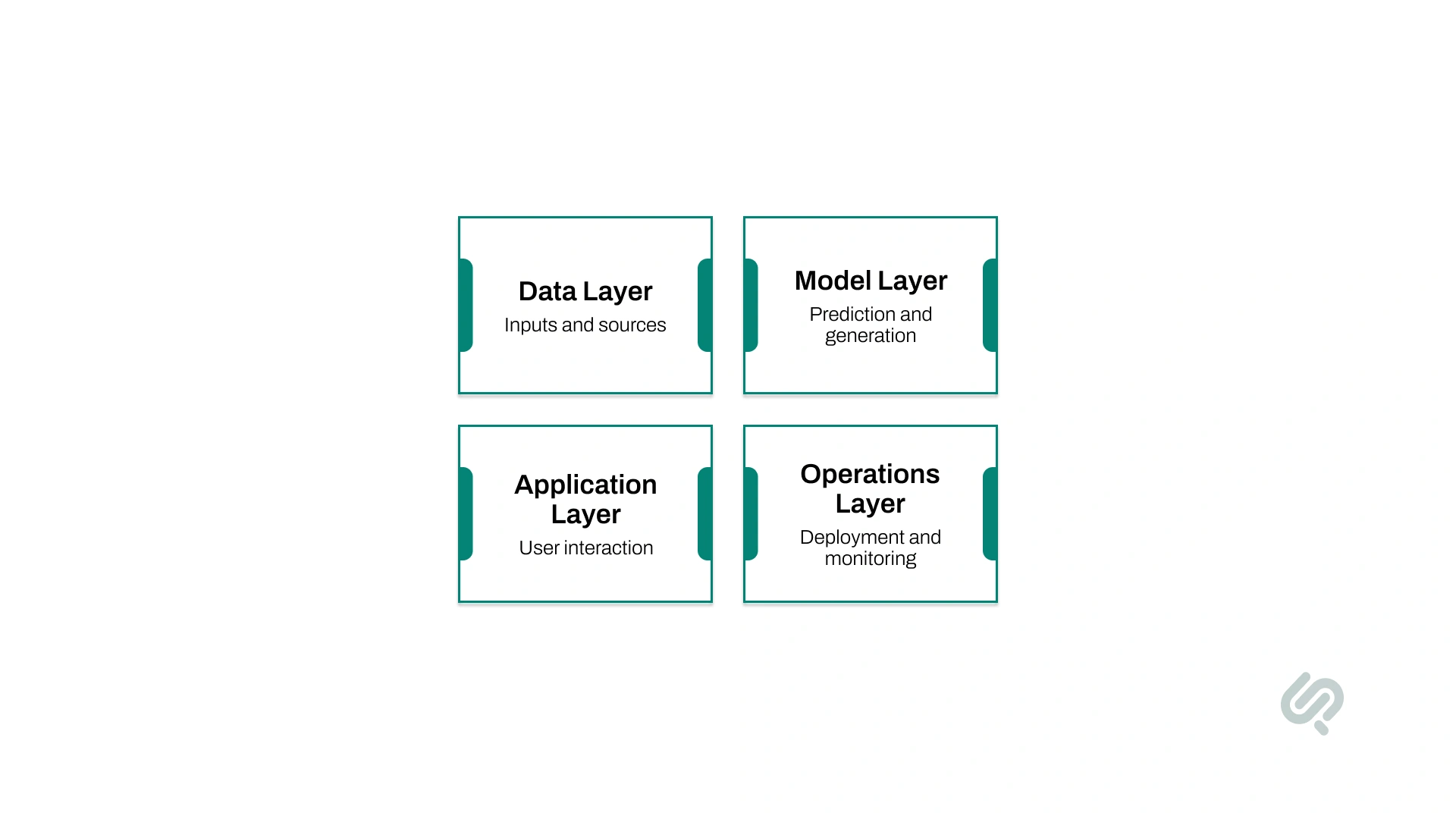
This is where your inputs come from.
It can include:
If this layer is messy, outdated, or incomplete, the rest of the system suffers.
This is where the actual AI logic runs.
It may include:
This layer is responsible for prediction, generation, extraction, or decision support.
This is how users or systems interact with the AI.
It may include:
This layer determines whether the AI output is actually usable.
This is what keeps the system reliable in production.
It includes:
Many AI projects fail because teams focus on the model but ignore this layer. If you want to create an AI system that lasts, all four layers need to work together.
Programming language matters, but it is rarely the first decision that determines project success. Most teams should focus on the use case, data, model path, and deployment plan first. After that, they can choose the language and frameworks that best fit the system.
Python is still the default for most AI projects because the ecosystem is mature and development is faster. Java can make sense for enterprise-heavy environments. R is useful for statistical work, and C++ matters more in performance-sensitive systems. Clarifai and CEI both place tools and frameworks in the context of the broader build process rather than treating language choice as the main early decision.
For most businesses, the bigger question is not “Which language should we use?” It is “What is the right architecture, model strategy, and workflow for this use case?”
One of the biggest decisions when you create an AI system is how much of the model you actually need to build yourself.
In many cases, starting with a pretrained model is the fastest and lowest-risk option. Fine-tuning or adapting an existing model makes sense when your business needs more specific outputs, better task accuracy, or stronger alignment with your domain.
Building a custom model from scratch should usually be reserved for cases where the use case is highly specialized, the data is strong, and the return clearly justifies the extra time, cost, and complexity.
For many businesses, the smartest path is to start with a pretrained model, validate the use case, and only move to fine-tuning or full custom AI model development when the business case is clear.
Google Cloud notes that fine-tuning can improve edge cases, complex prompts, output structure, cost, and latency for the right use cases, while OpenAI’s guidance points teams first toward strong prompting and then fine-tuning when they need better task adaptation.
If your system also needs access to fresh internal knowledge, retrieval-based approaches can be a better fit than training a model from scratch.
That is often the more practical route when accuracy depends on up-to-date business content rather than brand-new model knowledge.
Not every AI system needs a newly trained model. In many cases, a retrieval-based system or an AI agent is the smarter choice. Clarifai explicitly includes hybrid approaches and retrieval-augmented generation as part of model strategy, which is a gap worth filling here.
RAG is a strong fit when answers depend on current business content rather than knowledge baked into a model.
Use it for:
RAG is often better than retraining when the information changes often.
AI agents are a better fit when the system needs to do more than answer a question.
Use them for:
This is useful in support, operations, internal automation, and process-heavy products.
Training or fine-tuning makes more sense when you need:
A good rule is simple:

A custom AI system is not always the first step, but it can be the right step when the problem is specific, the workflow is important, and the system needs to fit tightly into how your business operates.
For many teams, a pretrained model or AI PoC is the best place to start. But once the use case is validated, a custom AI system often becomes the better long-term option.
A custom build makes more sense when:
The biggest advantage of custom AI is not just better performance. It is better fit.
A custom AI system can give you:
The smartest path for most businesses is not “custom first.” It is “validate first, then customize where it creates clear value.”
Creating a working prototype is one thing. Turning it into a reliable AI system that delivers value inside a real business workflow is much harder.
Current enterprise research shows that adoption is rising, but many teams still struggle to scale AI because the hard part is not the demo. It is the workflow, data, evaluation, and governance around it.
McKinsey says only 21% of respondents whose organizations use generative AI report that their organizations have fundamentally redesigned at least some workflows, even though workflow redesign is one of the clearest drivers of value. (2)
Many AI projects start with excitement around the technology, but not enough clarity around the actual problem. If the team cannot explain what the system should do, who will use it, and how success will be measured, the project usually stalls after the prototype stage.
Even strong models struggle when the data is incomplete, noisy, outdated, or poorly matched to the task. An AI system needs relevant data not just for training, but also for testing, validation, and real-world improvement after launch.
Google Cloud’s deployment guidance stresses building custom evaluation datasets that reflect essential, average, and edge-case use cases.
A prototype can show that the model works. That does not mean the business process is ready for it. McKinsey’s latest State of AI research makes this clear: organizations get more value when they redesign workflows around AI instead of simply layering AI tools on top of old processes.
Once an AI system goes live, it still needs evaluation, oversight, and clear rules for how it operates.
Google Cloud recommends keeping humans in the loop for critical decisions and treats evaluation as a core part of operating AI systems in production.
Deloitte also reports that only one in five companies has a mature governance model for autonomous AI agents, which shows how often oversight still lags behind deployment. (3)

AI systems need more than model performance. They also need guardrails. Clarifai’s article gives dedicated attention to deployment security, fairness, robustness, and lifecycle management, while CEI also emphasizes privacy, bias, explainability, and compliance as ongoing implementation issues.
Before launching an AI system, make sure you can answer these questions:
Know:
Set clear access rules for:
This matters even more when the AI touches customer data, financial data, or internal documents.
Not every output should go straight into production action.
Add human review when:
Track:
Have a plan for:
If your team cannot answer these questions clearly, the system is probably not ready for full production.
Not every team should jump straight into a full custom build. In many cases, the smarter move is to start with a clear use case, validate the workflow, and decide whether you need a prototype, a fine-tuned model, or a fully custom AI solution. That staged approach fits current enterprise guidance much better than rushing from idea to full deployment.
If you are planning to create an AI system, here are a few practical ways we can help:
Start with our AI PoC & MVP Development Services.



Musa is a senior technical content writer with 7+ years of experience turning technical topics into clear, high-performing content.
His articles have helped companies boost website traffic by 3x and increase conversion rates through well-structured, SEO-friendly guides. He specializes in making complex ideas easy to understand and act on.