


.webp)
.webp)
.webp)
.webp)








%20(1).webp)
Generative AI for software development means using AI tools and large language models to speed up planning, coding, testing, documentation, code review, and product delivery. For businesses, the real question is not whether GenAI can help. It is how to adopt it without adding risk, cost, or delivery confusion.
Should you give your developers tools like GitHub Copilot or Cursor? Should you hire GenAI developers in-house? Or should you work with a GenAI development company that already uses AI across planning, development, testing, and deployment?
This guide helps founders, CTOs, product leaders, and engineering teams compare each option clearly before investing time, budget, or engineering resources.
You will learn:
Generative AI for software development means using AI tools and LLMs to support coding, testing, documentation, code review, architecture planning, and software delivery. It helps teams move faster, but senior engineers still control architecture, quality, and final decisions.
Generative AI improves software development by reducing time spent on repetitive tasks like boilerplate code, test case creation, documentation, and code review. It helps developers work faster while keeping more time for logic, architecture, and product decisions.
No. Code generation is only one use case. GenAI can also support requirement analysis, sprint planning, testing, bug detection, API documentation, DevOps setup, workflow automation, and AI features built into the product itself.
Use GenAI tools if your team only needs productivity support. Hire a GenAI development partner if your product needs production AI features, LLM integration, RAG, AI agents, data workflows, security, monitoring, or faster full-stack delivery.
The cost depends on scope. GenAI tools are low-cost monthly subscriptions, while custom GenAI software can range from a focused MVP to a larger enterprise build. The main cost drivers are data quality, integrations, security, monitoring, and post-launch support.
No. Generative AI helps developers work faster, but it does not replace engineering judgment. Architecture, security, complex integrations, business logic, product decisions, and production readiness still need experienced developers.
.webp)
Generative AI does not replace the software development lifecycle. It improves specific parts of it.
The biggest gains usually come from repetitive, structured, and documentation-heavy tasks. The biggest risks appear when teams use AI-generated output without senior engineering review.
The real value of GenAI is not “faster code.” It is faster movement across the full delivery process when experienced engineers control the output.
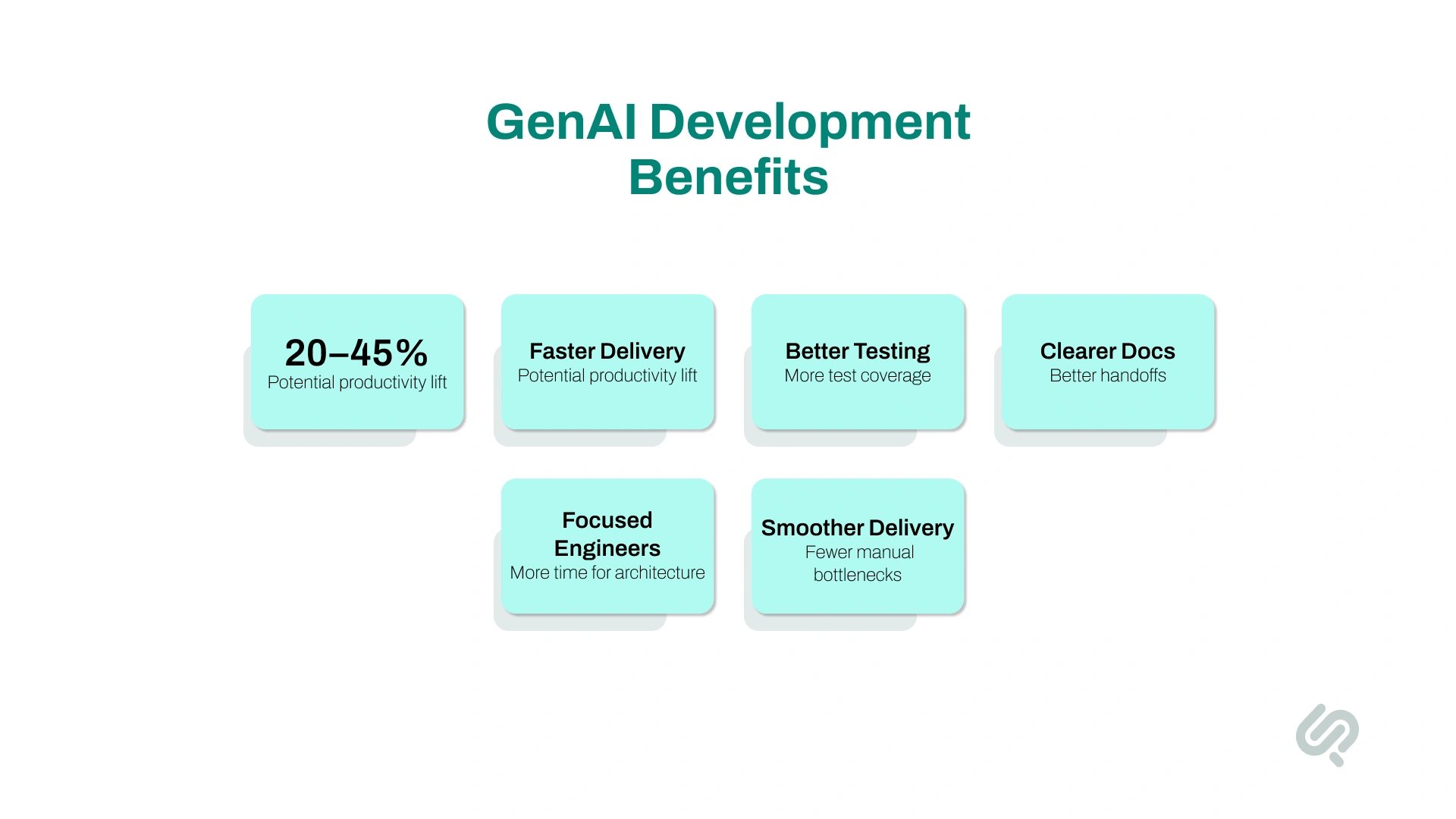
Generative AI creates the most value when it improves delivery speed, software quality, and team efficiency at the same time.
McKinsey estimates that generative AI could improve software engineering productivity by 20% to 45% of current annual spending on the function, mainly by reducing time spent on code drafts, code correction, refactoring, root-cause analysis, and system design support. (1)
For business teams, the main benefits include:
The real benefit is not simply “faster coding.” It is a smoother software delivery process with fewer manual bottlenecks.
Once you understand what GenAI actually changes in development, the adoption question becomes practical. There are three real paths.
What this involves:
Subscribing to AI coding assistants — GitHub Copilot, Cursor, Codeium, or similar — and integrating them into your team's existing development workflow.
In a controlled GitHub Copilot study, developers with access to the AI pair programmer completed a coding task 55.8% faster than developers without it. (2)
Realistic outcomes:
A 20–35% productivity improvement on routine coding tasks within 4–8 weeks of adoption. Larger gains require workflow changes beyond just installing a tool — teams need to learn prompting, review practices, and where to trust vs. verify AI output.
Works well when:
Works poorly when:
What this involves:
Recruiting engineers who have built with GenAI tools daily — developers with experience in LLM integration, prompt engineering, AI pipeline development, and AI-assisted development workflows.
Realistic outcomes:
A team that ships faster and builds AI capabilities into the product from the start, without a learning curve on GenAI tooling.
Works well when:
Works poorly when:
What this involves:
Engaging a development company that uses generative AI across every stage of its delivery process — and can build GenAI features directly into your product.
Realistic outcomes:
Faster time to production than building the capability in-house, full-stack delivery (design + AI features + integration + deployment + documentation), and a team that has already solved the GenAI integration problems your project will encounter.
Works well when:
Works poorly when:
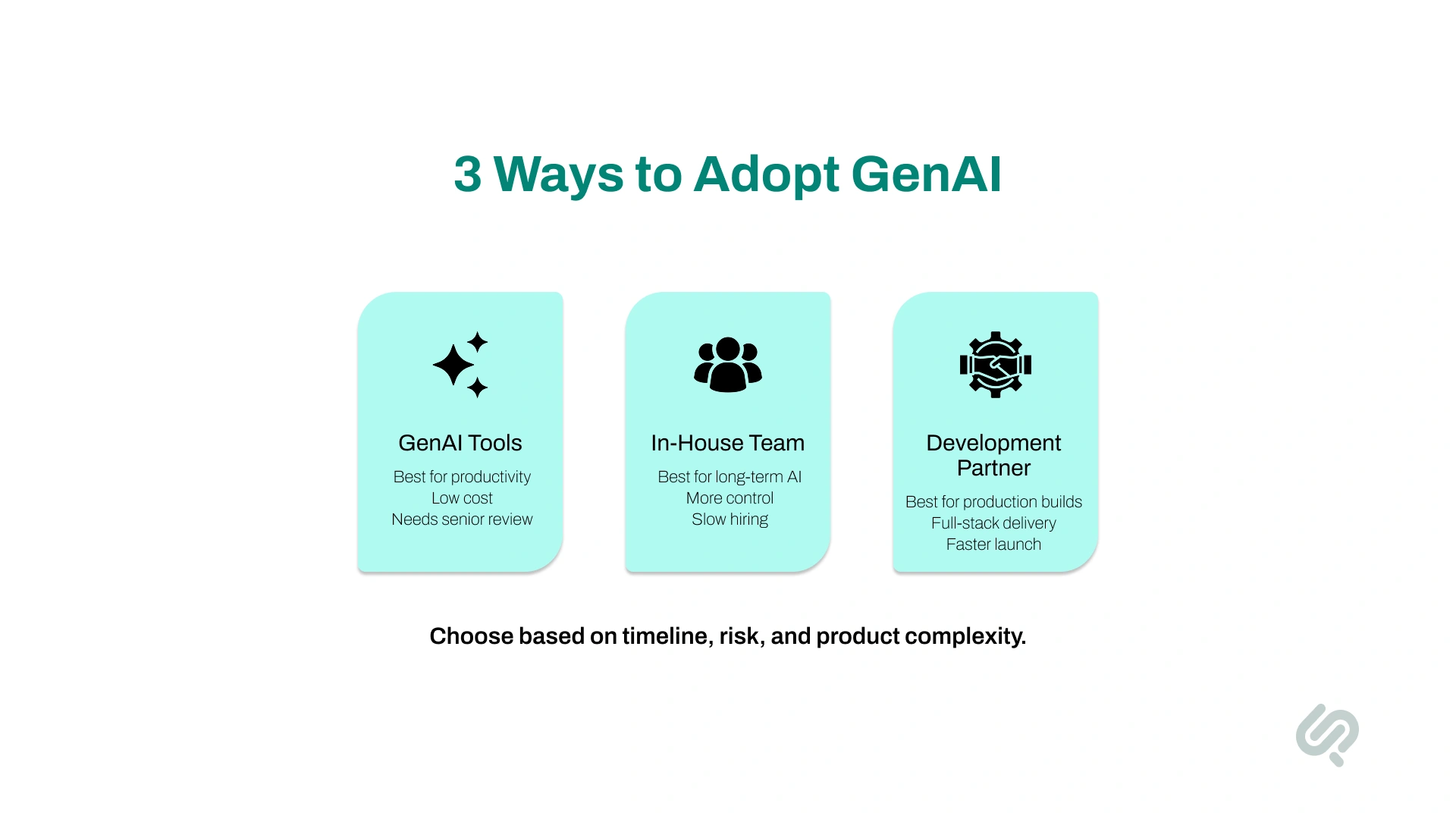
Use this comparison to quickly see which GenAI adoption path fits your timeline, budget, internal capability, and product complexity.

GenAI tools may be enough if your team already has strong engineering skills and the product does not require complex AI features.
This path works best when you want to improve developer productivity, not build a full AI-powered product.
GenAI tools are a good fit when:
Common tools include GitHub Copilot, Cursor, ChatGPT, Codeium, and AI-assisted testing or documentation tools.
AI tools are already mainstream in development teams. Stack Overflow’s 2025 Developer Survey found that 84% of respondents are using or planning to use AI tools in their development process, and 51% of professional developers use AI tools daily. But the same survey also found that 66% of developers are frustrated by AI solutions that are “almost right, but not quite,” which is why senior review still matters. (3)
But tools alone do not create an AI-first development process. They help individual developers move faster. They do not automatically improve architecture, QA, DevOps, security, or product strategy.
Teams also need a clear process for reviewing and debugging AI-generated code.
Hiring GenAI developers in-house makes sense when AI will be a long-term part of your product, platform, or internal engineering capability.
This is usually the right path for companies that need permanent AI ownership, not just one project.
Hiring in-house works well when:
The challenge is that one GenAI developer is rarely enough.
A production AI product may need:
That is why in-house hiring works best when you are building a long-term AI team, not when you need fast delivery on a single product.
A GenAI development company is the better option when you need production-ready software, not just internal experimentation.
This path is useful when you need a team that can plan, design, build, test, deploy, and maintain AI-powered software under one delivery process.
You should consider a GenAI development partner when:
A good partner should not just “add AI features.” They should help you decide which AI features are worth building, how they will work in production, and how they will create business value.
You probably need a GenAI development partner if several of these apply:
The cost of generative AI software development depends on the adoption path.
Using AI tools is cheaper at the start. Building in-house gives more control. Working with a partner can reduce delivery risk when the project needs production AI features.
The largest cost drivers are usually not the model or API fees.
The real cost depends on:
This is why a simple AI demo may be affordable, while a production-ready GenAI product requires proper planning, engineering, and maintenance.
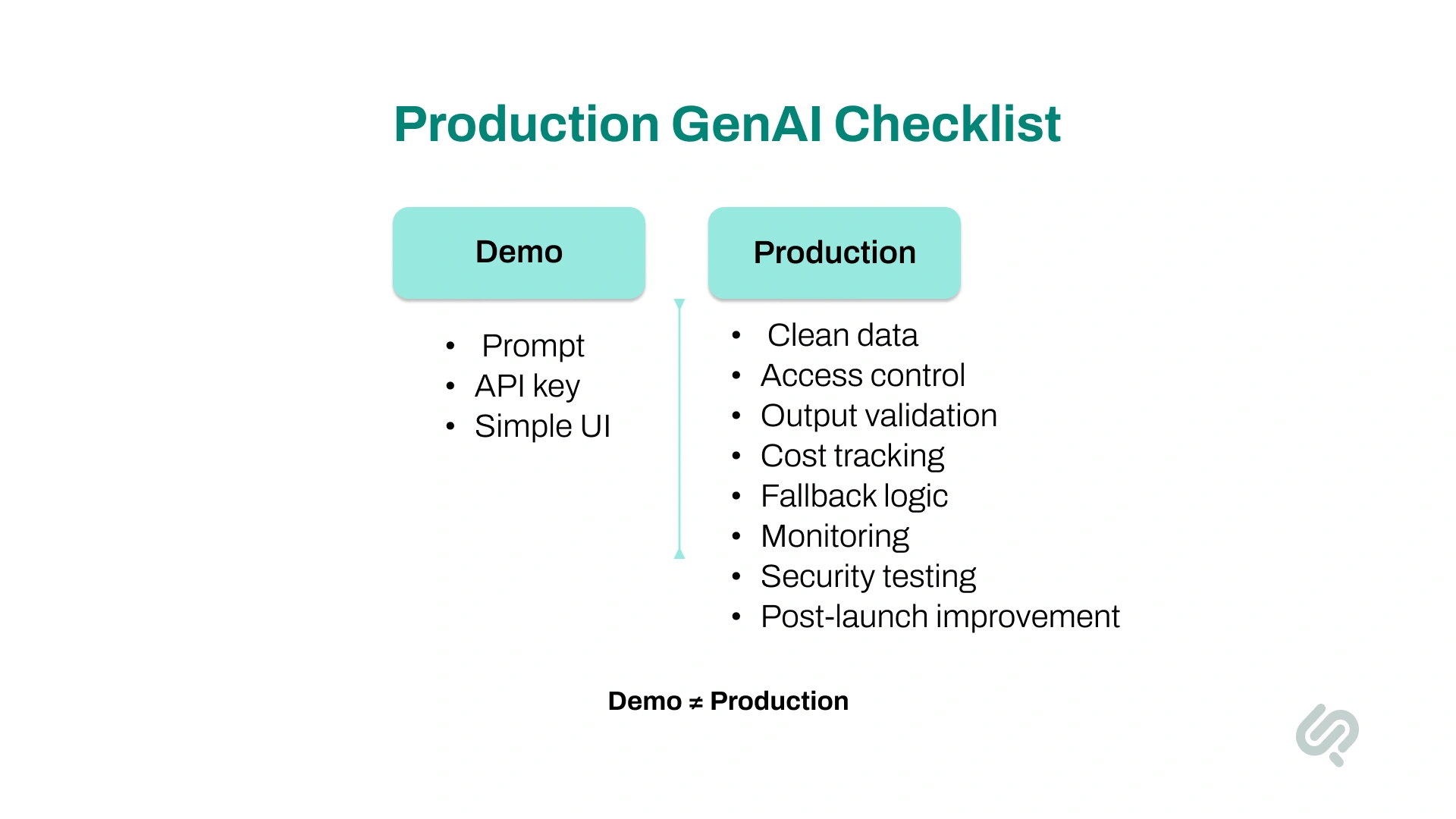
Many teams underestimate what it takes to move from an AI demo to production software.
A demo may only need a prompt, an API key, and a simple interface. A production GenAI product needs reliability, security, cost control, monitoring, and fallback logic.
Production-grade GenAI software usually requires:
This is where many first-time GenAI projects fail.
The first version may look impressive, but the system breaks when real users ask unexpected questions, upload messy data, or use the product at scale.
A strong GenAI development process plans for these problems before launch.
Generative AI works best when it solves a specific workflow problem.
The goal is not to add AI everywhere. The goal is to use AI where it reduces manual work, improves user experience, speeds decisions, or creates a stronger product feature.
The best GenAI use cases are narrow, measurable, and connected to a real business process.
Avoid starting with “we need AI.” Start with “which workflow is slow, expensive, repetitive, or hard to scale?”
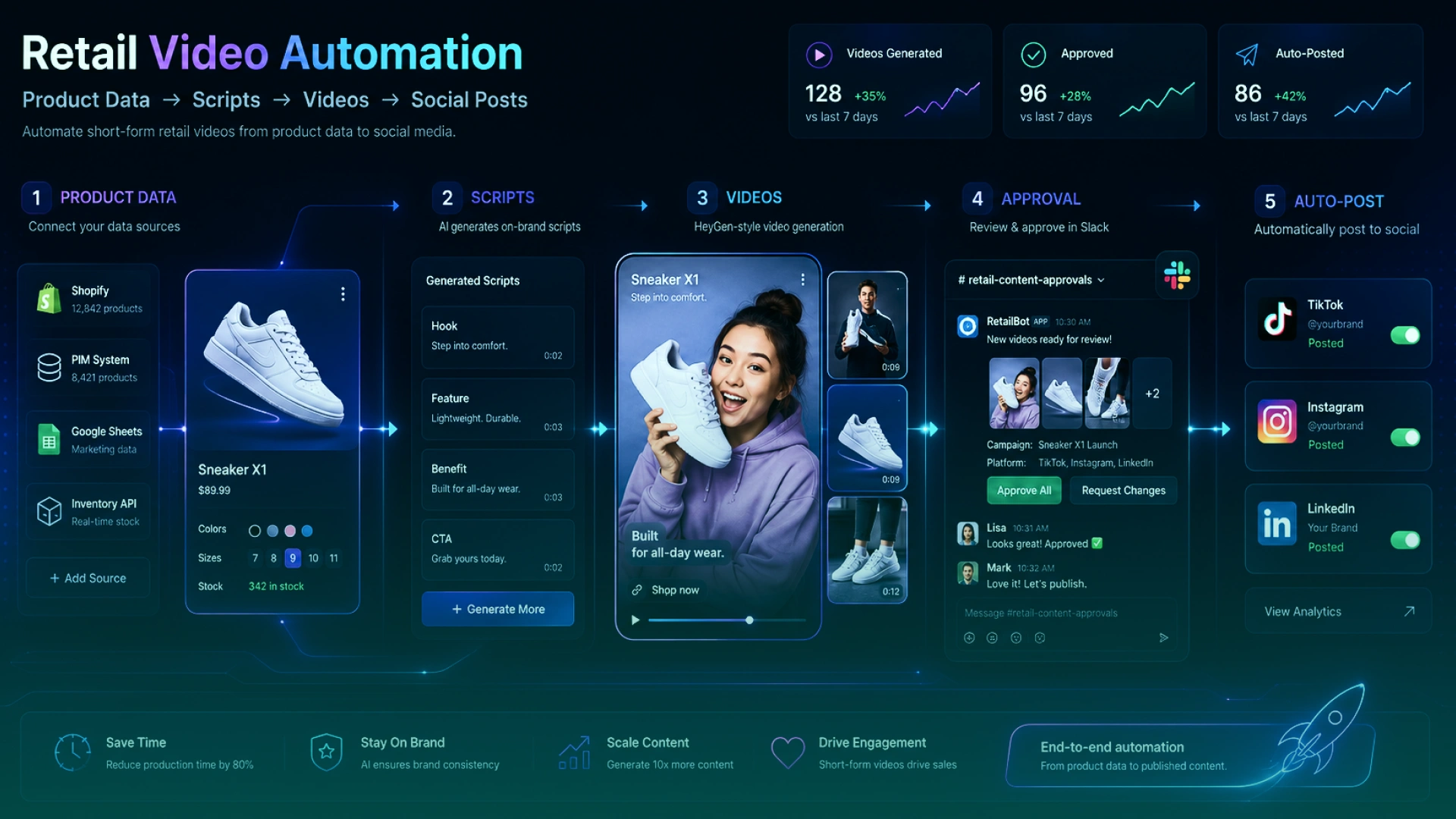
Phaedra Solutions built an AI-powered retail video automation system that helps retail brands and ecommerce teams create a steady stream of shoppable social videos without expanding their marketing teams.
The result is a fully automated content engine that helps teams scale from 5–8 videos per week to 35–60 videos per week, cut production time by up to 90%, increase content output by 4X, improve turnaround speed by 2X, and lift CTR by 24%.
For retail marketing teams, this shows what production-ready GenAI software can do when it is connected to real business workflows: reduce manual effort, increase output, and create daily visibility across high-value social channels.
Choosing the right GenAI software development company matters because AI projects carry more risk than standard software builds.
You are not only hiring a team to write code. You are trusting them to make decisions about data, architecture, model behavior, security, cost, and long-term maintainability.
NIST’s AI Risk Management Framework says trustworthy AI systems should be valid and reliable, safe, secure and resilient, accountable and transparent, explainable and interpretable, privacy-enhanced, and fair. These are useful criteria when evaluating whether a GenAI partner is ready to build production software, not just demos. (4)
Before choosing a partner, ask:
A good GenAI partner should help you reduce uncertainty before development starts.
They should tell you what to build, what not to build, what can be shipped first, and what should wait until later.
Not every AI vendor is ready to build production software.
Some teams can create an impressive demo but struggle with real users, real data, security needs, performance issues, and ongoing maintenance.
Watch for these red flags:
A serious GenAI development company should be clear about risks. If a vendor makes AI sound effortless, they may not understand what production delivery actually requires.
Generative AI should be measured by business and engineering outcomes, not by tool usage.
A team using AI tools every day is not automatically more productive. The real question is whether GenAI improves delivery speed, quality, cost, and product outcomes.
Track these KPIs:
For leadership teams, focus on 3–5 core metrics: delivery speed, cost reduction, defect reduction, team productivity, and business impact.
For engineering teams, track more detailed metrics around code quality, test coverage, review time, and deployment stability.
The best way to start is not by choosing a tool first. Start by choosing the right adoption path.
Follow these steps:
Decide whether your problem is slow coding, weak testing, poor documentation, delivery delays, or a need for AI product features.
Use GenAI tools if your team needs productivity support. Hire in-house if AI will be a long-term internal capability. Work with a partner if you need production-ready AI software faster.
Avoid adding AI everywhere. Pick one workflow, product feature, or delivery bottleneck where GenAI can create measurable value.
If the project needs RAG, AI search, document processing, or AI agents, review your data quality, access rules, and system integrations first.
Track delivery speed, cost, quality, adoption, support reduction, or revenue impact depending on the project.
Include testing, security, monitoring, fallback logic, documentation, and post-launch improvement in the plan.
This helps you avoid the common mistake of building an impressive AI demo that is not ready for real users.
Generative AI can speed up development, improve product workflows, and create new software capabilities.
But the results depend on how you adopt it.
If your team only needs a productivity boost, GenAI tools may be enough. If AI will become a long-term product capability, hiring in-house may make sense. If you need to build and launch faster, a GenAI development partner can help you reduce risk and move with more confidence.
Phaedra Solutions helps startups, product teams, and enterprises build production-ready GenAI software.
We can help you:
Book a discovery call with our GenAI team and get a clear recommendation on what to build, what to avoid, and what your project will realistically take.



Musa is a senior technical content writer with 7+ years of experience turning technical topics into clear, high-performing content.
His articles have helped companies boost website traffic by 3x and increase conversion rates through well-structured, SEO-friendly guides. He specializes in making complex ideas easy to understand and act on.
