













A forward deployed engineer enterprise integration engagement puts a senior engineer inside the customer's real environment to connect new software or AI with ERPs, CRMs, databases, APIs, identity platforms, cloud infrastructure, data pipelines, and legacy systems.
Unlike an integration consultant who may stop at architecture or recommendations, an FDE stays hands-on through discovery, custom integration development, testing, deployment, and production troubleshooting. This matters because enterprise integrations rarely involve one clean API.
They involve conflicting data, undocumented system behavior, permissions, security rules, multiple owners, and workflows that cannot stop while the integration is being built.
A forward deployed engineer maps the existing environment, builds integrations, resolves legacy and data issues, implements security controls, tests production failure scenarios, and supports rollout. The FDE stays responsible for the connected workflow instead of completing one isolated API task.
FDEs first map systems, data flows, permissions, dependencies, and business rules. They then choose the right integration architecture, build connectors or middleware, test failures and edge cases, deploy in stages, and fix issues discovered in the real environment.
Yes. An FDE can connect AI applications or agents with legacy databases, ERPs, CRMs, internal applications, APIs, files, middleware, and identity systems. Where a modern API does not exist, the engineer may use adapters, wrappers, queues, or controlled database integrations.
A contained API integration may take a few weeks, while multi-system enterprise integration can take several months. The timeline depends on system access, legacy complexity, security approval, data quality, vendor dependencies, testing, and how much must be discovered during implementation.
Use an FDE when the project has high technical uncertainty and requires production engineering, not only advice. An integration consultant may be enough when the architecture is understood and the main requirement is planning, governance, configuration, or implementation coordination.
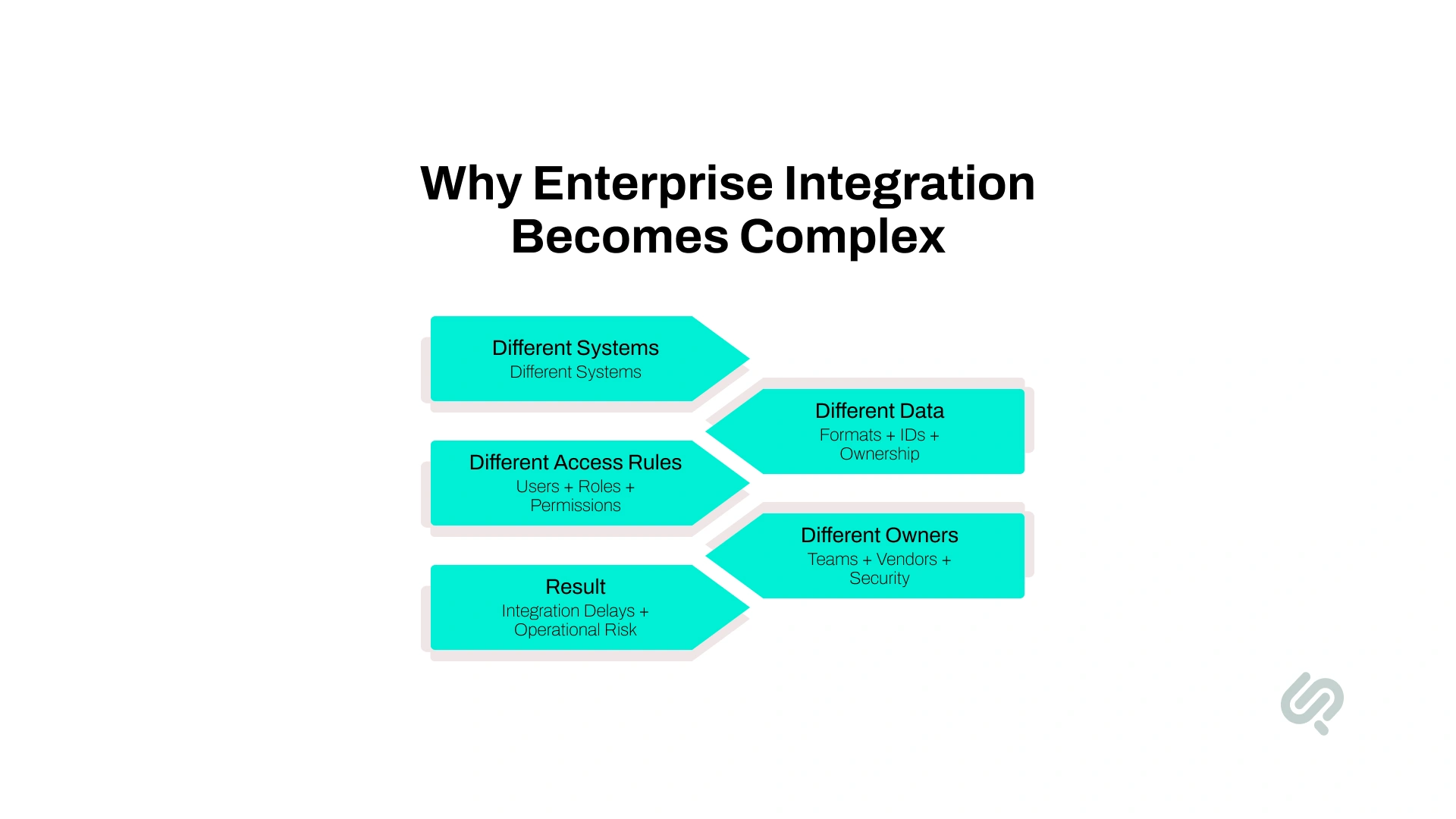
Enterprise systems are rarely designed at the same time or around the same data model. A business may use Salesforce for sales, SAP or Oracle for operations, a separate identity provider, internal databases, cloud applications, vendor APIs, and older systems that still hold important business logic. (1)
Adding AI can expose those gaps even faster. MuleSoft's 2026 Connectivity Benchmark found that 95% of organizations face integration challenges, while 96% of IT leaders agree that AI agent success depends on effective integration across systems. The same research found that 86% believe poorly integrated agents can add more complexity than value. (2)
For business leaders, the cost goes beyond engineering time. Poor system interoperability can cause:
This is why enterprise integration becomes difficult when ownership is fragmented. One team controls the CRM, another owns the ERP, security controls identity, a vendor owns an API, and nobody is responsible for whether the complete workflow works.

Complex integrations contain unknowns that are difficult to resolve during planning alone.
An API may behave differently in production than its documentation suggests. A legacy application may contain rules known only by an operations team. Two systems may use the same customer field differently. A proposed authentication model may need to change after security review.
An embedded engineer can investigate those problems while implementation is happening. Discovery continues as the FDE builds, tests, and releases the integration.
Current FDE requirements at Accenture reflect this type of work. Its engineering stack includes REST and GraphQL APIs, SQL and NoSQL databases, Snowflake, Databricks, Kafka, Docker, Kubernetes, CI/CD, SAP environments, and enterprise AI platforms.
FDEs are not limited to AI projects. They can work across conventional software, cloud, data, modernization, and enterprise systems integration. AI has increased demand for the model because agents and AI applications need reliable access to company data, APIs, identity controls, business systems, and production workflows.
A stronger AI model cannot compensate for unreliable data movement, unclear permissions, or systems that cannot exchange information consistently.
A forward deployed engineer enterprise integration engagement is valuable because the engineer can own the full path between systems rather than one isolated technical task.
That ownership typically includes:
The FDE is not expected to replace every specialist.
Security teams may still own security policies. Platform engineers may own cloud infrastructure. Data teams may control data architecture. Product teams still decide what users need.
The difference is that one senior engineer remains accountable for making the connected workflow function as a whole.
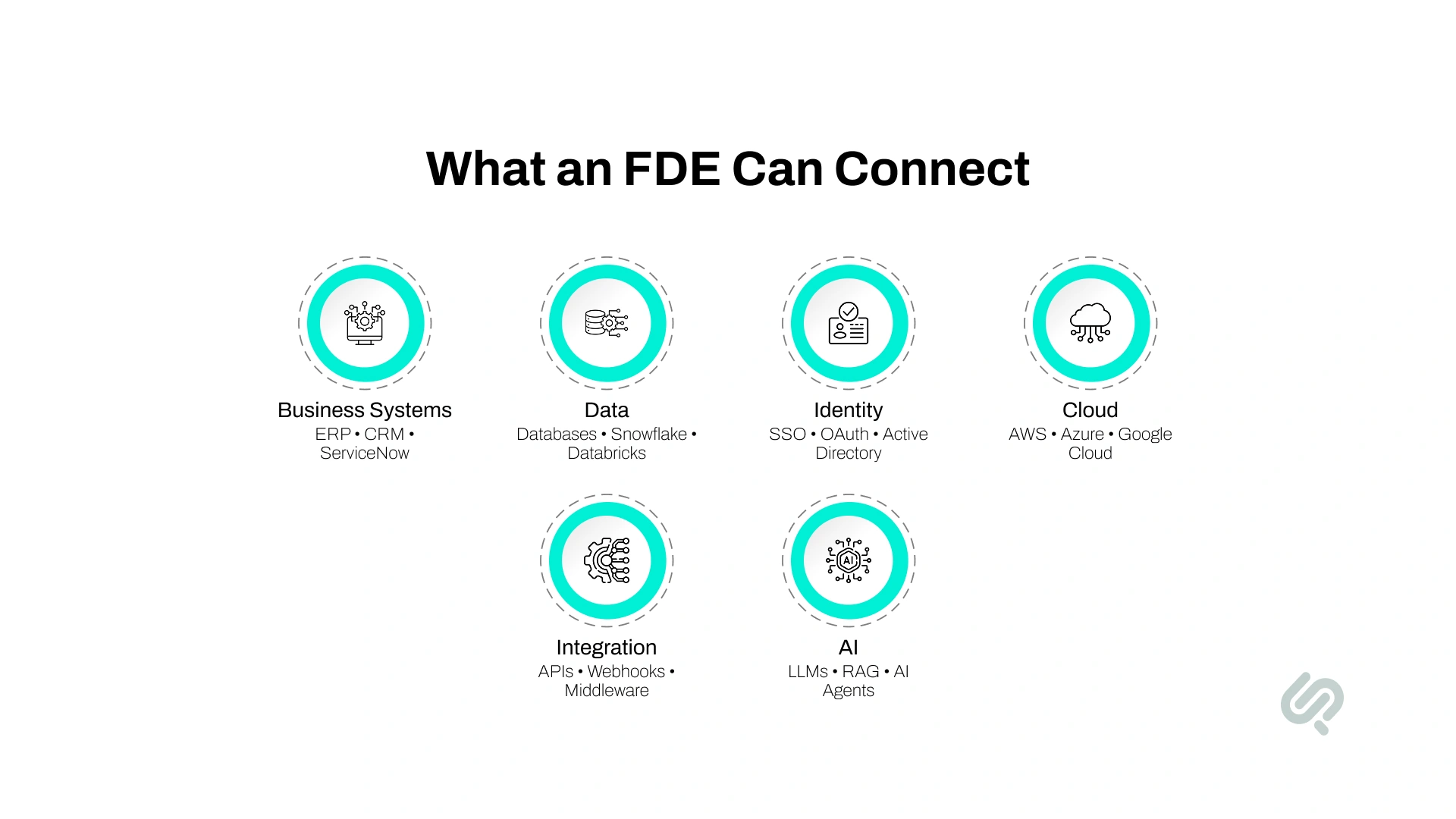
An FDE may work across business applications, data infrastructure, cloud platforms, identity systems, APIs, and legacy software during the same engagement.
The exact technology matters less than whether the engineer can work across system boundaries. Current FDE roles, for example, can span enterprise APIs, SAP, Snowflake, Databricks, streaming infrastructure, containers, data pipelines, and AI platforms.
For buyers, this is an important distinction. A project may begin as a Salesforce integration and later require identity changes, data transformations, cloud infrastructure, monitoring, and changes to an internal application.
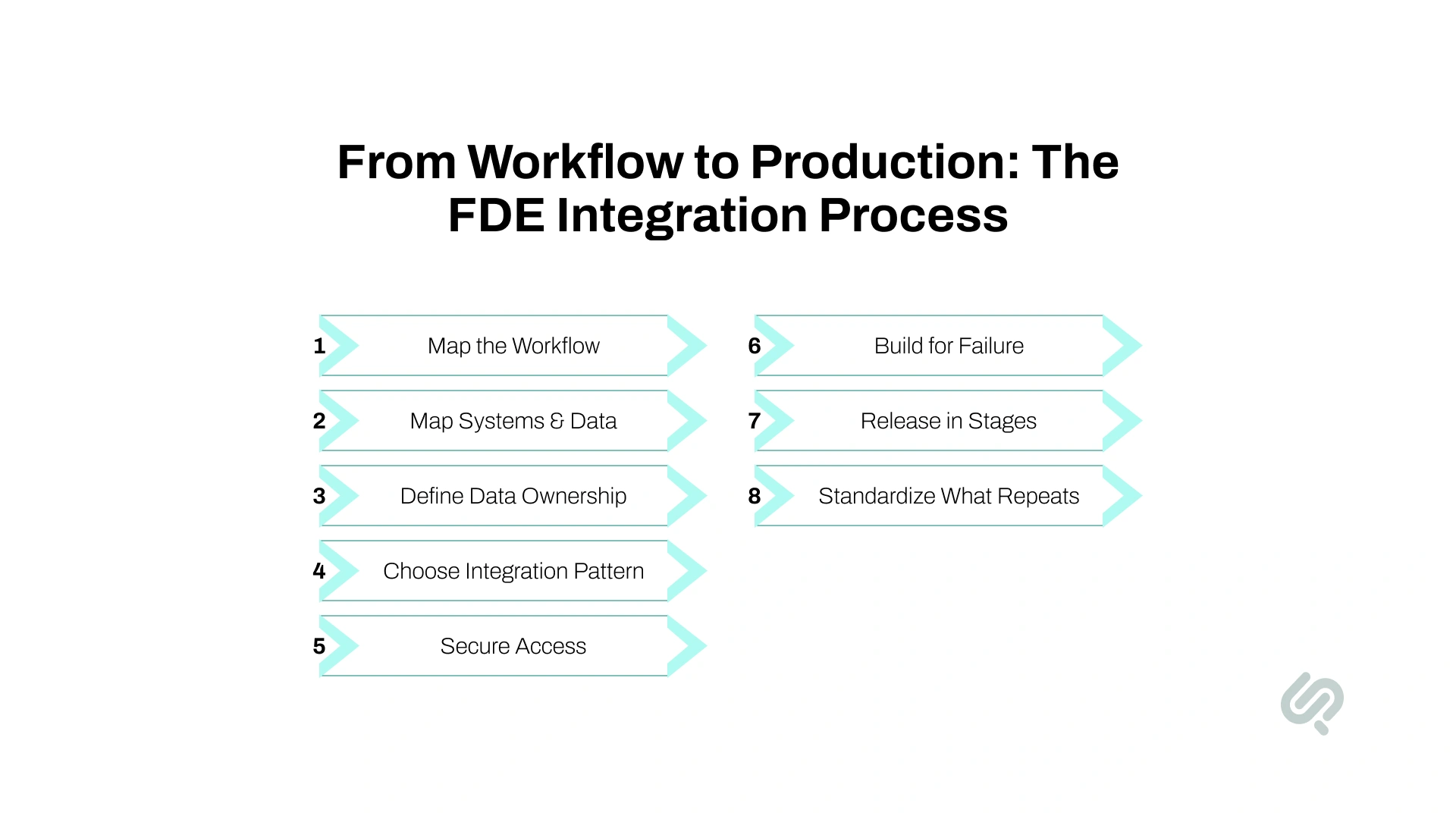
A strong FDE integration process starts with the business workflow and ends with a production system the internal team can operate.
Each step reduces uncertainty before it turns into production risk.
The FDE first maps the full business process, including users, actions, approvals, exceptions, systems, and expected outcomes.
What the FDE does:
Example: A customer onboarding process may involve the CRM, ERP, identity provider, billing platform, document storage, and support system. Mapping the workflow shows where information needs to move and who owns each decision.
Starting with the workflow also prevents the integration from becoming a collection of technical connections that do not improve the actual business process.
The FDE creates a practical view of the current enterprise architecture to understand how systems, data, vendors, and infrastructure depend on one another.
What the FDE does:
Example: A finance integration may look like a simple ERP connection until discovery shows that invoice status also depends on a warehouse database and a nightly batch process.
This stage often reveals dependencies that were never captured in the original project requirements.
Different systems often store the same customer, product, order, or transaction differently.
Without clear ownership, the result can be duplicate records, conflicting updates, and unreliable synchronization.
What the FDE does:
Example: A CRM and ERP may both store customer records but use different IDs and status fields. The FDE defines which system owns each field and what should happen when records conflict.
The FDE chooses the integration approach based on latency, reliability, security, data volume, vendor limits, and maintainability.
Example: A real-time order update may use webhooks, while millions of historical records may move through a scheduled data pipeline.
A good integration architecture avoids unnecessary point-to-point connections and makes future changes easier to manage.
Security should be part of the integration design from the start. The same controls also need to remain enforceable across cloud infrastructure, identity providers, and connected applications.
What the FDE does:
Example: An AI agent connected to a CRM may be allowed to read customer records but require human approval before changing an account or issuing a refund.
This is especially important for enterprise AI integration, where an automated system may be capable of acting across several applications.
Identity controls determine not only what the AI can see, but what it is allowed to do.
An integration is not production-ready because two systems successfully exchanged data once.
APIs fail. Tokens expire. Vendors have outages. Networks slow down. Rate limits change. Messages arrive twice or out of order.
What the FDE does:
Example: If an ERP becomes unavailable, transactions can enter a queue and retry safely instead of disappearing or being processed twice.
This is where forward deployed engineering integration goes beyond simply connecting two APIs.
Enterprise integrations should be tested with real workflows before they are expanded across the business.
What the FDE does:
Example: A CRM and ERP integration may first launch with one region or business unit. The FDE can validate synchronization, user access, failure handling, and operational impact before a company-wide rollout.
Production feedback often exposes problems that test environments cannot reproduce.
A good FDE should not leave every customer-specific problem behind as permanent custom code.
Once the integration works, the engineer identifies which fixes are unique to the environment and which can become reusable connectors, abstractions, configuration, documentation, or improvements to the underlying platform.
What the FDE does:
This feedback loop is increasingly part of the FDE model. OpenAI describes its Enterprise Frontier FDE engagements as establishing repeatable patterns that customer teams can later own and extend.
The end goal is not simply to make one integration work. The business should be easier to integrate with the next time.
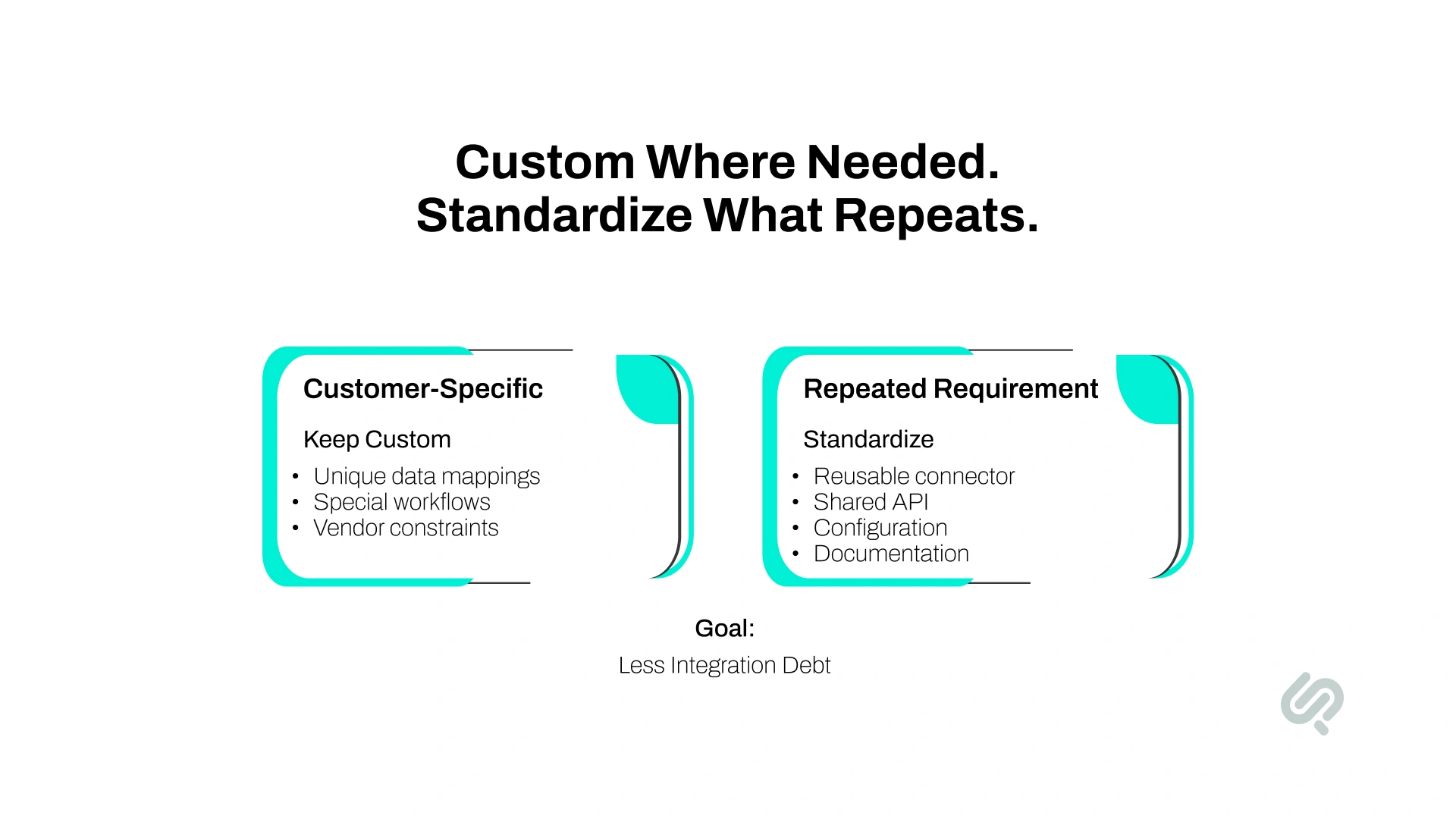
Custom engineering can unblock an enterprise quickly, but too many one-off fixes create another problem: integration debt.
Integration debt appears when every customer, system, or exception receives its own connector, transformation script, authentication workaround, or undocumented rule. The integration may work today, but every future change becomes harder.
A strong FDE follows a useful rule: Customize where the environment genuinely requires it. Standardize what keeps repeating.
For example, a customer-specific data model may require unique field mappings. But if the same authentication or synchronization problem keeps appearing, it may belong in a reusable connector or platform component instead of another customer-specific patch.
Before an FDE engagement ends, business and engineering leaders should be able to answer:
This matters because fast delivery has limited value if the company becomes dependent on the original engineer for every future change.
"The hardest enterprise integrations are rarely blocked by one API. They are blocked by ownership gaps between systems, teams, data, and decisions. A strong FDE closes those gaps without leaving the client with another dependency to maintain."
Abubakar Shams, CEO & Business Strategy Lead, Phaedra Solutions
The underlying idea is also visible in how OpenAI describes its FDE model: engineers work alongside customer teams while creating deployment patterns those teams can ultimately operate and extend.
These problems usually appear when integrations move beyond a standard API connection and start crossing legacy systems, data sources, security boundaries, vendors, and internal teams.
FDEs are particularly useful when investigating the environment is part of solving the engineering problem.
Older platforms may have limited APIs, fragile databases, custom protocols, or business rules that exist only in code.
An FDE can wrap stable legacy capabilities behind new interfaces, introduce middleware, or migrate selected functions without forcing a full system replacement.
The objective is to create a safe integration path without destabilizing software that the business still depends on.
ERP systems and CRM systems often disagree about customer, order, pricing, billing, and account data.
FDEs define:
This helps commercial and operational teams work from consistent information.
AI applications require context and, increasingly, the ability to take actions.
That means models or agents may need controlled access to CRMs, ERPs, ticketing systems, knowledge bases, databases, communication tools, and internal applications.
The FDE makes sure the AI:
This is where enterprise AI integration becomes a broader systems problem rather than a model-selection problem.
Large companies depend on third-party software they do not control.
Vendor rate limits, version changes, authentication methods, outages, inconsistent documentation, and support delays can all affect the integration.
An FDE can isolate vendor-specific logic, add monitoring, and design fallback behavior so one external dependency does not silently break an entire workflow.
Not every piece of data needs to move instantly.
Some updates require real-time synchronization. Others can move every few minutes, hourly, overnight, or through scheduled batch processing.
An FDE decides:
This keeps the design tied to the business requirement instead of treating every data update as equally urgent.
Phaedra Solutions built an AI-powered cloud surveillance platform that connected IP cameras and access-control systems within one web and mobile environment. The product brought surveillance activities into a single monitoring system and added AI-powered analytics, face detection, historical tracking, access logs, and expanded device integration.
The project was not originally positioned as a forward deployed engineering engagement, but it shows the type of environment where an FDE model can fit well.
An FDE could own the path across device integrations, access-control systems, AI capabilities, backend services, cloud infrastructure, testing, and the customer's operating workflow instead of forcing each integration problem through separate technical teams.
The right delivery model depends on technical uncertainty, internal capacity, ownership, and how deeply the integration crosses organizational boundaries.
A multi-system integration is a strong FDE candidate when learning the environment is part of the engineering work.
If requirements, interfaces, architecture, and ownership are already stable, assigning the work to an internal engineering team may be more efficient.
If the organization mainly needs architecture recommendations or integration strategy, a consultant may be enough.
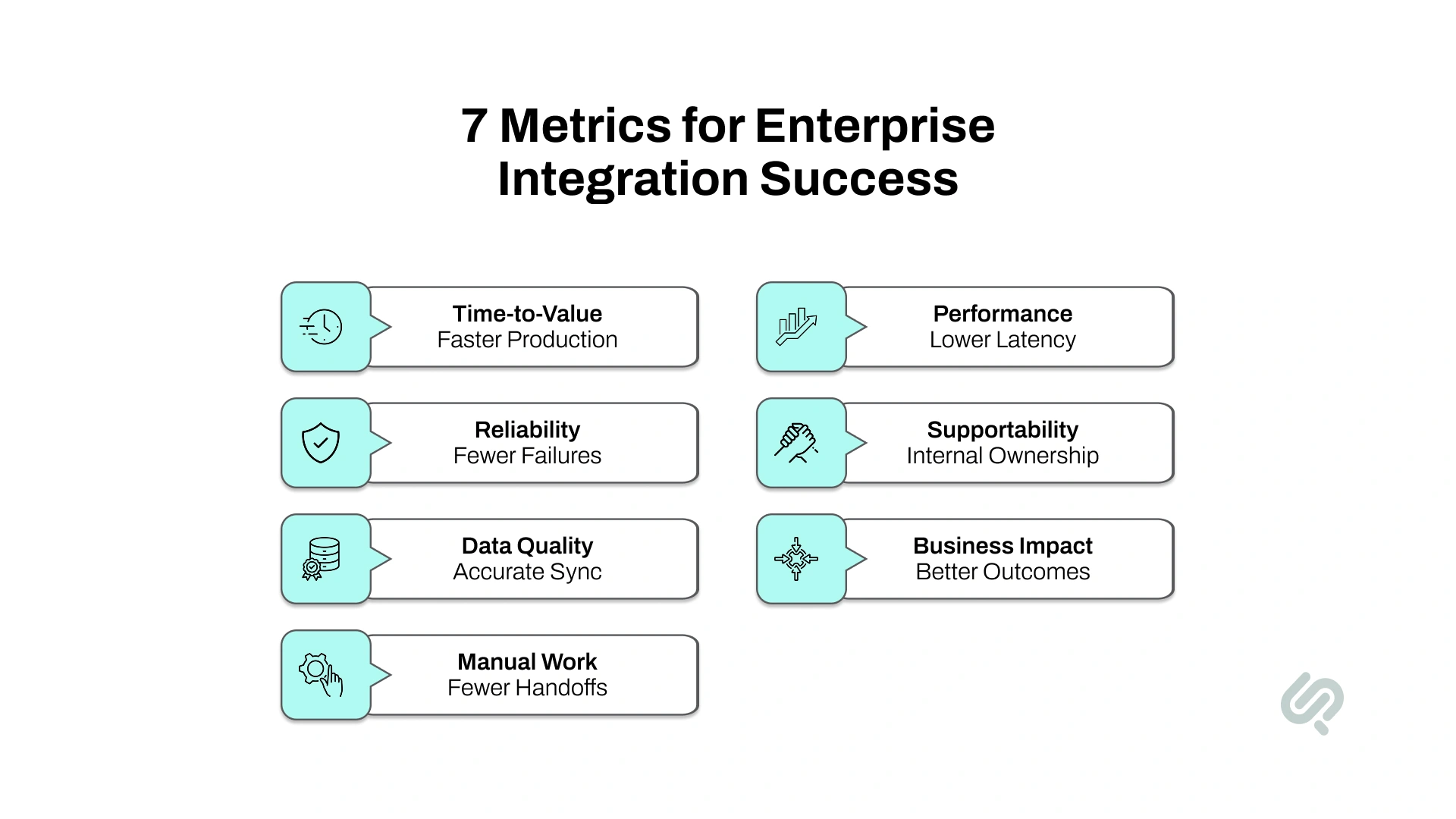
A successful forward deployed engineer enterprise integration should be measured by business reliability and time-to-value, not by how many APIs or connectors were built.
Useful measures include:
The right metric depends on the workflow.
For customer onboarding, success may mean reducing manual data entry and moving customers from contract to activation faster.
For an ERP integration, it may mean fewer reconciliation errors.
For an AI agent, it may mean giving the agent access to approved systems while keeping every sensitive action permission-controlled and auditable.
The final question is straightforward:
Did connecting these systems improve the business process they were supposed to support?
Consider an FDE integration partner when:
You probably do not need an FDE when the work involves a standard connector, the API is stable, the workflow is simple, requirements are already understood, and an internal team has clear end-to-end ownership.
The FDE model should be used where uncertainty and business importance justify senior embedded engineering capacity.
When an integration crosses APIs, legacy systems, cloud infrastructure, data, security, and several internal teams, the missing resource may be a senior engineer who can own the complete technical path.
Phaedra Solutions provides IT staff augmentation services that allow businesses to add senior engineering capability directly to their existing teams. Companies can hire a forward deployed engineer for complex integration work without committing to permanent headcount before knowing how much ongoing capacity the project requires.
An FDE can work alongside internal engineering, security, data, product, and operations teams across:
If a complex forward deployed engineer enterprise integration project is blocking a product launch, customer deployment, modernization program, or AI rollout, book a consultation with Phaedra Solutions to discuss whether adding a forward deployed engineer to your team is the right next step.



Ameena is a content writer with a background in International Relations, blending academic insight with SEO-driven writing experience. She has written extensively in the academic space and contributed blog content for various platforms.
Her interests lie in human rights, conflict resolution, and emerging technologies in global policy. Outside of work, she enjoys reading fiction, exploring AI as a hobby, and learning how digital systems shape society.