


.webp)


.webp)
.webp)
.webp)







Enterprise application development is how large organizations build the systems that run finance, HR, customer operations, supply chain, approvals, and compliance.
When these apps are slow, insecure, or poorly integrated, the business feels it immediately through missed SLAs, manual workarounds, audit risk, and teams stuck waiting on broken workflows.
When people search for ‘enterprise application development’, they usually want four things:
This guide delivers that — plus the architecture patterns, team roles, and production readiness practices that make enterprise software reliable at scale.
An enterprise application is software built to manage and automate core business processes across large organizations. Simply put, an enterprise application is designed for scale, security, and long-term operational reliability.
Unlike consumer apps, enterprise applications serve entire departments and business units. They handle complex workflows, large volumes of data, and strict compliance requirements.
These systems are often integrated with multiple enterprise systems and are responsible for managing sensitive company data.
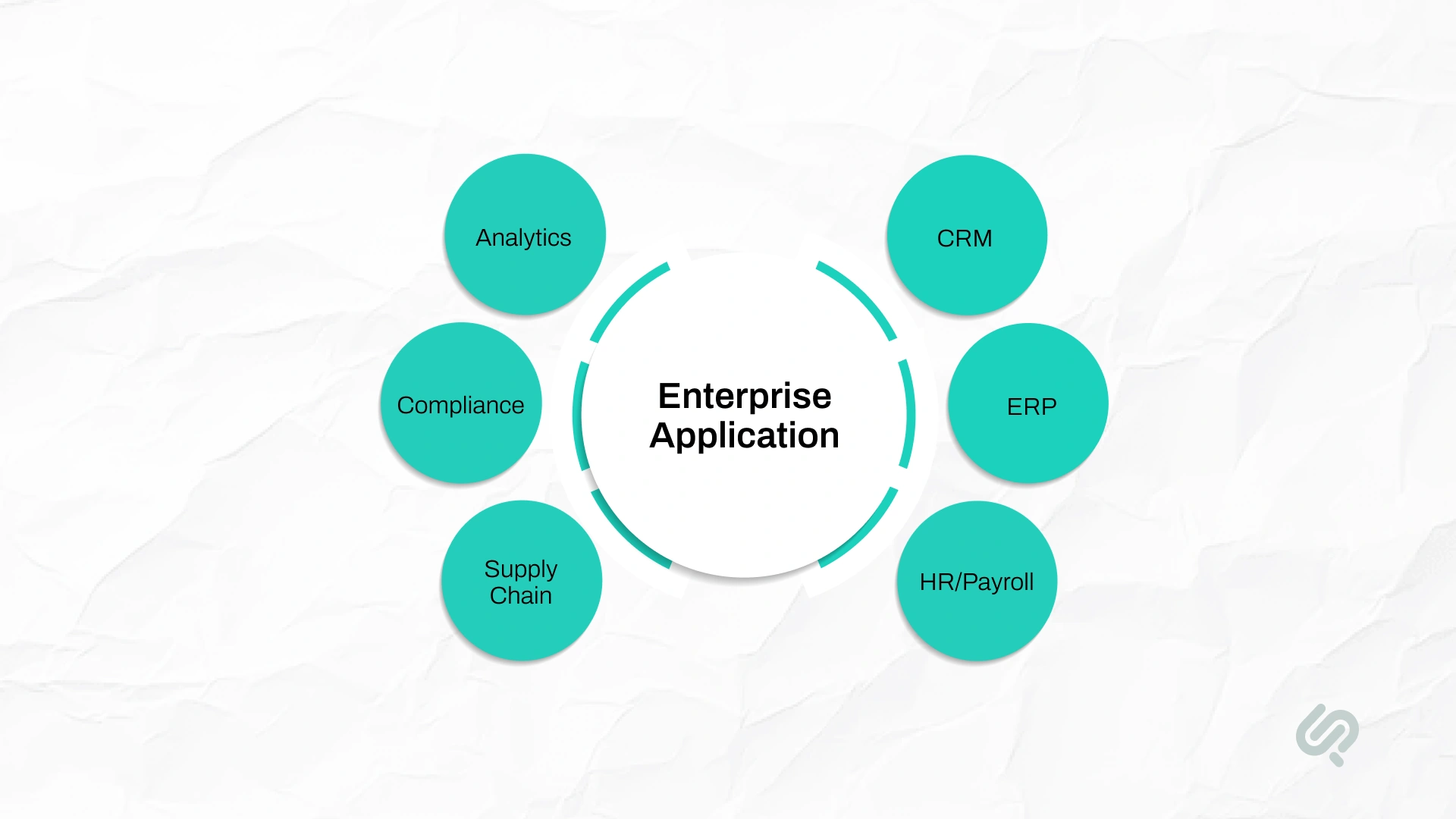
Typical enterprise application systems include:
A true enterprise-level application must support role-based access control, multi-factor authentication, data encryption, audit logs, and seamless integration with other enterprise systems.
Today, many organizations deploy these platforms as secure enterprise web apps, accessible through browsers and optimized for mobile devices, ensuring scalability and consistent access across teams.
People often mix these terms. Here’s the simplest way to separate them.
Important: Many enterprise applications are enterprise web apps. “Web app” doesn’t automatically mean “enterprise.” The requirements do.
This decision should come before architecture and development—because it changes everything.
Rule of thumb: Buy what’s standard. Build what’s unique. Integrate everything cleanly.
Enterprise Application Development is significantly more complex than building standard consumer software.
Enterprise environments involve multiple business units, legacy systems, regulatory requirements, and high-stakes operational workflows.
Common Challenges in Enterprise Application Development include:
The most frequent challenges of enterprise application development include:
These challenges are not purely technical. They are organizational, operational, and strategic — affecting the entire enterprise system.
Successful enterprise software development follows a clear, disciplined process. These steps reduce risk, control scope, and ensure long-term scalability across enterprise systems.
Before starting enterprise software development, clearly define why you are building the application, what success looks like, and how it will be measured.
Start with a direct statement of business objectives:
Document these decisions in a structured product development roadmap. A strong product development roadmap organizes enterprise application development into realistic, phased milestones so stakeholders understand priorities and progression.
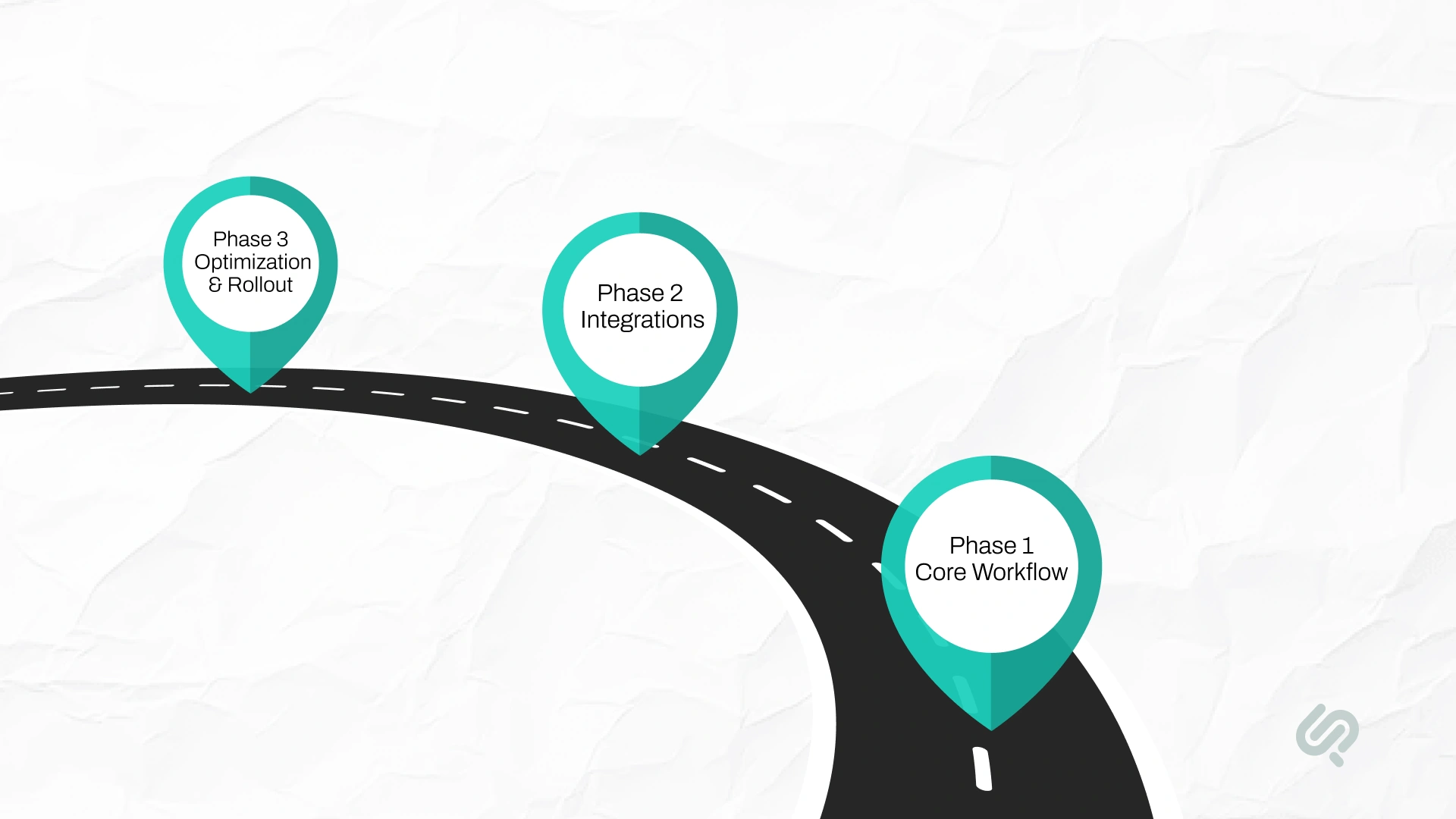
Phase 1 – Core Workflow Delivery
Deliver one high-value workflow end-to-end.
Example: Submit expense report → Manager approval → Finance logging.
Phase 2 – Integrations and Expansion
Connect to ERP systems, HR platforms, CRM systems, and reporting dashboards.
Phase 3 – Performance and Scalability
Focus on performance optimization, scaling infrastructure, and rollout across additional business units.
This phased approach prevents one of the most common traps in enterprise software development: trying to build everything at once. It ensures building enterprise applications that deliver measurable business value at each stage.
Clear requirements are the backbone of successful enterprise application development. Without them, enterprise software development becomes expensive, slow, and unpredictable.
Start by separating requirements into two categories.
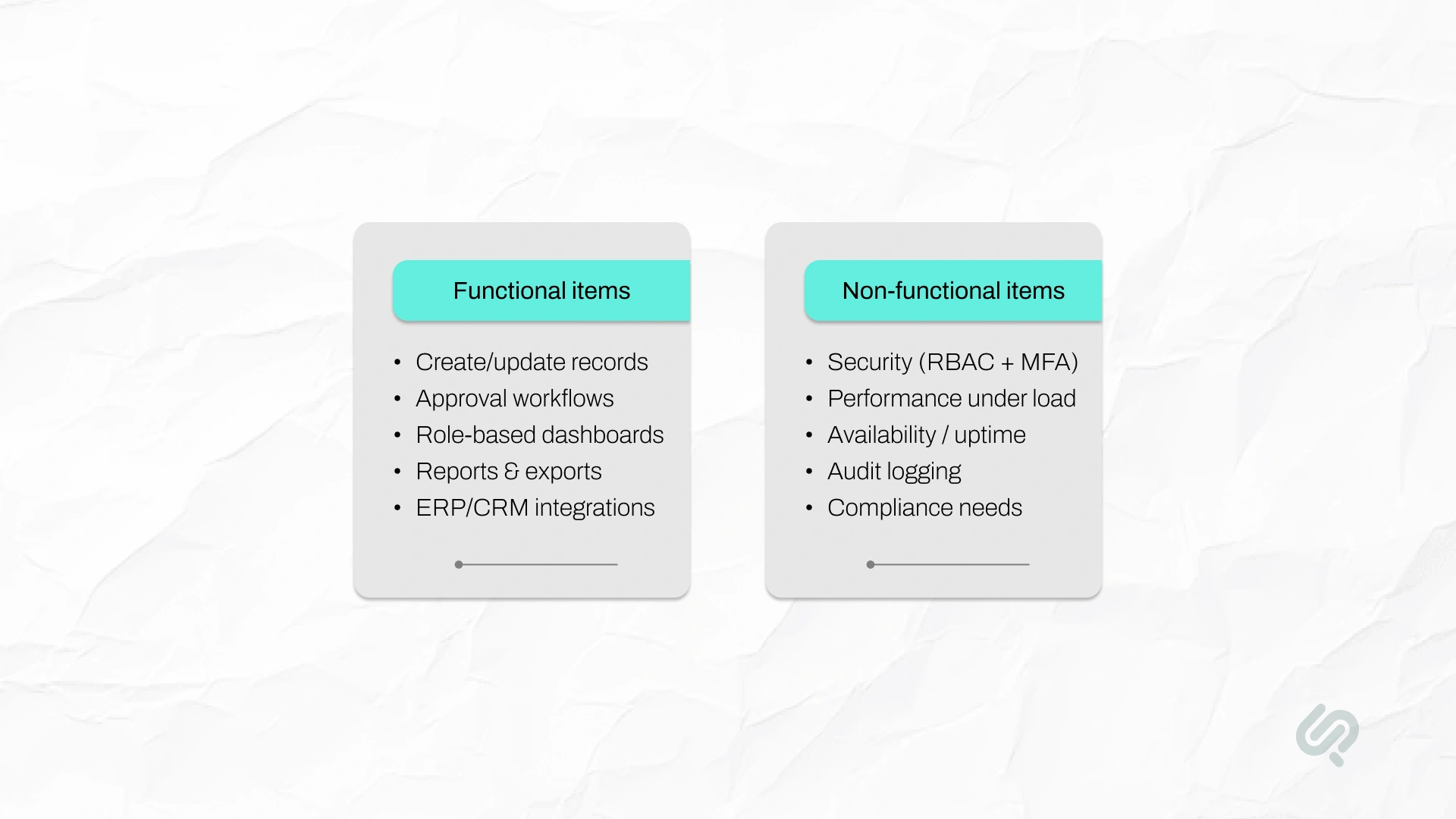
These define core business capabilities:
These define quality and reliability standards:
Keeping functional and non-functional requirements explained and documented ensures your development team builds it correctly the first time.
When requirements are clear, building enterprise applications becomes structured and measurable.
When they are vague, enterprise software engineering turns into repeated rework, missed deadlines, and budget overruns.
Before moving to architecture, confirm:
Strong requirements reduce risk across the entire lifecycle of enterprise application systems.
Architecture decisions determine whether your enterprise-level application scales smoothly or becomes fragile over time.
A well-defined enterprise application development framework standardizes technical decisions and ensures consistency across enterprise systems.
Modern enterprise software development increasingly relies on cloud-native patterns.
CNCF’s Cloud Native Survey shows cloud native adoption has reached an all-time high of 89% among surveyed organizations, with Kubernetes widely used across modern systems (1).
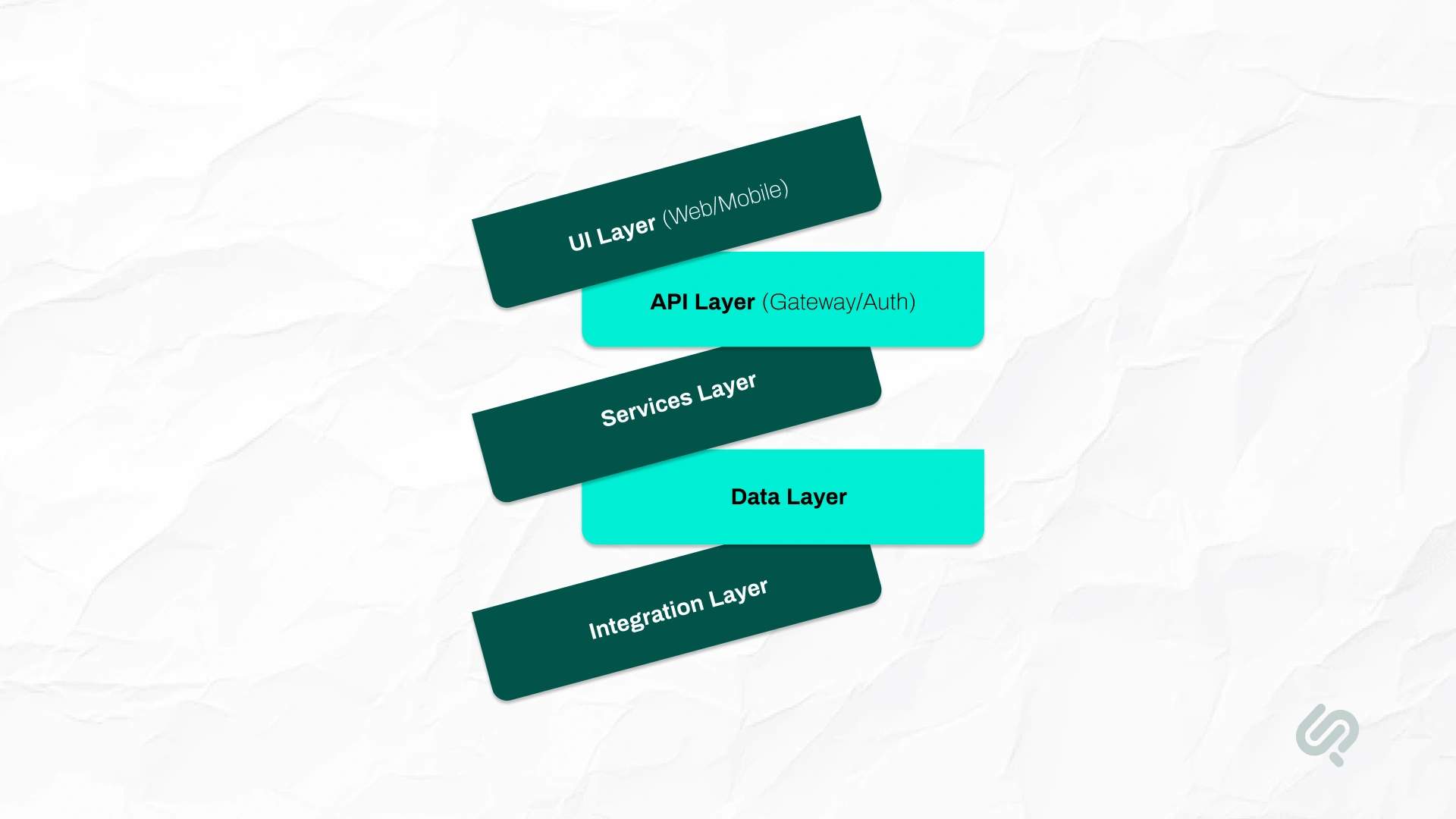
A reliable enterprise app usually has these layers:
Role-based screens designed around real workflows (approvals, handoffs, exception handling).
A single entry point that enforces authentication, rate limits, logging, and access policies.
Services organized around business capabilities (billing, approvals, onboarding) instead of random features.
Define where “truth” lives. Don’t let multiple systems edit the same record without rules.
Connect ERP/CRM/IDP and other systems using: APIs for real-time requests and events/queues for reliable background processing and decoupling
Why this matters: Most enterprise failures come from messy ownership and messy integrations (not from UI screens).
Enterprise apps used to be built in a slower, heavier way. Today, many teams build enterprise systems using cloud-native practices—but not every org needs microservices.
A) Traditional Enterprise Application Development (What It Looks Like)
Best when: requirements are stable, systems are internal-only, and release frequency is low.
B) Modern Enterprise Application Development (What It Looks Like)
Best when: you need frequent releases, many integrations, high usage, or multiple business units.
C) Monolith vs Modular Monolith vs Microservices (Simple Rule)
Practical guidance: If your team can’t consistently manage monitoring, deployments, and incident response, microservices can create more problems than they solve.
Enterprise delivery depends on accountability, clearly defined roles, and long-term ownership. Without structure, enterprise application development quickly becomes fragmented and inefficient.
In enterprise software development, role clarity prevents delivery friction:
When the product manager vs project manager is unclear, priorities conflict, delivery slows, and enterprise application systems lose alignment with business goals.
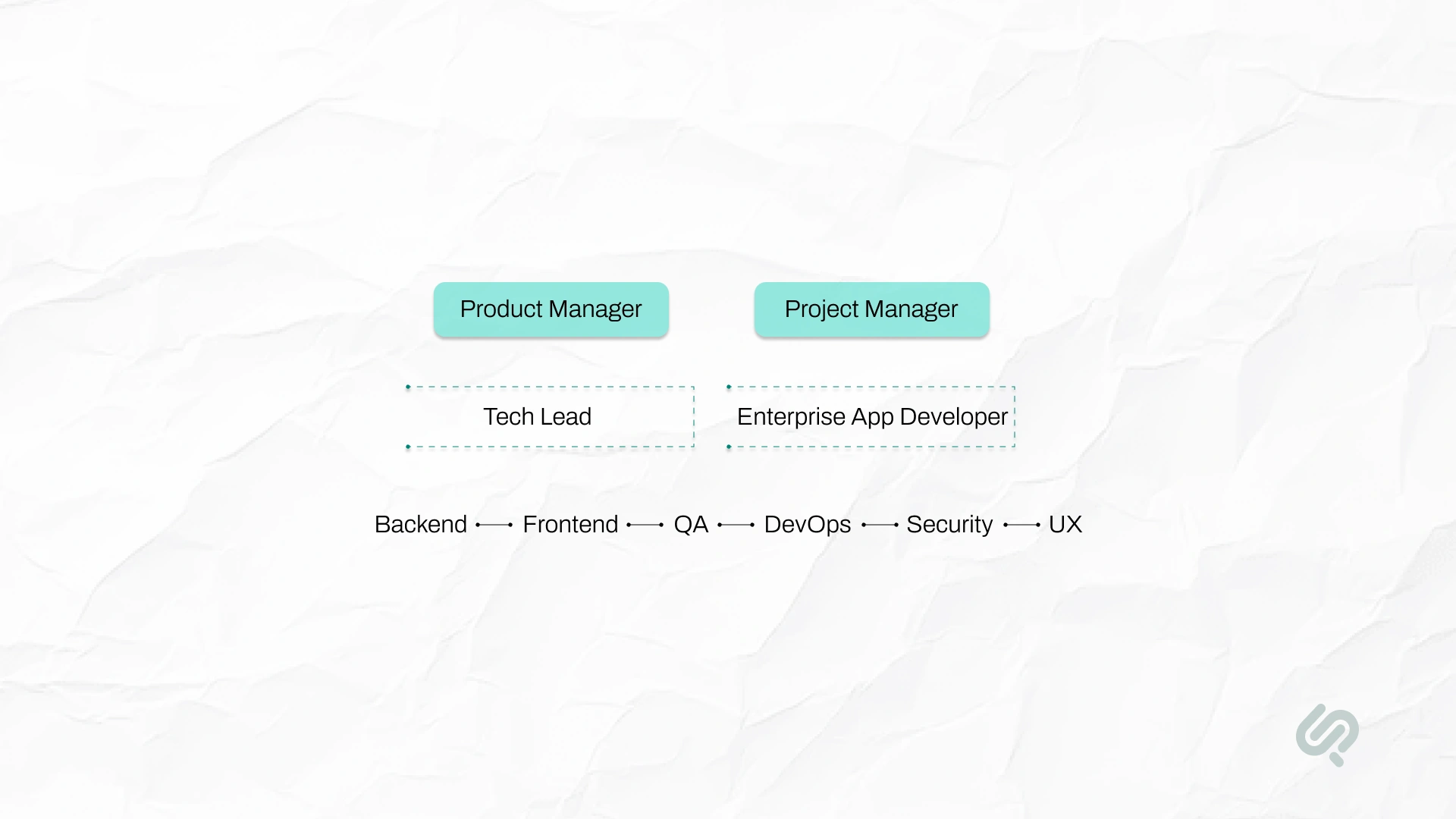
A strong enterprise development team typically includes:
Enterprise environments demand experienced leadership. A senior enterprise application developer ensures architectural consistency, integration discipline, and security alignment across the entire system.
A dedicated engineering team ensures continuity, reduces technical debt, and protects long-term scalability.
Clear full-stack developer responsibilities should include:
Top enterprise application development companies structure teams around business capabilities rather than isolated features.
This improves operational efficiency and supports scalable enterprise software engineering practices.
Enterprise software development requires a structured development process supported by governance, testing discipline, and measurable milestones.
Enterprise systems are long-term technology investments. Without process discipline, enterprise application development becomes unpredictable and costly.
Strong enterprise software engineering includes:
Agile methodology works best when combined with structured checkpoints and documented standards. The development lifecycle must be clearly defined so stakeholders understand progression and accountability.
Continuous integration and deployment reduce risk by catching issues early. Automated testing protects mission-critical systems from regression failures. Performance optimization ensures the enterprise-level application remains stable under scale.
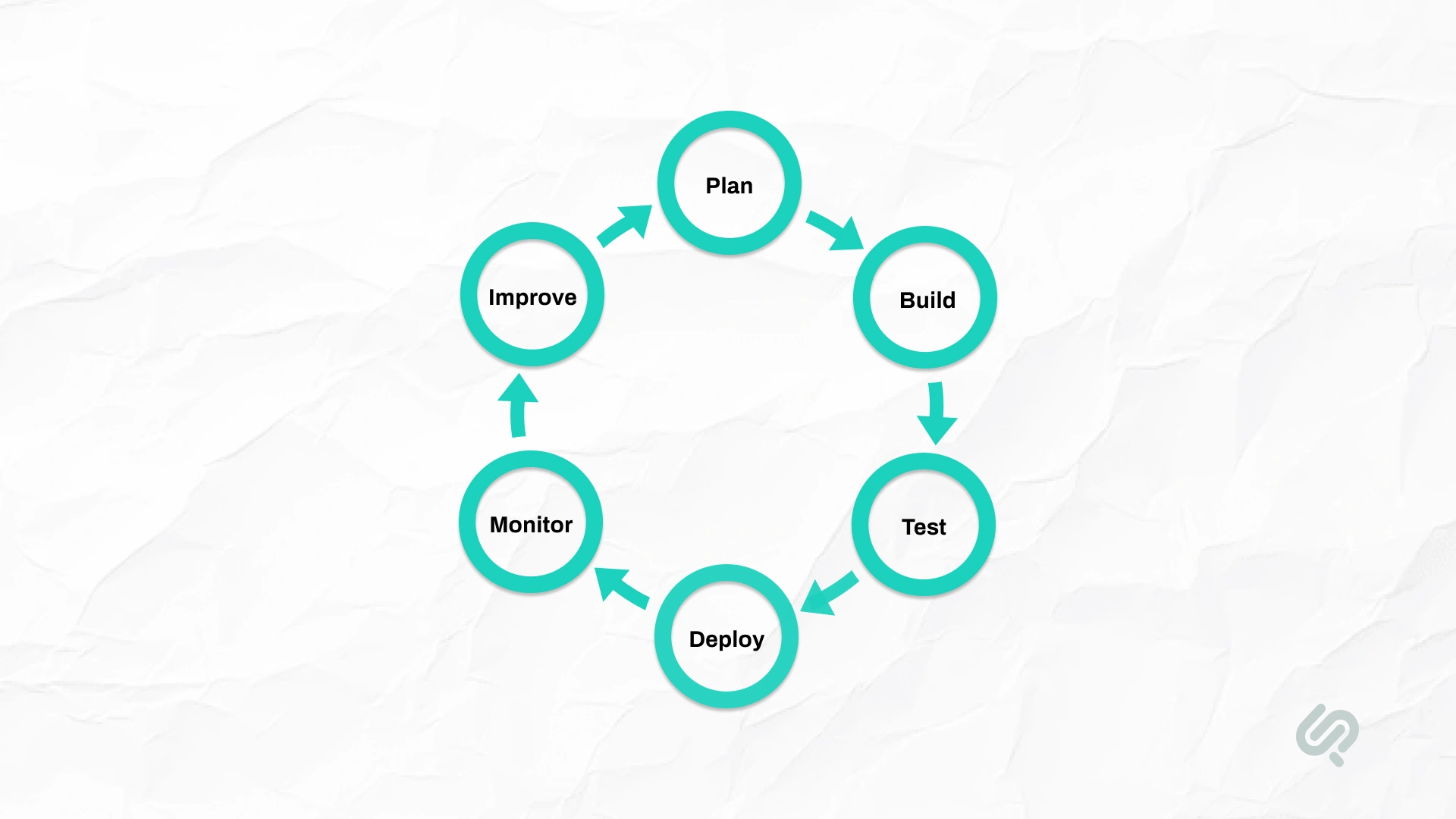
Reliable enterprise app development services emphasize:
These practices ensure enterprise application systems remain stable, secure, and scalable across the entire lifecycle.
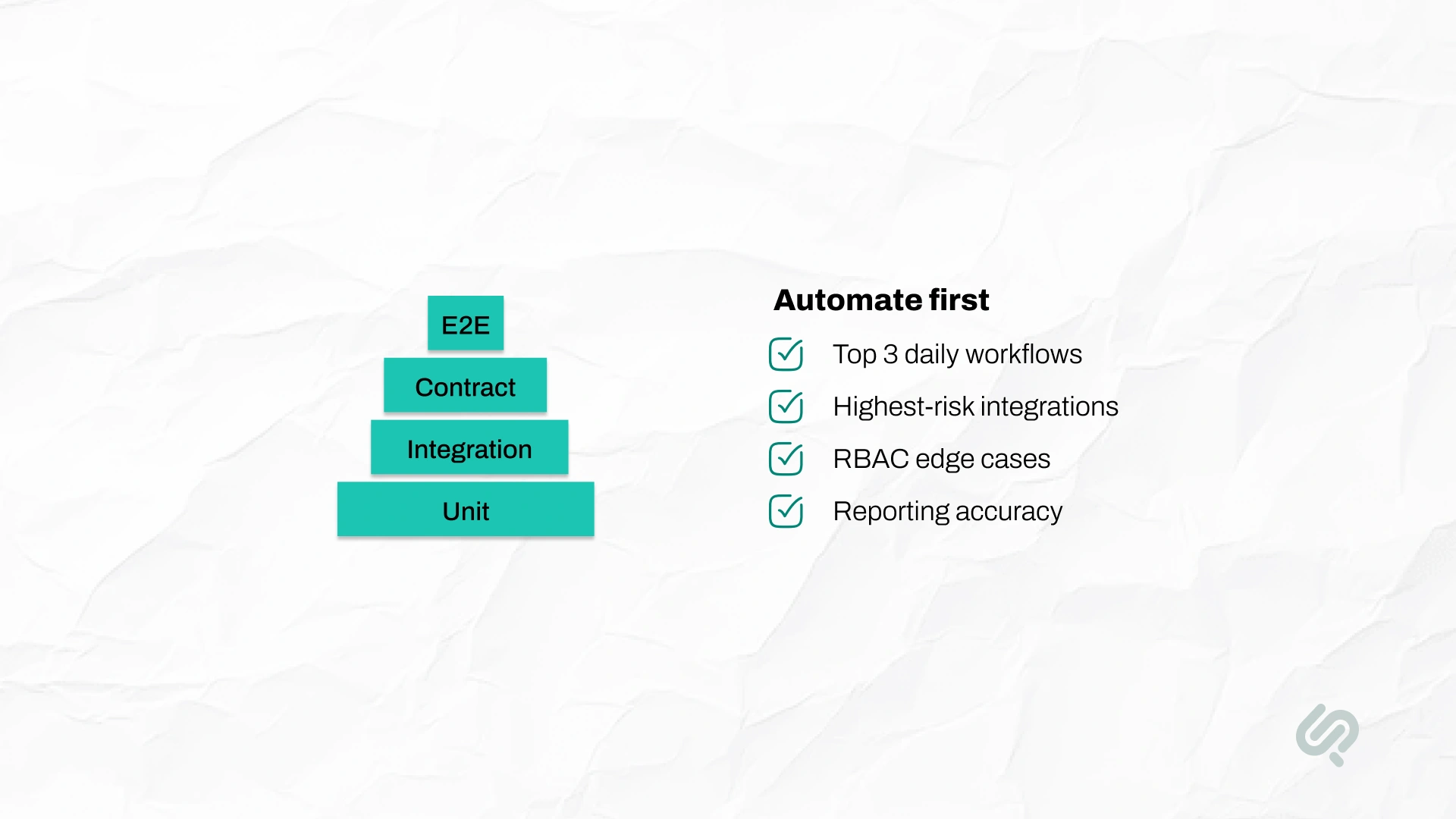
Enterprise apps break in expensive ways, because integrations, permissions, and data workflows are complex. Testing must reflect that reality.
A) The testing layers that matter most are:
B) Here’s what you should automate first:
Simple goal: Catch failures in staging, not in production.
In enterprise application development, security is not optional. It must be embedded into the architecture, development process, and every feature decision from day one.
Use enterprise-grade single sign-on solutions such as Active Directory or SAML/OAuth protocols.
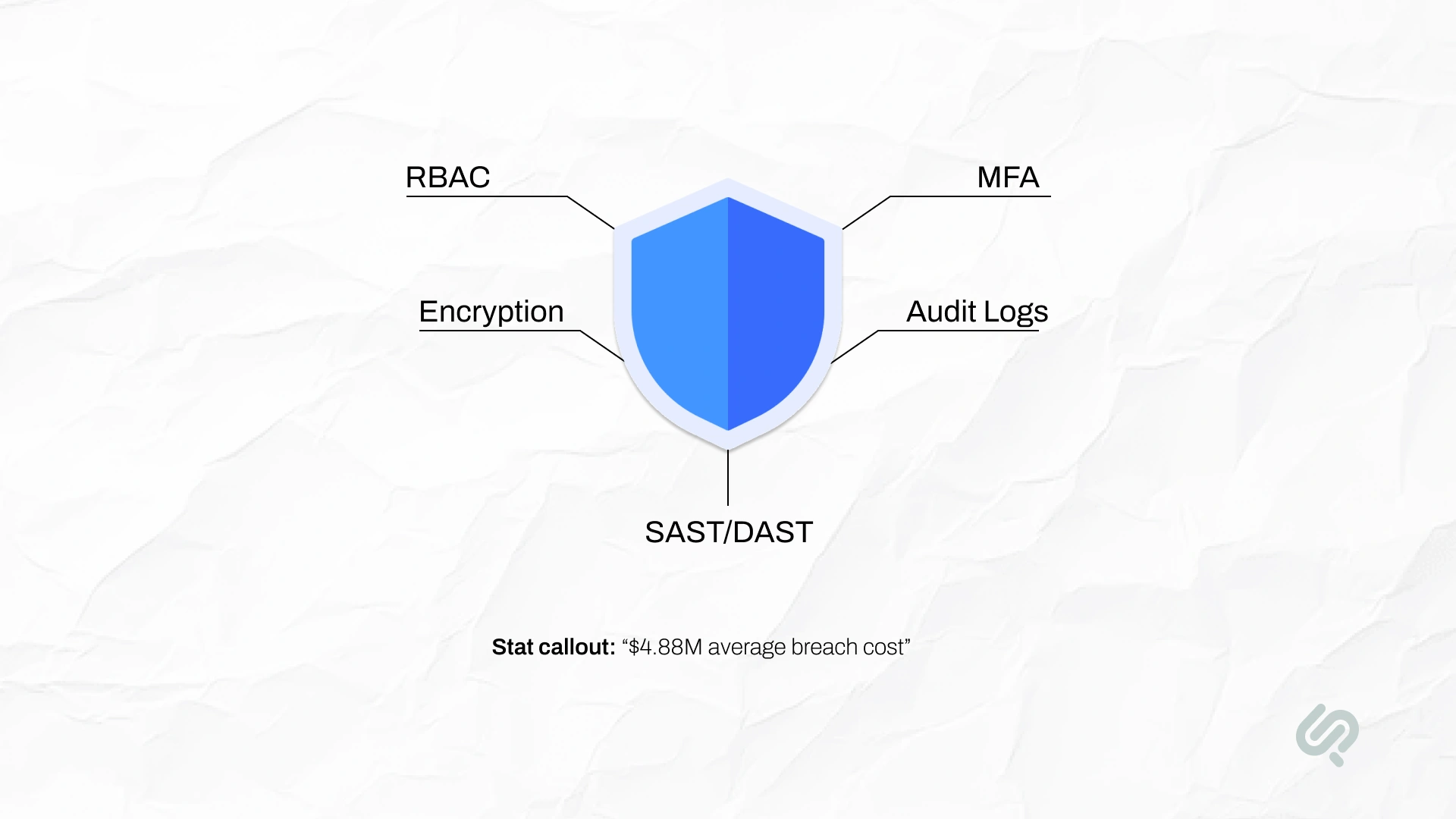
Enforce multi-factor authentication for sensitive roles and privileged accounts. Strong authentication reduces unauthorized access across enterprise application systems.
All data in transit must use HTTPS/TLS encryption. All data at rest must be encrypted at the database or storage level.
Encryption is a foundational requirement in enterprise software development, especially when handling customer data and regulated information.
Implement fine-grained role-based access control (RBAC) for every action.
For example, only finance users should be allowed to export financial reports. Access control policies should be clearly documented and mapped to business roles.
Enterprise systems require traceability.
Record key events such as logins, data changes, and approvals with user IDs and timestamps. Many industries require auditable trails for compliance and regulatory reporting.
Schedule periodic vulnerability scans and code reviews.
Static and dynamic security testing tools (SAST and DAST) should run continuously as part of the development lifecycle. Regular security audits reduce risk exposure before deployment.
The impact of security failures is significant. According to IBM’s Data Breach Report, the global average cost of a breach reached $4.88 million. Beyond financial loss, breaches damage trust and may trigger legal penalties. (2)
In enterprise software engineering, security should be treated as part of functional requirements. Every feature must explicitly answer the question: how is this secured?
Step 7: Integration and Data Management
Integration often determines whether enterprise application systems succeed or fail. Poor integration leads to manual workarounds and shadow IT.
List every system the new application must interact with, including CRM systems, ERP platforms, databases, identity providers, and external APIs. Integration complexity increases rapidly in enterprise environments.
For each integration, define API endpoints, message schemas, and data validation rules. Document these integration contracts and align with teams responsible for other enterprise systems. Clear contracts reduce downstream failures.
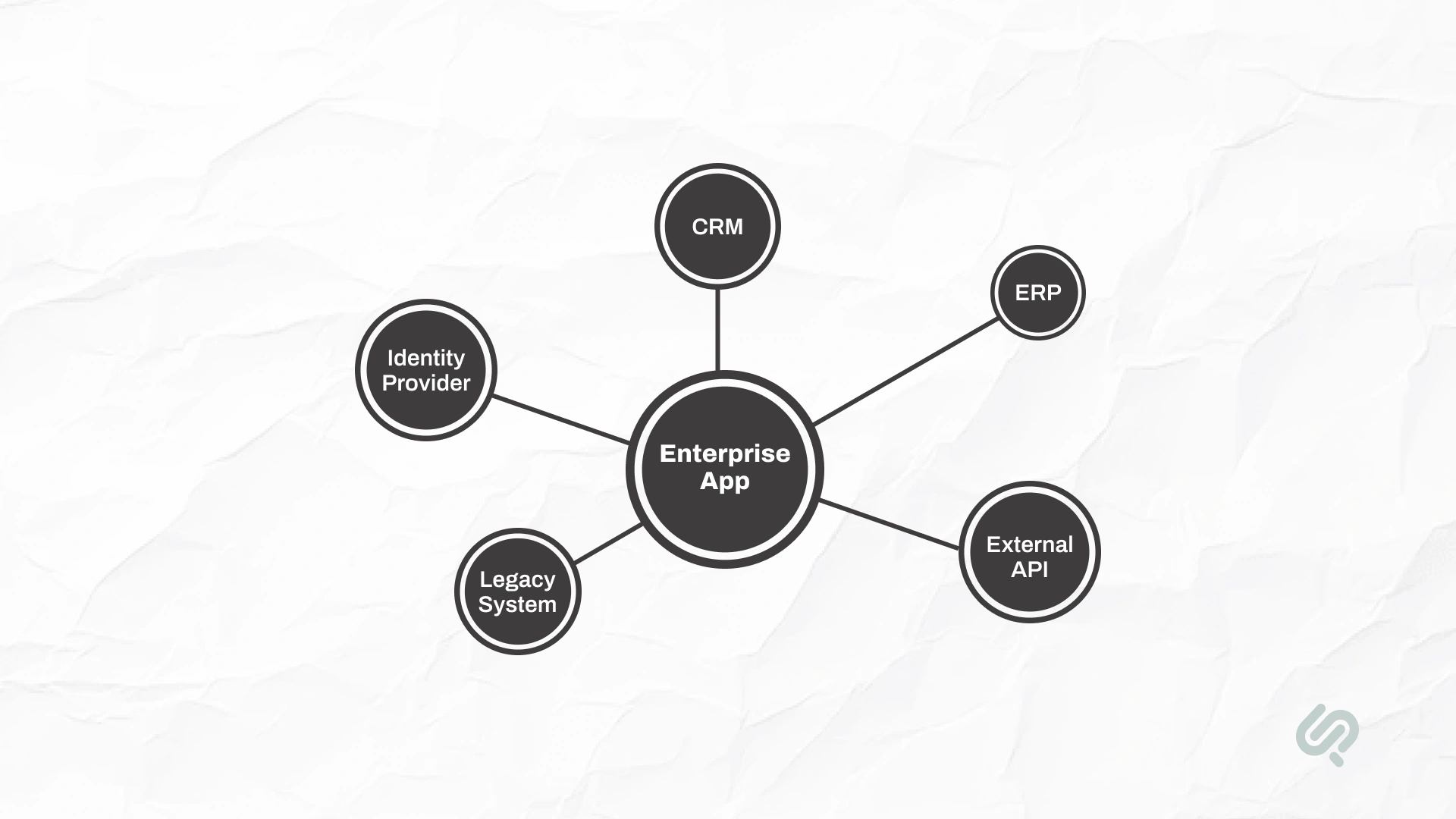
If legacy systems lack modern APIs, middleware layers, or bulk data migration strategies may be required.
The strangler fig pattern, gradually replacing legacy components with modern services, can reduce migration risk while maintaining operational continuity.
Create detailed data flow diagrams. If your application updates inventory inside an ERP system, clearly define the request flow, acknowledgment handling, and fallback behavior if the ERP is unavailable.
Designate a single system of record for each critical data entity. Synchronize other systems through events or scheduled processes. This prevents duplication and inconsistencies across enterprise application systems.
Integration testing must be taken seriously. Establish sandbox environments or test accounts for each integrated system.
Automate integration tests using real or mocked APIs. Many integration defects surface only after deployment and are costly to resolve.
Well-integrated enterprise application systems improve business agility. Poor integration leads to spreadsheet-based workarounds and fragmented business processes.
Launch is not the finish line in enterprise software development. Production readiness determines long-term reliability and operational efficiency.
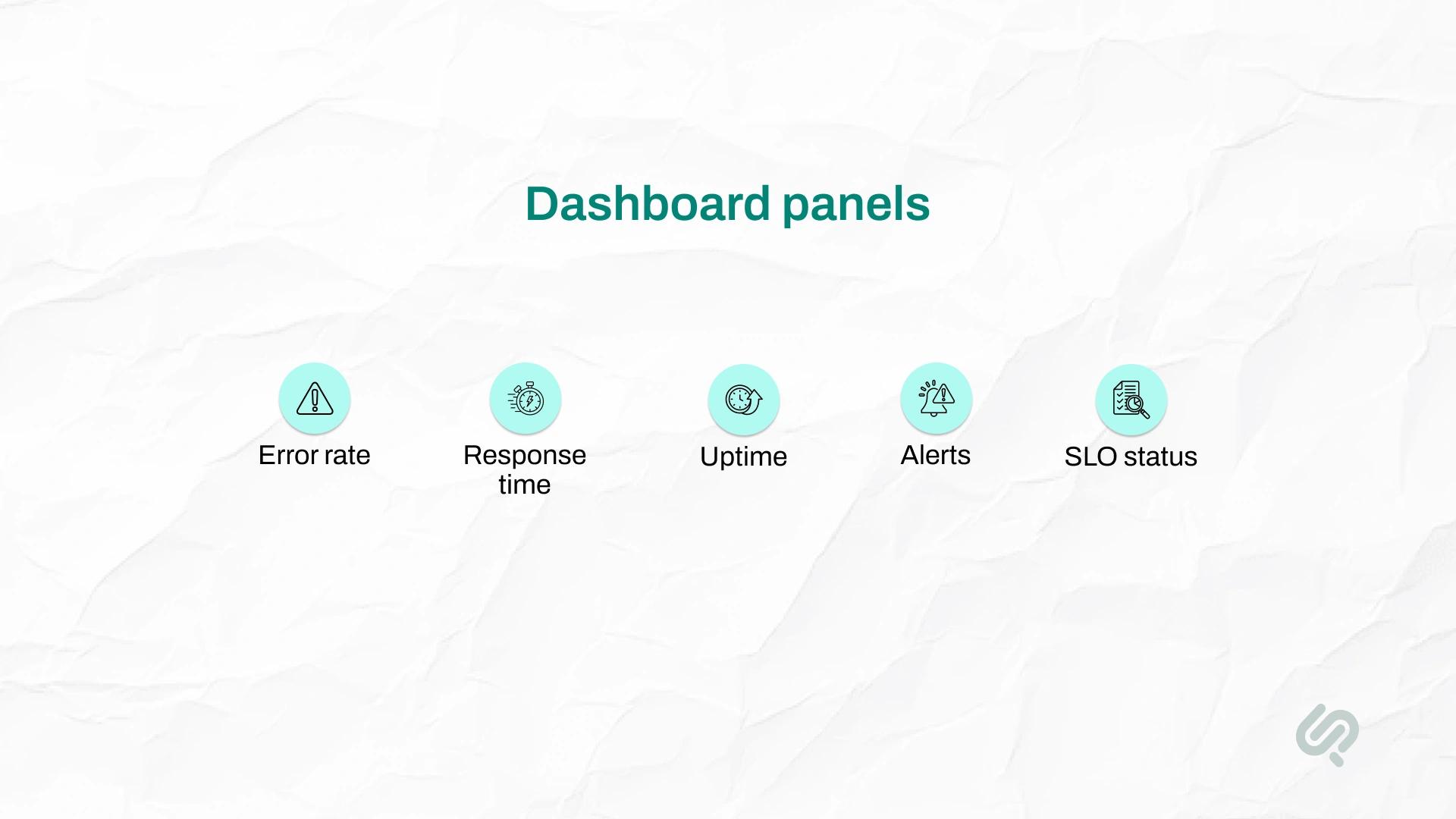
Implement centralized logging and monitoring from the beginning. Use logging platforms such as ELK or Graylog and metrics dashboards such as Grafana or Prometheus.
Track key indicators including error rates, response times, system load, and queue lengths.
Define measurable targets, such as 99% API success rate or 95% of requests completing within two seconds. Configure alerts when SLOs are breached to enable proactive response.
Assign on-call engineers and document incident runbooks. For example, define recovery steps if a service crashes and escalation paths for notifying responsible teams. Conduct periodic incident simulations to validate readiness.
Ensure all critical data is backed up regularly. Test restoration procedures in staging environments to confirm backups are usable. Disaster recovery planning is part of responsible enterprise application development.
Anticipate growth patterns. If order volumes spike seasonally, configure auto-scaling policies or reserve additional capacity in advance. Capacity planning protects performance under real-world load.
Enterprises increasingly operate cloud-native infrastructure. CNCF reports that 82% of container users run Kubernetes in production (3), highlighting the importance of platform engineering practices such as rolling updates, health checks, and auto-scaling.
A production-first mindset also protects budgets. Phaedra’s research shows that cost overruns often result from unplanned post-release firefighting. By prioritizing reliability, monitoring, and resilience, enterprise software engineering becomes proactive instead of reactive.
Even the best enterprise application fails if teams don’t adopt it. Adoption is a delivery requirement, not an afterthought.
Best practice: Treat rollout as a phase in your roadmap, not a single launch event.
Modern enterprise web apps are no longer optional tools. They are central to how large organizations operate, collaborate, and scale.
To remain competitive, enterprise applications must be accessible, secure, and consistent across environments.
Today’s enterprise web apps must support:
Enterprise users expect the same reliability and responsiveness they experience in consumer apps, but with enterprise-level security and governance.
According to Statista, the global enterprise software market is projected to exceed $1150 billion by 2035, driven largely by cloud services and enterprise web apps. (4)
This rapid growth reflects increasing adoption of scalable, cloud-based solutions that enable remote work, real-time collaboration, and centralized data management across enterprise systems.
In short, enterprise web applications must balance performance, security, usability, and scalability to support evolving business operations.
Enterprise application development is less about one programming language and more about having a stack that supports security, integrations, testing, and reliability.
What matters most: Choose tools your team can operate reliably in production.
If you engage outside support for enterprise application development, evaluate vendors carefully.
Enterprise systems are mission-critical, and the wrong partner can create long-term technical and operational risk.
Choose partners that offer true Enterprise App Development Services, not just coding resources.
They should contribute to architecture decisions, scalability planning, and long-term enterprise software development strategy — not simply execute backlog tickets.
Enterprise Application Development Companies should demonstrate a proven track record with large organizations.
Ask for case studies involving multi-system integration, complex enterprise application systems, cloud deployments, and production-scale environments.
Ensure the vendor provides a Dedicated Engineering Team assigned specifically to your project. Rotating staffing models reduces continuity, increases knowledge loss, and slows enterprise software engineering progress.
Confirm the partner has strong security practices, DevOps automation capabilities, monitoring standards, and structured deployment pipelines. They should follow secure coding practices and conduct regular security audits.
Avoid partners that disappear after launch. Ensure documentation, handover sessions, and internal enablement are part of the engagement. Sustainable enterprise application development depends on knowledge continuity.
If scope or technology decisions are unclear, start with an Intelligent Enterprise App Consultancy phase.
This discovery process can uncover architectural gaps, integration risks, and data quality issues before significant development begins.
For most organizations, the smartest path is hybrid.
Buy reliable off-the-shelf enterprise software for standard functions (CRM, HR, finance basics), then use custom enterprise application development to handle unique workflows, compliance needs, and deep integration across enterprise systems.
You move faster without sacrificing flexibility, and you keep long-term control where it matters.
Book a Free 30-minute Intelligent Enterprise App Consultancy Session.



Ameena is a content writer with a background in International Relations, blending academic insight with SEO-driven writing experience. She has written extensively in the academic space and contributed blog content for various platforms.
Her interests lie in human rights, conflict resolution, and emerging technologies in global policy. Outside of work, she enjoys reading fiction, exploring AI as a hobby, and learning how digital systems shape society.
