

.webp)


.webp)
.webp)
.webp)
.webp)







If you are looking for an RPA vs AI automation comparison, the real decision is not just which tool is more advanced. It is which approach can reduce manual work, lower errors, speed up operations, and create measurable ROI for your business process.
RPA is best for repetitive, rule-based tasks that follow the same steps every time. AI automation is better for workflows that involve documents, emails, customer messages, predictions, exceptions, or decision support.
For many businesses, the right answer is hybrid automation: RPA handles execution, AI handles understanding, and workflow automation connects systems, approvals, people, and data.
RPA follows fixed rules to complete repetitive digital tasks. AI automation understands data, language, documents, patterns, and exceptions to support more complex workflows.
RPA is better for structured, repetitive tasks. AI automation is better for document-heavy, customer-facing, predictive, or decision-heavy workflows. Many businesses need both.
Use RPA when the task is high-volume, rule-based, predictable, and easy to document. Examples include data entry, report generation, payroll updates, ERP updates, and legacy portal tasks.
Use AI automation when the workflow involves PDFs, emails, support tickets, contracts, claims, risk scoring, forecasting, summaries, classifications, or exceptions.
Yes. AI can read, extract, classify, or score information, while RPA updates systems or completes repetitive actions. This is often called intelligent automation.
Map the workflow first. Use RPA for predictable execution, AI automation for understanding and decisions, and hybrid automation when the process needs both.

The better question is not “Which technology is more advanced?”
The better question is: Which parts of your process need execution, and which parts need intelligence?
RPA is useful when you already know the exact steps. AI automation is useful when the system needs to understand information before deciding what should happen next.
If your team copies invoice numbers from one system into another, RPA may be enough. If your team reads invoices in different formats, extracts line items, checks risk, and routes approvals, AI automation or hybrid automation is better.
Many competitor articles explain definitions but do not help buyers choose what to implement. The real value is in choosing the right automation type for the right process.
Robotic process automation uses software bots to perform repetitive digital work that people usually do manually.
An RPA bot can log into systems, copy data, fill forms, move files, generate reports, update records, check fields, and trigger notifications.
RPA is useful when employees repeat the same clicks, checks, and updates across systems. It is especially valuable when older software does not have modern APIs because bots can work through the same screens a human uses.
RPA is commonly used for data entry, invoice matching, payroll updates, CRM updates, ERP data entry, report generation, order processing, finance reconciliation, compliance logs, and legacy system updates.
AI automation uses artificial intelligence to automate work that requires understanding, classification, prediction, summarization, or decision support.
Unlike RPA, AI automation can work with unstructured information such as PDFs, emails, contracts, support tickets, call transcripts, customer messages, and business documents.
AI automation may include machine learning, natural language processing, document understanding, predictive analytics, generative AI, AI agents, and intelligent workflow engines.
Microsoft and LinkedIn found that 75% of global knowledge workers use AI at work, and 90% of AI users say it helps them save time. This supports why AI automation is becoming a practical business operations tool, not just a future trend. (1)
AI automation is commonly used for support ticket classification, email routing, invoice data extraction, contract review, fraud detection, risk scoring, lead prioritization, customer sentiment analysis, demand forecasting, compliance checks, and report summarization.
AI automation becomes valuable when the process is not just “follow these steps,” but “understand this information and decide what should happen next.”
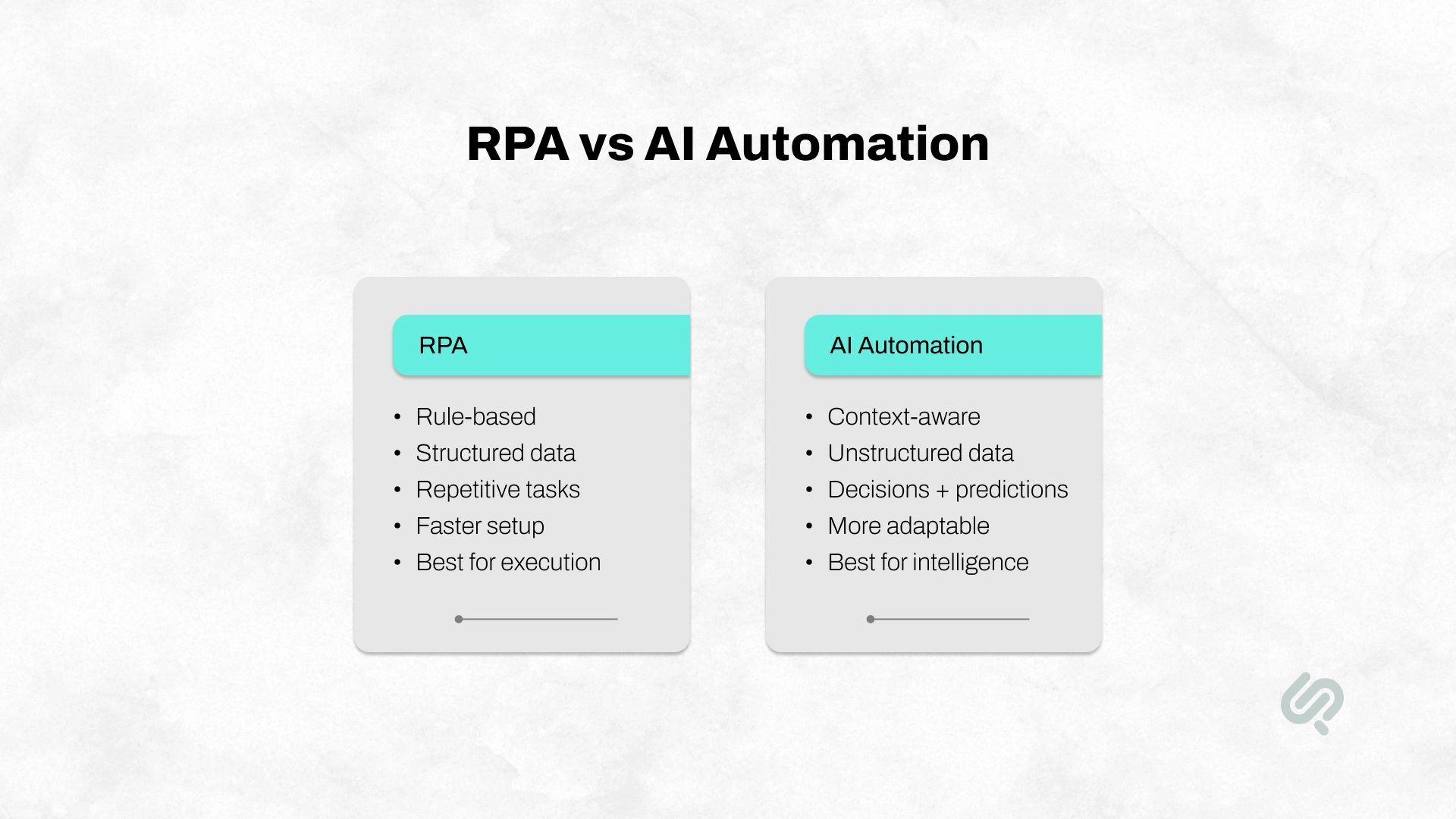
RPA and intelligent automation are not the same.
RPA automates fixed, rule-based tasks. Intelligent automation improves full business workflows by combining RPA, AI automation, workflow orchestration, integrations, analytics, and human review.
In simple terms:
This matters because most businesses do not only want to remove one manual step. They want to reduce delays, improve accuracy, connect systems, and scale operations without adding more manual work.
RPA is the better choice when a business process is repetitive, structured, rule-based, and easy to document. If the task follows the same steps every time and does not require judgment, RPA can usually automate it faster and at a lower cost than AI automation.
Choose RPA when:
RPA is a strong fit for businesses that want to reduce manual admin work without rebuilding their full technology stack. It is especially useful in finance, HR, operations, procurement, and back-office workflows where employees repeat the same digital actions across multiple systems.
RPA usually delivers faster ROI when the workflow is already well documented, has high volume, and uses structured data. However, if the process changes often or has many exceptions, RPA may become difficult to maintain.
RPA is useful for repetitive tasks, but it is not always the best automation option. If your workflow changes often or depends on judgment, RPA can become difficult to maintain.
RPA may not be the right choice when:
RPA works best when the process is stable, structured, and predictable. For modern systems with APIs, direct integration may be cleaner than using a bot. For legacy systems without APIs, RPA can still be useful because it can work through existing screens like a human user.
This is why a proper RPA vs AI automation comparison should start with the workflow, not the tool.
AI automation is the better choice when the process requires interpretation, context, prediction, or decision support.
It is designed for work where inputs vary, data is unstructured, or a human currently needs to read, understand, and decide what should happen next.
Choose AI automation when:
AI automation is especially useful for document-heavy, customer-facing, and decision-heavy processes. It can help teams reduce manual review, prioritize work, improve response times, and make more consistent decisions.
AI automation is strongest when the workflow depends on judgment, not just execution. For example, support teams can use AI automation to classify tickets, finance teams can use it to extract invoice data, and compliance teams can use it to flag risky documents before human review.
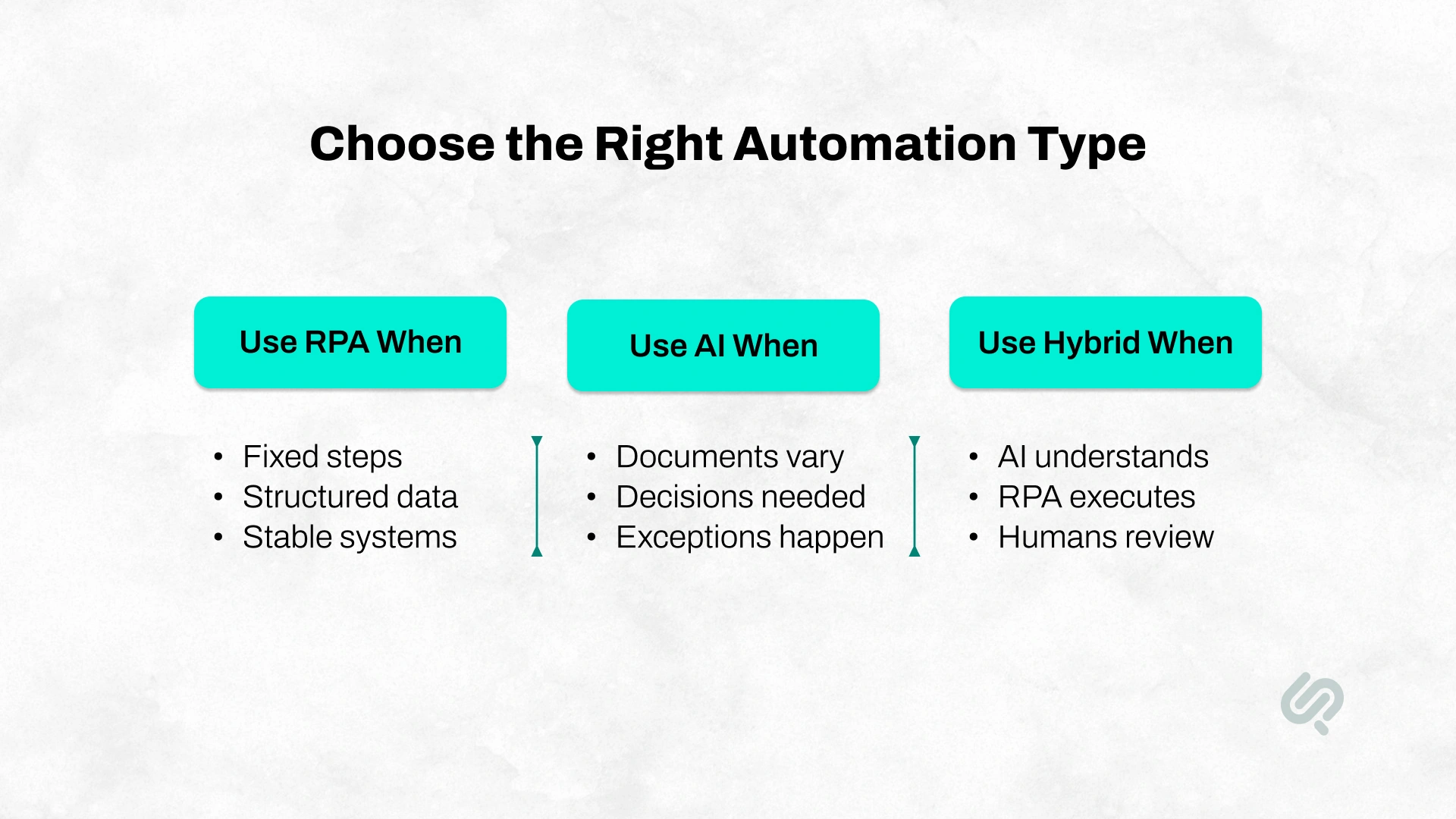
Many businesses do not need to choose only one. In real operations, the best answer is often RPA and AI together.
A typical hybrid automation workflow looks like this:
This hybrid model is often called intelligent automation. It is useful because AI handles the thinking layer, RPA handles the execution layer, and workflow automation connects the full process.
A finance team receives invoices in multiple PDF formats. RPA alone may struggle because the invoices do not always follow the same layout.
AI automation can read each invoice, extract the vendor name, invoice number, line items, due date, and total amount. It can also flag unusual invoices, missing fields, or low-confidence entries. Once the information is verified, RPA can enter the approved data into the accounting or ERP system.
This reduces manual data entry while keeping control over approvals, exceptions, and financial risk.
For buyers comparing RPA vs AI automation, this is often the most practical answer: use AI where the process needs understanding, use RPA where the process needs execution, and use workflow automation to connect both.

Automation should make business processes faster, but it should not remove control from sensitive workflows.
For finance, healthcare, insurance, legal, HR, logistics, and enterprise operations, some decisions still need human review. This is especially important when workflows involve customer data, financial approvals, contracts, claims, compliance checks, or medical information.
A secure automation workflow should define:
This is where human-in-the-loop automation becomes useful. AI can extract, classify, summarize, or recommend the next step, while humans review high-risk exceptions before final action.
The goal is not to automate everything blindly. The goal is to reduce manual work while keeping control, visibility, and accountability.
“RPA is useful when the work is stable and repeatable, but AI automation is where businesses start improving the decision layer of operations. The safest path is to map the workflow first, automate predictable steps, add AI where context is required, and keep human review for high-risk exceptions.”
Hammad Maqbool, Head of AI & Prompt Engineering at Phaedra Solutions
The right automation approach depends on the process. Some workflows are simple and repetitive. Others involve documents, decisions, exceptions, or multiple departments.
This table should be used as a starting point. The final decision depends on process volume, data quality, system complexity, compliance needs, and how often exceptions occur.
McKinsey estimates that generative AI and other technologies could automate activities that take up 60% to 70% of employees’ time. This makes AI automation especially relevant for document-heavy, decision-heavy, and repetitive business workflows. (2)
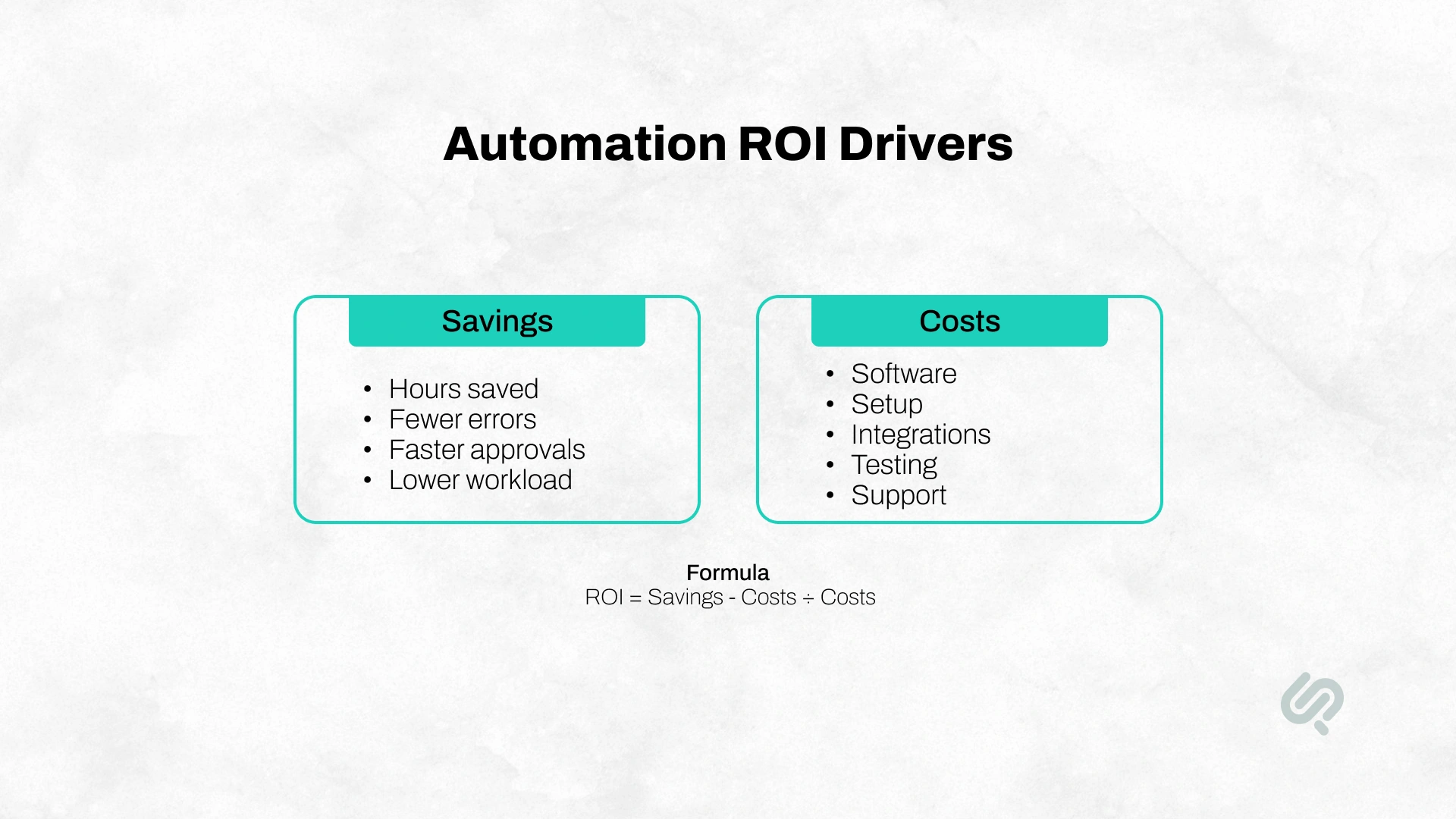
ROI is one of the most important factors when choosing between RPA vs AI automation. A tool may sound advanced, but buyers need to know whether it will reduce cost, save time, improve accuracy, and pay for itself.
Use this automation ROI formula:
Automation ROI = [(Annual Savings - Automation Costs) / Automation Costs] × 100
Annual savings may include:
Automation costs may include:
RPA usually delivers faster ROI when the process is simple, repetitive, and already documented. AI automation may take longer to implement, but it can create higher value when the workflow involves documents, decisions, predictions, or large volumes of unstructured data.
Deloitte’s intelligent automation survey found that organizations expected an average 31% cost reduction over three years, while organizations beyond the pilot stage reported an average 32% cost reduction. (3)
Payback Period = Total Automation Cost / Monthly Savings
If automation costs $30,000 and saves $10,000 per month, the payback period is about three months.
This helps buyers compare automation options based on business value, not just software features.
A company spends 40 hours per week on manual reporting. The average loaded employee cost is $40 per hour.
That means:
Now assume automation costs $18,000 to set up, plus $1,000 per month for software and support. Year 1 automation cost is $30,000.
If automation removes 70% of manual reporting work:
In plain terms, the automation pays for itself in about five months and creates positive Year 1 value.
This type of calculation helps businesses avoid vague automation decisions. Instead of asking whether RPA or AI sounds better, buyers can compare cost, savings, complexity, and payback before committing budget.
Automation ROI depends on process volume, workflow clarity, system stability, data quality, and adoption.
The best ROI comes from choosing the right workflow first, not the most advanced automation tool.
Phaedra Solutions developed an AI-powered inventory management system to help a business move beyond manual stock tracking and reactive inventory decisions. The solution included smart inventory tracking, barcode scanning, automatic barcode generation, real-time stock updates, and AI-driven reports to predict future stock needs.
This case study is a strong example of where AI automation is more useful than simple RPA. RPA could help with repetitive data entry, but AI automation adds forecasting, reporting, and decision support.
For businesses comparing RPA vs AI automation, this shows the value of using AI when the workflow requires real-time visibility, smarter stock control, and better decisions around overstocking and shortages.
Use this checklist before choosing a tool or vendor.
RPA usually has a lower starting cost when the task is simple, rule-based, and easy to document. The bot follows fixed steps, so setup can be faster for repetitive back-office work.
AI automation usually needs more planning. It may involve document processing, model selection, workflow logic, prompts, integrations, testing, and human review. The setup can be more complex, but the value is often higher when the workflow involves decisions, documents, messages, or exceptions.
Maintenance is also different.
RPA maintenance usually includes:
AI automation maintenance usually includes:
For buyers, the real question is not “Which option is cheaper?” The better question is “Which automation approach will reduce the most manual work without creating future maintenance problems?”
Off-the-shelf RPA and AI tools work well for simple workflows. But they can become limiting when the process is specific, regulated, or spread across multiple systems.
A custom automation solution may be better when:
For simple tasks, a tool may be enough. For high-value business processes, custom AI workflow automation gives more control, flexibility, and long-term scalability.
Automation projects usually waste budget when businesses choose a tool before understanding the process.
Common mistakes include:
The strongest automation projects start with process clarity. Before choosing RPA, AI automation, or a hybrid model, define the workflow, success metrics, data sources, integrations, user roles, exception handling, and approval rules.
The best way to choose between RPA and AI automation is to start with one measurable workflow.
First, map the current process. Identify where time, errors, delays, rework, and manual handoffs happen. Then separate the workflow into rule-based steps, document-heavy steps, decision-heavy steps, and human approval points.
A practical roadmap looks like this:
This prevents businesses from buying automation software before understanding what actually needs to change.
If you are comparing RPA vs AI automation, start with process mapping before choosing a tool. Phaedra Solutions helps businesses identify where RPA, AI automation, AI agents, workflow orchestration, system integrations, and human review fit inside the real business process.
Our AI workflow automation services are designed for businesses that want to reduce manual work, modernize legacy workflows, improve operational speed, and build automation systems that can scale.
Using an AI-first delivery process with expert engineering oversight and tools such as AI agents, Claude, Cursor, and modern automation ecosystems, Phaedra Solutions can help reduce development timelines, optimize cost, and reduce team effort by 30% to 80%, depending on project size, complexity, and workflow maturity.



Ameena is a content writer with a background in International Relations, blending academic insight with SEO-driven writing experience. She has written extensively in the academic space and contributed blog content for various platforms.
Her interests lie in human rights, conflict resolution, and emerging technologies in global policy. Outside of work, she enjoys reading fiction, exploring AI as a hobby, and learning how digital systems shape society.
