




.webp)
.webp)







Conversational analytics uses AI to let people ask questions about business data in natural language and receive answers as numbers, charts, summaries, or follow-up insights. Users can explore company performance without writing SQL or searching through several dashboards.
In 2026, semantic layers, permission-aware querying, multi-step reasoning, and analytics AI agents are making these systems more useful. Their accuracy still depends on clean data, consistent business definitions, controlled access, and regular evaluation.
It allows people to ask questions about business data in everyday language. The system queries approved data and returns an answer as a number, chart, table, or explanation.
The system interprets the question, maps it to approved business metrics, checks the user’s permissions, and queries trusted data. It can retain context so the user can continue with follow-up questions.
No. Dashboards remain useful for recurring reports and routine KPI monitoring. Conversational BI is better for ad hoc questions, follow-up analysis, and investigating why a result changed.
A focused pilot can take around four to eight weeks when the data is accessible and the required metrics are already defined. Fragmented data, custom permissions, and complex business logic can extend the timeline.
Buy when an existing platform supports your data stack, metrics, and security requirements. Build or customize when you need multiple data sources, proprietary calculations, embedded analytics, or actions triggered by an insight.
Business intelligence is moving beyond fixed dashboards and analyst-led report requests. Natural language BI now allows decision-makers to investigate metrics, compare periods, and ask follow-up questions without learning SQL.
The change in 2026 is the combination of natural-language access with governed metrics, security controls, semantic layers, and AI agents. These additions make it possible to move from individual questions toward multi-step analysis and continuous monitoring.
Google’s BigQuery release shows this direction. On June 30, 2026, Google made its conversational analytics capability generally available. Business and technical users can ask questions, conduct multi-step analysis, and generate visual reports where their data already resides. The platform also allows data teams to create specialized agents grounded in selected projects, datasets, tables, views, graphs, and functions. (1)
Google expanded this direction through Looker Agentic Workflows in July 2026. The feature can turn a request such as “monitor return rates weekly” into an ongoing monitoring routine, with the proposed workflow reviewed before activation. (2)
Gartner also predicts that 75% of new analytics content will be contextualized for intelligent applications using generative AI by 2027. This suggests that AI-generated explanations and context will become a standard part of business intelligence rather than an isolated feature. (3)
Several developments are making conversational BI more practical for business use:
The technical ability to query a database with natural language is no longer enough. Buyers should ask:
An AI analytics chatbot alone may not meet these requirements. Production systems also need governed data, clear metric definitions, reliable integrations, security controls, evaluation processes, and defined failure behavior.
Giving employees a chat interface does not resolve conflicting metrics, missing data, or unclear ownership. It often exposes these problems more quickly.
Consider a request such as:
“Show me revenue from active customers last quarter.”
The system still needs approved answers to several questions:
A language model cannot decide which business definition the company should use. Those rules must come from metric owners, data teams, and the governed semantic layer.
This changes the work of analytics teams. They may spend less time answering repeated report requests and more time maintaining business definitions, evaluation sets, permissions, and reusable data products.
Natural-language access reduces the effort required to ask a question. Data quality and analytics governance still determine whether the answer can be trusted.
Some platforms use the same term to describe the analysis of customer calls, chats, and support conversations.
This article focuses on a different use case: allowing people to ask questions about structured business data and receive analytical answers. Conversation intelligence platforms that analyze call transcripts, customer sentiment, agent performance, or support quality belong to a related but separate category.
A user sees a simple chat interface, but several systems work together behind each answer.
The user enters a question such as: “Why did gross margin fall last month?”
They do not need to know the database structure, table names, or SQL syntax.
The AI identifies the metric, time range, filters, dimensions, and intended comparison. A semantic layer connects terms such as gross margin, qualified lead, or active customer to approved company definitions.
If a question can have several meanings, the system should ask for clarification.
Before querying the data, the system confirms what the user is allowed to access. Controls may include:
These controls should be enforced within the data and application layers. An instruction inside an AI prompt should never serve as the only security boundary.
The system generates and executes a query against authorized sources. These may include:
The language model should base its response on the returned data instead of attempting to supply the answer from its general knowledge.
The response may include:
A reliable AI-powered business intelligence system should also show the source, calculation, timestamp, or generated query when verification is required.
The system retains the context of the initial request. The user can continue with questions such as:
This multi-turn process helps users move from a high-level KPI to a more detailed investigation without rebuilding a report.
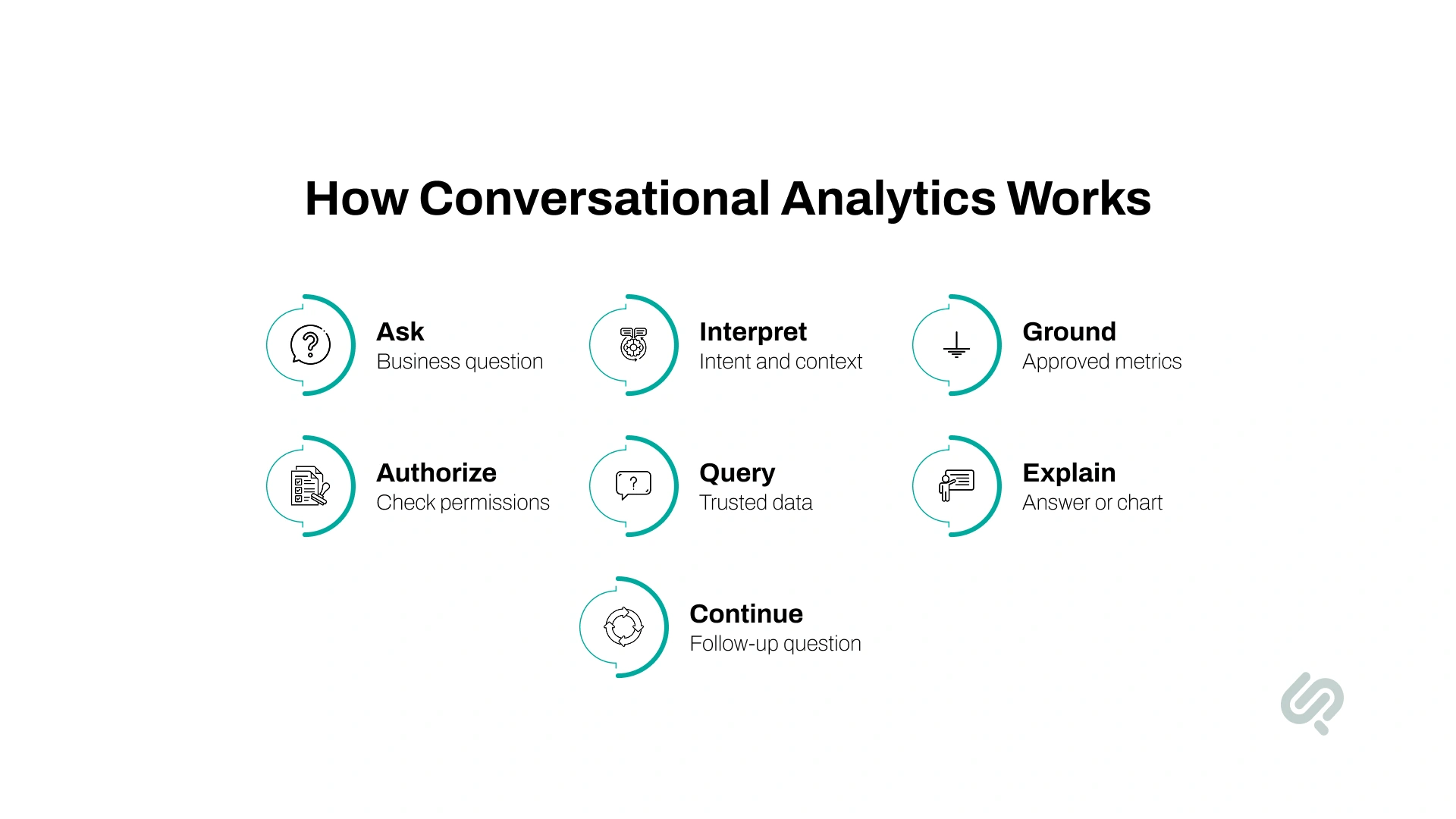
The workflow can be summarized as:
Business question → Intent interpretation → Semantic grounding → Permission check → Approved query → Analysis → Traceable answer → Follow-up
The quality of the answer depends on the data, definitions, access rules, integrations, and evaluation process supporting this workflow.
These approaches support different types of analysis.
Dashboards provide a consistent view of recurring KPIs. They remain valuable for executive reporting, regulatory submissions, standard financial reviews, and daily operational monitoring.
Conversational BI works better when the user has an unexpected question or wants to investigate why a metric changed. It can fill the gap between a predefined dashboard and a new report request sent to an analyst.
Analytics AI agents extend this model. An agent can monitor a metric, detect a change, investigate likely causes, and send the findings to the relevant team. Controls are still needed before an agent can initiate a financial, customer-facing, or operational action.
Google’s Looker Agentic Workflows preview demonstrates this progression. A user can define a monitoring requirement in natural language, review the proposed workflow, and receive root-cause findings through tools such as Slack or email.

The strongest use cases involve questions that arise frequently, influence a decision, and currently require someone to gather information manually.
A CFO could ask:
“Why did gross margin fall last month?”
The system could break the result down by region, product, customer segment, pricing changes, or fulfillment costs.
The purpose is not to remove financial review. It is to reduce the time required to assemble the first layer of analysis and identify where a finance professional should investigate further.
A sales or revenue leader could ask:
When CRM, billing, product, and customer-activity data are connected, the system can answer questions that would otherwise require several reports and input from multiple teams.
An operations leader may know that fulfillment time increased but not understand the cause.
They could ask the system to identify which locations changed most and then examine possible relationships with order volume, staffing, supplier delays, inventory levels, or transportation performance.
This becomes especially valuable when the answer is distributed across several operational systems.
A marketing leader could ask:
“Why did customer acquisition cost increase last week?”
Follow-up questions could examine:
This gives the marketing team a faster way to investigate performance between formal reporting cycles.
Executives often need an answer while a decision is being discussed. Opening several dashboards or waiting for a new report interrupts that process.
A governed AI data assistant can help leadership teams ask questions about revenue, costs, customers, operations, or performance and receive immediate data-backed findings. They can then explore what changed, why it changed, and which areas require attention.
The business value comes from reducing the time between asking a question, verifying the answer, and making a decision.
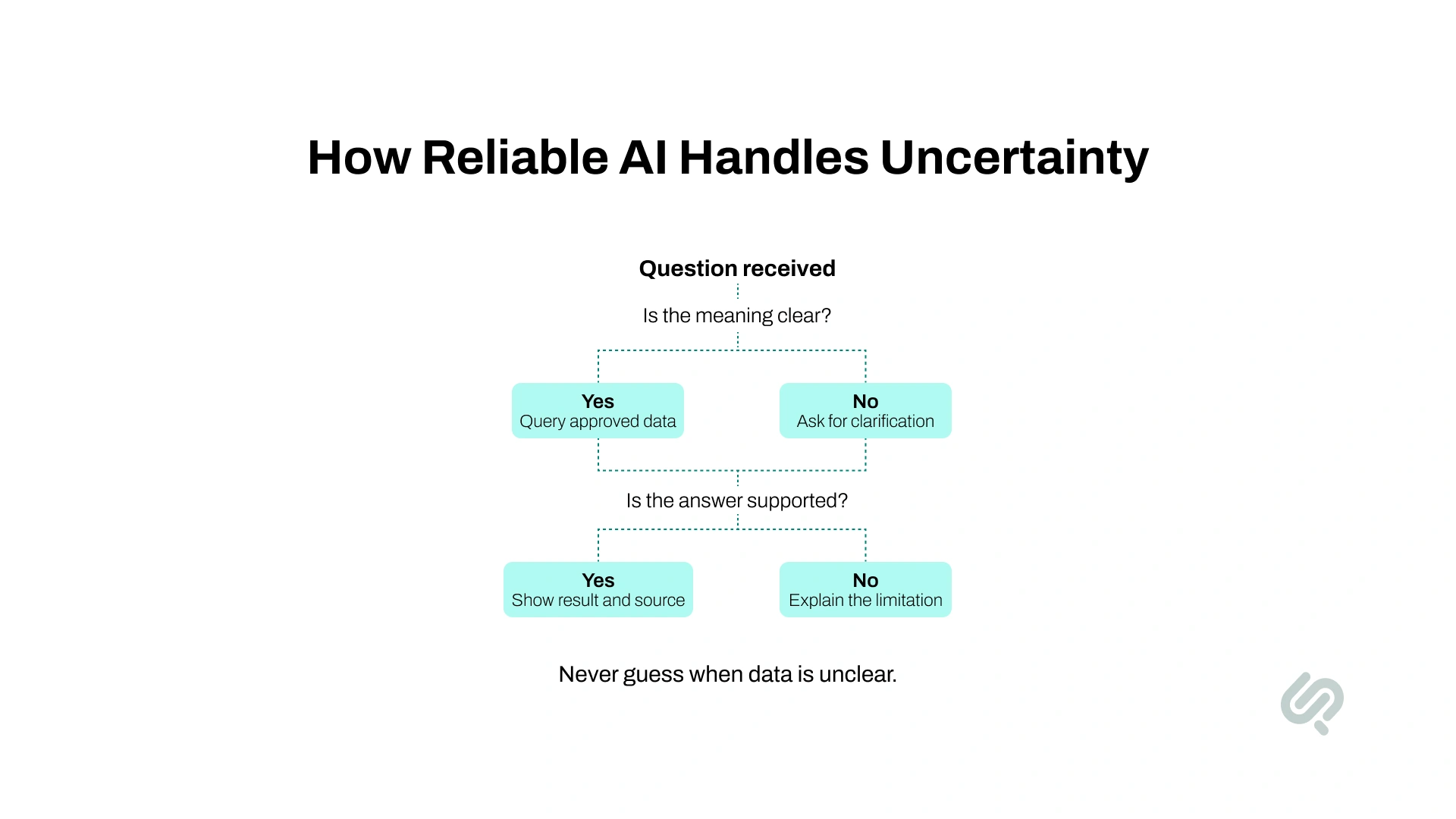
Natural-language access can make an incorrect answer appear clear and convincing. Businesses need to test the full data and query process, not only the quality of the written response.
Common failure points include:
For example, “revenue last month” may produce different answers depending on whether the system uses invoices, payments, recognized revenue, or CRM opportunities. A fluent explanation does not make the selected definition correct.
A production system needs clear failure behavior. When confidence is low, it should:
This is particularly important for financial, healthcare, compliance, and executive reporting.
A polished chat interface can be built quickly. Reliable answers require preparation in five areas.
Document how important metrics are calculated, who owns them, which source is authoritative, and how exceptions are treated.
Start with metrics that affect frequent or high-value decisions. Revenue, churn, margin, pipeline, and active customers often need clearer definitions than teams expect.
Identify the data needed to answer the first set of business questions. Confirm its quality, refresh schedule, ownership, and relationships with other systems.
Connecting every available dataset at the beginning adds cost and makes testing harder. Start with the minimum data required for a useful pilot.
Users should only receive data they are authorized to view. Apply permissions before the system runs a query.
Depending on the use case, this can include:
Create a set of real questions with analyst-approved answers. Include simple questions, follow-ups, unclear wording, unusual date ranges, cross-system queries, and questions the system should refuse.
This evaluation set becomes the baseline for testing future changes to models, prompts, data sources, and semantic definitions.
Users should be able to understand where a result came from. High-impact answers may need to show the source, metric definition, data timestamp, applied filters, or generated query.
Traceability makes errors easier to find and gives business users a reason to trust verified answers.
“The value is not that an executive can type a question instead of opening a dashboard. The value is that the answer is grounded in the same business definitions, permissions, and source data the company already trusts.”
Hammad Maqbool, AI & LLM Engineering Lead , Phaedra Solutions
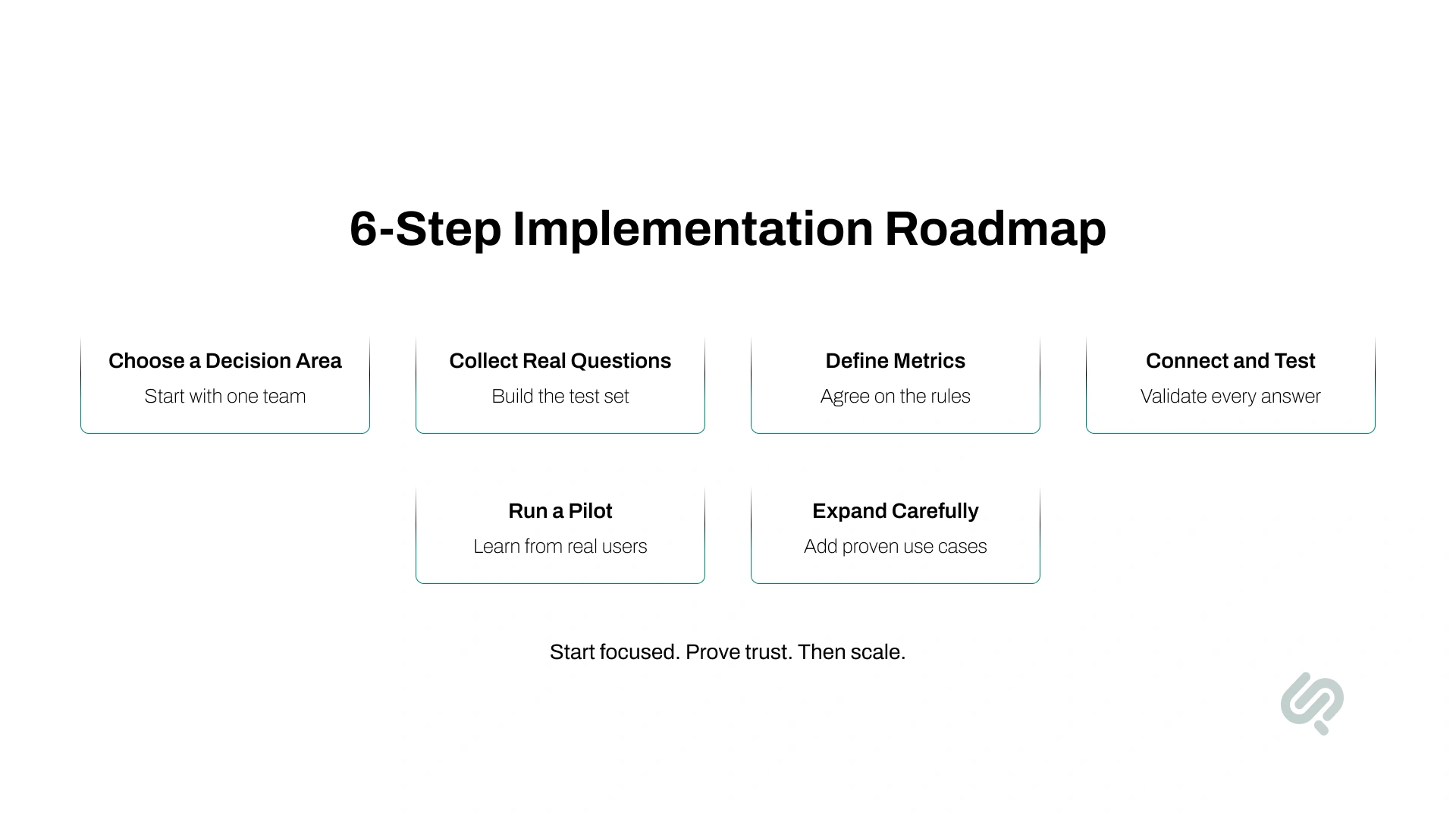
A focused rollout is easier to validate than a company-wide launch. The following six-step process keeps the first implementation tied to a measurable business need.
Select one function, such as finance, sales, marketing, or operations.
Identify the questions users repeatedly ask, the time currently required to answer them, and the decisions those answers support.
Collect 20 to 40 real questions from the intended users. Include:
This set helps define the required metrics, data sources, permissions, and acceptance criteria.
Document how each metric is calculated and which system owns the final number.
Resolve conflicting definitions before connecting the AI interface. If finance, sales, and marketing use different definitions of revenue, the system needs an approved rule for each context.
Connect the required systems, apply permissions, and configure the semantic model.
Compare generated results with analyst-approved answers. Test filters, time zones, currencies, missing data, cross-system joins, and access restrictions.
Begin with a small group of actual business users.
Track where the system answers correctly, asks for clarification, fails, or requires analyst support. User feedback should be combined with query traces and factual evaluation.
Add new data sources, departments, and agent workflows after the first use case meets agreed standards for:
A pilot should prove that users can reach a trusted answer faster. A high number of chat messages alone does not demonstrate value.
A vendor demonstration usually relies on prepared questions and clean data. Buyers should test each platform using their own terminology, permissions, and data problems.
Platforms that may enter a shortlist include:
The shortlist should follow the company’s data environment. A business with governed Looker models may reach production faster by extending Looker. A company with several data and application environments may need a custom or hybrid architecture.
Ask each shortlisted vendor:
These questions provide a more realistic assessment than a prepared product demonstration.
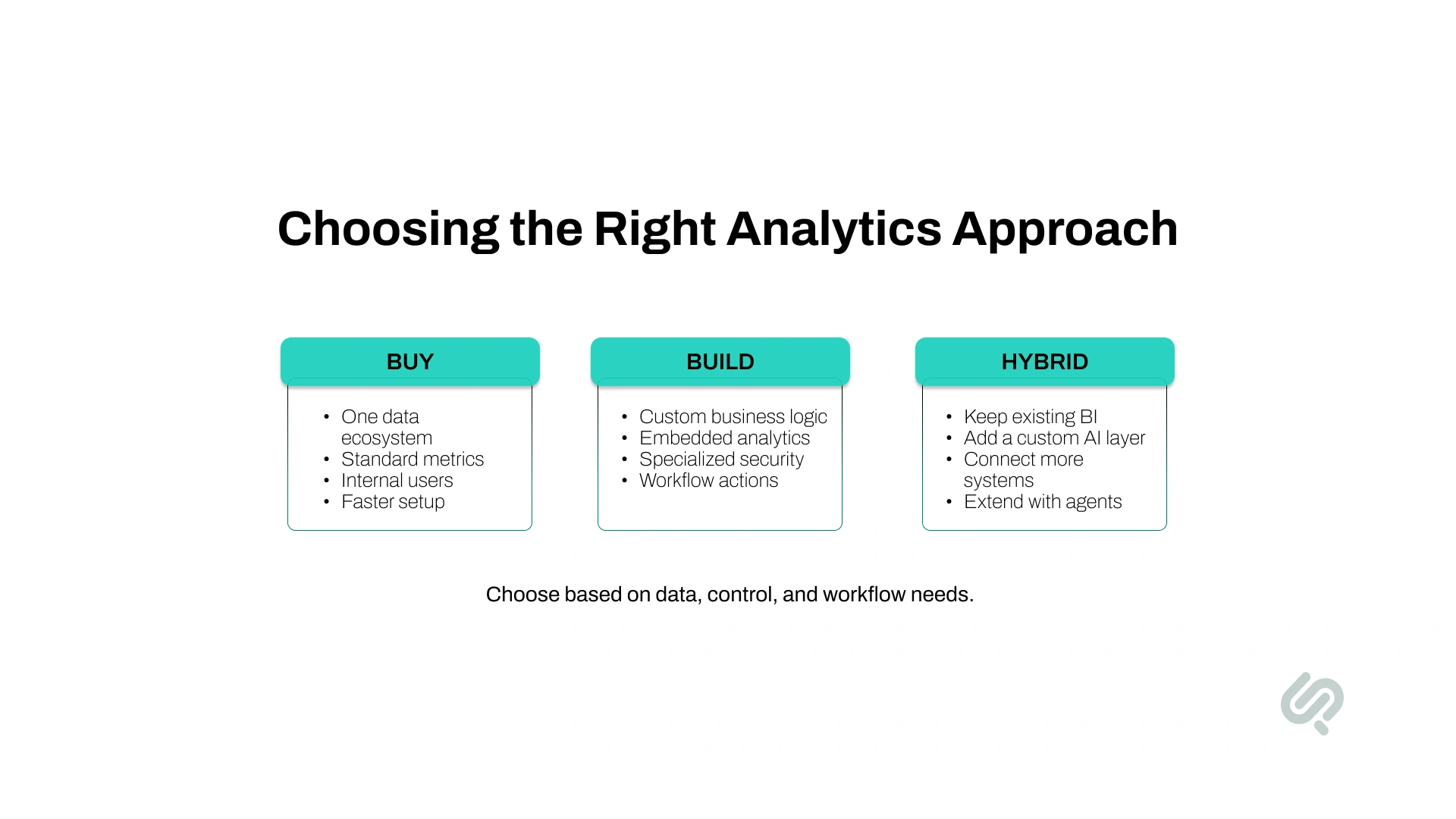
The right approach depends on the company’s data environment, business logic, security requirements, and intended user experience.
An existing platform may be sufficient when:
This route can reduce the time and engineering effort required for an initial rollout.
Custom development may be appropriate when:
A custom build provides more control. It also creates responsibility for security, evaluation, monitoring, maintenance, and model updates.
A hybrid architecture keeps the existing warehouse, BI platform, and semantic model while adding a custom conversational or agent layer.
This works well when a company wants to preserve its current analytics investment but needs:
For many established businesses, a hybrid model provides a practical balance between speed, control, and implementation effort.
Measure whether the system helps people reach verified insights and make decisions faster. Usage alone does not show whether the answers are valuable.
Track:
Track:
Track:
Track:
A useful AI data assistant should reduce the time spent waiting for routine analysis without creating an equal amount of verification work.
Repeated questions can also reveal automation opportunities. A question that users ask every week may be better converted into a governed dashboard, alert, or reusable agent workflow.
A commercial property firm relied on Excel reports that took three to four days to prepare. Leasing, occupancy, CRM, and finance data remained separated, making it difficult to compare vacancy trends, rental performance, and asset ROI across its portfolio.
Phaedra Solutions built a conversational data intelligence solution that connected these sources and allowed teams to ask questions in plain language. The firm gained real-time rent and occupancy tracking, instant answers to performance questions, and 75% fewer analyst tickets, helping teams make faster pricing and portfolio decisions.
Implementation cost depends on the condition of the data, number of integrations, required security controls, and level of customization.
Disconnected systems, missing fields, duplicate records, and inconsistent formats require additional integration and cleaning work.
The system needs approved definitions for metrics, calculations, dimensions, and relationships. Existing semantic models can reduce this effort.
Role-based access, data masking, audit logs, regulated data, and detailed permission requirements add design and testing work.
A built-in BI assistant requires less development than a custom experience embedded in a web application, CRM, collaboration tool, or customer portal.
Teams need approved test questions, regression testing, user feedback, performance monitoring, and a process for correcting unreliable answers.
Continuous monitoring, root-cause investigation, alerts, and business actions require more orchestration than a question-and-answer interface.
A focused proof of concept costs less than a multi-department production system. Businesses should define one decision area and assess the available data before requesting a reliable estimate.
The chat interface usually represents a small part of the work. Data preparation, metric governance, integrations, security, and testing determine much of the project effort.
A specialist partner is useful when the project requires more than activating a feature in an existing BI platform.
Consider external support when:
Before selecting a partner, ask how it will validate answers, enforce permissions, manage semantic definitions, and monitor production quality.
The engagement should begin with business questions and decision workflows. Platform and model selection should follow those requirements.
Start with the questions your teams repeatedly ask, the data needed to answer them, and the decisions those answers influence.
Phaedra Solutions’ data analytics & AI insights service helps businesses connect fragmented data, define reliable metrics, and build governed analytics experiences around their existing systems.
Book a Data Analytics & AI Insights consultation to assess your data readiness and define a focused first use case. New engagements are also covered by Phaedra Solutions’ 14-day money-back guarantee.



Ameena is a content writer with a background in International Relations, blending academic insight with SEO-driven writing experience. She has written extensively in the academic space and contributed blog content for various platforms.
Her interests lie in human rights, conflict resolution, and emerging technologies in global policy. Outside of work, she enjoys reading fiction, exploring AI as a hobby, and learning how digital systems shape society.