

.webp)
.webp)
.webp)
.webp)








.webp)
Legacy system modernization cost in 2026 usually ranges from $50,000 to $500,000+ for focused application upgrades, while large enterprise modernization programs involving ERP, CRM, mainframes, COBOL, or regulated data can reach $1 million to $10 million+.
The final cost depends on system complexity, business risk, integrations, data migration, security requirements, testing needs, and whether the business chooses to rehost, replatform, refactor, rebuild, replace, or retire parts of the legacy system.
For enterprise leaders, the real question is not only “What will modernization cost?” It is also “What is this legacy system already costing us through slow releases, manual workarounds, security risk, support overhead, poor reporting, and blocked AI adoption?”
This guide breaks down typical modernization cost ranges, cost drivers, hidden maintenance costs, AI-assisted savings, ROI planning, and how to choose the safest modernization path without overspending.
Legacy system modernization cost in 2026 usually ranges from $50,000 to $500,000+ for one application, module, or focused modernization track. Large enterprise programs involving ERP, CRM, mainframes, COBOL, or regulated data can cost $1 million to $10 million+.
The cost usually includes technical discovery, architecture review, code analysis, data migration, API integration, cloud or infrastructure work, security improvements, testing, compliance checks, deployment planning, and post-launch support.
The biggest cost drivers are poor documentation, hidden business logic, old frameworks, data quality issues, complex integrations, security requirements, compliance rules, downtime risk, and the need for specialist legacy skills.
Modernization is usually cheaper when the system still contains valuable business logic and can be improved in phases. Replacement may be better when the system is unstable, unsupported, rarely used, or no longer fits the business process.
Yes, AI can reduce cost in areas like code analysis, documentation, dependency mapping, test generation, refactoring support, and migration planning. However, senior engineers still need to validate architecture, business logic, security, and compliance.
Start with a legacy system audit, retire unused modules, modernize in phases, add APIs where possible, clean data before migration, build test coverage early, and use AI-assisted workflows under expert review.
Legacy system modernization means upgrading an old software system so it can support today’s business needs, security standards, integrations, data requirements, and growth plans.
For business leaders, it does not always mean replacing the entire system. In many cases, modernization means keeping the parts that still work and improving the parts that slow teams down, increase cost, or create risk.
A legacy system can be:
Legacy system modernization can include:
The goal is to keep what still works, fix what creates cost or risk, and remove what slows the business down.
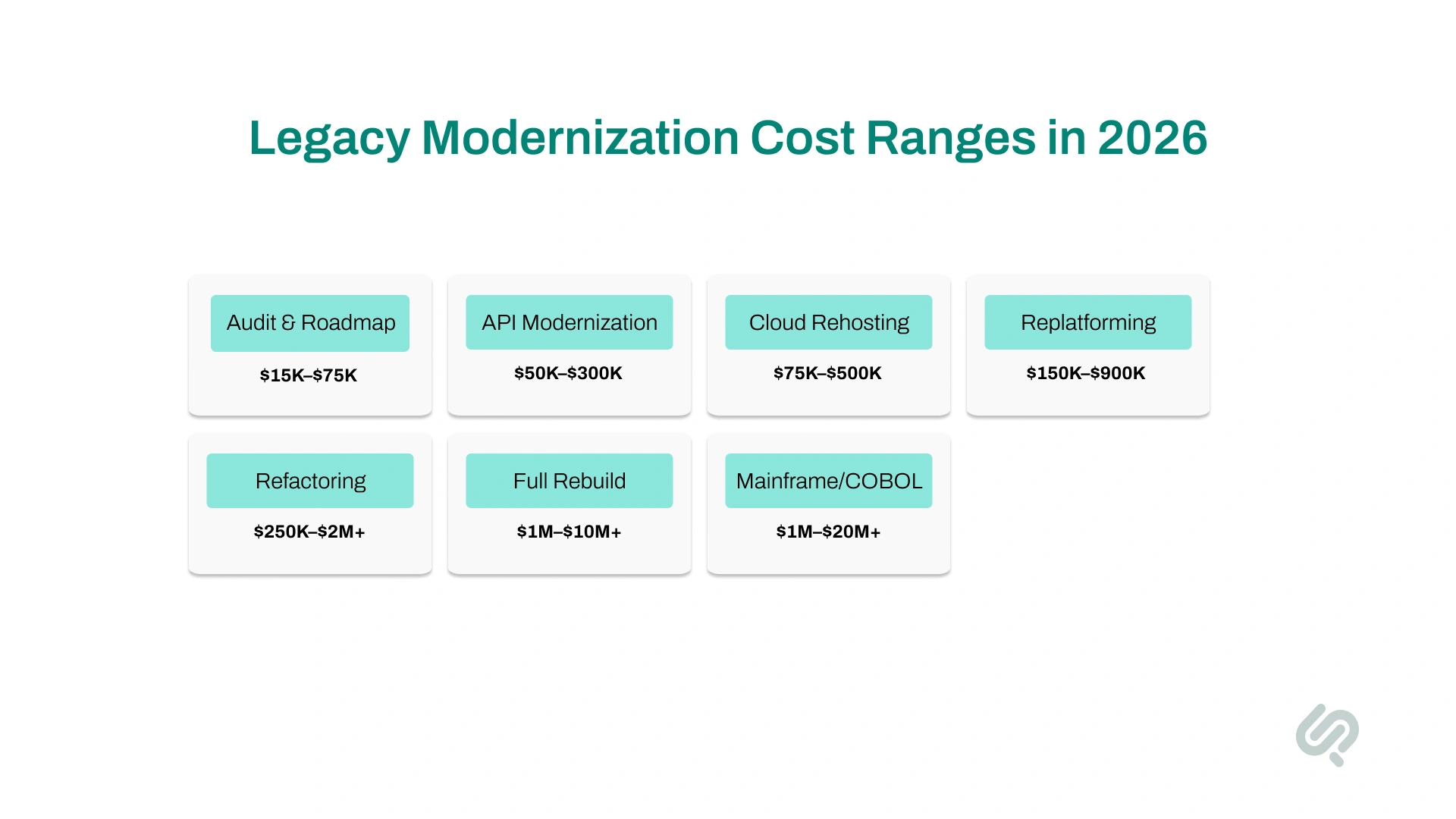
There is no single fixed modernization price because every legacy system is different. A small internal tool and a banking mainframe are not in the same cost category.
Use this table as a planning guide.
These are not final quote numbers. They are realistic planning ranges. A proper cost estimate needs technical discovery, architecture review, codebase review, data review, security review, and business workflow mapping.
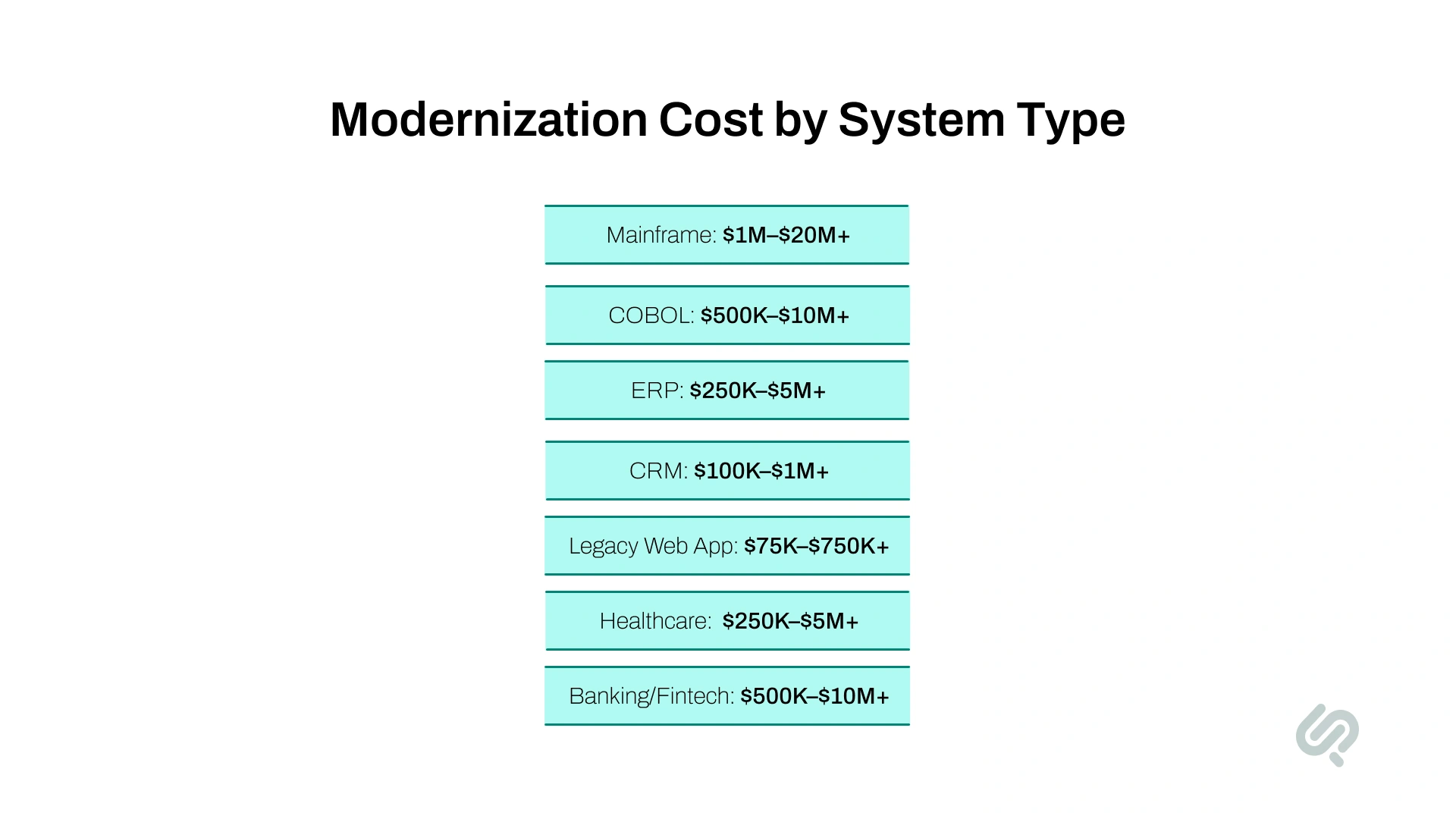
Different systems have different modernization costs. The more critical, regulated, customized, or connected the system is, the higher the budget usually becomes.
These ranges are planning estimates, not fixed prices. A system audit is still needed to confirm the actual scope, risk, and modernization path.

Legacy application modernization cost depends on how difficult your system is to understand, update, test, secure, and connect with the rest of your business.
Two applications may look similar to users, but the cost can be very different once the team reviews the codebase, data, integrations, workflows, and hidden business rules.
In most enterprise projects, the biggest cost drivers are system complexity, business criticality, data migration, and integrations.
The more complex the legacy application is, the more time it takes to modernize. Cost increases when the system has:
For example, a legacy order management system may look simple to the sales team. But behind the scenes, it may connect with inventory, billing, shipping, finance, and reporting tools.
Changing one workflow without understanding these links can break several business functions. That is why complex systems need more discovery, documentation, testing, and phased delivery.
Mission-critical systems cost more because the risk of failure is higher. If the application supports billing, payments, claims, patient records, inventory, compliance, customer accounts, or daily operations, the modernization plan needs stronger controls.
This usually includes:
For example, modernizing a healthcare platform that stores patient records requires more care than updating a simple internal dashboard. The team must protect sensitive data, maintain audit trails, follow compliance rules, and reduce disruption for users.
The more closely the system is tied to revenue, compliance, or customer experience, the higher the modernization cost usually becomes.
Data migration is one of the most underestimated parts of legacy software modernization cost. Old systems often contain:
Simply moving this data into a new system does not fix the problem. It can create reporting errors, compliance gaps, and operational confusion later.
For example, if an old CRM has duplicate customer records and outdated sales stages, migrating that data without cleaning it first will make the new CRM harder to trust from day one.
That is why data migration usually includes data cleaning, field mapping, validation, backup planning, test migrations, and final checks.
Legacy applications rarely work alone. They often connect with ERP platforms, CRM systems, payment tools, HR software, inventory systems, reporting dashboards, compliance tools, or customer-facing apps.
Every integration adds cost because the team must understand:
For example, a legacy billing system may send payment data to finance, customer records to CRM, invoice data to reports, and tax details to compliance tools. If one connection is missed, teams may face broken reports, failed payments, or manual reconciliation work.
That is why integration mapping should happen early in the modernization roadmap, before development begins.
Security can greatly affect the modernization budget.
IBM’s Cost of a Data Breach Report 2025 reported that the global average cost of a data breach was $4.4 million (1). This matters because old systems often run on outdated frameworks, weak access controls, unsupported libraries, or old infrastructure.
A serious modernization budget should include:
Testing is a major part of the enterprise application modernization cost. Many legacy systems contain business rules that are not documented anywhere. Employees know “how the system behaves,” but no one knows where that logic lives in the code.
Testing must confirm that:
If the system has no automated tests, the team may need to build tests before making major changes.
Modernization work needs senior technical talent.
The U.S. Bureau of Labor Statistics reported that software developers had a median annual wage of $133,080 (2), and overall employment for software developers, QA analysts, and testers is projected to grow 15% from 2024 to 2034.
This affects modernization budgets because skilled engineers, architects, QA specialists, DevOps teams, cloud experts, and security professionals are in high demand.
Costs can rise further when the system needs rare skills such as COBOL, mainframe, old Oracle, older Java, or .NET Framework expertise.
Legacy modernization pricing depends on how much discovery is needed, how risky the system is, and how predictable the scope becomes after the technical review.
Most enterprise modernization vendors use one of these pricing models:
This is usually the safest first step. The vendor reviews your codebase, architecture, integrations, data, infrastructure, security gaps, and business workflows before giving a larger modernization estimate.
Best for:
In this model, you pay for the actual engineering, architecture, QA, DevOps, and project management time used during modernization.
Best for:
This model gives you a fixed team of engineers, architects, QA specialists, DevOps experts, and delivery leads for a monthly cost.
Best for:
The system is modernized in smaller phases instead of one large rebuild. Each phase focuses on the highest-value or highest-risk area first.
Best for:
An AI-first sprint uses AI-assisted code analysis, documentation support, test generation, dependency mapping, and engineering review to speed up early discovery and planning.
Best for:
This is used when modernization is not a one-time project. The partner supports audits, roadmaps, phased delivery, cloud migration, integrations, DevOps, monitoring, and future improvements.
Best for:
A reliable modernization quote should not be based only on development hours. It should include discovery, risk, integrations, testing, data migration, deployment, and post-launch support.

A legacy modernization quote should explain what work is included, what assumptions were made, and what risks could change the final cost.
A weak quote usually gives you only a development estimate. A strong quote shows the full modernization scope.
Your quote should include:
This covers the codebase, architecture, database, infrastructure, hosting setup, release process, and system dependencies.
The vendor should understand which workflows the system supports, which teams use it, and which processes cannot be broken during modernization.
The quote should identify all connected systems, APIs, payment tools, ERP platforms, CRM tools, reporting dashboards, compliance systems, and third-party services.
The quote should explain how data will be cleaned, mapped, validated, backed up, migrated, and tested before the new or modernized system goes live.
This includes access control, encryption, secure APIs, vulnerability fixes, audit logs, backup planning, compliance checks, and monitoring.
Testing should cover business logic, user roles, integrations, reports, performance, data accuracy, security, and rollback scenarios.
Mission-critical systems need a clear release plan, downtime plan, backup process, rollback strategy, and support team during launch.
If the modernization changes workflows, dashboards, user roles, or reporting, the quote should include user training and adoption support.
The quote should include monitoring, bug fixing, performance checks, documentation, and support after launch.
Before approving a modernization proposal, ask one question: Does this quote cover only the build, or does it cover the full business risk of changing a legacy system?
Not every legacy system needs a full rebuild. Many enterprises overspend because they choose the most expensive path before understanding what the system actually needs.
Here is a simple comparison of the main modernization approaches:
Not every system needs the same modernization path. Some should be retained for now, some should be retired, and some only need APIs or infrastructure upgrades.
The highest costs usually come from refactoring, rearchitecting, rebuilding, or replacing because these options affect code, data, workflows, testing, integrations, and user adoption.
Phased modernization usually costs less upfront and carries less risk than full replacement. It lets the business modernize the most valuable or most painful parts of the system first, without rebuilding everything at once.
Full replacement can still make sense, but only when the old system is unstable, unsupported, rarely used, or no longer matches the way the business operates.
For many enterprises, the lowest-risk path is not “modernize everything” or “replace everything.” It is to audit the system, retire what is unused, connect what still works, refactor what has value, and rebuild only the parts that create cost, risk, or growth limits.
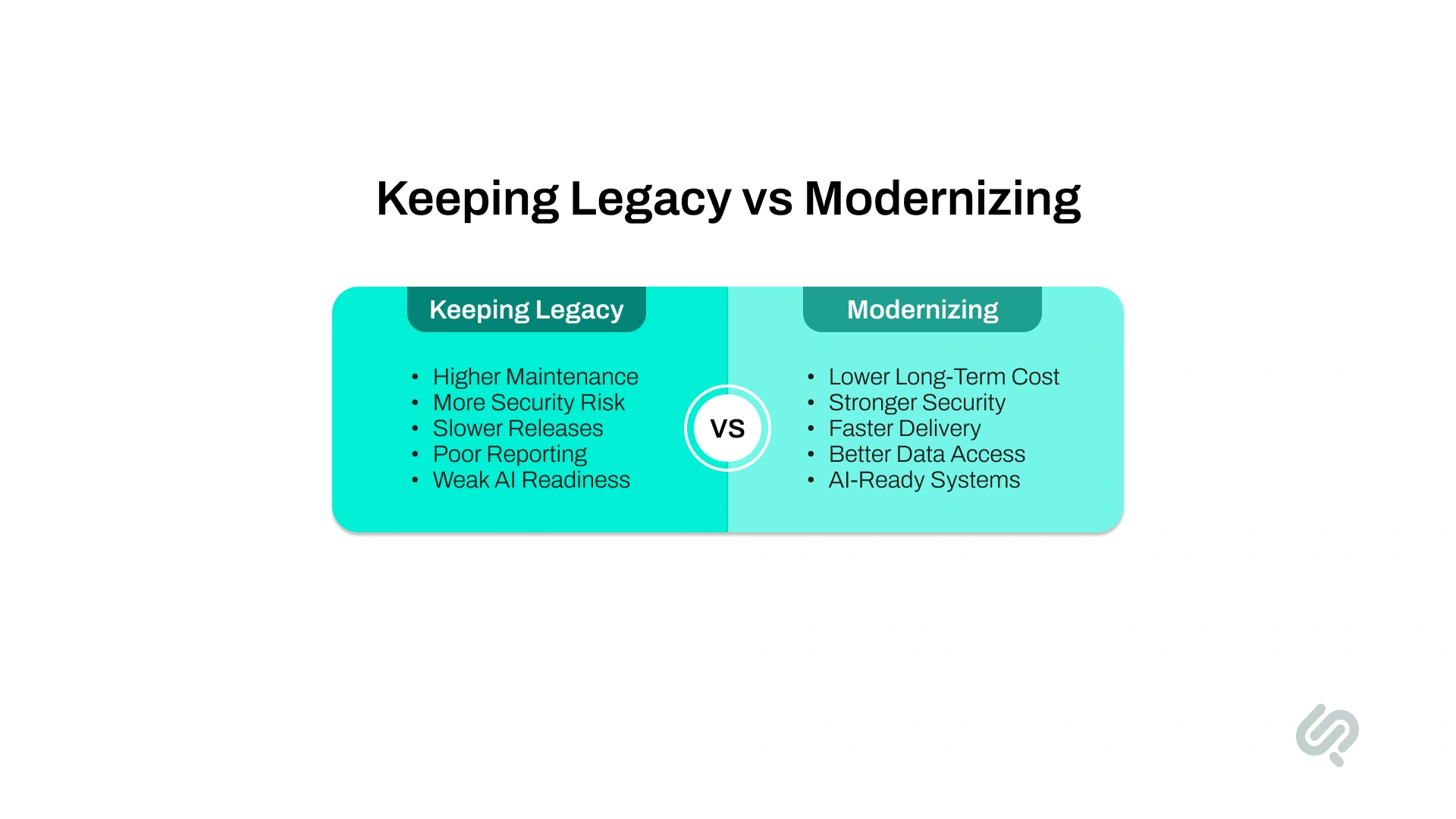
The cost of legacy system modernization should always be compared with the total cost of keeping the old system alive.
An outdated application may look cheaper because it is already built. But the real cost often shows up in maintenance, support tickets, manual work, security exposure, slow releases, poor reporting, and missed automation opportunities.
For many enterprises, the bigger financial risk is not modernization. It is the cost of waiting too long.
Legacy systems usually create costs in areas that do not always appear in the IT budget. Common hidden costs include:
This is why legacy system TCO matters. The true cost is not only hosting, licenses, and maintenance. It is the business drag created by a system that slows down operations, reporting, security, and growth.
Legacy maintenance is like paying interest on technical debt. The system may still run, but it keeps creating cost through delays, support work, manual effort, and missed opportunities.
Modernization helps reduce that cost by fixing the systems, workflows, integrations, and data problems that create long-term business drag.
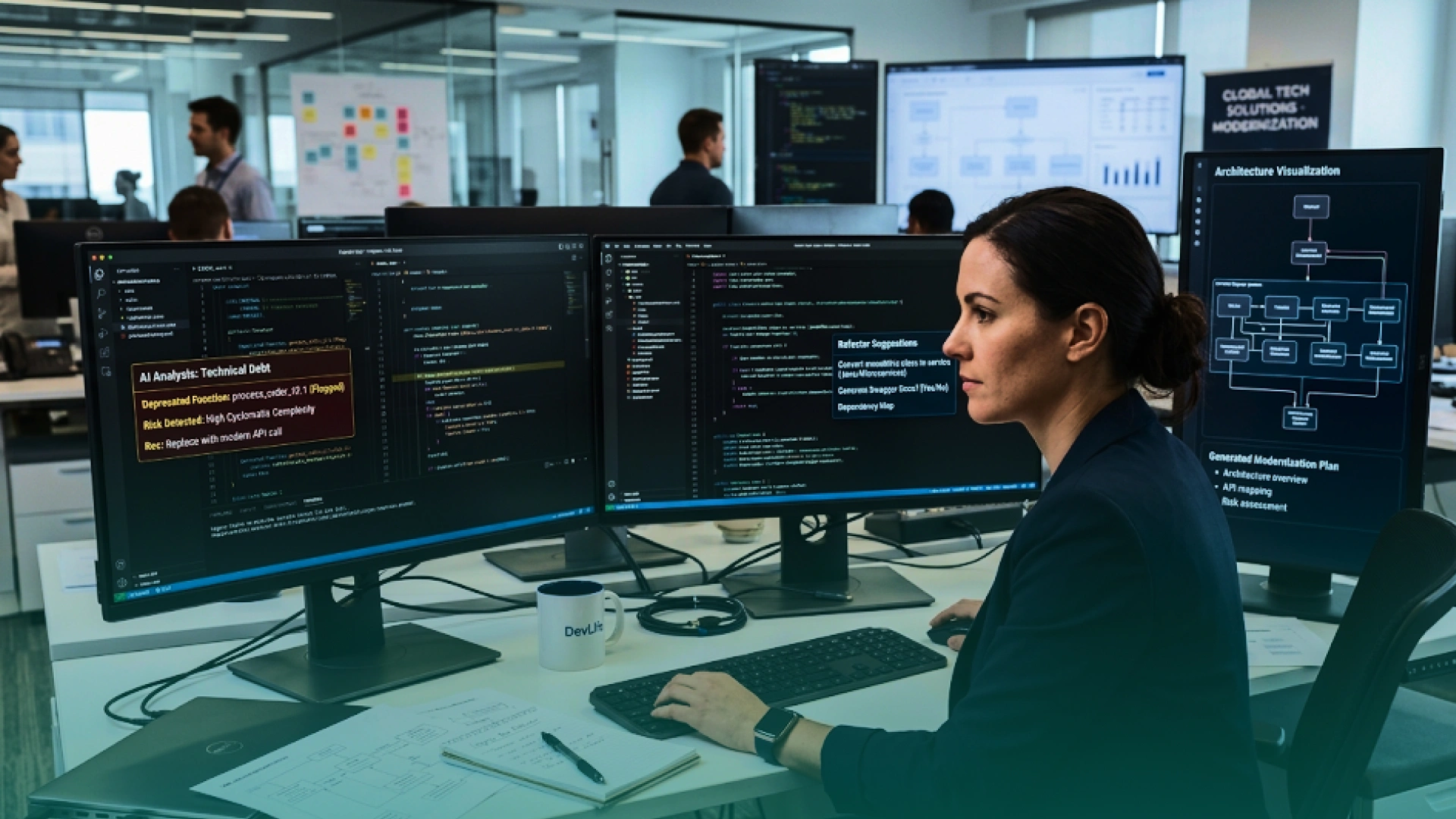
AI is changing legacy modernization costs, but it does not remove the need for experienced engineers. Instead, AI-assisted legacy modernization helps teams reduce effort in specific areas like code review, documentation, testing, and migration planning.
AI can support modernization by helping with:
This matters for legacy systems because a small mistake can break billing, reporting, compliance, customer records, or internal operations. Stack Overflow also reported that 66% of developers said their biggest AI frustration was getting solutions that are almost right, but not quite. (3)
“AI can speed up legacy modernization, but it should never replace engineering judgment. The value comes when AI helps teams understand old systems faster, while senior engineers still protect architecture, security, compliance, and business logic.”
— Khawar Qayyum, Digital Transformation Head at Phaedra Solutions
In 2026, enterprises are investing more in AI, automation, analytics, and AI agents. But AI tools only work well when the systems behind them are clean, connected, and secure.
This creates a clear problem: if customer data is trapped in an old CRM, finance data is stuck in an outdated ERP, and teams still rely on manual exports, AI cannot deliver reliable results.
That is why modernization budgets now include:
Modernization is no longer just about replacing old technology. It is about preparing the business to automate safely, make faster decisions, and use AI with reliable data.
Phaedra Solutions helped a US-based healthcare company modernize a legacy lab management web application that had become slow, fragile, and expensive to maintain. The platform supported critical workflows such as test bookings, doctor requests, progress tracking, and result viewing, so a full rebuild would have created unnecessary cost and operational risk.
Instead, Phaedra modernized the database, backend, web application, and DevOps pipeline in phases. This improved performance, made releases safer, reduced support issues tied to slowness and regressions, and created a more scalable foundation without forcing the client into a costly full replacement.
The cheapest modernization plan is not always the safest. The goal is to reduce cost without creating new technical debt, downtime, or business disruption.
Start with a legacy system audit before choosing a rebuild. Review what the system does, who uses it, which workflows matter, what can be retired, and what blocks reporting, automation, or AI. A clear audit helps avoid costly assumptions.
Next, rank systems by business value and risk. Focus first on applications that affect revenue, security, compliance, customer experience, integrations, or daily operations.
A few cost-saving moves usually help:
Legacy modernization projects usually go over budget when teams underestimate the business risk behind the technology.
Common reasons include:
The most expensive modernization project is not the one with the highest starting estimate. It is the one that starts without enough discovery, breaks halfway through, and leaves the business stuck between old and new systems.
A strong business case should not only say, “The system is old.” It should show what the old system is already costing the business.
Start by calculating the current annual cost of maintenance, vendor support, hosting, licensing, manual workarounds, downtime, delayed releases, security patches, compliance risk, and reporting delays.
Then compare it with the modernization investment, including audit, architecture, engineering, QA, data migration, cloud setup, security, training, support, and contingency.
Finally, estimate the business gains:
A simple ROI formula is:
ROI = modernization benefits minus modernization cost, divided by modernization cost.
For example, if modernization costs $800,000 and creates $1.4 million in savings and business gains, the first-year net benefit is $600,000, or a 75% first-year return.
Use this simple decision table:
Do not choose based only on technology. Choose based on business value, risk, cost, and future need.
Legacy modernization becomes expensive when teams guess too early, rebuild too much, or discover hidden risk after development has already started.
Phaedra Solutions helps enterprises avoid that. Through our legacy modernization services, we assess your architecture, codebase, infrastructure, data, integrations, release process, security gaps, and business workflows before recommending the safest path forward.
Our AI-first modernization process uses senior engineering review, AI-assisted code analysis, documentation support, test generation, and delivery automation through tools and agents such as Claude, Cursor, and structured AI workflows. Depending on system size, complexity, and risk, this can help reduce development timelines, cost, and delivery team size by 30% to 80%.
If your legacy application is becoming harder to maintain, integrate, secure, or scale, start with one clear next step.
Book a free legacy modernization consultation and get a practical view of what to keep, fix, connect, modernize, or retire.



Ameena is a content writer with a background in International Relations, blending academic insight with SEO-driven writing experience. She has written extensively in the academic space and contributed blog content for various platforms.
Her interests lie in human rights, conflict resolution, and emerging technologies in global policy. Outside of work, she enjoys reading fiction, exploring AI as a hobby, and learning how digital systems shape society.
