
.webp)
.webp)
.webp)







.webp)
Vibe coding cost can range from less than $100 per month for a DIY experiment to $15,000–$50,000 for a professionally delivered MVP and $40,000–$250,000+ for a secure, production-ready application with integrations, testing, deployment, and ongoing support.
The AI coding tool is usually the smallest part of the total budget. Businesses may also need product planning, UI/UX design, software architecture, human code review, QA, cybersecurity, cloud infrastructure, API integrations, monitoring, and maintenance.
That is why an application created with Cursor, GitHub Copilot, Replit, Claude, or another AI coding platform may cost only a few hundred dollars to generate but require a five- or six-figure investment to make reliable enough for customers, employees, payments, or business-critical operations.
This guide explains what businesses actually pay, where AI-assisted development reduces cost, which expenses are often missed, and when professional vibe coding services provide better value than a DIY build.
A DIY prototype may cost $0–$200 per month in tools. Professionally delivered MVPs may require $15,000–$50,000, while production applications with custom integrations, security, QA, and support can cost $40,000–$250,000+.
It can be cheaper when AI tools reduce time spent on standard coding, testing, documentation, debugging, and repetitive implementation. However, they do not remove the need for architecture, product planning, integrations, security, QA, or experienced engineering review.
Individual plans often range from free to approximately $100 per user per month. Businesses may also pay for additional AI credits, premium models, hosting, databases, storage, APIs, monitoring, and deployment.
A small code audit or prototype may cost several thousand dollars. A complete business MVP may cost $15,000–$50,000, while a custom production application may cost $40,000–$250,000+ depending on its features, integrations, risks, and scale.
The main hidden costs are internal time, repeated AI usage, code cleanup, changing requirements, security reviews, integrations, production hardening, hosting, maintenance, and rebuilding weak generated code.
Yes, but generated code should be reviewed, tested, secured, documented, and deployed by accountable engineers. A working demo should not automatically be treated as production-ready software.
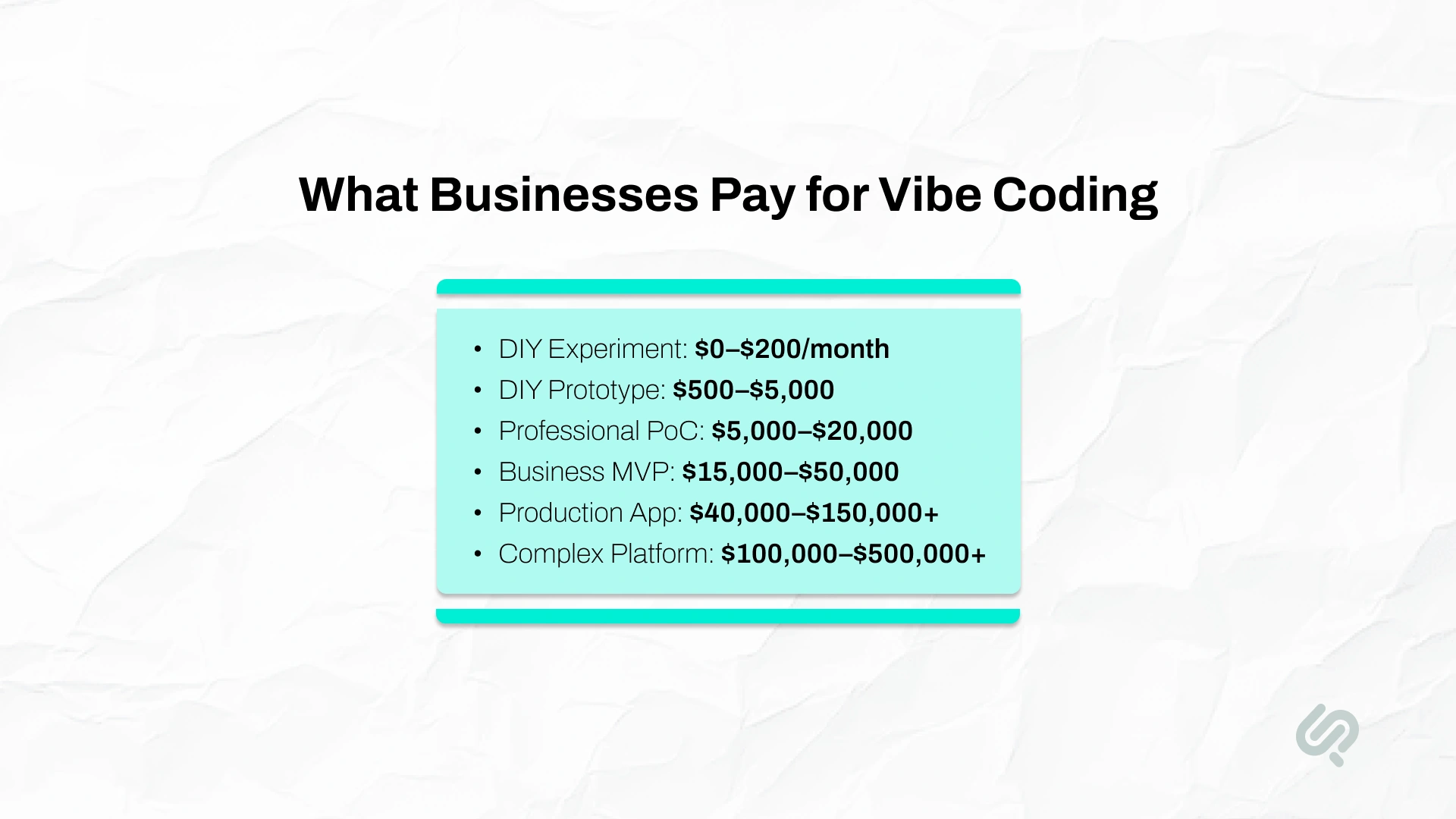
The cost of vibe coding depends on whether you are testing an idea, building the application yourself, hiring an individual developer, or paying a professional team to deliver and support the product.
The following figures are practical planning ranges. They are not fixed prices because every application has different requirements, risks, and integration needs.
A low tool bill does not always mean a low project cost. A founder may spend $500 on subscriptions but invest hundreds of hours defining prompts, fixing broken features, testing workflows, and learning how the generated system works.
A professionally delivered application costs more upfront because the price includes accountability for the complete outcome, not only the code-generation tool.
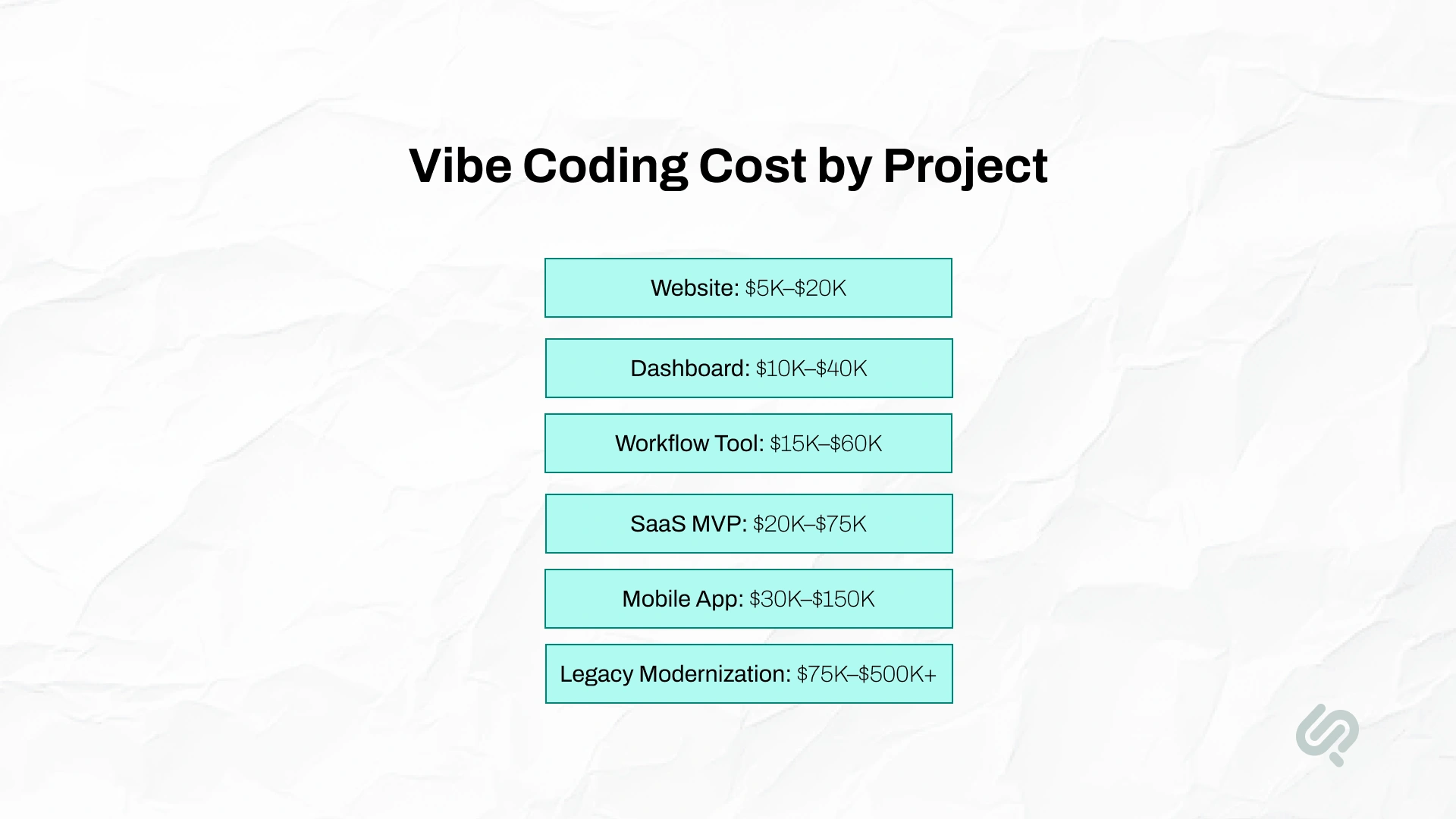
The project type provides a more useful pricing signal than the company’s size.
Vibe coding is strongest for clearly defined websites, dashboards, customer portals, internal tools, workflow applications, SaaS MVPs, and standard product features.
Savings are usually smaller for complex mobile functionality, regulated systems, weak legacy codebases, high-risk integrations, and applications with unclear business rules.
In these more complex projects, AI tools can still accelerate selected development tasks, but experienced engineers must lead architecture, security, integration, testing, and deployment.

Businesses can use AI-assisted development in several ways. The lowest upfront option is not always the lowest-risk option.
DIY development works best when:
The direct cost may be low, but the internal time investment can be substantial.
A freelancer can be cost-effective for a small, well-defined product. The business should still confirm:
An agency is more suitable when the business needs a complete outcome rather than isolated coding help.
A professional team may cover:
An in-house team makes sense when software development is a continuous business capability.
The cost includes more than salaries. Businesses may also pay for recruitment, management, tools, cloud infrastructure, security, training, and employee benefits.
Six factors have the greatest effect on AI-assisted development pricing.
A landing page with a contact form costs less than a SaaS platform with subscriptions, dashboards, user roles, notifications, and analytics.
The more screens, workflows, and user types the application has, the more development and testing it requires.
Standard features can often be generated quickly. Examples include:
Costs increase when the application includes:
Connecting a new application to a CRM, ERP, payment gateway, helpdesk, legacy database, or internal platform adds discovery, development, testing, and security work.
An integration is not only an API connection. The team must also understand:
A prototype only needs to demonstrate that an idea can work.
A production application may also need:
These requirements explain why turning a prototype into production software often costs more than creating the initial version.
AI tools can generate standard interfaces quickly, but they do not automatically create a strong product experience.
Custom design work may include:
A basic internal dashboard needs less design work than a customer-facing application competing in a crowded market.
The project costs more when the delivery partner remains responsible for monitoring, updates, infrastructure, security patches, feature improvements, and production support.
This ongoing responsibility can reduce business risk because the company is not left with a codebase that nobody fully understands.
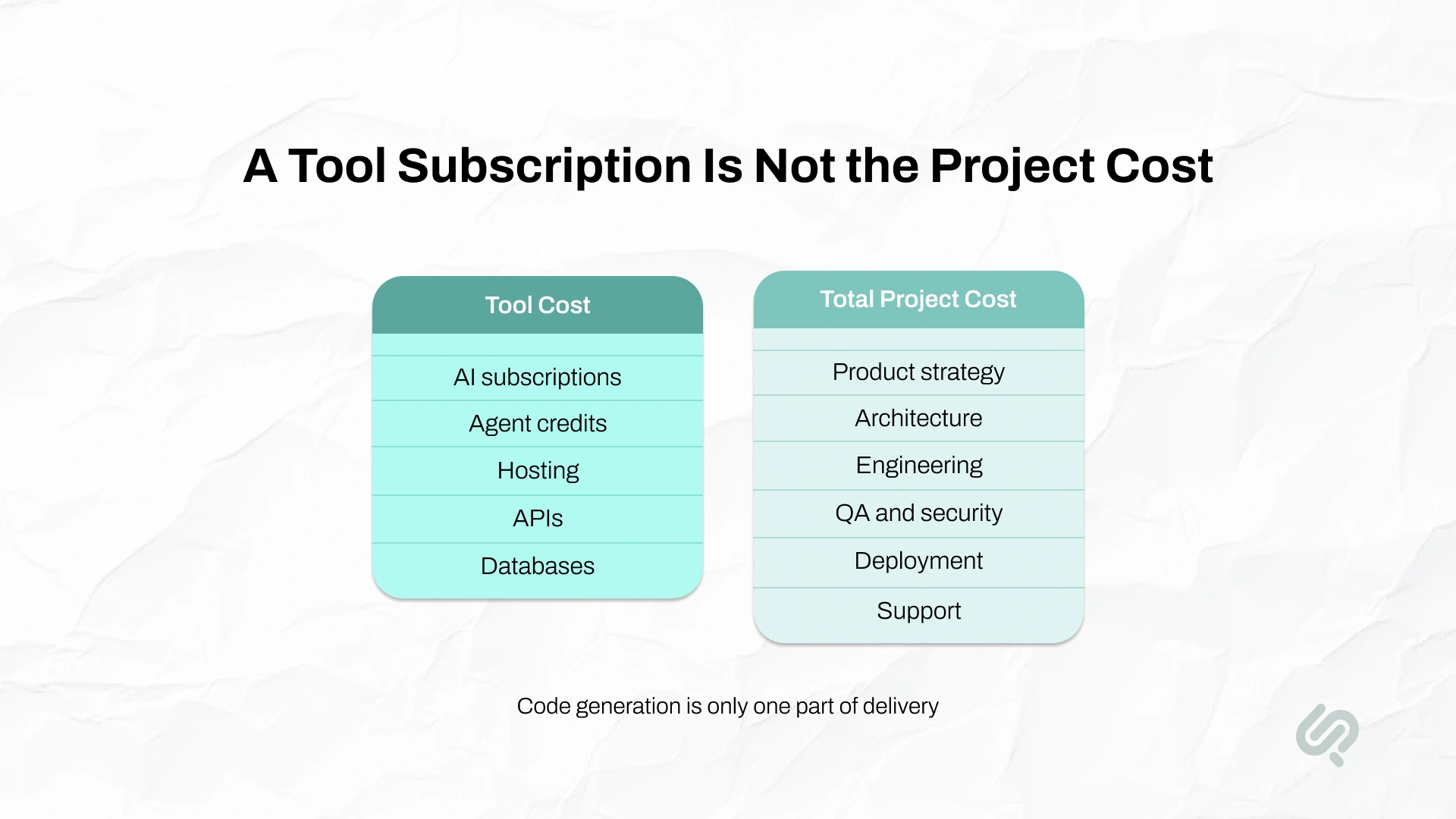
Tool pricing and project pricing are not the same.
Tool cost includes the software used to generate, review, test, and deploy code.
Examples include:
Total project cost includes the people, processes, and controls required to turn the generated code into usable software.
A $20 subscription can help create code. It does not provide business analysis, architecture, product ownership, QA, cybersecurity, DevOps, or responsibility for the finished application.
Prices in this section were checked on July 10, 2026. Tool providers can change their plans, credit systems, and usage limits, so businesses should confirm current pricing before budgeting.
Cursor currently lists a free Hobby plan, an Individual plan from $20 per month, and a Teams plan from $40 per user monthly. Cursor also states that on-demand model usage can continue after included limits and is billed separately.
GitHub currently lists Copilot Free, Pro at $10 per user monthly, Pro+ at $39, and Max at $100. Its paid plans include different amounts of AI credits, and additional credits may be purchased.
Replit currently lists a free Starter plan, Core at $20 per month when billed annually, and Pro at $95 per month when billed annually. The plans include different monthly credit amounts, collaboration limits, and agent capacity.
Other platforms may use token, message, credit, compute, or usage-based pricing. The monthly bill can increase when a team:
For a business project, tool pricing should be treated as a variable operating expense rather than the full development budget.
A professional proposal should separate the main cost areas. A single line labelled “development” does not show what the business is actually buying.
The quote should also explain:
Use this formula when comparing proposals:
Total Year 1 Cost = Tools + Internal Time + Professional Delivery + Integrations + Infrastructure + Production Hardening + Maintenance
The final vibe coding cost should include both visible invoices and the value of internal business time.
A business uses AI-assisted workflows to build an internal operations platform.
The tool bill in this example is only $1,500. Most of the investment goes into understanding the workflow, building the product correctly, connecting it to existing systems, and keeping it reliable after launch.
AI-assisted development does not reduce every cost equally.
It creates the most value when the work is clear, repeatable, and easy to verify.
A controlled GitHub Copilot study found that developers completing a defined JavaScript task finished 55.8% faster with the AI coding assistant. This shows that AI can produce meaningful task-level improvements, but it should not be treated as a guaranteed 55.8% reduction in the full project budget. (1)
The productivity effect also changes by developer, task, tool, and codebase. METR’s early 2025 research found experienced open-source developers took 19% longer on selected mature-codebase tasks when AI was allowed. (2)
Its February 2026 update found some evidence of improved speed with newer tools, but the researchers said selection effects made the newer estimate unreliable.
The practical conclusion is not that AI always speeds development up or always slows it down.
The correct conclusion is: AI reduces cost when the team uses it for suitable work and verifies the result. It can increase cost when generated output creates rework, technical debt, or hidden defects.
“Vibe coding lowers the cost of producing code, but businesses are not buying code volume. They are buying a reliable product. The savings become real when AI agents are paired with clear requirements, senior engineering review, automated testing, and production accountability.”
— Abubakar Shams, CEO, AI-First Strategy Lead, and Vibe Code Expert, Phaedra Solutions
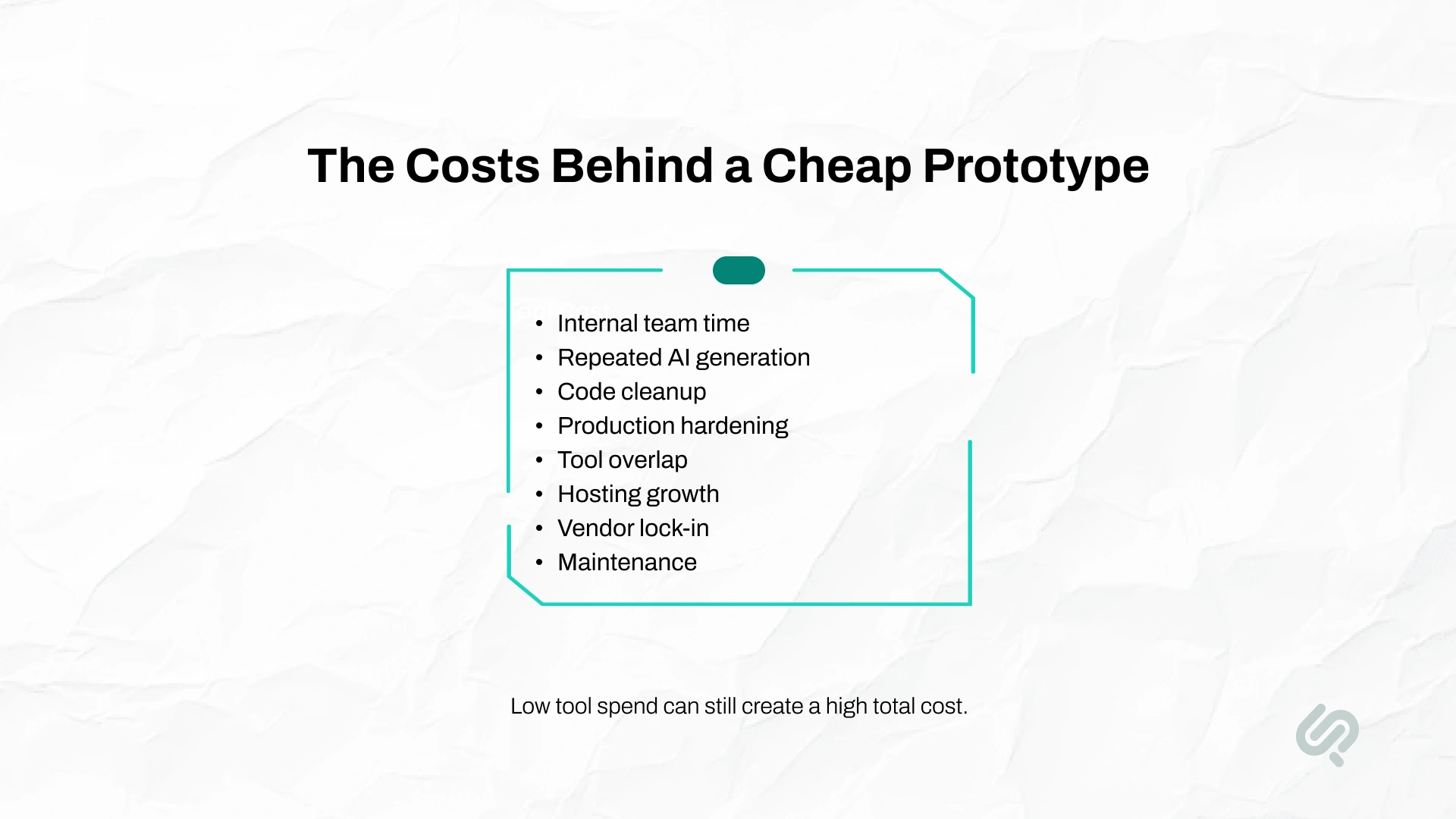
A low initial estimate may exclude expenses that appear later in development or after launch.
Someone must explain the workflow, answer questions, review outputs, test the application, and approve decisions.
For a DIY build, this work may fall on a founder, product manager, or operations leader. That time should be included in the total cost of ownership.
AI tools do not always solve a problem correctly on the first attempt.
A team may pay for repeated prompts, model usage, agent runs, and regeneration when:
Generated code may work but still be difficult to maintain.
Cleanup can include:
A prototype may not include the controls required for real users.
Production hardening can involve:
Teams may subscribe to several tools that perform similar work.
For example, a project may use:
Review the tool stack regularly and remove services that do not create enough value.
A pilot with 50 users may be inexpensive to run. Costs can increase when the application reaches thousands of users or begins processing more files, messages, API calls, images, or background jobs.
The infrastructure should be designed for the expected usage pattern, not only the first demo.
Businesses should know whether they can:
Ownership should be stated clearly in the contract.
An application may depend on proprietary authentication, databases, deployment services, or platform-specific functions.
Even when the source code can be exported, replacing these services may require additional development.
Software continues to change after launch.
Maintenance may include:
A practical maintenance budget may be 15%–25% of the original build cost per year, but the actual amount depends on release frequency, complexity, usage, and code quality.
Projects usually exceed their budget because the business underestimates the complete product, not because one AI subscription becomes too expensive.
Common causes include:
A clear scope does not prevent all change. It makes change visible, measurable, and easier to price.
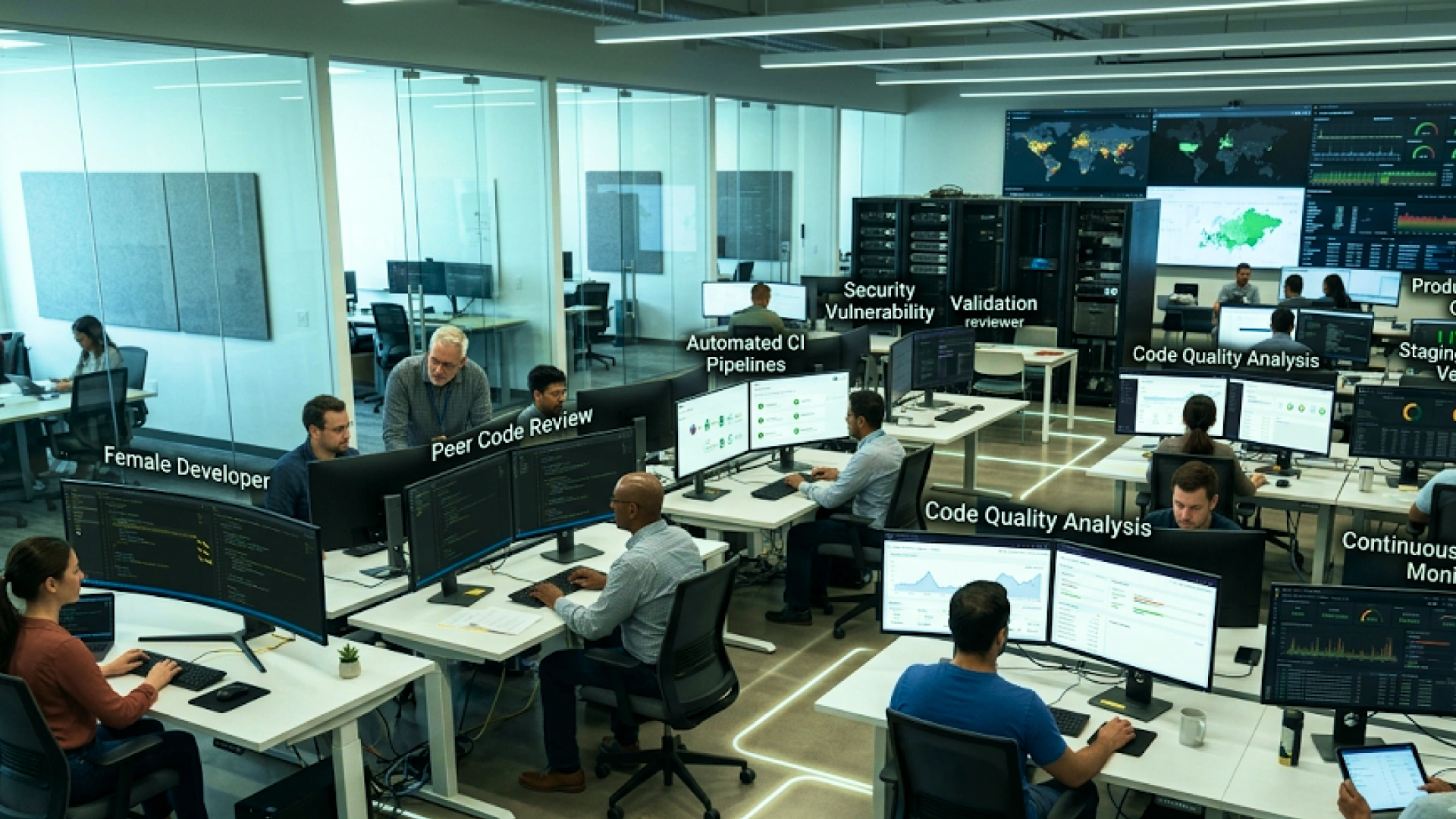
Vibe coding can be used for production software, but AI-generated code should not be trusted only because it runs successfully.
Working code can still contain:
Veracode tested more than 100 AI models across Java, Python, C#, and JavaScript. It reported that 45% of generated code samples failed security tests and introduced OWASP Top 10 vulnerabilities. (3)
The 2025 Stack Overflow Developer Survey also found that 84% of respondents were using or planning to use AI tools, but 46% distrusted the accuracy of AI output, compared with 33% who trusted it. This supports the need for human verification in accountable software delivery. (4)
Before launch, confirm that:
For low-risk prototypes, some controls can be added later. For payments, healthcare, finance, personal data, or critical business operations, they should be planned from the beginning.
AI-assisted development can also reduce selected costs in legacy modernization.
It can help teams:
However, modernization is not simply a code-generation task.
Experienced engineers still need to understand:
The safest approach is selective AI assistance.
Use AI to accelerate review, documentation, testing, and repetitive implementation. Keep architecture, migration strategy, security decisions, and final accountability with experienced people.
The best savings come from reducing unnecessary work, not removing essential controls.
Do not begin with “build an AI-powered platform.”
Begin with a measurable goal, such as:
A focused problem produces a clearer scope and a more reliable estimate.
Version one should solve the main user problem.
Delay non-essential features such as:
These can be added after real users validate the core product.
For every feature, specify what successful behavior looks like.
Instead of:
Build a customer dashboard.
Use:
A logged-in customer can view active orders, filter them by status, open an order, and download its invoice. Customers cannot view another account’s orders.
Clear acceptance criteria reduce prompting, revisions, testing disputes, and rework.
Existing services can reduce development time for:
Before selecting one, check:
Removing experienced review may reduce the first invoice but increase later costs.
Senior review helps identify:
Do not leave QA until the final week.
Testing each feature as it is completed makes defects easier and cheaper to correct.
Estimate expected:
This prevents surprise costs after launch.
Set spending limits and monitor:
A visible usage policy prevents uncontrolled experimentation from becoming an avoidable monthly expense.
Start with a proof of concept when the core technical assumption is uncertain.
Start with an MVP when the workflow is understood but market or user demand still needs validation.
Move directly to production development only when the requirements, users, risks, and ownership model are sufficiently clear.
Before choosing a developer or agency, ask:
A strong partner should explain both the benefits and the limits of AI-assisted delivery.
Be cautious when a vendor:
Phaedra Solutions modernized a legacy healthcare lab management platform that was experiencing performance bottlenecks, scaling limitations, and risky software releases. The team rebuilt the database and backend, modernized the web application with React and Next.js, and introduced DevOps automation. AI-assisted modernization was used selectively to accelerate review and documentation tasks, while architecture, migration, QA, and production decisions remained human-led.
The modernization improved platform performance by approximately 40%, reduced release-related issues by 50%, and lowered support tickets connected to slowness and release regressions by 25%. The project demonstrates where AI-first delivery creates value: accelerating suitable tasks without removing the engineering controls required for a critical production system.
Phaedra Solutions combines AI tools such as Claude and Cursor with human-led product strategy, engineering, QA, security, and deployment. Our AI-first approach helps businesses build MVPs, web and mobile applications, internal tools, and modernized software faster without treating generated code as finished software.
Explore our vibe coding services or book a free 30-minute consultation to receive a realistic project scope, delivery approach, and cost range.



Ameena is a content writer with a background in International Relations, blending academic insight with SEO-driven writing experience. She has written extensively in the academic space and contributed blog content for various platforms.
Her interests lie in human rights, conflict resolution, and emerging technologies in global policy. Outside of work, she enjoys reading fiction, exploring AI as a hobby, and learning how digital systems shape society.