

.webp)
.webp)
.webp)
.webp)









.webp)
A legacy modernization strategy is how your organization decides whether to replatform, rebuild, or replace an outdated system — based on business value, technical debt, risk, and cost.
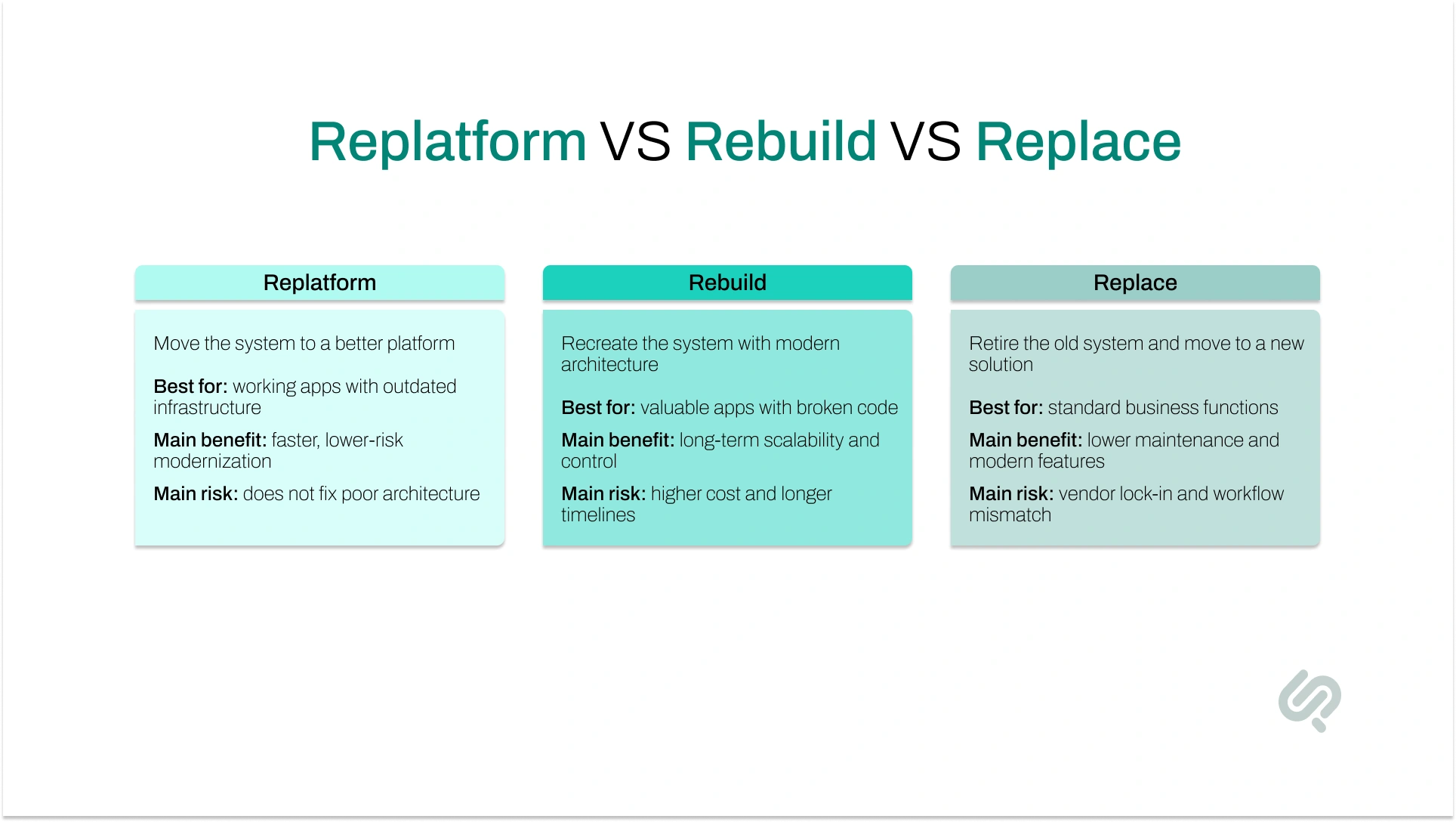
The three primary paths are replatforming (moving to modern infrastructure with minimal code changes), rebuilding (recreating the system with modern architecture while preserving business logic), and replacing (retiring the old system entirely for a SaaS or vendor solution).
The right choice depends on your system's technical health, business criticality, integration complexity, security posture, and budget. Getting this decision right determines whether modernization becomes a competitive advantage or an expensive IT project.
A legacy modernization strategy is a structured decision framework that determines how to move an outdated software system forward — whether by replatforming it on better infrastructure, rebuilding it with modern architecture, replacing it with a new solution, or a combination. It starts with a system assessment, not a technology selection. Without a clear strategy, modernization projects commonly run over budget, miss deadlines, and fail to deliver business value.
Replatforming moves your application to a new platform — typically the cloud — with minimal changes to the code or business logic. Rebuilding recreates the application from scratch with modern architecture while preserving the core business logic. Replatforming is faster and cheaper but does not fix poor architecture. Rebuilding delivers a stronger technical foundation but requires significantly more time and investment.
Replace when the system handles a standard business function — HR, payroll, CRM, ERP — and a modern SaaS product already meets most of your requirements. If the system adds no competitive value and costs more to maintain or rebuild than to replace, replacement is the right call. Rebuilding is the better choice only when the system contains proprietary business logic that a packaged solution cannot replicate.
Not exactly. Cloud migration — also called rehosting or lift-and-shift — moves a system to the cloud with no code changes at all. Replatforming goes further: it makes targeted improvements like switching to managed cloud databases, containerizing the application, or upgrading runtime environments. Replatforming typically delivers better performance, cost efficiency, and scalability than a pure cloud migration.
Evaluate eight factors: business criticality, code quality, integration complexity, security posture, budget, timeline, scalability needs, and competitive value. Systems that still function but run on outdated infrastructure are usually candidates for replatforming. Systems with valuable but unmaintainable code are candidates for rebuilding. Systems handling generic, commoditized functions with no competitive differentiation are candidates for replacement.
The 6 R's are Rehost, Replatform, Refactor, Rearchitect, Rebuild, and Replace. They represent a spectrum from minimal change (rehost) to full transformation (replace). Most enterprise modernization decisions focus on replatforming, rebuilding, and replacing — the three paths with the clearest business trade-offs and distinct cost and risk profiles. The full 6 R's framework becomes more useful when you are assessing an entire application portfolio rather than a single system.
Most companies start legacy system modernization by asking the wrong question: which cloud provider, framework, or vendor should we use?
The right question is: which modernization approach fits this specific system, this business, and this level of risk?
Technology decisions should follow strategy — not drive it. A replatform that moves a broken system to a newer host solves nothing. A full rebuild on a system that could have been replaced with a modern SaaS tool wastes months of engineering work. A vendor replacement that cannot support your unique workflows creates new problems instead of solving old ones.
Legacy systems vary enormously.
Some function well but sit on outdated, expensive infrastructure. Others lock valuable business logic inside unmaintainable code. Others handle commodity functions that a modern SaaS product could replace at a fraction of the cost. Each situation calls for a different answer — and no technology investment fixes a strategy mismatch.
According to McKinsey & Company, organizations spend 70–80% of their IT budgets maintaining legacy systems, leaving very little capacity for innovation or growth (1). McKinsey Digital further estimates that technical debt typically represents 20–40% of an organization's entire technology estate value — a hidden cost that compounds the longer modernization is deferred. (2)
Getting your legacy modernization strategy right is not just a technical decision. It is a financial and competitive one.
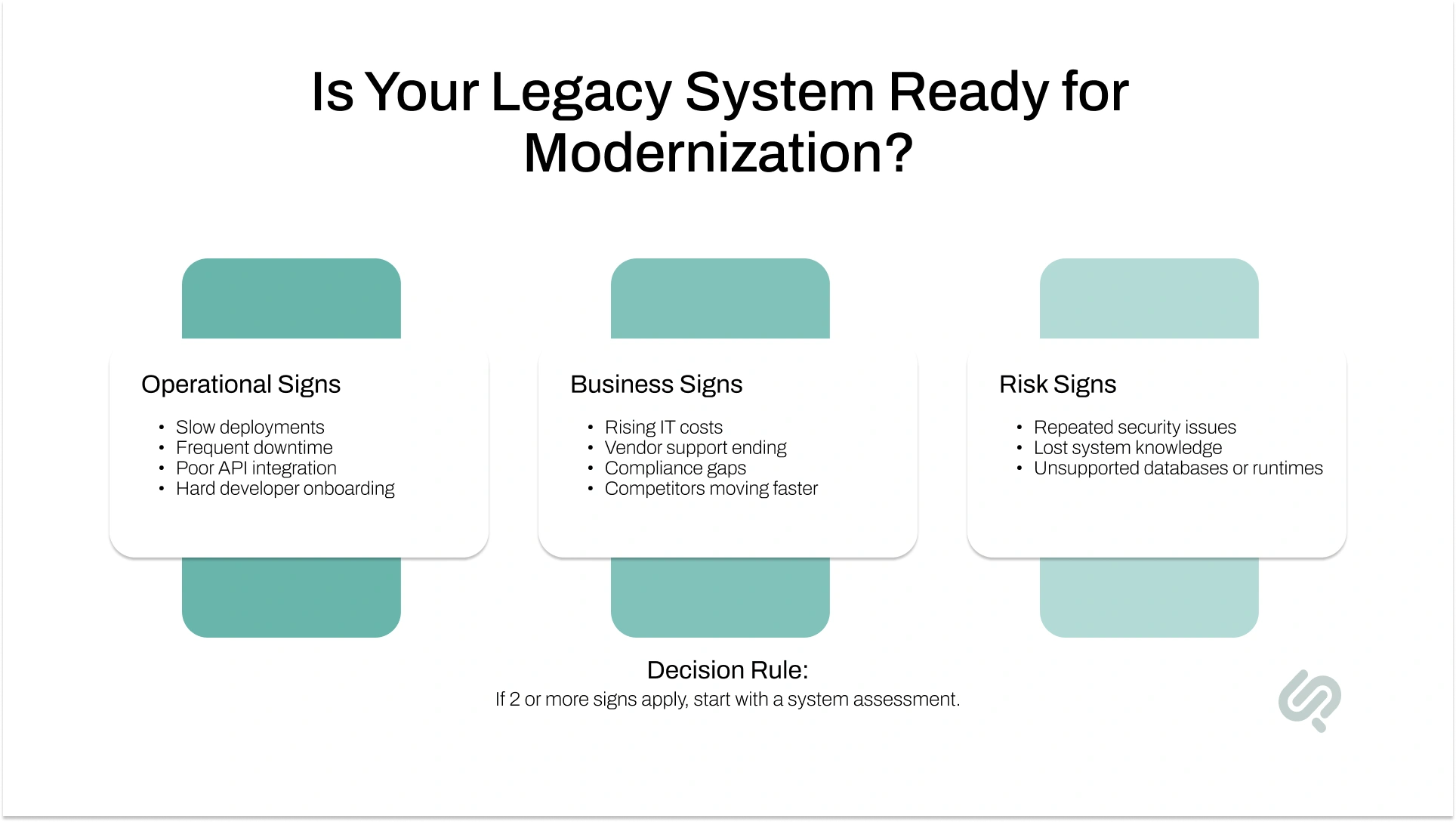
Before choosing between replatforming, rebuilding, or replacing, confirm you are dealing with a modernization-level problem. These are the signals that business and IT leaders most consistently report in the period before beginning a legacy application modernization project.
Operational signals:
Business signals:
Risk signals:
If two or more of these describe your situation, the next step is a structured application portfolio assessment — not a technology decision. The assessment tells you which modernization path is actually appropriate. Starting with a technology choice before completing that assessment is the single most common cause of failed modernization projects.

Replatforming means moving a legacy application to a modern platform — usually the cloud — while making targeted improvements so it performs better. It is sometimes called "lift, tinker, and shift" because you are not rebuilding the full system or replacing it with something new.
For business teams, replatforming is often the fastest way to reduce infrastructure costs, improve performance, and make an outdated system easier to manage without disrupting daily operations.
In a replatforming engagement, teams typically:
The core business logic, most of the existing codebase, and the primary application workflows stay the same.
Replatforming makes sense when your application still works well but the infrastructure behind it is outdated, expensive, or difficult to scale. It is a strong option when you need faster modernization with lower risk and a smaller budget.
One important limitation: replatforming will not fix broken code, poor architecture, or security vulnerabilities built into the system design. If those problems exist, moving the system to the cloud only relocates them to a more modern environment. A cloud migration strategy alone is not a substitute for addressing architectural or code quality problems.
Rebuilding means recreating a legacy application from the ground up using modern architecture, frameworks, and engineering practices. It is also referred to as software re-engineering or a full application rewrite.
In a rebuild, the old codebase is retired — but the valuable business logic, core workflows, and key rules are documented, preserved, and carried forward into a new, cleaner system.
For business leaders, rebuilding is the right answer when software is not just outdated but actively blocking growth, scalability, security improvements, and faster delivery.
A typical rebuilding engagement includes:
Rebuilding is appropriate when the codebase is too costly to maintain or extend, the architecture cannot support future growth, or security vulnerabilities are structural and cannot be patched. It is also the right path when the business needs deep integrations with modern APIs, microservices architecture, automation workflows, or real-time data systems.
Rebuilding carries real risk. Full rewrites frequently exceed original timelines and budgets, particularly when business rules are poorly documented or institutional knowledge has been lost.
The Standish Group's CHAOS Report found that only 29% of large IT projects are considered successful, with cost overruns and scope creep as the primary causes of failure (3). Rebuilding projects are especially vulnerable to both. Phased delivery, clear architecture governance, and strong engineering ownership significantly reduce that risk.
Replacing means retiring the legacy system entirely and moving to a new solution — an enterprise SaaS product, an industry-specific platform, an open-source system, or a vendor-built application.
Unlike replatforming or rebuilding, replacement does not reuse the old codebase. The business migrates its users, data, and workflows to a different platform entirely.
For business teams, replacing a legacy system makes sense when the current software no longer delivers strategic value and is too costly or risky to maintain.
Common replacement paths include:
Replacement is appropriate when the legacy system supports a standard business function, the vendor has ended or is ending support, compliance requirements have changed, or the annual maintenance cost exceeds the cost of transitioning to a modern alternative.
Replacement creates its own risks. Off-the-shelf tools may not support unique workflows. Vendor lock-in reduces long-term flexibility. Legacy system migration is almost always more complex than anticipated. If significant customization is required post-implementation, the total cost of replacement can approach that of a rebuild.
Defining business and technical requirements thoroughly before selecting a vendor is not optional — it is the only way to avoid replacing one expensive problem with another.
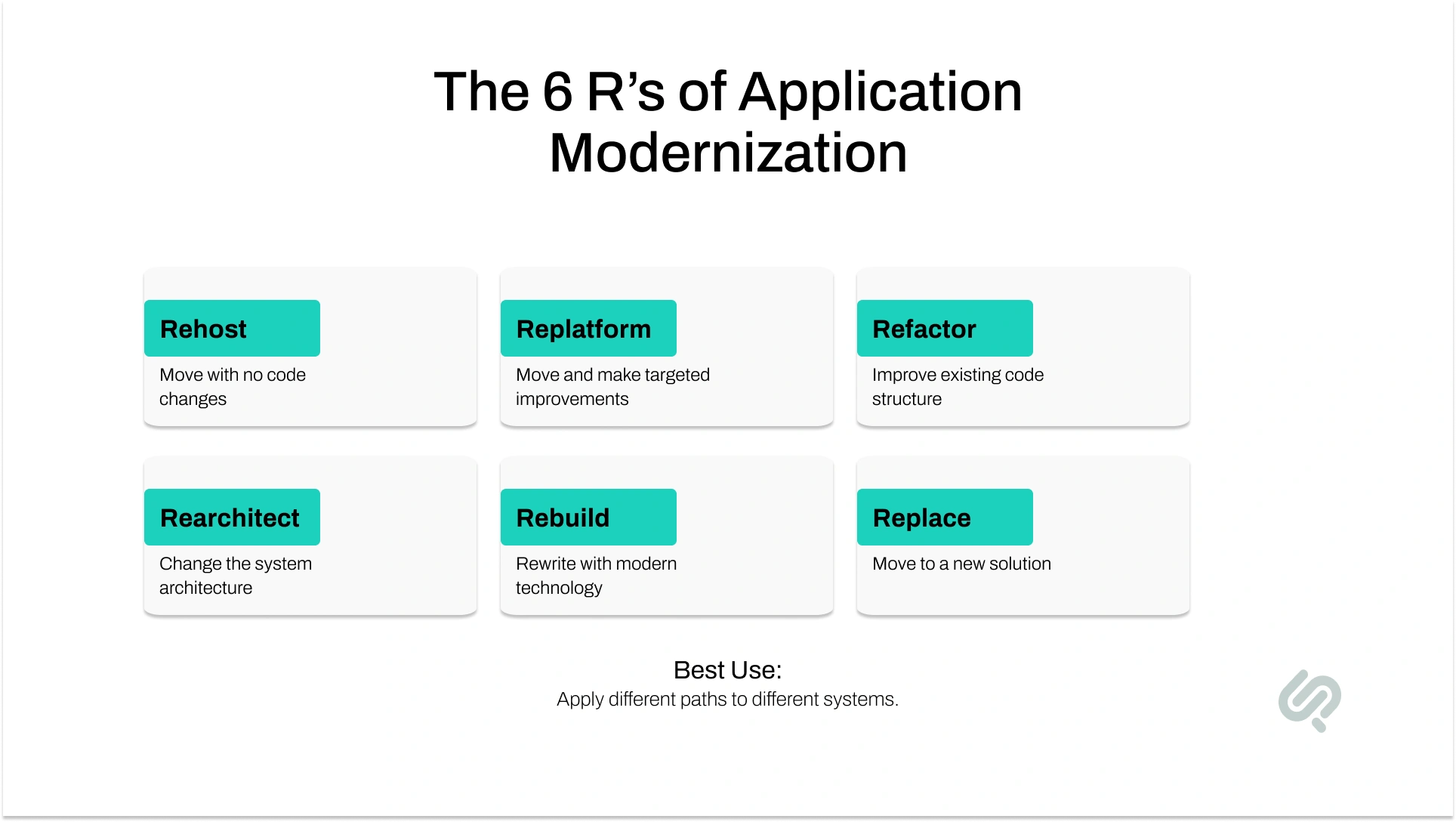
The replatform-rebuild-replace framework covers the majority of enterprise modernization decisions. But broader frameworks — including the widely referenced 6 R's of application modernization — include additional options that become relevant when you are assessing a portfolio of applications rather than a single system.
In practice, most organizations managing a portfolio of applications will apply different approaches to different systems, not one strategy across everything. The application portfolio assessment determines which path fits which system.
The right legacy modernization strategy starts with a clear-eyed system assessment — not a technology preference or a vendor conversation. Before committing to replatform, rebuild, or replace, evaluate these factors:
Khawar Qayyum, Head of Digital Transformation Services at Phaedra Solutions, has worked through this decision with organizations across industries. His consistent observation:
"Most companies come to us having already decided on a technology — a cloud platform, a new framework, a SaaS product. What they haven't done is assess what they actually have.
Nine times out of ten, the first conversation we have is about slowing down and doing that assessment properly. The organizations that skip it either over-invest in a system they should have replaced, or replace something they should have rebuilt. The assessment is not a formality — it is the work."
Replatforming is the right choice when your application still works, but the infrastructure behind it is outdated, costly, or hard to manage. You are not changing the core system. You are moving it to a better platform so it can run faster, scale better, and cost less to maintain.
Choose replatforming when:
Rebuilding is the right choice when the application still has business value, but the codebase or architecture has become too difficult to maintain. In this case, the goal is to preserve what makes the system valuable while replacing the outdated technical foundation.
Choose rebuilding when:
Example: A logistics company has a custom order management system with unique business rules. No SaaS tool supports its workflow, but the old monolithic codebase cannot scale or connect with modern carrier APIs. Rebuilding it with a modular, API-first architecture protects the business logic while making the system ready for growth.
Replacing is the right modernization path when the legacy system handles a standard business function and no longer gives your company a strategic advantage. Instead of spending heavily to maintain or rebuild it, you move to a modern SaaS, vendor, or industry platform.
Choose replacement when:
Example: A manufacturer uses an old custom HR system on an unsupported database. The workflows are standard, the platform is no longer secure, and the system adds no competitive value. Replacing it with a modern HR platform can reduce IT overhead, improve security, and give employees a better experience — faster and cheaper than rebuilding from scratch.
Even the right legacy modernization strategy can fail if execution is poor. Avoid these common mistakes:
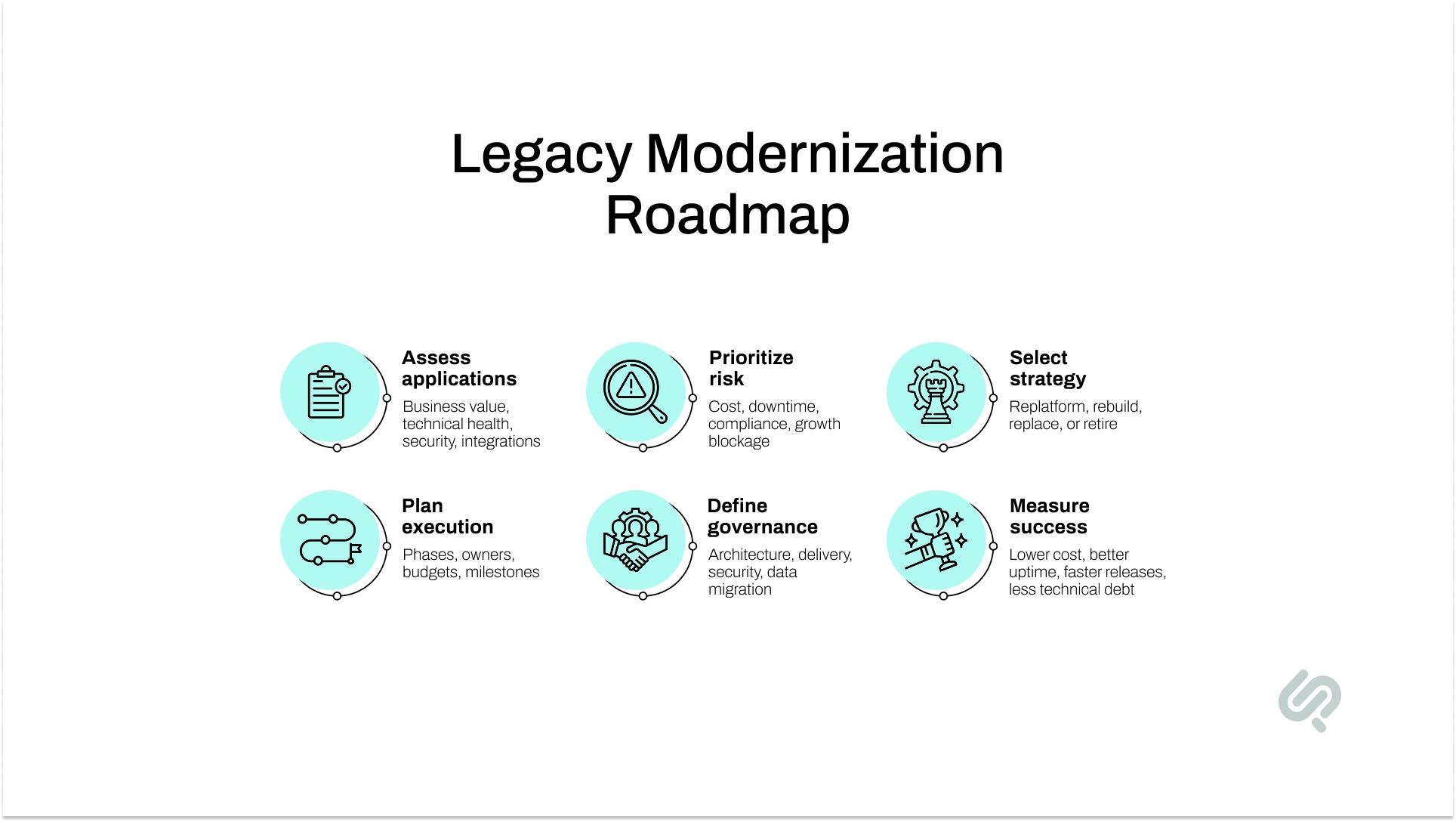
Before you choose replatforming, rebuilding, or replacing, build a clear legacy modernization roadmap. This reduces risk, controls cost, and aligns business and technical teams before work begins.
A strong modernization roadmap includes:
A roadmap turns legacy modernization from a risky IT project into a controlled, business-driven transformation.
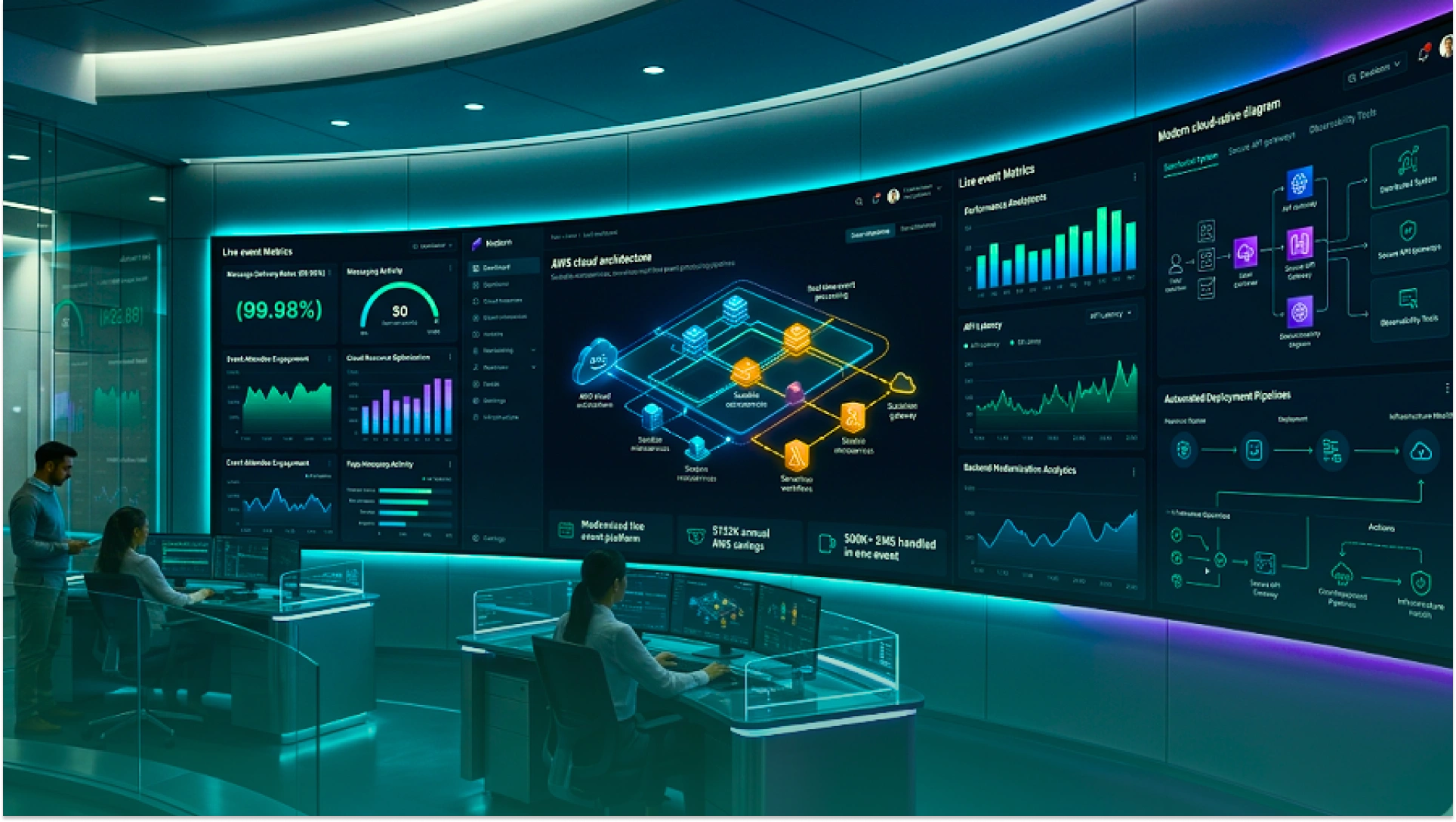
A live event operations platform was running on an aging Ruby on Rails codebase — slow, buggy under traffic, and costing $22,000 a month in AWS infrastructure. The temptation was to rebuild from scratch, but a full rewrite would have meant taking a business-critical system offline during active customer use.
Instead, Phaedra Solutions designed a phased migration strategy: a module-by-module backend transition from Ruby on Rails to NestJS, combined with targeted cloud infrastructure optimization. The platform stayed live throughout. Customers experienced no disruption. And the technical foundation improved with every release cycle.
The results were concrete: AWS costs dropped from $22,000 to $9,000 per month — roughly $132,000 in annual savings. A custom high-volume SMS system, built and deployed in 14 days, handled over 500,000 messages during a single live event.
At Phaedra Solutions, we help business leaders choose the right legacy system modernization path — before committing time and budget to the wrong one.
We are an AI-first development organization. By using AI agents, automation tools, and AI-enabled workflows — including platforms like Claude and Cursor — throughout every modernization engagement, we consistently deliver 30–80% reductions in development timelines, team size, and cost compared to traditional approaches. The range depends on project complexity and scope, but the efficiency gains are real and repeatable.
Our legacy system modernization services cover every phase:
Ready to make the right call on your legacy systems? Book a Legacy System Modernization Assessment.



Ameena is a content writer with a background in International Relations, blending academic insight with SEO-driven writing experience. She has written extensively in the academic space and contributed blog content for various platforms.
Her interests lie in human rights, conflict resolution, and emerging technologies in global policy. Outside of work, she enjoys reading fiction, exploring AI as a hobby, and learning how digital systems shape society.
